Pilih Bahasa

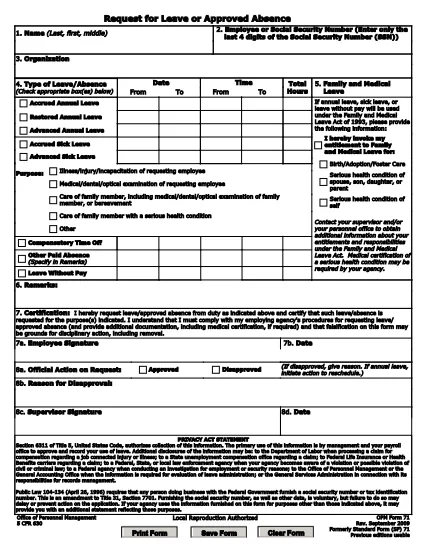
Application for Yesterday Absent – Fillable PDF Form

  1. Bahasa Inggeris
  2. Negara USA
  3. Jabatan Human Resources
  4. Aktiviti Employee Management
Isi borang ini
Application for Yesterday Absent – Fillable PDF Form

When you missed work or school yesterday and need official documentation, the Application for Yesterday Absent is the right tool. This fillable PDF lets you quickly request a one‑day absence, provide a reason, and obtain the necessary approvals—all without printing or scanning.

Why You Need a Yesterday Absence Application

Employers and educational institutions often require a written request for any unplanned absence. Submitting a completed form demonstrates professionalism, helps payroll process correctly, and keeps HR records accurate.

How to Fill Out the Yesterday Absence Form Online

With Formize’s built‑in PDF filler, you can complete the form in seconds:

  1. Click the "Fill out this form" button on the page.
  2. Wait for the Formize PDF Filler app to load.
  3. Enter your personal information (name, employee ID, department).
  4. Select the date of absence – the form defaults to yesterday’s date.
  5. Provide a brief reason (e.g., medical, family emergency).
  6. Add your electronic signature and, if required, your supervisor’s signature.
  7. Submit the form directly from the app or download a copy for your records.

Common Mistakes to Avoid

  • Leaving fields blank: Every required field must be filled, otherwise the form will be rejected.
  • Incorrect date: Double‑check that the date shown is indeed yesterday’s date.
  • Unclear reason: Use concise language and, if needed, attach supporting documentation.
  • Missing signature: Both employee and supervisor signatures are mandatory for approval.

Download the Fillable PDF

If you prefer to work offline, you can download the original fillable PDF from the link below and open it with any PDF editor that supports form fields.

Download Yesterday Absence Application (PDF)

Frequently Asked Questions

Find quick answers to the most common queries about this form below.

SOALAN LAZIM
  • Do I need a manager’s signature for a one‑day absence?

    Yes. Most organizations require both the employee’s and the manager’s signatures to approve any unplanned leave.

  • Can I edit the form after I submit it?

    Once submitted, the form is locked. If you need changes, request a new form and follow the same steps.

  • Is the PDF truly fillable on any device?

    The form is built with standard PDF form fields, so it works on desktop, tablet, and mobile browsers via Formize.

  • What if I don’t have an internet connection?

    Download the PDF from the link provided, fill it out offline with a PDF editor, then email or upload it once you’re back online.

  • How long does it take for HR to process the request?

    Processing time varies by organization, but most HR departments acknowledge receipt within 24 hours.

  • Can I attach supporting documents (e.g., doctor’s note)?

    Yes. After completing the form, use the upload feature in the Formize app or attach files when you email the PDF.

BAGAIMANA UNTUK

Cara mengisi yesterday absent application secara percuma, dalam talian dalam 7 langkah mudah:

  1. 1
    Click the Fill Out Button
    Press the "Fill out this form" button on the page to launch Formize’s online PDF editor.
  2. 2
    Wait for the Filler to Load
    The Formize PDF Filler app loads in a few seconds – you’ll see the form fields become editable.
  3. 3
    Enter Your Information
    Fill in your name, employee ID, department, and any other required personal details.
  4. 4
    Select Yesterday’s Date
    The date field defaults to yesterday; verify it’s correct before proceeding.
  5. 5
    Provide a Reason
    Write a brief, clear explanation for the absence (e.g., medical appointment, family emergency).
  6. 6
    Add Your Signature
    Use the e‑signature field to sign electronically, then have your supervisor sign if required.
  7. 7
    Submit or Download
    Click "Submit" to send the form directly to your HR portal, or download a copy for your records.
Bentuk apl Pengisi PDF
TENTANG

templat yesterday absent application.

Dengan set ciri tradisional untuk melihat dan mengisi dokumen PDF, digabungkan dengan faedah aplikasi web dan reka letak responsif, anda boleh melengkapkan yesterday absent application dalam beberapa minit.

CIRI-CIRI

Pengisi PDF

Cara paling mudah untuk mengisi yesterday absent application dalam talian

  • Cepat isi yesterday absent application
    Mencari cara untuk mengisi yesterday absent application dengan cepat dalam talian? Dengan pengisi borang PDF percuma dalam talian kami, anda akan tahu cara mengedit dan mengisi dokumen pdf ini dalam masa kurang daripada satu minit.
  • Mudah untuk menggunakan editor PDF dalam talian
    Bosan dengan mencetak fail PDF supaya anda boleh mengeditnya, sebelum mengimbas semula dan menghantarnya semula? Edit dokumen PDF secara percuma dalam talian. Gunakan editor pdf dalam talian kami untuk menjimatkan masa dan kertas.
  • Alat yang hebat, semua platform
    Tertanya-tanya cara mengisi yesterday absent application pada Mac, atau mungkin cara menggunakan pengisi PDF secara percuma? Alat PDF dalam talian kami berfungsi pada semua platform.
  • Simpanan fail selamat
    Fail "yesterday absent application" yang lengkap disimpan dalam pangkalan data selamat yang diuruskan oleh pengehosan Amazon Cloud. Anda boleh memadamkan fail anda daripada sistem kami pada bila-bila masa. Walau apa pun, fail ini dipadamkan secara automatik selepas 24 jam.
  • Sembang dengan yesterday absent application
    Sembang dengan "yesterday absent application" di Chatize yang merupakan pembantu pembaca PDF percuma. Tanya soalan dan dapatkan jawapan daripada "yesterday absent application". Cuma klik pada butang Sembang Dengan Dokumen di atas.

Padamkan sesi pengisian

Padamkan sesi pengisian yang dipilih? Dalam kes ini, kemajuan anda dalam melengkapkan borang akan hilang.

Padamkan sesi penyuntingan

Padamkan sesi penyuntingan yang dipilih? Dalam kes ini, kemajuan anda dalam membuat dan mengedit borang akan hilang.