
Pilih Bahasa

IRS Form 14039 – Fillable Identity Theft Affidavit PDF

  1. Negara USA
  2. Bahasa Inggeris
  3. Aktiviti Cukai
  4. Jabatan IRS
Isi borang ini
IRS Form 14039 – Fillable Identity Theft Affidavit PDF

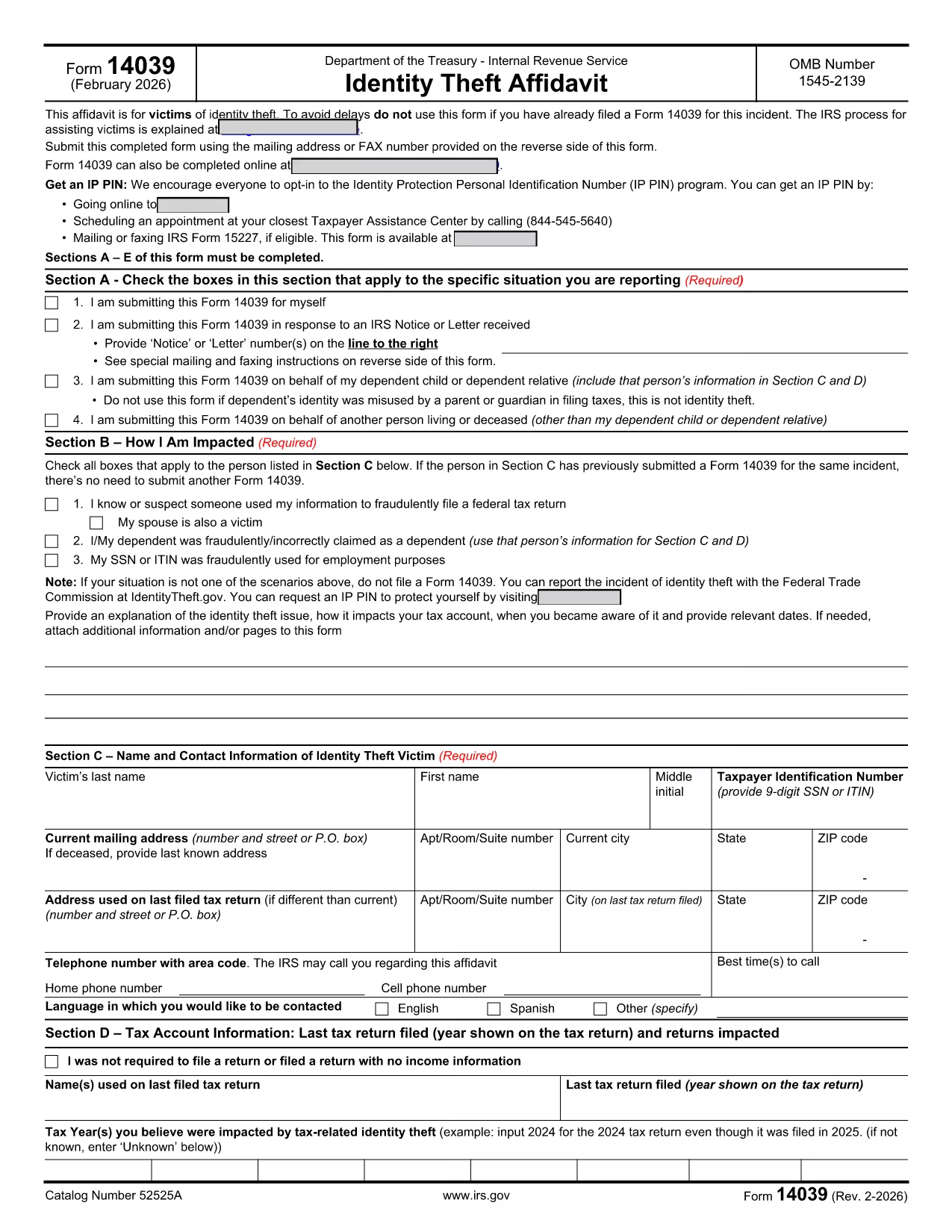
IRS Form 14039, also known as the Identity Theft Affidavit, is the official document you use to report tax‑related identity theft to the Internal Revenue Service. Whether your Social Security number or ITIN has been misused for a fraudulent return, employment, or any other purpose, this form lets you alert the IRS quickly and securely.

Formize.com hosts a fully fillable PDF version of Form 14039, so you can complete the affidavit directly in your browser—no extra software required. Just click the “Fill out this form” button, wait for the Formize PDF Filler app to load, and start entering your information.

What Is IRS Form 14039?

The form is a two‑page affidavit that collects personal details, a description of the identity‑theft incident, and the tax years affected. It is required whenever the IRS notifies you of a suspected fraud or when you discover unauthorized use of your taxpayer information.

Key Sections of the Form

  • Section A – Type of Situation: Choose why you are filing (self‑initiated, response to IRS notice, etc.).
  • Section B – How You Are Impacted: Check the boxes that match your experience (e.g., fraudulent return filed, SSN used for employment).
  • Section C – Victim Contact Information: Provide your name, SSN/ITIN, mailing address, and phone number.
  • Section D – Tax Account Information: List the tax year(s) you believe were compromised.
  • Section E – Penalty of Perjury & Signature: Sign under penalty of perjury to certify the information is true.
  • Section F – Representative Information: Fill out only if you are filing on behalf of someone else.

How to Complete the Form Online

Follow the simple steps below to submit a completed Form 14039 using Formize’s fillable PDF:

Common Mistakes to Avoid

  • Leaving any required field blank – the PDF validator will block submission.
  • Using an outdated version of the form. Always download the latest PDF (Rev. 2‑2026) from the IRS.
  • Forgetting to sign the affidavit. An unsigned form will be returned.
  • Submitting the form to the wrong address. Follow the mailing/fax instructions on the reverse side.

Where to Submit the Completed Form

After you finish, you can either:

  • Print the PDF and mail it to the address listed in the form’s instructions.
  • Fax it to the number provided on the reverse side.
  • Attach the PDF to a secure message in your IRS online account (if available).

Using Formize’s fillable version ensures the PDF is correctly formatted, reducing the chance of processing delays.

SOALAN LAZIM
  • Who should file IRS Form 14039?

    Anyone who believes their SSN or ITIN has been used fraudulently for tax filing, employment, or other purposes should file Form 14039.

  • Can I file Form 14039 electronically?

    The IRS does not currently accept an electronic submission of Form 14039. You must print and mail or fax the completed form.

  • Do I need a lawyer to complete the Identity Theft Affidavit?

    No. The form is designed for individuals to complete on their own. If you have a representative, you can fill out Section F.

  • What if I file the wrong tax year?

    Specify the tax year(s) you suspect were compromised in Section D. If you’re unsure, write “Unknown” and provide any supporting details.

  • How long does the IRS take to respond?

    Processing times vary, but the IRS typically acknowledges receipt within 30 days. They may contact you for additional information.

  • Is the Formize fillable PDF free?

    Yes. Formize provides the fillable version of Form 14039 at no cost.

  • Can I use the same Form 14039 for multiple incidents?

    Each incident should be reported on a separate, newly completed Form 14039.

BAGAIMANA UNTUK

Cara mengisi IRS Form 14039 secara percuma, dalam talian dalam 5 langkah mudah:

  1. 1
    Open the Fillable Form
    Click the “Fill out this form” button on the page. The Formize PDF Filler app will load in a new window.
  2. 2
    Enter Your Information
    Complete each section (A‑F) directly in the browser. The form validates required fields in real time.
  3. 3
    Review and Sign
    Double‑check all entries, then use the built‑in e‑signature tool to add your signature under penalty of perjury.
  4. 4
    Save or Print
    Save the completed PDF to your computer, or print it if you need to mail or fax the affidavit to the IRS.
  5. 5
    Submit to the IRS
    Follow the mailing or fax instructions on the reverse side of the form, or upload the PDF through your IRS online account.
Bentuk apl Pengisi PDF
TENTANG

Borang cukai

IRS Form 14039 ialah salah satu daripada borang Cukai yang merupakan dokumen yang digunakan untuk melaporkan pendapatan, potongan dan liabiliti cukai kepada pihak berkuasa cukai yang berkaitan. Borang ini merupakan bahagian penting dalam proses pemfailan cukai dan digunakan untuk memastikan individu dan perniagaan mematuhi undang-undang cukai dan mengira kewajipan cukai mereka dengan tepat.

Borang cukai khusus yang diperlukan boleh berbeza-beza bergantung pada faktor seperti status pemfailan individu, sumber pendapatan dan undang-undang cukai negara. Walau bagaimanapun, berikut ialah beberapa jenis borang cukai biasa:

Borang Cukai Pendapatan Individu: Borang ini, seperti siri 1040 di Amerika Syarikat, digunakan oleh individu untuk melaporkan pendapatan mereka, menuntut potongan dan kredit, dan mengira liabiliti cukai mereka.

Borang Cukai Perniagaan: Perniagaan, termasuk syarikat milikan tunggal, perkongsian, syarikat dan individu yang bekerja sendiri, mungkin perlu memfailkan pelbagai borang untuk melaporkan pendapatan, perbelanjaan dan cukai mereka yang terhutang. Contohnya termasuk Jadual C (Untung atau Rugi daripada Perniagaan) dan Borang 1120 (Pulangan Cukai Pendapatan Perbadanan A.S.).

Borang Cukai Pekerjaan: Majikan dikehendaki melaporkan gaji pekerja dan menahan serta menghantar cukai gaji. Borang seperti W-2 (Penyata Gaji dan Cukai) dan 941 (Nyata Cukai Persekutuan Suku Tahunan Majikan) digunakan untuk tujuan ini.

Borang Akaun Pelaburan dan Persaraan: Borang ini digunakan untuk melaporkan pendapatan pelaburan, keuntungan modal dan kerugian, serta sumbangan dan pengagihan daripada akaun persaraan. Contohnya termasuk Borang 1099-DIV (Dividen dan Pengagihan) dan Borang 5498 (Maklumat Sumbangan IRA).

Borang Cukai Harta Pusaka dan Hadiah: Apabila seseorang meninggal dunia atau membuat hadiah penting, borang khusus seperti Borang 706 (Penyata Cukai Harta Pusaka Amerika Syarikat (dan Pemindahan Melangkau Generasi)) dan Borang 709 (Hadiah Amerika Syarikat (dan Generasi- Skipping Transfer) Tax Return) digunakan untuk melaporkan dan mengira sebarang cukai harta pusaka atau hadiah yang berkenaan.

Adalah penting untuk ambil perhatian bahawa undang-undang dan borang cukai boleh berubah dari semasa ke semasa, jadi individu dan perniagaan harus berunding dengan pihak berkuasa cukai yang berkaitan atau mendapatkan nasihat cukai profesional untuk memastikan pematuhan dengan keperluan semasa.

CIRI-CIRI

Pengisi PDF

Cara paling mudah untuk mengisi IRS Form 14039 dalam talian

  • Cepat isi IRS Form 14039
    Mencari cara untuk mengisi IRS Form 14039 dengan cepat dalam talian? Dengan pengisi borang PDF percuma dalam talian kami, anda akan tahu cara mengedit dan mengisi dokumen pdf ini dalam masa kurang daripada satu minit.
  • Mudah untuk menggunakan editor PDF dalam talian
    Bosan dengan mencetak fail PDF supaya anda boleh mengeditnya, sebelum mengimbas semula dan menghantarnya semula? Edit dokumen PDF secara percuma dalam talian. Gunakan editor pdf dalam talian kami untuk menjimatkan masa dan kertas.
  • Alat yang hebat, semua platform
    Tertanya-tanya cara mengisi IRS Form 14039 pada Mac, atau mungkin cara menggunakan pengisi PDF secara percuma? Alat PDF dalam talian kami berfungsi pada semua platform.
  • Simpanan fail selamat
    Fail "IRS Form 14039" yang lengkap disimpan dalam pangkalan data selamat yang diuruskan oleh pengehosan Amazon Cloud. Anda boleh memadamkan fail anda daripada sistem kami pada bila-bila masa. Walau apa pun, fail ini dipadamkan secara automatik selepas 24 jam.
  • Sembang dengan IRS Form 14039
    Sembang dengan "IRS Form 14039" di Chatize yang merupakan pembantu pembaca PDF percuma. Tanya soalan dan dapatkan jawapan daripada "IRS Form 14039". Cuma klik pada butang Sembang Dengan Dokumen di atas.

Padamkan sesi pengisian

Padamkan sesi pengisian yang dipilih? Dalam kes ini, kemajuan anda dalam melengkapkan borang akan hilang.

Padamkan sesi penyuntingan

Padamkan sesi penyuntingan yang dipilih? Dalam kes ini, kemajuan anda dalam membuat dan mengedit borang akan hilang.