
Pilih Bahasa

IRS Form 15110 – Fillable PDF (Additional Child Tax Credit)

  1. Negara USA
  2. Bahasa Inggeris
  3. Aktiviti Cukai
  4. Jabatan IRS
Isi borang ini
IRS Form 15110 – Fillable PDF (Additional Child Tax Credit)

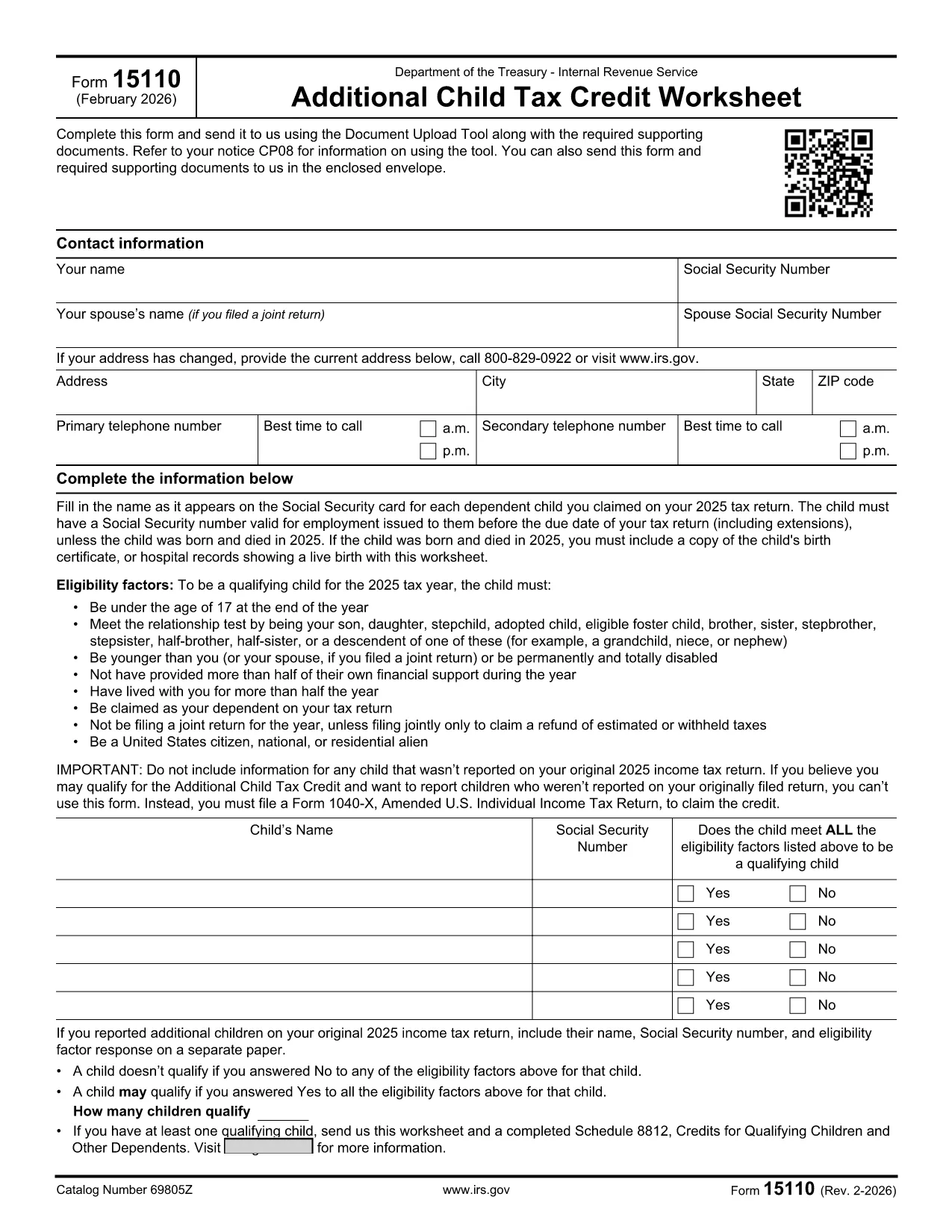
Form 15110 is the Additional Child Tax Credit Worksheet the IRS sends when you receive a CP08 notice. It lets you claim any refundable portion of the child tax credit that wasn’t captured on your original return.

What Is Form 15110 and When Do You Need It?

This one‑page worksheet collects:

  • Taxpayer contact information
  • Social Security numbers for you, your spouse, and each qualifying child
  • Eligibility details for each child (age, relationship, residency, etc.)

If the IRS has told you to complete Form 15110, you must return it with any required supporting documents to claim the additional credit.

How to Complete Form 15110 Online with Formize

Instead of printing, printing, and scanning, use our Formize PDF Filler – a secure, browser‑based editor that works on any device.

  1. Click the "Fill out this form" button on this page.
  2. Wait a few seconds while the Formize PDF Filler app loads the fillable PDF.
  3. Enter your information exactly as it appears on your tax return.
  4. Review each field for accuracy; the filler highlights required fields.
  5. When you’re done, click Save & Download to get a completed PDF you can attach to your CP08 response.

Common Mistakes & Tips for a Smooth Submission

  • Social Security numbers: Double‑check every SSN. A missing or transposed digit will delay processing.
  • Child eligibility: Verify that each child is under 17, lives with you > ½ year, and is a U.S. citizen or resident.
  • Address changes: Use the most recent address on your last filed return; update it in the form if needed.
  • Signature: The fillable PDF allows you to type a digital signature. Make sure it’s legible.
  • Supporting documents: Attach any required proof (e.g., birth certificates) as separate PDFs when you upload your response.

Download the Official Fillable PDF

Need the original PDF for offline use? Click the link below to download the IRS‑provided fillable version.

Download IRS Form 15110 (PDF)

SOALAN LAZIM
  • Do I need a special program to open Form 15110?

    No. With Formize you can fill out the form directly in your web browser. If you prefer, you can also download the PDF and use any standard PDF reader.

  • What is a CP08 notice?

    A CP08 notice is sent by the IRS when they need additional information to process your claim for the Additional Child Tax Credit. The notice includes Form 15110.

  • Can I use an ITIN instead of an SSN for my children?

    No. For the child tax credit and additional child tax credit, each qualifying child must have a Social Security Number before the tax return due date.

  • How many children can I list on Form 15110?

    You can list up to three qualifying children on a single Form 15110 worksheet. If you have more, you must submit additional worksheets.

  • What happens if I make a mistake on the form?

    Errors can delay your refund. Review the form carefully, use the built‑in validation in Formize, and correct any mistakes before submitting.

  • Is there a filing deadline for Form 15110?

    You should return the completed Form 15110 as soon as possible after receiving the CP08 notice. Late submissions may result in a reduced credit.

  • Do I need to attach proof of residency for each child?

    Typically the IRS only requires the worksheet, but if they request additional documentation, you may need to provide school records, medical bills, or a lease showing the child lived with you > ½ year.

BAGAIMANA UNTUK

Cara mengisi IRS Form 15110 secara percuma, dalam talian dalam 4 langkah mudah:

  1. 1
    Open the Fillable Form
    Click the "Fill out this form" button on the page. The Formize PDF Filler will load the Form 15110 directly in your browser.
  2. 2
    Enter Your Information
    Fill in all required fields—name, SSN, address, and each child's details. Required fields are highlighted in red.
  3. 3
    Review and Save
    Double‑check every entry, then click "Save & Download" to get a completed PDF you can attach to your CP08 response.
  4. 4
    Submit to the IRS
    Upload the completed PDF (and any supporting documents) using the IRS Document Upload Tool or mail it in the envelope provided with the notice.
Bentuk apl Pengisi PDF
TENTANG

Borang cukai persekutuan

IRS Form 15110 ialah salah satu borang cukai Persekutuan yang merupakan dokumen yang digunakan untuk melaporkan dan memfailkan cukai pendapatan persekutuan dengan Perkhidmatan Hasil Dalam Negeri (IRS) di Amerika Syarikat. Borang ini digunakan oleh individu, perniagaan dan organisasi untuk melaporkan pendapatan mereka, potongan dan maklumat lain yang berkaitan yang diperlukan untuk mengira liabiliti cukai persekutuan mereka.

Borang cukai persekutuan yang paling biasa digunakan ialah Borang 1040, yang digunakan oleh pembayar cukai individu untuk melaporkan cukai pendapatan peribadi mereka. Borang lain yang biasa digunakan termasuk Borang 1065 untuk perkongsian, Borang 1120 untuk syarikat dan Borang 990 untuk organisasi yang dikecualikan cukai.

Borang cukai persekutuan biasanya memerlukan pembayar cukai melaporkan pelbagai sumber pendapatan, seperti gaji, gaji dan petua, serta pendapatan daripada pelaburan, hartanah sewaan dan sumber lain. Borang tersebut juga membenarkan pembayar cukai menuntut potongan dan kredit untuk pelbagai perbelanjaan, seperti sumbangan amal, faedah gadai janji dan perbelanjaan penjagaan kesihatan.

Adalah penting untuk memfailkan borang cukai persekutuan dengan tepat dan tepat pada masanya, kerana kegagalan untuk berbuat demikian boleh mengakibatkan penalti dan caj faedah daripada IRS.

CIRI-CIRI

Pengisi PDF

Cara paling mudah untuk mengisi IRS Form 15110 dalam talian

  • Cepat isi IRS Form 15110
    Mencari cara untuk mengisi IRS Form 15110 dengan cepat dalam talian? Dengan pengisi borang PDF percuma dalam talian kami, anda akan tahu cara mengedit dan mengisi dokumen pdf ini dalam masa kurang daripada satu minit.
  • Mudah untuk menggunakan editor PDF dalam talian
    Bosan dengan mencetak fail PDF supaya anda boleh mengeditnya, sebelum mengimbas semula dan menghantarnya semula? Edit dokumen PDF secara percuma dalam talian. Gunakan editor pdf dalam talian kami untuk menjimatkan masa dan kertas.
  • Alat yang hebat, semua platform
    Tertanya-tanya cara mengisi IRS Form 15110 pada Mac, atau mungkin cara menggunakan pengisi PDF secara percuma? Alat PDF dalam talian kami berfungsi pada semua platform.
  • Simpanan fail selamat
    Fail "IRS Form 15110" yang lengkap disimpan dalam pangkalan data selamat yang diuruskan oleh pengehosan Amazon Cloud. Anda boleh memadamkan fail anda daripada sistem kami pada bila-bila masa. Walau apa pun, fail ini dipadamkan secara automatik selepas 24 jam.
  • Sembang dengan IRS Form 15110
    Sembang dengan "IRS Form 15110" di Chatize yang merupakan pembantu pembaca PDF percuma. Tanya soalan dan dapatkan jawapan daripada "IRS Form 15110". Cuma klik pada butang Sembang Dengan Dokumen di atas.

Padamkan sesi pengisian

Padamkan sesi pengisian yang dipilih? Dalam kes ini, kemajuan anda dalam melengkapkan borang akan hilang.

Padamkan sesi penyuntingan

Padamkan sesi penyuntingan yang dipilih? Dalam kes ini, kemajuan anda dalam membuat dan mengedit borang akan hilang.