
Pilih Bahasa

IRS Form 56 – Section 54 & 56 Application Form (Fillable PDF)

  1. Negara USA
  2. Bahasa Inggeris
  3. Aktiviti Cukai
  4. Jabatan IRS
Isi borang ini
IRS Form 56 – Section 54 & 56 Application Form (Fillable PDF)

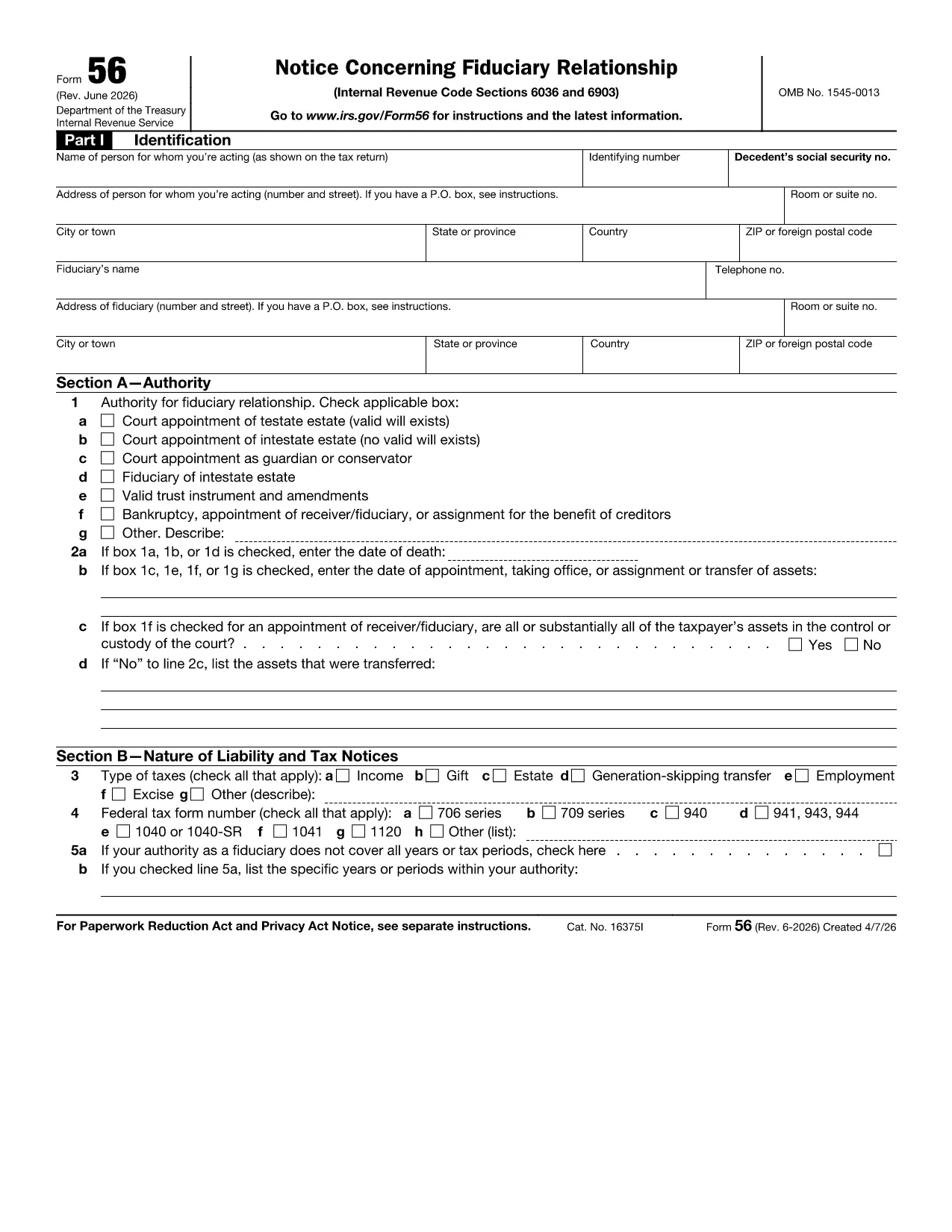
IRS Form 56, also known as the "Application for Notice of Fiduciary Relationship," is the official document used to notify the Internal Revenue Service about a fiduciary relationship for a specific taxpayer. Sections 54 and 56 of the form deal with revocation of earlier notices and the details of the fiduciary, making it essential for estates, trusts, and other fiduciary arrangements.

Formize hosts a secure, fillable PDF version of Form 56 so you can complete the form directly in your browser—no extra software required. The online editor automatically saves your entries, validates required fields, and lets you e‑sign before downloading the final PDF.

Below you’ll find everything you need to successfully complete Form 56, from a quick step‑by‑step guide to answers for the most common questions.

What Is IRS Form 56?

Form 56 informs the IRS that a fiduciary (such as an executor, administrator, or trustee) is acting on behalf of a taxpayer. It is used for:

  • Establishing a fiduciary relationship for tax filings.
  • Revoking a previously filed fiduciary notice (Section 54).
  • Providing contact information, tax‑year coverage, and any revocation details (Section 56).

How to Fill Out Form 56 Online with Formize

Follow these simple steps to complete the fillable PDF directly on Formize:

  1. Click the "Fill out this form" button on this page.
  2. Wait a few seconds while the Formize PDF Filler app loads the IRS Form 56 template.
  3. Enter all required information—fiduciary name, taxpayer details, revocation data, and signatures.
  4. Review the completed form for accuracy; the app highlights any missing required fields.
  5. When you’re satisfied, click "Submit & Download" to receive a completed, printable PDF.

Common Mistakes to Avoid

  • Leaving Section 54 blank when you actually need to revoke a prior notice.
  • Using an outdated address or phone number for the fiduciary.
  • Forgetting to sign the form—unsigned PDFs are rejected by the IRS.
  • Submitting the wrong tax‑year range in the coverage section.

Download & Print Options

If you prefer a hard copy, you can still download the completed PDF from Formize and print it on standard 8.5" × 11" paper. The PDF retains all fillable fields, so you can re‑open it later for edits before the final submission.

FAQs About Form 56

Find quick answers to the most frequent questions below. If you need additional help, refer to the IRS instructions linked on the PDF itself.

SOALAN LAZIM
  • Do I need to print Form 56 after filling it online?

    No. The IRS accepts electronically completed PDFs, but you can print a hard copy if you prefer to mail it.

  • What is the purpose of Section 54 on Form 56?

    Section 54 is used to revoke a previously filed fiduciary notice for the same tax matters and years.

  • Can I save my progress and finish the form later?

    Yes. Formize automatically saves your entries in the browser session; you can reopen the PDF to continue editing.

  • Is an electronic signature accepted by the IRS on Form 56?

    Yes. The IRS recognizes e‑signatures on fillable PDFs as long as the signature field is completed.

  • What happens if I make a mistake after submitting?

    You can file a corrected Form 56 with the appropriate sections updated. Be sure to reference the original filing date.

  • Do I need a separate form for each taxpayer I represent?

    Yes. Each fiduciary relationship requires its own Form 56, even if the same fiduciary acts for multiple taxpayers.

BAGAIMANA UNTUK

Cara mengisi IRS Form 56 secara percuma, dalam talian dalam 5 langkah mudah:

  1. 1
    Start the Fillable Form
    Click the "Fill out this form" button on the page to launch the Formize PDF Filler.
  2. 2
    Load the Form
    Wait a few seconds while the IRS Form 56 template loads in the secure editor.
  3. 3
    Enter Required Information
    Complete all sections, including fiduciary details, taxpayer identification, and any revocation notices.
  4. 4
    Review & Sign
    Check for missing fields, add your electronic signature, and ensure the information is accurate.
  5. 5
    Download the Completed PDF
    Click "Submit & Download" to receive a filled‑out PDF you can print or email to the IRS.
Bentuk apl Pengisi PDF
TENTANG

Borang cukai persekutuan

IRS Form 56 ialah salah satu borang cukai Persekutuan yang merupakan dokumen yang digunakan untuk melaporkan dan memfailkan cukai pendapatan persekutuan dengan Perkhidmatan Hasil Dalam Negeri (IRS) di Amerika Syarikat. Borang ini digunakan oleh individu, perniagaan dan organisasi untuk melaporkan pendapatan mereka, potongan dan maklumat lain yang berkaitan yang diperlukan untuk mengira liabiliti cukai persekutuan mereka.

Borang cukai persekutuan yang paling biasa digunakan ialah Borang 1040, yang digunakan oleh pembayar cukai individu untuk melaporkan cukai pendapatan peribadi mereka. Borang lain yang biasa digunakan termasuk Borang 1065 untuk perkongsian, Borang 1120 untuk syarikat dan Borang 990 untuk organisasi yang dikecualikan cukai.

Borang cukai persekutuan biasanya memerlukan pembayar cukai melaporkan pelbagai sumber pendapatan, seperti gaji, gaji dan petua, serta pendapatan daripada pelaburan, hartanah sewaan dan sumber lain. Borang tersebut juga membenarkan pembayar cukai menuntut potongan dan kredit untuk pelbagai perbelanjaan, seperti sumbangan amal, faedah gadai janji dan perbelanjaan penjagaan kesihatan.

Adalah penting untuk memfailkan borang cukai persekutuan dengan tepat dan tepat pada masanya, kerana kegagalan untuk berbuat demikian boleh mengakibatkan penalti dan caj faedah daripada IRS.

CIRI-CIRI

Pengisi PDF

Cara paling mudah untuk mengisi IRS Form 56 dalam talian

  • Cepat isi IRS Form 56
    Mencari cara untuk mengisi IRS Form 56 dengan cepat dalam talian? Dengan pengisi borang PDF percuma dalam talian kami, anda akan tahu cara mengedit dan mengisi dokumen pdf ini dalam masa kurang daripada satu minit.
  • Mudah untuk menggunakan editor PDF dalam talian
    Bosan dengan mencetak fail PDF supaya anda boleh mengeditnya, sebelum mengimbas semula dan menghantarnya semula? Edit dokumen PDF secara percuma dalam talian. Gunakan editor pdf dalam talian kami untuk menjimatkan masa dan kertas.
  • Alat yang hebat, semua platform
    Tertanya-tanya cara mengisi IRS Form 56 pada Mac, atau mungkin cara menggunakan pengisi PDF secara percuma? Alat PDF dalam talian kami berfungsi pada semua platform.
  • Simpanan fail selamat
    Fail "IRS Form 56" yang lengkap disimpan dalam pangkalan data selamat yang diuruskan oleh pengehosan Amazon Cloud. Anda boleh memadamkan fail anda daripada sistem kami pada bila-bila masa. Walau apa pun, fail ini dipadamkan secara automatik selepas 24 jam.
  • Sembang dengan IRS Form 56
    Sembang dengan "IRS Form 56" di Chatize yang merupakan pembantu pembaca PDF percuma. Tanya soalan dan dapatkan jawapan daripada "IRS Form 56". Cuma klik pada butang Sembang Dengan Dokumen di atas.

Padamkan sesi pengisian

Padamkan sesi pengisian yang dipilih? Dalam kes ini, kemajuan anda dalam melengkapkan borang akan hilang.

Padamkan sesi penyuntingan

Padamkan sesi penyuntingan yang dipilih? Dalam kes ini, kemajuan anda dalam membuat dan mengedit borang akan hilang.