Pilih Bahasa

UST‑6 Application Form – Fillable PDF

  1. Bahasa Inggeris
  2. Negara USA
  3. Aktiviti Environmental Compliance
  4. Jabatan North Carolina Department of Environmental Quality
Isi borang ini
UST‑6 Application Form – Fillable PDF

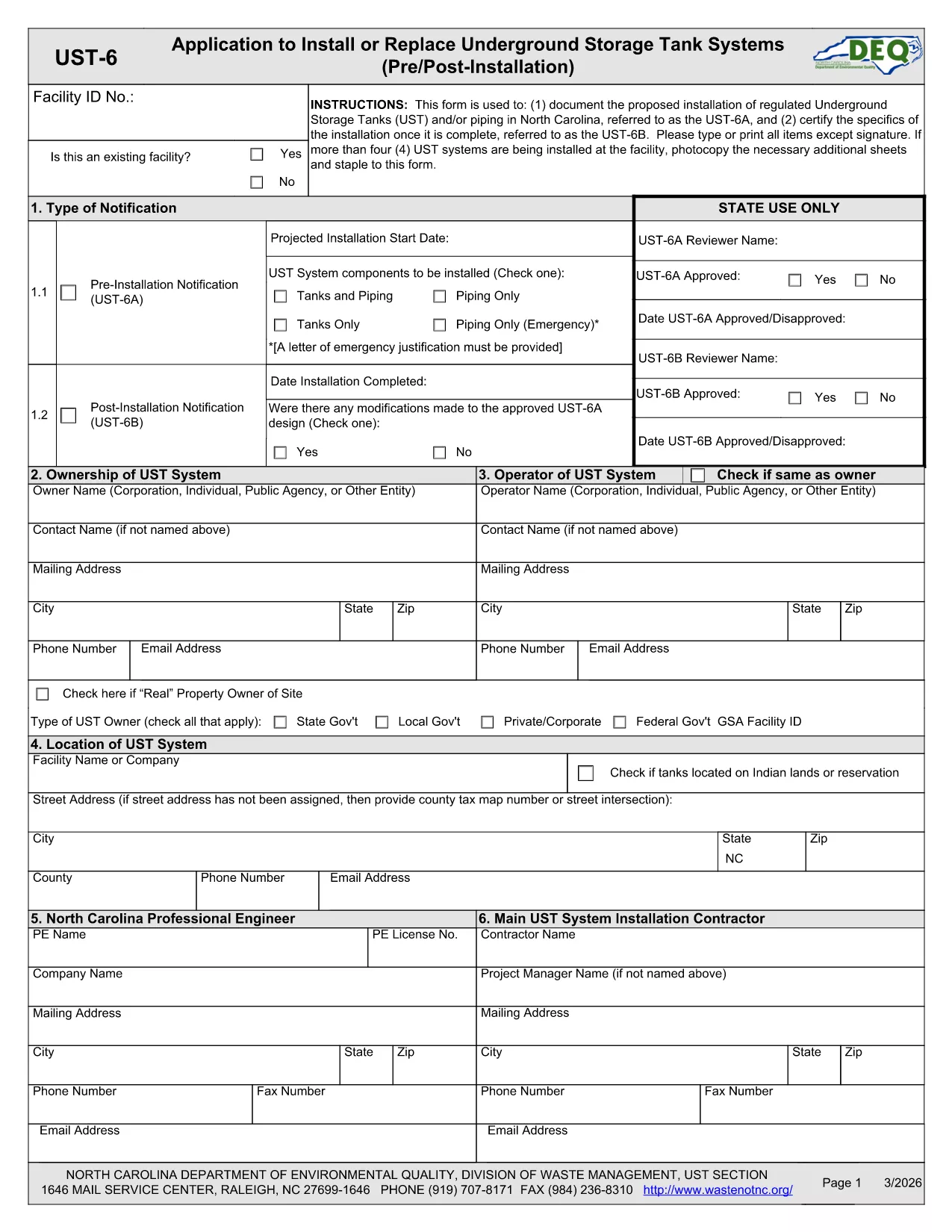
The UST‑6 Application Form is required by the North Carolina Department of Environmental Quality (DEQ) for owners and operators of underground storage tanks (USTs) who need to certify pre‑installation information, report modifications, or request approvals. This page gives you everything you need to download, fill out, and submit the form quickly using Formize’s online PDF filler.

What is the UST‑6 Form?

The UST‑6 is a certification and pre‑installation questionnaire that ensures UST systems meet state environmental standards. It collects details about tank location, design, materials, and compliance measures. Submitting a correctly completed UST‑6 helps avoid penalties and keeps your operation compliant with North Carolina regulations.

How to Fill Out the UST‑6 Online

Instead of printing the PDF and using a third‑party editor, simply click the "Fill out this form" button on this page. The Formize PDF Filler app will load directly in your browser, allowing you to type, select dates, and sign electronically.

Common Mistakes to Avoid

  • Leaving required fields blank – the filler will highlight missing information before you can submit.
  • Using outdated tank specifications – double‑check that the data matches the most recent engineering drawings.
  • Forgetting to attach supporting documents – upload any required permits or inspection reports in the designated attachment sections.

Download the Fillable PDF

If you prefer to work offline, you can download the official UST‑6 PDF using the link below. The file is fully fillable with standard PDF readers, but we recommend the online Formize filler for a smoother experience.

Download UST‑6 Application Form (PDF)

FAQs About the UST‑6 Application

Find quick answers to the most common questions below. If you need further assistance, consult the DEQ guidance documents linked on the form.

SOALAN LAZIM
  • What is the purpose of the UST‑6 form?

    The UST‑6 certifies that a new or modified underground storage tank complies with North Carolina environmental regulations before installation.

  • Can I submit the form electronically?

    Yes. After filling it out with Formize, you can download the completed PDF and upload it through the DEQ online portal, or print and mail it if required.

  • Do I need a digital signature?

    A digital signature is accepted for most submissions. Use the signature field in the Formize filler to add your electronic signature.

  • What supporting documents are required?

    Attach tank design drawings, installation permits, and any previous inspection reports as specified in the attachment sections of the form.

  • Is there a fee to file the UST‑6?

    The UST‑6 itself does not carry a filing fee, but DEQ may charge processing fees for related permits or inspections.

  • How long does it take to process the form?

    Processing time varies, but DEQ typically reviews a completed UST‑6 within 10‑15 business days after receipt.

  • What if I make a mistake after submitting?

    Contact the DEQ UST program office to request a correction. You may need to submit an amended UST‑6 with a cover letter explaining the changes.

  • Can I save my progress and return later?

    Yes. The Formize filler lets you save a draft locally on your computer and resume editing at any time before final submission.

BAGAIMANA UNTUK

Cara mengisi UST-6 form secara percuma, dalam talian dalam 5 langkah mudah:

  1. 1
    Click the Fill Out Button
    On this page, click the "Fill out this form" button to launch the Formize PDF Filler.
  2. 2
    Wait for the Filler to Load
    The browser will open the fillable PDF inside the Formize app – no download required.
  3. 3
    Complete All Required Fields
    Enter the requested information, select dates, and use the drop‑down menus where applicable.
  4. 4
    Review and Sign
    Check each section for completeness, then add your electronic signature in the designated field.
  5. 5
    Submit or Save
    When finished, click "Submit" to send the form to DEQ (if supported) or download the completed PDF for manual submission.
Bentuk apl Pengisi PDF
TENTANG

templat UST-6 form.

Dengan set ciri tradisional untuk melihat dan mengisi dokumen PDF, digabungkan dengan faedah aplikasi web dan reka letak responsif, anda boleh melengkapkan UST-6 form dalam beberapa minit.

CIRI-CIRI

Pengisi PDF

Cara paling mudah untuk mengisi UST-6 form dalam talian

  • Cepat isi UST-6 form
    Mencari cara untuk mengisi UST-6 form dengan cepat dalam talian? Dengan pengisi borang PDF percuma dalam talian kami, anda akan tahu cara mengedit dan mengisi dokumen pdf ini dalam masa kurang daripada satu minit.
  • Mudah untuk menggunakan editor PDF dalam talian
    Bosan dengan mencetak fail PDF supaya anda boleh mengeditnya, sebelum mengimbas semula dan menghantarnya semula? Edit dokumen PDF secara percuma dalam talian. Gunakan editor pdf dalam talian kami untuk menjimatkan masa dan kertas.
  • Alat yang hebat, semua platform
    Tertanya-tanya cara mengisi UST-6 form pada Mac, atau mungkin cara menggunakan pengisi PDF secara percuma? Alat PDF dalam talian kami berfungsi pada semua platform.
  • Simpanan fail selamat
    Fail "UST-6 form" yang lengkap disimpan dalam pangkalan data selamat yang diuruskan oleh pengehosan Amazon Cloud. Anda boleh memadamkan fail anda daripada sistem kami pada bila-bila masa. Walau apa pun, fail ini dipadamkan secara automatik selepas 24 jam.
  • Sembang dengan UST-6 form
    Sembang dengan "UST-6 form" di Chatize yang merupakan pembantu pembaca PDF percuma. Tanya soalan dan dapatkan jawapan daripada "UST-6 form". Cuma klik pada butang Sembang Dengan Dokumen di atas.

Padamkan sesi pengisian

Padamkan sesi pengisian yang dipilih? Dalam kes ini, kemajuan anda dalam melengkapkan borang akan hilang.

Padamkan sesi penyuntingan

Padamkan sesi penyuntingan yang dipilih? Dalam kes ini, kemajuan anda dalam membuat dan mengedit borang akan hilang.