
Pilih Bahasa

DS-11 U.S. Passport Application – Fillable PDF

  1. Bahasa Inggeris
  2. Negara USA
  3. Aktiviti pasport
Isi borang ini
DS-11 U.S. Passport Application – Fillable PDF

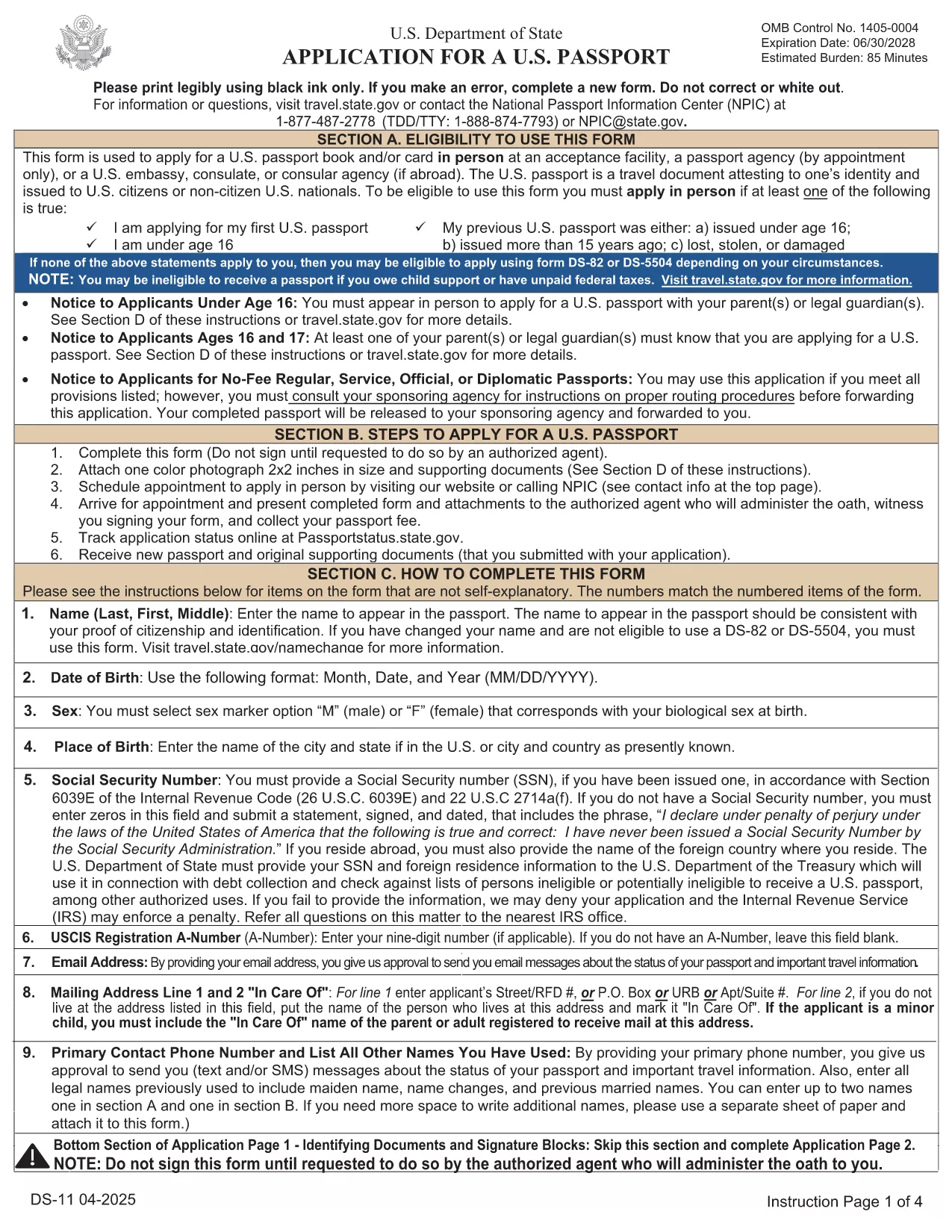
The DS-11 is the official application for first‑time U.S. passports, passports for minors, and replacement of lost or damaged passports. Using Formize’s built‑in PDF filler, you can complete the form online, avoid manual errors, and print a clean, one‑sided copy ready for submission.

What Is the DS-11 Form?

DS-11 is issued by the U.S. Department of State. It collects personal information, citizenship proof, and travel details. You must present the unsigned, completed form at a passport acceptance facility along with supporting documents.

How to Complete the DS-11 with Formize

Follow these simple steps to fill the form directly in your browser—no PDF editor required.

  • Click “Fill out this form” on the page.
  • Wait a few seconds while the Formize PDF Filler loads the official DS-11.
  • Enter your information in each field using the on‑screen keyboard.
  • Use the navigation arrows to move between pages.
  • When finished, click Print to produce a one‑sided copy.

Common Mistakes to Avoid

  • Using colored ink – print in black ink only.
  • Leaving any required box empty – the filler will highlight missing fields.
  • Signing the form before you reach the acceptance facility – sign only on the printed copy.
  • Altering a printed form by hand – any corrections require a new form.

Where to Submit Your Completed Form

Take the printed, unsigned DS-11, your proof of citizenship, a government‑issued photo ID, and a passport‑size photo to any passport acceptance facility (post offices, libraries, or designated clerks). If you need expedited service, schedule an appointment at a regional passport agency.

Download the Official Fillable PDF

For offline use, you can download the original PDF from the U.S. Department of State. The online filler provides the same official form, but the download link is included for reference.

Download DS-11 PDF (official)

SOALAN LAZIM
  • Who must use the DS-11 form?

    First‑time applicants, minors under 16, and anyone replacing a lost, stolen, or damaged passport that is more than 5 years old must use DS‑11.

  • Can I submit a signed DS-11 online?

    No. The DS‑11 must be presented unsigned to a passport acceptance agent, who will witness your signature.

  • Do I need a passport photo?

    Yes. Provide one recent, 2×2 inch color photo that meets State Department requirements.

  • How long does processing take?

    Standard processing is 4‑6 weeks after the acceptance facility receives your application. Expedited service reduces this to 2‑3 weeks.

  • Is the Formize filler free?

    Formize offers a free online filler for the DS‑11. No download or software installation is required.

  • What documents accompany the DS‑11?

    You need proof of U.S. citizenship (birth certificate or naturalization certificate), a government‑issued photo ID, a passport‑size photo, and the applicable fee.

  • Can I correct errors after printing?

    If you discover an error, you must fill out a new DS‑11. Hand‑written corrections are not accepted.

BAGAIMANA UNTUK

Cara mengisi DS-11 secara percuma, dalam talian dalam 5 langkah mudah:

  1. 1
    Open the Formizer Fillable DS-11
    Click the “Fill out this form” button on the page. The Formize PDF Filler will load the official DS-11 automatically.
  2. 2
    Enter Your Information
    Use the on‑screen fields to type your name, date of birth, address, and other required details. The filler validates each entry.
  3. 3
    Review and Print
    After completing all pages, click the Print button. Print a single‑sided copy on white paper using black ink.
  4. 4
    Sign at the Acceptance Facility
    Do NOT sign the printed form until you are in front of a passport acceptance agent.
  5. 5
    Submit Your Package
    Take the printed DS-11, your supporting documents, and payment to the nearest passport acceptance facility.
Bentuk apl Pengisi PDF
TENTANG

Borang Pasport

DS-11 ialah salah satu daripada borang Pasport yang merupakan dokumen yang digunakan untuk memohon pasport, iaitu dokumen perjalanan yang memperakui identiti dan kewarganegaraan pemegang dan membolehkan mereka melancong ke peringkat antarabangsa. Borang pasport boleh berbeza-beza bergantung pada negara yang mengeluarkan pasport, tetapi ia biasanya mengandungi maklumat peribadi tentang pemohon, seperti nama, tarikh lahir dan tempat lahir, serta maklumat tentang ibu bapa pemohon dan sebarang pasport atau dokumen perjalanan terdahulu. .

Di Amerika Syarikat, dua borang pasport yang paling biasa ialah DS-11 dan DS-82. Borang DS-11 digunakan untuk pemohon kali pertama, bawah umur atau individu yang tidak layak menggunakan borang DS-82. Borang DS-82 digunakan untuk pembaharuan pasport melalui pos bagi pemohon yang layak. Kedua-dua borang memerlukan pemohon untuk memberikan maklumat peribadi dan dokumentasi sokongan, seperti gambar pasport dan bukti kewarganegaraan.

Negara lain mungkin mempunyai borang dan keperluan pasport yang berbeza, tetapi proses asas biasanya melibatkan melengkapkan permohonan pasport, menyediakan dokumentasi sokongan dan menghadiri temu duga dengan pegawai pasport di kemudahan kerajaan atau kedutaan. Adalah penting untuk ambil perhatian bahawa proses permohonan pasport boleh mengambil masa beberapa minggu atau bulan, jadi adalah disyorkan untuk memohon lebih awal daripada sebarang perjalanan yang dirancang.

CIRI-CIRI

Pengisi PDF

Cara paling mudah untuk mengisi DS-11 dalam talian

  • Cepat isi DS-11
    Mencari cara untuk mengisi DS-11 dengan cepat dalam talian? Dengan pengisi borang PDF percuma dalam talian kami, anda akan tahu cara mengedit dan mengisi dokumen pdf ini dalam masa kurang daripada satu minit.
  • Mudah untuk menggunakan editor PDF dalam talian
    Bosan dengan mencetak fail PDF supaya anda boleh mengeditnya, sebelum mengimbas semula dan menghantarnya semula? Edit dokumen PDF secara percuma dalam talian. Gunakan editor pdf dalam talian kami untuk menjimatkan masa dan kertas.
  • Alat yang hebat, semua platform
    Tertanya-tanya cara mengisi DS-11 pada Mac, atau mungkin cara menggunakan pengisi PDF secara percuma? Alat PDF dalam talian kami berfungsi pada semua platform.
  • Simpanan fail selamat
    Fail "DS-11" yang lengkap disimpan dalam pangkalan data selamat yang diuruskan oleh pengehosan Amazon Cloud. Anda boleh memadamkan fail anda daripada sistem kami pada bila-bila masa. Walau apa pun, fail ini dipadamkan secara automatik selepas 24 jam.
  • Sembang dengan DS-11
    Sembang dengan "DS-11" di Chatize yang merupakan pembantu pembaca PDF percuma. Tanya soalan dan dapatkan jawapan daripada "DS-11". Cuma klik pada butang Sembang Dengan Dokumen di atas.

Padamkan sesi pengisian

Padamkan sesi pengisian yang dipilih? Dalam kes ini, kemajuan anda dalam melengkapkan borang akan hilang.

Padamkan sesi penyuntingan

Padamkan sesi penyuntingan yang dipilih? Dalam kes ini, kemajuan anda dalam membuat dan mengedit borang akan hilang.