Pilih Bahasa

Form G-1450 – Authorization for Credit Card Transactions (Fillable PDF)

  1. Negara USA
  2. Bahasa Inggeris
  3. Jabatan Perkhidmatan Kewarganegaraan dan Imigresen A.S.
Isi borang ini
Form G-1450 – Authorization for Credit Card Transactions (Fillable PDF)

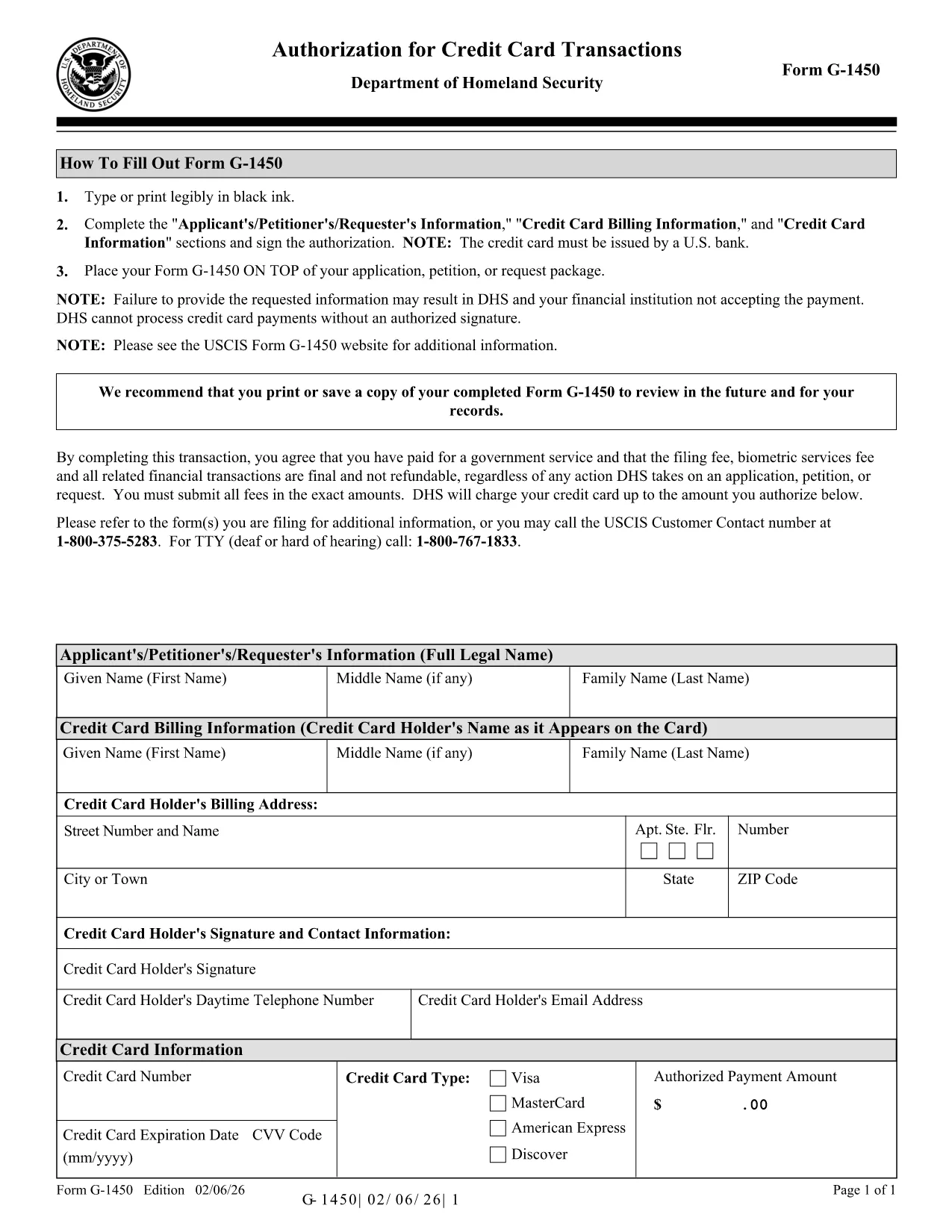
The Form G-1450 is the United States Citizenship and Immigration Services (USCIS) authorization you need when you want to pay filing fees by credit, debit, or prepaid card through the mail. This fillable PDF lets you enter all required information electronically, print a clean copy, and attach it to your application package.

What Is Form G-1450?

Form G-1450, "Authorization for Credit Card Transactions," captures the cardholder’s name, billing address, card number, expiration date, and a signature authorizing USCIS to charge the card for the requested filing fee. The latest edition (02/06/26) adds a CVV field for extra security, although the CVV is not required for USCIS processing.

How to Complete the Fillable PDF Online

Instead of downloading the file and opening a PDF editor, simply click the "Fill out this form" button on this page. The Formize PDF Filler app will load, and you can:

  • Enter your information directly into the fields.
  • Use the built‑in validation to avoid formatting errors.
  • Save a draft and return later if you need more time.
  • Print a PDF that is ready for mailing.

Common Mistakes & Tips for a Successful Submission

  • Do not use a foreign‑issued credit card. USCIS only accepts cards issued by U.S. banks.
  • Make sure the card number and expiration date are entered without spaces or dashes.
  • Even though the CVV field is optional, fill it in if you have it – it helps other DHS components verify the card.
  • Signature must be legible; use the mouse or touch screen to draw your signature, then print.
  • Check that the edition date (02/06/26) appears at the bottom of every page before mailing.

Where to Send Your Completed Form

Place the completed Form G-1450 on top of your application package and mail it to the USCIS Lockbox address indicated in the “Where to File” section of the specific form you are submitting. Do not send the form to a regional office or a USCIS field office.

Download the Official PDF

If you prefer a hard copy, you can download the official USCIS PDF directly from the government website.

Download Form G-1450 (PDF, 272 KB)

SOALAN LAZIM
  • Can I use a credit card issued outside the United States?

    No. USCIS only accepts credit, debit, or prepaid cards issued by U.S. banks for Form G-1450.

  • Is the CVV field required?

    The CVV field is optional for USCIS processing, but filling it in can help other DHS components verify the card.

  • What should I do if I make a mistake after printing?

    Correct the error on the printed form, sign again, and include the corrected page with your original application. Do not submit a torn or altered PDF.

  • Do I need to attach a copy of my credit card?

    No. Do not attach the physical card or a photocopy. Only the completed Form G-1450 is required.

  • Can I submit Form G-1450 electronically?

    Form G-1450 is accepted only as a printed document attached to a paper filing. Online filings use Pay.gov instead.

  • How long is the Form G-1450 valid?

    The form is valid for the filing fee amount listed on the accompanying USCIS form. If fees change, you must use the most recent edition.

  • Where can I find the current filing fee schedule?

    Visit the USCIS Fee Schedule page on the official USCIS website for up‑to‑date fee amounts.

BAGAIMANA UNTUK

Cara mengisi Form G-1450 secara percuma, dalam talian dalam 5 langkah mudah:

  1. 1
    Open the Online Filler
    Click the "Fill out this form" button on this page. The Formize PDF Filler app will launch in a new window.
  2. 2
    Enter Your Information
    Type your name, address, card details, and any optional fields directly into the fillable PDF fields.
  3. 3
    Add Your Signature
    Use the mouse or touch screen to draw your signature in the signature field. You can also upload an image of your signature.
  4. 4
    Review and Save
    Check all entries for accuracy, then click "Save" to download a completed PDF ready for printing.
  5. 5
    Print and Mail
    Print the completed form, place it on top of your USCIS application package, and mail it to the lockbox address shown on the form’s instructions.
Bentuk apl Pengisi PDF
TENTANG

templat Form G-1450.

Dengan set ciri tradisional untuk melihat dan mengisi dokumen PDF, digabungkan dengan faedah aplikasi web dan reka letak responsif, anda boleh melengkapkan Form G-1450 dalam beberapa minit.

CIRI-CIRI

Pengisi PDF

Cara paling mudah untuk mengisi Form G-1450 dalam talian

  • Cepat isi Form G-1450
    Mencari cara untuk mengisi Form G-1450 dengan cepat dalam talian? Dengan pengisi borang PDF percuma dalam talian kami, anda akan tahu cara mengedit dan mengisi dokumen pdf ini dalam masa kurang daripada satu minit.
  • Mudah untuk menggunakan editor PDF dalam talian
    Bosan dengan mencetak fail PDF supaya anda boleh mengeditnya, sebelum mengimbas semula dan menghantarnya semula? Edit dokumen PDF secara percuma dalam talian. Gunakan editor pdf dalam talian kami untuk menjimatkan masa dan kertas.
  • Alat yang hebat, semua platform
    Tertanya-tanya cara mengisi Form G-1450 pada Mac, atau mungkin cara menggunakan pengisi PDF secara percuma? Alat PDF dalam talian kami berfungsi pada semua platform.
  • Simpanan fail selamat
    Fail "Form G-1450" yang lengkap disimpan dalam pangkalan data selamat yang diuruskan oleh pengehosan Amazon Cloud. Anda boleh memadamkan fail anda daripada sistem kami pada bila-bila masa. Walau apa pun, fail ini dipadamkan secara automatik selepas 24 jam.
  • Sembang dengan Form G-1450
    Sembang dengan "Form G-1450" di Chatize yang merupakan pembantu pembaca PDF percuma. Tanya soalan dan dapatkan jawapan daripada "Form G-1450". Cuma klik pada butang Sembang Dengan Dokumen di atas.

Padamkan sesi pengisian

Padamkan sesi pengisian yang dipilih? Dalam kes ini, kemajuan anda dalam melengkapkan borang akan hilang.

Padamkan sesi penyuntingan

Padamkan sesi penyuntingan yang dipilih? Dalam kes ini, kemajuan anda dalam membuat dan mengedit borang akan hilang.