Pilih Bahasa

I-765 Fillable PDF – Apply for Employment Authorization

  1. Bahasa Inggeris
  2. Negara USA
  3. Aktiviti Imigresen
  4. Jabatan USCIS
Isi borang ini
I-765 Fillable PDF – Apply for Employment Authorization

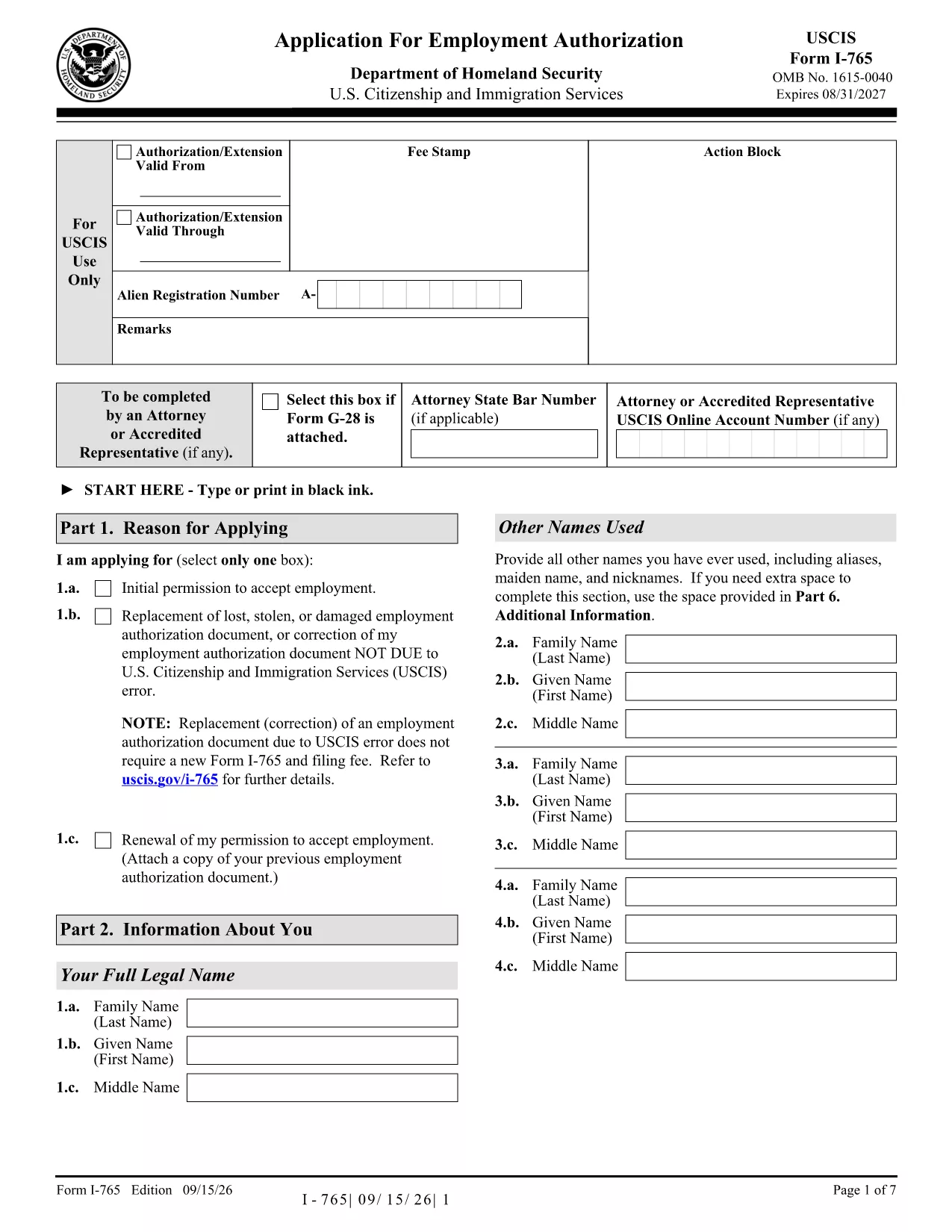
The Form I-765 (Application for Employment Authorization) is the official United States Citizenship and Immigration Services (USCIS) form used by non‑citizens to request an Employment Authorization Document (EAD). With Formize, you can download the official fillable PDF, fill it out directly in your browser, and save a clean, printable version ready for submission.

What is Form I-765?

I-765 is required for a variety of immigration categories, including asylum seekers, DACA recipients, adjustment of status applicants, and many others. The form collects personal information, immigration status, and the reason you are requesting work authorization.

Benefits of Using a Fillable PDF

  • Speed: No printing or scanning needed – fill, sign, and download in minutes.
  • Accuracy: Built‑in validation helps prevent missing fields or formatting errors.
  • Security: Your data stays in the browser; Formize never stores personal information.
  • Compliance: The PDF matches the exact USCIS layout, ensuring your submission is accepted.

How to Complete the I-765 on Formize

Follow the simple steps below to finish your application online.

Common Mistakes to Avoid

  • Leaving any required field blank – USCIS will reject the form.
  • Using a photo that is edited or mounted – submit a plain, unretouched photo.
  • Signing the PDF with a typed name only – use the digital signature tool provided.
  • Submitting an outdated edition of the form – always use the latest PDF (linked above).

Where to Submit Your Completed I-765

After saving the completed PDF, mail it to the USCIS filing address that corresponds to your eligibility category. Check the USCIS I-765 page for the most current address information.

SOALAN LAZIM
  • Is the Formize version of I-765 the official USCIS form?

    Yes. The PDF we provide is the exact USCIS edition (9/15/26) and is fully fillable while preserving the original layout.

  • Do I need a PDF editor to use this form?

    No. Formize’s online filler works in any modern browser—no additional software or plugins are required.

  • Can I save my progress and finish later?

    Yes. Use the **Save Draft** button to download a partially completed PDF. Reload it later to continue editing.

  • Will USCIS accept a digitally signed I-765?

    USCIS requires a handwritten signature on the printed form. After filling out the PDF online, print the document and sign the signature line manually before mailing.

  • What if I make a mistake after downloading?

    Print a fresh copy of the fillable PDF, correct the error, and re‑download. The online validator helps you catch most errors before printing.

  • Is there a fee to use Formize’s filler?

    Formize’s basic fillable PDF functionality is free. No hidden charges are applied for downloading or completing the form.

  • How do I know which filing address to use?

    The filing address depends on your eligibility category. Refer to the USCIS I‑765 webpage or the instructions PDF linked on that page for the correct address.

  • Can I submit the I-765 electronically?

    Currently, USCIS only accepts paper submissions for I‑765. Complete the fillable PDF, print, sign, and mail it as instructed.

BAGAIMANA UNTUK

Cara mengisi i-765 fillable pdf secara percuma, dalam talian dalam 5 langkah mudah:

  1. 1
    Open the Fillable Form
    Click the **Fill out this form** button on the page. The Formize PDF Filler app loads instantly in your browser.
  2. 2
    Enter Your Information
    Type directly into each field. Use the navigation pane on the left to jump between sections quickly.
  3. 3
    Add Your Digital Signature
    Select the signature field, draw or type your signature, and confirm. The signature is embedded securely in the PDF.
  4. 4
    Review and Validate
    Click **Validate** to let Formize check for missing or incorrectly formatted fields. Correct any alerts shown.
  5. 5
    Download the Completed PDF
    When all fields are complete, hit **Download**. Save the file to your computer and print or attach it to your USCIS filing package.
Bentuk apl Pengisi PDF
TENTANG

templat i-765 fillable pdf.

Dengan set ciri tradisional untuk melihat dan mengisi dokumen PDF, digabungkan dengan faedah aplikasi web dan reka letak responsif, anda boleh melengkapkan i-765 fillable pdf dalam beberapa minit.

CIRI-CIRI

Pengisi PDF

Cara paling mudah untuk mengisi i-765 fillable pdf dalam talian

  • Cepat isi i-765 fillable pdf
    Mencari cara untuk mengisi i-765 fillable pdf dengan cepat dalam talian? Dengan pengisi borang PDF percuma dalam talian kami, anda akan tahu cara mengedit dan mengisi dokumen pdf ini dalam masa kurang daripada satu minit.
  • Mudah untuk menggunakan editor PDF dalam talian
    Bosan dengan mencetak fail PDF supaya anda boleh mengeditnya, sebelum mengimbas semula dan menghantarnya semula? Edit dokumen PDF secara percuma dalam talian. Gunakan editor pdf dalam talian kami untuk menjimatkan masa dan kertas.
  • Alat yang hebat, semua platform
    Tertanya-tanya cara mengisi i-765 fillable pdf pada Mac, atau mungkin cara menggunakan pengisi PDF secara percuma? Alat PDF dalam talian kami berfungsi pada semua platform.
  • Simpanan fail selamat
    Fail "i-765 fillable pdf" yang lengkap disimpan dalam pangkalan data selamat yang diuruskan oleh pengehosan Amazon Cloud. Anda boleh memadamkan fail anda daripada sistem kami pada bila-bila masa. Walau apa pun, fail ini dipadamkan secara automatik selepas 24 jam.
  • Sembang dengan i-765 fillable pdf
    Sembang dengan "i-765 fillable pdf" di Chatize yang merupakan pembantu pembaca PDF percuma. Tanya soalan dan dapatkan jawapan daripada "i-765 fillable pdf". Cuma klik pada butang Sembang Dengan Dokumen di atas.

Padamkan sesi pengisian

Padamkan sesi pengisian yang dipilih? Dalam kes ini, kemajuan anda dalam melengkapkan borang akan hilang.

Padamkan sesi penyuntingan

Padamkan sesi penyuntingan yang dipilih? Dalam kes ini, kemajuan anda dalam membuat dan mengedit borang akan hilang.