Pilih Bahasa

Application Form Sample – Fillable PDF Online

  1. Bahasa Inggeris
  2. Negara USA
  3. Aktiviti Imigresen
  4. Jabatan USCIS
Isi borang ini
Application Form Sample – Fillable PDF Online

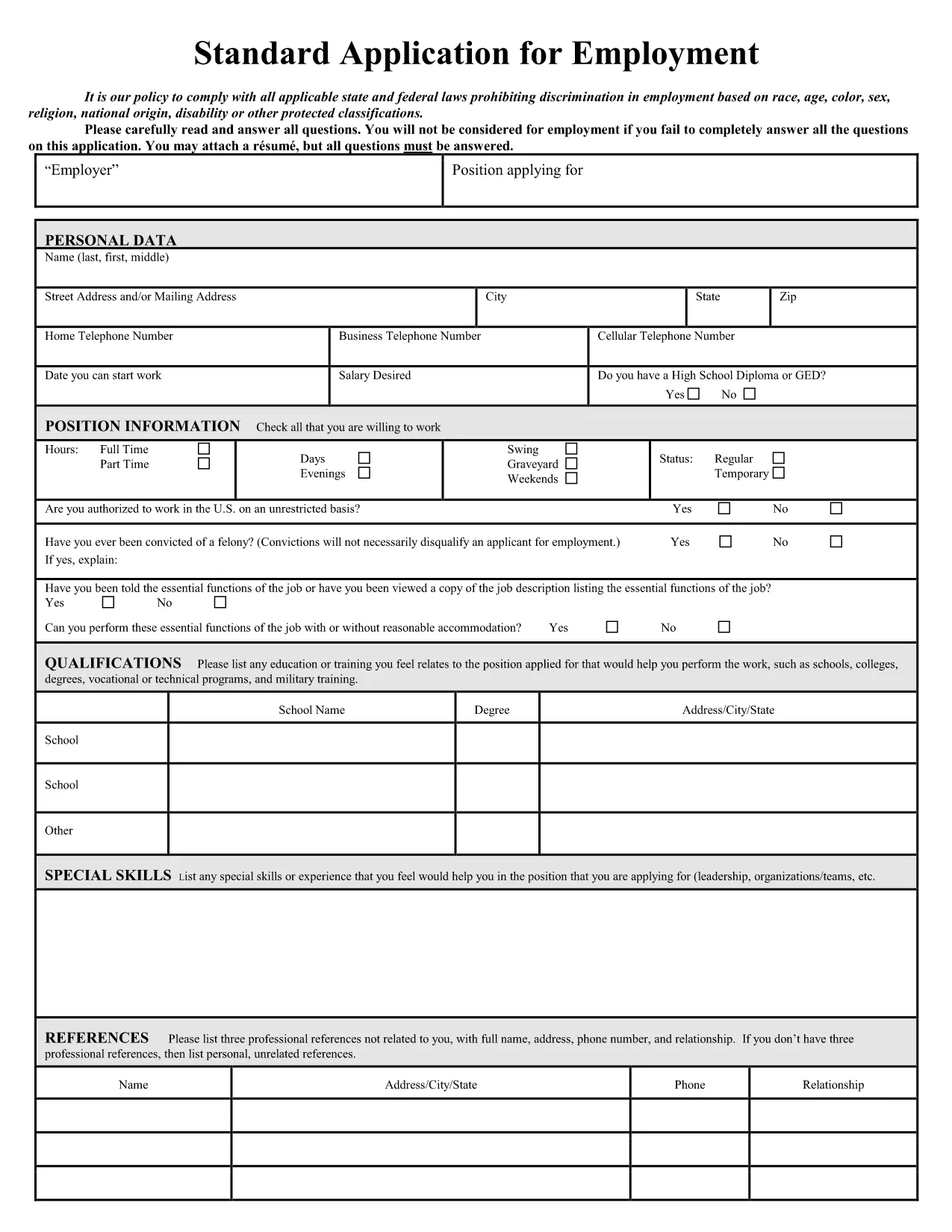
Looking for a professional application form sample that you can edit instantly? Our free fillable PDF lets you complete a job‑application style form without installing any software. Simply click the button, let Formize load the PDF filler, and start typing.

Why Choose a Fillable Application Form?

Fillable PDFs eliminate the hassle of printing, scanning, or re‑typing. They preserve the original layout, keep your data secure, and work on any device – desktop, tablet, or phone.

How to Complete the Form in Seconds

Follow the step‑by‑step guide below. The process takes less than two minutes, even for first‑time users.

Common Mistakes to Avoid

  • Leaving required fields blank – the filler will highlight them.
  • Using special characters in name fields – stick to letters, hyphens, and apostrophes.
  • Skipping the final review – errors can be costly for employers.

Download vs. Fill Online – Which Is Best?

Downloading gives you an offline copy, but filling online guarantees you always have the latest version and automatic saving.

Legal Compliance & Privacy Guarantees

Our PDF filler complies with U.S. data‑protection standards. Your information never leaves the secure Formize environment unless you choose to submit it.

Ready to start? Click the button below and experience a smooth, paper‑less application process.

SOALAN LAZIM
  • Do I need a PDF reader to fill the form?

    No. The Formize online filler works in any modern browser, so you don’t need Adobe Acrobat or any other software.

  • Can I edit the form after I download it?

    Yes. The saved PDF remains fully editable with any standard PDF editor if you need to make changes later.

  • Is my personal data safe?

    Absolutely. All data is processed in a secure, encrypted session and never stored on our servers unless you choose to save it.

  • What if I make a mistake while filling?

    You can simply click back into the field and correct it. The filler also offers an “Undo” button for quick fixes.

  • Can I print the completed form?

    Yes. After you save the filled PDF, you can print it using any standard printer.

  • Is the form compatible with mobile devices?

    The online filler is responsive and works on smartphones and tablets as well as desktops.

  • Do I need to create an account?

    No account is required. The filler is free and anonymous; you only need to click the button to start.

  • Can I use this form for any job application?

    The sample follows standard U.S. employment‑application conventions and works for most entry‑level and professional positions.

BAGAIMANA UNTUK

Cara mengisi application form sample secara percuma, dalam talian dalam 4 langkah mudah:

  1. 1
    Click the Fill‑out Button
    Press the “Fill out this form” button on the page. The Formize PDF Filler app will open in a new tab.
  2. 2
    Wait for the Filler to Load
    The app loads the fillable PDF automatically. No download or installation is required.
  3. 3
    Enter Your Information
    Type directly into each field. Required fields are marked with a red asterisk.
  4. 4
    Review and Save
    Use the “Preview” button to check for errors, then click “Save” to download a completed copy or submit it directly to the employer.
Bentuk apl Pengisi PDF
TENTANG

templat application form sample.

Dengan set ciri tradisional untuk melihat dan mengisi dokumen PDF, digabungkan dengan faedah aplikasi web dan reka letak responsif, anda boleh melengkapkan application form sample dalam beberapa minit.

CIRI-CIRI

Pengisi PDF

Cara paling mudah untuk mengisi application form sample dalam talian

  • Cepat isi application form sample
    Mencari cara untuk mengisi application form sample dengan cepat dalam talian? Dengan pengisi borang PDF percuma dalam talian kami, anda akan tahu cara mengedit dan mengisi dokumen pdf ini dalam masa kurang daripada satu minit.
  • Mudah untuk menggunakan editor PDF dalam talian
    Bosan dengan mencetak fail PDF supaya anda boleh mengeditnya, sebelum mengimbas semula dan menghantarnya semula? Edit dokumen PDF secara percuma dalam talian. Gunakan editor pdf dalam talian kami untuk menjimatkan masa dan kertas.
  • Alat yang hebat, semua platform
    Tertanya-tanya cara mengisi application form sample pada Mac, atau mungkin cara menggunakan pengisi PDF secara percuma? Alat PDF dalam talian kami berfungsi pada semua platform.
  • Simpanan fail selamat
    Fail "application form sample" yang lengkap disimpan dalam pangkalan data selamat yang diuruskan oleh pengehosan Amazon Cloud. Anda boleh memadamkan fail anda daripada sistem kami pada bila-bila masa. Walau apa pun, fail ini dipadamkan secara automatik selepas 24 jam.
  • Sembang dengan application form sample
    Sembang dengan "application form sample" di Chatize yang merupakan pembantu pembaca PDF percuma. Tanya soalan dan dapatkan jawapan daripada "application form sample". Cuma klik pada butang Sembang Dengan Dokumen di atas.

Padamkan sesi pengisian

Padamkan sesi pengisian yang dipilih? Dalam kes ini, kemajuan anda dalam melengkapkan borang akan hilang.

Padamkan sesi penyuntingan

Padamkan sesi penyuntingan yang dipilih? Dalam kes ini, kemajuan anda dalam membuat dan mengedit borang akan hilang.