
Pilih Bahasa

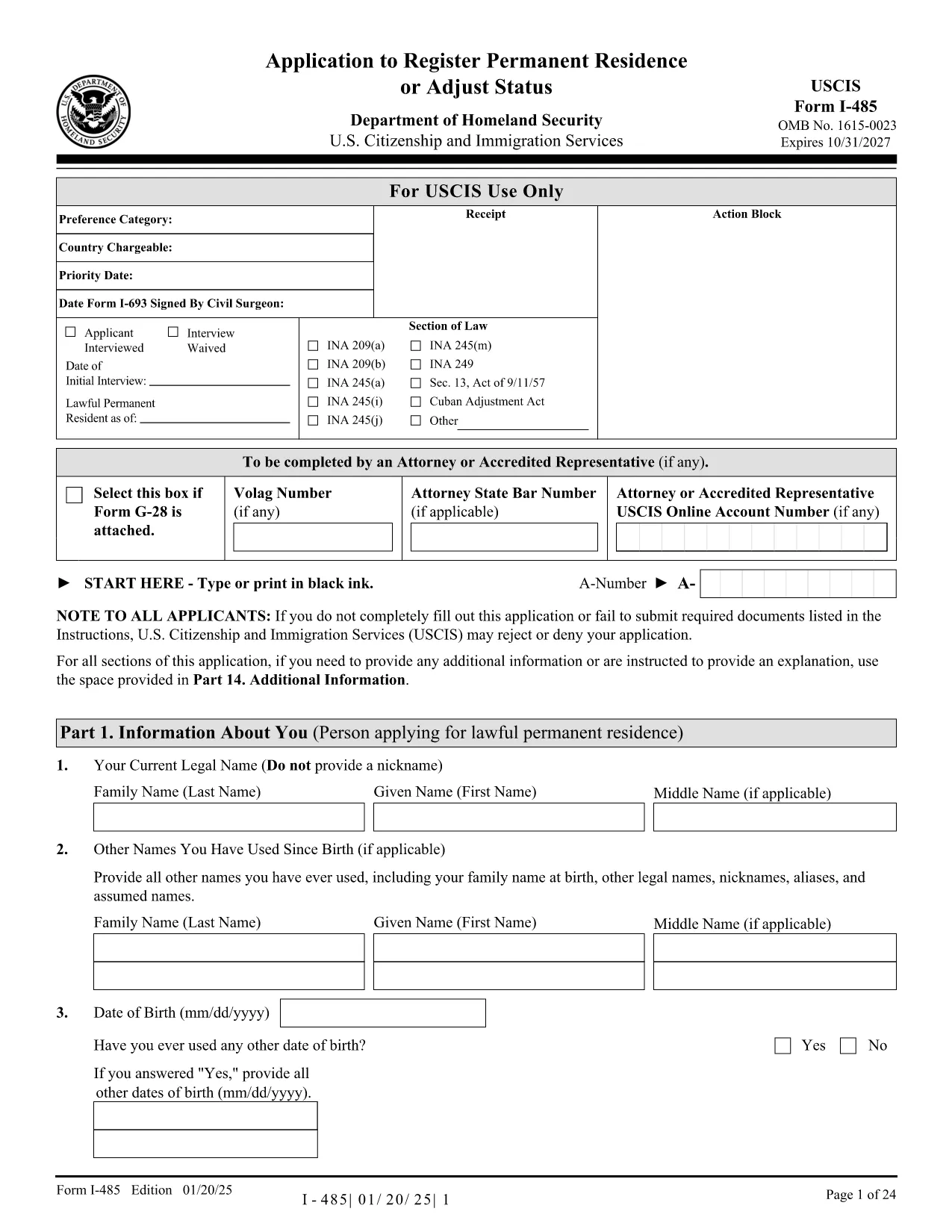
Keep Permanent Residence Permit Application Form (Fillable PDF)

  1. Bahasa Inggeris
  2. Negara USA
  3. Aktiviti Imigresen
  4. Jabatan USCIS
Isi borang ini
Keep Permanent Residence Permit Application Form (Fillable PDF)

If you already hold a permanent residence permit and need to keep it while living abroad, you’ll need the correct application form. Our fillable PDF makes the process quick, accurate, and paper‑free.

What is the Keep Permanent Residence Permit?

A “keep” or “retention” permit is an official request to maintain your existing permanent residence status when you plan to stay outside the country for an extended period. In the United States, this is handled through USC USCIS Form I‑485 (Application to Register Permanent Residence or Adjust Status) when you are adjusting or renewing status.

How to Complete the Fillable PDF Form

Instead of downloading the PDF to edit it in Adobe Reader, simply click the "Fill out this form" button on this page. The Formize PDF Filler app will load instantly, allowing you to type, select checkboxes, and sign directly in your browser.

Common Mistakes to Avoid

  • Leaving required fields blank – the filler highlights missing information.
  • Using an outdated version of the form – our link always points to the latest official PDF.
  • Forgetting to sign the form – the electronic signature field is mandatory.
  • Submitting without the required supporting documents – check the checklist at the end of the form.

Where to Submit Your Application

After completing the form, download the completed PDF and mail it to the USCIS address listed in the form’s instructions, or submit it online if you have a USCIS online account. Keep a copy for your records.

Frequently Asked Questions

Below are quick answers to the most common questions about keeping your permanent residence permit.

SOALAN LAZIM
  • Do I need to print the form after filling it online?

    Yes. USCIS requires a printed, signed copy for mailed submissions. For online filing, upload the PDF directly from the Formize app.

  • Can I edit the form after I download it?

    You can, but any changes must be made in the original fillable PDF to keep the field structure intact. It’s best to complete all edits before downloading.

  • What supporting documents are required?

    Typically you’ll need a copy of your current residence card, proof of travel abroad, and any relevant tax or employment records. The form’s checklist lists all required items.

  • Is there a filing fee?

    Yes. USCIS charges a filing fee for Form I‑485. Check the latest fee schedule on the USCIS website before submitting.

  • How long does processing take?

    Processing times vary by service center, but most applications are reviewed within 6‑12 months. You can track status online with your receipt number.

  • What if I make a mistake on the form?

    If you notice an error after submission, you can file a written correction with your receipt number, or withdraw and resubmit a corrected form.

BAGAIMANA UNTUK

Cara mengisi keep permanent residence permit secara percuma, dalam talian dalam 4 langkah mudah:

  1. 1
    Click the Fill Out Button
    Press the "Fill out this form" button on this page. The Formize PDF Filler loads in a new window.
  2. 2
    Enter Your Information
    Type directly into each field, select dates from the calendar picker, and check the appropriate boxes. All changes are saved automatically.
  3. 3
    Add Your Signature
    Use the electronic signature field at the bottom of the form. You can draw your signature with a mouse or touchscreen.
  4. 4
    Download and Submit
    When finished, click "Download PDF" to save a copy. Print and mail it to the address shown in the form instructions, or upload it via your USCIS online account.
Bentuk apl Pengisi PDF
TENTANG

templat keep permanent residence permit.

Dengan set ciri tradisional untuk melihat dan mengisi dokumen PDF, digabungkan dengan faedah aplikasi web dan reka letak responsif, anda boleh melengkapkan keep permanent residence permit dalam beberapa minit.

CIRI-CIRI

Pengisi PDF

Cara paling mudah untuk mengisi keep permanent residence permit dalam talian

  • Cepat isi keep permanent residence permit
    Mencari cara untuk mengisi keep permanent residence permit dengan cepat dalam talian? Dengan pengisi borang PDF percuma dalam talian kami, anda akan tahu cara mengedit dan mengisi dokumen pdf ini dalam masa kurang daripada satu minit.
  • Mudah untuk menggunakan editor PDF dalam talian
    Bosan dengan mencetak fail PDF supaya anda boleh mengeditnya, sebelum mengimbas semula dan menghantarnya semula? Edit dokumen PDF secara percuma dalam talian. Gunakan editor pdf dalam talian kami untuk menjimatkan masa dan kertas.
  • Alat yang hebat, semua platform
    Tertanya-tanya cara mengisi keep permanent residence permit pada Mac, atau mungkin cara menggunakan pengisi PDF secara percuma? Alat PDF dalam talian kami berfungsi pada semua platform.
  • Simpanan fail selamat
    Fail "keep permanent residence permit" yang lengkap disimpan dalam pangkalan data selamat yang diuruskan oleh pengehosan Amazon Cloud. Anda boleh memadamkan fail anda daripada sistem kami pada bila-bila masa. Walau apa pun, fail ini dipadamkan secara automatik selepas 24 jam.
  • Sembang dengan keep permanent residence permit
    Sembang dengan "keep permanent residence permit" di Chatize yang merupakan pembantu pembaca PDF percuma. Tanya soalan dan dapatkan jawapan daripada "keep permanent residence permit". Cuma klik pada butang Sembang Dengan Dokumen di atas.

Padamkan sesi pengisian

Padamkan sesi pengisian yang dipilih? Dalam kes ini, kemajuan anda dalam melengkapkan borang akan hilang.

Padamkan sesi penyuntingan

Padamkan sesi penyuntingan yang dipilih? Dalam kes ini, kemajuan anda dalam membuat dan mengedit borang akan hilang.