Pilih Bahasa

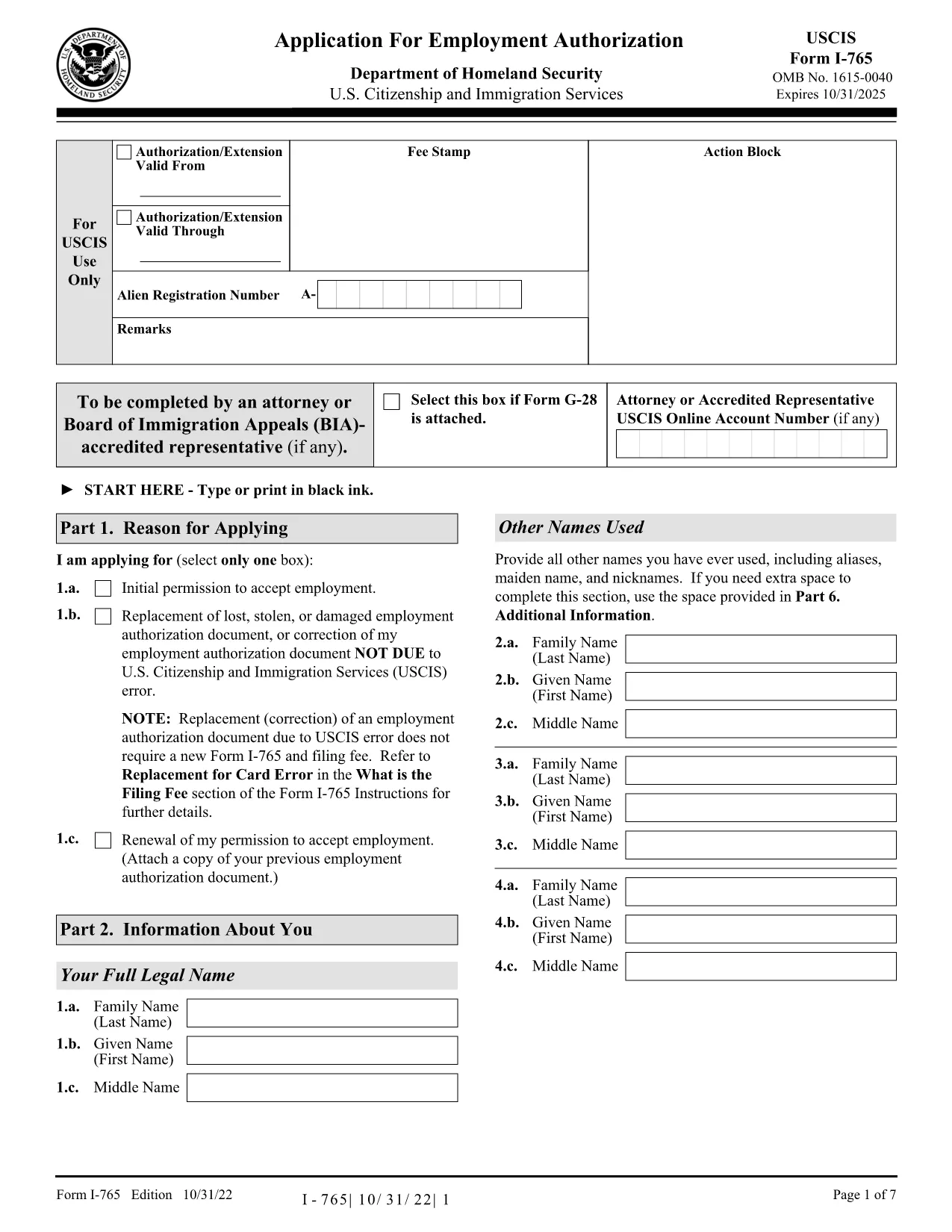
Work Permit Application Form – Fillable PDF (I‑765)

  1. Negara USA
  2. Bahasa Inggeris
  3. Aktiviti Work Permits
  4. Jabatan USCIS
Isi borang ini
Work Permit Application Form – Fillable PDF (I‑765)

The I‑765, Application for Employment Authorization is the official United States Citizenship and Immigration Services (USCIS) form used by eligible non‑citizens to request a work permit (Employment Authorization Document – EAD). Our fillable PDF version lets you complete the form quickly, accurately, and securely, without printing or manual data entry.

What Is the I-765 Work Permit Form?

The I‑765 is required for many immigration categories, including students on Optional Practical Training (OPT), asylum seekers, and individuals with a pending adjustment of status. The form collects personal information, immigration status, eligibility category, and supporting documentation details.

Why Use a Fillable PDF with Formize?

Formize’s online PDF Filler loads the official I‑765 PDF directly in your browser. Benefits include:

  • Auto‑save while you type – no lost data.
  • Built‑in validation helps you avoid common errors.
  • Instant download of a completed, printable PDF.
  • Secure, no‑install solution – all work stays in your browser.

Step‑by‑Step Guide to Completing the Form

See the howto section below for a quick walkthrough.

Common Mistakes to Avoid

  • Leaving the “Eligibility Category” blank or using the wrong code.
  • Submitting an outdated version of the I‑765 (always use the latest edition).
  • Forgetting to sign the form – electronic signatures are accepted when you print.
  • Omitting required supporting documents, which can cause a denial.

Where to Submit Your Completed Application

After you download the filled PDF, follow USCIS filing instructions for your specific eligibility category. Most applicants submit by mail; some categories allow online filing through the USCIS portal.

Ready to start? Click the button below, fill out the form in seconds, and download your completed I‑765.

SOALAN LAZIM
  • Who can file the I‑765 form?

    Anyone with a non‑immigrant status that permits employment authorization, such as F‑1 students (OPT), asylum applicants, and individuals with pending adjustment of status.

  • Do I need a PDF editor to fill the I‑765?

    No. With Formize you can fill the official PDF directly in your browser—no additional software required.

  • Is an electronic signature accepted on the I‑765?

    USCIS requires a handwritten signature on the printed form. After completing the form online, print it, sign, and then submit.

  • Can I submit the I‑765 online?

    Some eligibility categories allow online filing through the USCIS website. Check the USCIS filing guide for your specific category.

  • What is the filing fee for the I‑765?

    The fee varies by category and can change annually. Refer to the USCIS fee schedule for the most up‑to‑date amount.

  • How long does it take to receive the work permit?

    Processing times range from 2 to 6 months, depending on USCIS workload and the applicant’s category.

  • What supporting documents do I need?

    Typical documents include a copy of your passport, current visa, I‑94 arrival/departure record, and proof of eligibility (e.g., I‑20 for OPT).

  • What if I make a mistake after submitting?

    If you discover an error, you can file a new I‑765 with the corrected information, but you’ll need to pay the filing fee again.

BAGAIMANA UNTUK

Cara mengisi work permit application secara percuma, dalam talian dalam 5 langkah mudah:

  1. 1
    Click the Fill‑out Button
    Press the “Fill out this form” button on the page. The Formize PDF Filler app will open the I‑765 PDF in a new tab.
  2. 2
    Wait for the Filler to Load
    The app automatically loads the fillable fields. This usually takes a few seconds.
  3. 3
    Enter Your Information
    Type directly into each field. The filler validates dates, numbers, and required entries as you go.
  4. 4
    Review and Save
    When you finish, click “Review”. Check for any highlighted errors, then click “Save & Download” to get your completed PDF.
  5. 5
    Print or Submit
    Print the saved PDF, sign where required, and mail it to the USCIS address shown in the form instructions.
Bentuk apl Pengisi PDF
TENTANG

templat work permit application.

Dengan set ciri tradisional untuk melihat dan mengisi dokumen PDF, digabungkan dengan faedah aplikasi web dan reka letak responsif, anda boleh melengkapkan work permit application dalam beberapa minit.

CIRI-CIRI

Pengisi PDF

Cara paling mudah untuk mengisi work permit application dalam talian

  • Cepat isi work permit application
    Mencari cara untuk mengisi work permit application dengan cepat dalam talian? Dengan pengisi borang PDF percuma dalam talian kami, anda akan tahu cara mengedit dan mengisi dokumen pdf ini dalam masa kurang daripada satu minit.
  • Mudah untuk menggunakan editor PDF dalam talian
    Bosan dengan mencetak fail PDF supaya anda boleh mengeditnya, sebelum mengimbas semula dan menghantarnya semula? Edit dokumen PDF secara percuma dalam talian. Gunakan editor pdf dalam talian kami untuk menjimatkan masa dan kertas.
  • Alat yang hebat, semua platform
    Tertanya-tanya cara mengisi work permit application pada Mac, atau mungkin cara menggunakan pengisi PDF secara percuma? Alat PDF dalam talian kami berfungsi pada semua platform.
  • Simpanan fail selamat
    Fail "work permit application" yang lengkap disimpan dalam pangkalan data selamat yang diuruskan oleh pengehosan Amazon Cloud. Anda boleh memadamkan fail anda daripada sistem kami pada bila-bila masa. Walau apa pun, fail ini dipadamkan secara automatik selepas 24 jam.
  • Sembang dengan work permit application
    Sembang dengan "work permit application" di Chatize yang merupakan pembantu pembaca PDF percuma. Tanya soalan dan dapatkan jawapan daripada "work permit application". Cuma klik pada butang Sembang Dengan Dokumen di atas.

Padamkan sesi pengisian

Padamkan sesi pengisian yang dipilih? Dalam kes ini, kemajuan anda dalam melengkapkan borang akan hilang.

Padamkan sesi penyuntingan

Padamkan sesi penyuntingan yang dipilih? Dalam kes ini, kemajuan anda dalam membuat dan mengedit borang akan hilang.