Pilih Bahasa

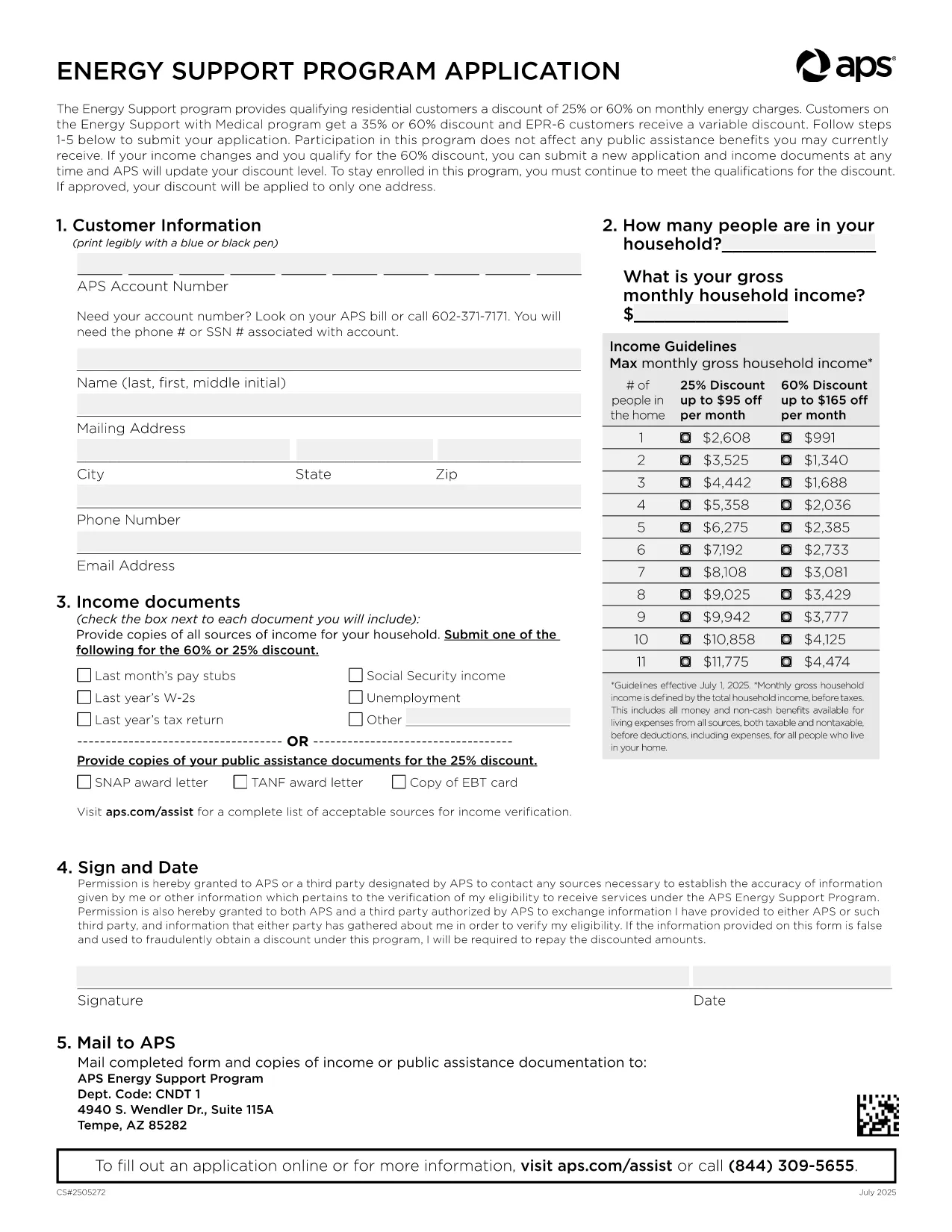
APS Energy Support Program Application Form (Fillable PDF)

  1. Bahasa Inggeris
  2. Negara USA
  3. Jabatan Utility
  4. Aktiviti Energy Assistance
Isi borang ini
APS Energy Support Program Application Form (Fillable PDF)

Arizona Public Service (APS) offers the Energy Support Program to help qualifying households lower their monthly electric bill. The official Application Form APS is now available as a fillable PDF that you can complete directly on this page.

Why Choose the APS Energy Support Application?

The APS Energy Support Program provides a discount of up to 60% on your electricity charges. Using the online fillable PDF saves you time, eliminates printing errors, and speeds up processing—your application can be submitted in minutes.

How to Fill the APS Application Form Online

Simply click the "Fill out this form" button below. The Formize PDF Filler will load, allowing you to type, select, and sign directly in your browser. No additional software is required.

Common Mistakes to Avoid

  • Leaving required fields blank – the filler highlights missing information.
  • Submitting incomplete income documents – attach clear scans or photos of each document.
  • Forgetting the signature – the digital signature field must be completed before submission.

Eligibility & Required Documents

To qualify, you must meet the household income guidelines and provide proof for every adult in the home. Acceptable documents include recent pay stubs, tax returns, Social Security statements, SNAP benefits letters, or other listed income sources.

Submit Your Completed Form

After filling the form, click Submit. Your application will be securely sent to APS for processing. You’ll receive a confirmation email with a reference number and next‑step instructions.

Need help? Review the FAQs below or contact APS Customer Care at (602) 371‑7171.

SOALAN LAZIM
  • What is the APS Energy Support Program?

    It is a discount program offered by Arizona Public Service that reduces eligible households' electric bills by up to 60% based on income.

  • Do I need to print the form?

    No. The fillable PDF can be completed entirely online using the Formize PDF Filler, then submitted electronically.

  • Which documents are required?

    Proof of income for every adult (pay stubs, tax returns, Social Security statements, SNAP letters, etc.) and a valid signature from the account holder.

  • How long does processing take?

    APS typically processes online applications within 10‑15 business days. You will receive an email notification of the decision.

  • Can I edit the form after submitting?

    Once submitted, the form cannot be edited. If you need to make changes, contact APS Customer Care to request a new application.

  • Is my information secure?

    Yes. Formize uses SSL encryption to protect all data entered in the PDF filler. APS also follows strict privacy standards.

  • How often do I need to reapply?

    Eligibility must be recertified every 24 months. APS will mail a re‑certification form before your current enrollment expires.

  • What if I have trouble with the online filler?

    Refresh the page, ensure your browser is up‑to‑date, and try again. If the issue persists, you can download the PDF (link below) and complete it manually.

BAGAIMANA UNTUK

Cara mengisi APS application form secara percuma, dalam talian dalam 5 langkah mudah:

  1. 1
    Open the Fillable Form
    Click the "Fill out this form" button on the page. The Formize PDF Filler loads instantly in your browser.
  2. 2
    Enter Your Information
    Type directly into each field, select options from dropdowns, and upload required documents using the attachment icons.
  3. 3
    Add Your Digital Signature
    Use the signature field to draw or type your name. The filler validates the signature before allowing submission.
  4. 4
    Review and Submit
    Check all entered data, ensure every required document is attached, then click the Submit button to send your application to APS.
  5. 5
    Save a Copy
    After submission, download a PDF copy for your records by clicking the "Download Completed Form" link.
Bentuk apl Pengisi PDF
TENTANG

templat APS application form.

Dengan set ciri tradisional untuk melihat dan mengisi dokumen PDF, digabungkan dengan faedah aplikasi web dan reka letak responsif, anda boleh melengkapkan APS application form dalam beberapa minit.

CIRI-CIRI

Pengisi PDF

Cara paling mudah untuk mengisi APS application form dalam talian

  • Cepat isi APS application form
    Mencari cara untuk mengisi APS application form dengan cepat dalam talian? Dengan pengisi borang PDF percuma dalam talian kami, anda akan tahu cara mengedit dan mengisi dokumen pdf ini dalam masa kurang daripada satu minit.
  • Mudah untuk menggunakan editor PDF dalam talian
    Bosan dengan mencetak fail PDF supaya anda boleh mengeditnya, sebelum mengimbas semula dan menghantarnya semula? Edit dokumen PDF secara percuma dalam talian. Gunakan editor pdf dalam talian kami untuk menjimatkan masa dan kertas.
  • Alat yang hebat, semua platform
    Tertanya-tanya cara mengisi APS application form pada Mac, atau mungkin cara menggunakan pengisi PDF secara percuma? Alat PDF dalam talian kami berfungsi pada semua platform.
  • Simpanan fail selamat
    Fail "APS application form" yang lengkap disimpan dalam pangkalan data selamat yang diuruskan oleh pengehosan Amazon Cloud. Anda boleh memadamkan fail anda daripada sistem kami pada bila-bila masa. Walau apa pun, fail ini dipadamkan secara automatik selepas 24 jam.
  • Sembang dengan APS application form
    Sembang dengan "APS application form" di Chatize yang merupakan pembantu pembaca PDF percuma. Tanya soalan dan dapatkan jawapan daripada "APS application form". Cuma klik pada butang Sembang Dengan Dokumen di atas.

Padamkan sesi pengisian

Padamkan sesi pengisian yang dipilih? Dalam kes ini, kemajuan anda dalam melengkapkan borang akan hilang.

Padamkan sesi penyuntingan

Padamkan sesi penyuntingan yang dipilih? Dalam kes ini, kemajuan anda dalam membuat dan mengedit borang akan hilang.