
Pilih Bahasa

Connecticut H‑30 Repossession Affidavit – Fillable PDF Form

  1. Bahasa Inggeris
  2. Negara USA
  3. Aktiviti Pendaftaran Kenderaan
  4. negeri Connecticut
Isi borang ini
Connecticut H‑30 Repossession Affidavit – Fillable PDF Form

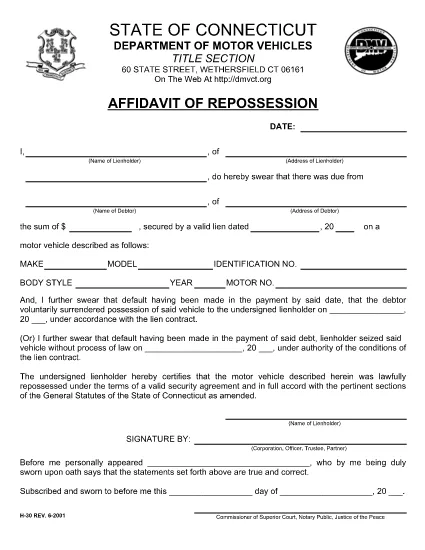
The Connecticut H‑30 Repossession Affidavit is the legal document lienholders must file when they repossess a motor vehicle under a valid security agreement. This fillable PDF, hosted on Formize, lets you complete, e‑sign, and download the form in minutes—no extra software required.

What Is the CT H‑30 Repossession Affidavit?

The H‑30 verifies that a vehicle was repossessed lawfully. It protects lienholders from future disputes and provides a clear record for the debtor and the Connecticut Department of Motor Vehicles.

Key Sections & Fillable Fields

  • Lienholder Information: Name, address, and contact details.
  • Debtor Information: Borrower’s name and address.
  • Vehicle Details: Make, model, VIN, and license plate.
  • Repossession Details: Date, location, and circumstances of the repossession.
  • Signature & Notarization: Lienholder signature and notarization block.

How to Complete the Form Online with Formize

Instead of downloading the PDF and opening a separate editor, simply click the Fill out this form button on this page. Formize’s PDF Filler app will load instantly, allowing you to type directly into each field, add your e‑signature, and save the completed document.

Common Mistakes to Avoid

  • Leaving any required field blank – the system will flag missing data before you can submit.
  • Using an outdated vehicle VIN – double‑check the VIN on the vehicle’s title.
  • Skipping the notarization step – the affidavit isn’t valid without a notarized signature.
  • Submitting the form to the wrong DMV office – see the submission section below.

Where to Submit the Completed H‑30

After you’ve saved the filled PDF, email it to dmv@ct.gov or mail a printed copy to:

Connecticut Department of Motor Vehicles
150 Columbus Blvd.
Hartford, CT 06103

Keep a copy for your records in case the DMV requests additional information.

SOALAN LAZIM
  • Who must file the CT H‑30 affidavit?

    Any lienholder who repossesses a motor vehicle in Connecticut under a valid security agreement must complete and file the H‑30.

  • Can I use a printed copy of the PDF instead of the fillable version?

    Yes, but using the fillable PDF reduces errors, speeds up completion, and ensures all required fields are captured.

  • Is an electronic signature accepted on the H‑30?

    Yes. Connecticut law accepts e‑signatures on the H‑30 when created with a compliant electronic signing tool like Formize.

  • What happens if I submit the form with missing information?

    The DMV will reject the submission and request the missing details, causing delays in the repossession process.

  • Do I need a notarized signature for the H‑30?

    A notarized signature is required for the affidavit to be legally valid. You can notarize after printing the completed PDF.

  • How long does it take for the DMV to process the H‑30?

    Processing typically takes 5‑7 business days after the DMV receives a complete, notarized form.

  • Is there a fee to download the H‑30 PDF?

    No. The Connecticut H‑30 PDF is provided free of charge by the state and by Formize.

  • Can I save a partially completed H‑30 and finish it later?

    Yes. Use the "Save" button in Formize to download a draft, then reopen it later to finish.

BAGAIMANA UNTUK

Cara mengisi CT H-30 form secara percuma, dalam talian dalam 5 langkah mudah:

  1. 1
    Open the Fillable Form
    Click the "Fill out this form" button on the page. Formize’s PDF Filler will load in a new window.
  2. 2
    Enter All Required Information
    Type directly into each highlighted field—lienholder details, debtor info, vehicle data, and repossession circumstances.
  3. 3
    Add Your Electronic Signature
    Use the built‑in e‑signature tool to sign the affidavit. The signature is legally binding under ESIGN laws.
  4. 4
    Review and Save
    Click "Review" to ensure no fields are missing, then press "Save" to download the completed PDF to your device.
  5. 5
    Submit to the Connecticut DMV
    Email the saved PDF to dmv@ct.gov or mail a printed copy to the address listed on the page.
Bentuk apl Pengisi PDF
TENTANG

Borang Pendaftaran Kenderaan

Jika anda memiliki atau memajak kenderaan bermotor, treler atau bot, anda mesti memenuhi kewajipan tertentu untuk memastikan kenderaan anda didaftarkan secara sah dan selamat.

CT H-30 form ialah salah satu borang pendaftaran Kenderaan yang merupakan dokumen yang digunakan untuk mendaftarkan kenderaan bermotor dengan pihak berkuasa negeri atau wilayah yang berkaitan. Borang ini biasanya diperlukan apabila seseorang membeli kenderaan baharu atau terpakai atau apabila mereka berpindah ke negeri atau wilayah baharu dengan kenderaan.

Keperluan dan borang tepat yang diperlukan untuk pendaftaran kenderaan boleh berbeza mengikut lokasi, tetapi secara amnya, proses itu melibatkan penyediaan maklumat tentang kenderaan, pemilik dan sebarang lien pada kenderaan.

Setelah borang pendaftaran dan bayaran diserahkan, pihak berkuasa negeri atau wilayah akan mengeluarkan sijil pendaftaran atau plat lesen kepada pemilik kenderaan. Pendaftaran ini membolehkan kenderaan itu dikendalikan secara sah di jalan raya dan lebuh raya awam.

CIRI-CIRI

Pengisi PDF

Cara paling mudah untuk mengisi CT H-30 form dalam talian

  • Cepat isi CT H-30 form
    Mencari cara untuk mengisi CT H-30 form dengan cepat dalam talian? Dengan pengisi borang PDF percuma dalam talian kami, anda akan tahu cara mengedit dan mengisi dokumen pdf ini dalam masa kurang daripada satu minit.
  • Mudah untuk menggunakan editor PDF dalam talian
    Bosan dengan mencetak fail PDF supaya anda boleh mengeditnya, sebelum mengimbas semula dan menghantarnya semula? Edit dokumen PDF secara percuma dalam talian. Gunakan editor pdf dalam talian kami untuk menjimatkan masa dan kertas.
  • Alat yang hebat, semua platform
    Tertanya-tanya cara mengisi CT H-30 form pada Mac, atau mungkin cara menggunakan pengisi PDF secara percuma? Alat PDF dalam talian kami berfungsi pada semua platform.
  • Simpanan fail selamat
    Fail "CT H-30 form" yang lengkap disimpan dalam pangkalan data selamat yang diuruskan oleh pengehosan Amazon Cloud. Anda boleh memadamkan fail anda daripada sistem kami pada bila-bila masa. Walau apa pun, fail ini dipadamkan secara automatik selepas 24 jam.
  • Sembang dengan CT H-30 form
    Sembang dengan "CT H-30 form" di Chatize yang merupakan pembantu pembaca PDF percuma. Tanya soalan dan dapatkan jawapan daripada "CT H-30 form". Cuma klik pada butang Sembang Dengan Dokumen di atas.

Padamkan sesi pengisian

Padamkan sesi pengisian yang dipilih? Dalam kes ini, kemajuan anda dalam melengkapkan borang akan hilang.

Padamkan sesi penyuntingan

Padamkan sesi penyuntingan yang dipilih? Dalam kes ini, kemajuan anda dalam membuat dan mengedit borang akan hilang.