
Pilih Bahasa

Illinois VSD 375 Information Request Form (Fillable PDF)

  1. Bahasa Inggeris
  2. Negara USA
  3. Aktiviti Pendaftaran Kenderaan
  4. negeri Illinois
Isi borang ini
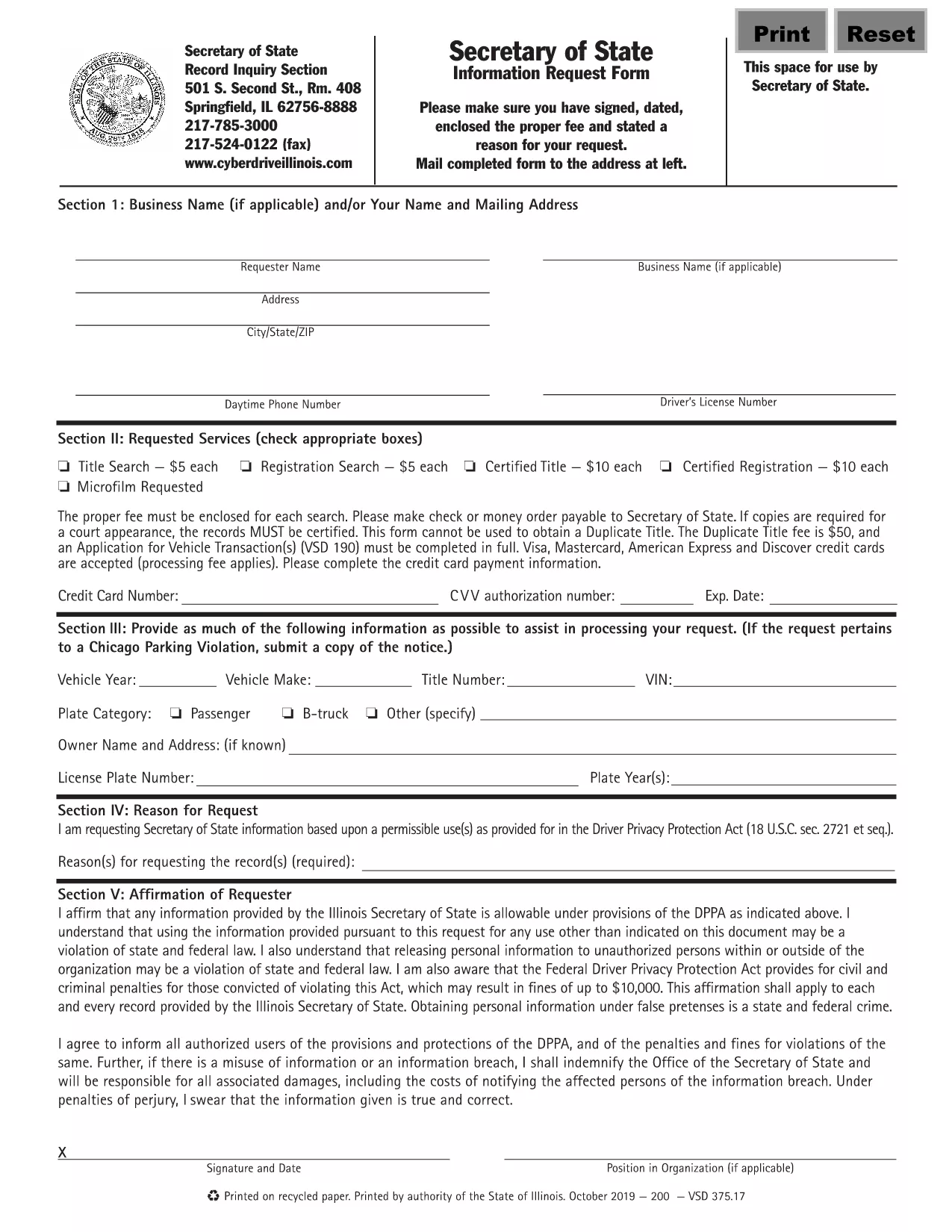
Illinois VSD 375 Information Request Form (Fillable PDF)

The VSD 375 is the Illinois Secretary of State’s official Information Request Form. It is used to obtain vehicle‑related records such as ownership history, title status, and registration details. This page provides a direct link to the fillable VSD 375 PDF and step‑by‑step instructions for completing it online with Formize’s PDF Filler.

What is the VSD 375 Form?

The VSD 375 form is required whenever you need official information from the Illinois Secretary of State’s Vehicle Services Division. Typical uses include:

  • Verifying ownership before purchasing a used vehicle
  • Checking title history for lien information
  • Obtaining registration status for legal or insurance purposes

How to Fill Out the VSD 375 Online

Instead of printing, scanning, or editing the PDF manually, simply click the “Fill out this form” button on this page. The Formize PDF Filler will load in your browser, allowing you to complete every field, add an electronic signature, and download the finished document.

Common Mistakes to Avoid

  • Missing signatures: The form is invalid without a signed and dated request.
  • Incorrect VIN or plate number: Double‑check the numbers for accuracy to prevent processing delays.
  • Omitting the fee: Include the required filing fee with your submission, as instructed on the form.

Where to Submit the Completed Form

After you have filled, signed, and saved the PDF, you can:

  • Mail it to the address listed on the form’s last page.
  • Deliver it in person to any Illinois Secretary of State office.

Processing times vary; in‑person delivery is usually faster.

SOALAN LAZIM
  • What does VSD 375 stand for?

    VSD 375 is the Illinois Secretary of State’s Vehicle Services Division Information Request Form used to obtain official vehicle records.

  • Is the form free to download?

    Yes, the fillable PDF is free to download. However, a filing fee may be required when you submit the request.

  • Can I submit the form electronically?

    The Illinois Secretary of State currently requires a signed paper copy. You can fill it out online, then print, sign, and mail it.

  • How long does it take to receive the requested records?

    Processing typically takes 5‑10 business days by mail; in‑person delivery can be faster.

  • What information do I need to provide?

    You must include your name, address, contact details, the vehicle’s VIN or license plate number, and the specific type of information you are requesting.

  • Do I need a notary for the VSD 375 form?

    No notary is required. A regular handwritten or electronic signature is sufficient.

  • What if I make a mistake after submitting?

    If you notice an error, contact the Illinois Secretary of State office immediately to request a correction or submit a new form.

BAGAIMANA UNTUK

Cara mengisi VSD 375 secara percuma, dalam talian dalam 5 langkah mudah:

  1. 1
    Click the Fill‑out Button
    Press the “Fill out this form” button on this page to launch Formize’s PDF Filler in a new tab.
  2. 2
    Wait for the Filler to Load
    The Formize PDF Filler loads automatically; this may take a few seconds depending on your connection.
  3. 3
    Complete Each Field
    Enter your contact information, vehicle details (VIN, plate number, make, model), and specify the records you need.
  4. 4
    Add Your Electronic Signature
    Use the built‑in signature tool to sign and date the form. The signature is legally binding.
  5. 5
    Download or Submit
    Save the completed PDF to your device, then mail or deliver it to the Illinois Secretary of State office as instructed.
Bentuk apl Pengisi PDF
TENTANG

Borang Pendaftaran Kenderaan

Jika anda memiliki atau memajak kenderaan bermotor, treler atau bot, anda mesti memenuhi kewajipan tertentu untuk memastikan kenderaan anda didaftarkan secara sah dan selamat.

VSD 375 ialah salah satu borang pendaftaran Kenderaan yang merupakan dokumen yang digunakan untuk mendaftarkan kenderaan bermotor dengan pihak berkuasa negeri atau wilayah yang berkaitan. Borang ini biasanya diperlukan apabila seseorang membeli kenderaan baharu atau terpakai atau apabila mereka berpindah ke negeri atau wilayah baharu dengan kenderaan.

Keperluan dan borang tepat yang diperlukan untuk pendaftaran kenderaan boleh berbeza mengikut lokasi, tetapi secara amnya, proses itu melibatkan penyediaan maklumat tentang kenderaan, pemilik dan sebarang lien pada kenderaan.

Setelah borang pendaftaran dan bayaran diserahkan, pihak berkuasa negeri atau wilayah akan mengeluarkan sijil pendaftaran atau plat lesen kepada pemilik kenderaan. Pendaftaran ini membolehkan kenderaan itu dikendalikan secara sah di jalan raya dan lebuh raya awam.

CIRI-CIRI

Pengisi PDF

Cara paling mudah untuk mengisi VSD 375 dalam talian

  • Cepat isi VSD 375
    Mencari cara untuk mengisi VSD 375 dengan cepat dalam talian? Dengan pengisi borang PDF percuma dalam talian kami, anda akan tahu cara mengedit dan mengisi dokumen pdf ini dalam masa kurang daripada satu minit.
  • Mudah untuk menggunakan editor PDF dalam talian
    Bosan dengan mencetak fail PDF supaya anda boleh mengeditnya, sebelum mengimbas semula dan menghantarnya semula? Edit dokumen PDF secara percuma dalam talian. Gunakan editor pdf dalam talian kami untuk menjimatkan masa dan kertas.
  • Alat yang hebat, semua platform
    Tertanya-tanya cara mengisi VSD 375 pada Mac, atau mungkin cara menggunakan pengisi PDF secara percuma? Alat PDF dalam talian kami berfungsi pada semua platform.
  • Simpanan fail selamat
    Fail "VSD 375" yang lengkap disimpan dalam pangkalan data selamat yang diuruskan oleh pengehosan Amazon Cloud. Anda boleh memadamkan fail anda daripada sistem kami pada bila-bila masa. Walau apa pun, fail ini dipadamkan secara automatik selepas 24 jam.
  • Sembang dengan VSD 375
    Sembang dengan "VSD 375" di Chatize yang merupakan pembantu pembaca PDF percuma. Tanya soalan dan dapatkan jawapan daripada "VSD 375". Cuma klik pada butang Sembang Dengan Dokumen di atas.

Padamkan sesi pengisian

Padamkan sesi pengisian yang dipilih? Dalam kes ini, kemajuan anda dalam melengkapkan borang akan hilang.

Padamkan sesi penyuntingan

Padamkan sesi penyuntingan yang dipilih? Dalam kes ini, kemajuan anda dalam membuat dan mengedit borang akan hilang.