
Pilih Bahasa

VR-095 Multipurpose Vehicle Form – Download & Fill Online

  1. Bahasa Inggeris
  2. Negara USA
  3. Aktiviti Pendaftaran Kenderaan
  4. negeri Maryland
Isi borang ini
VR-095 Multipurpose Vehicle Form – Download & Fill Online

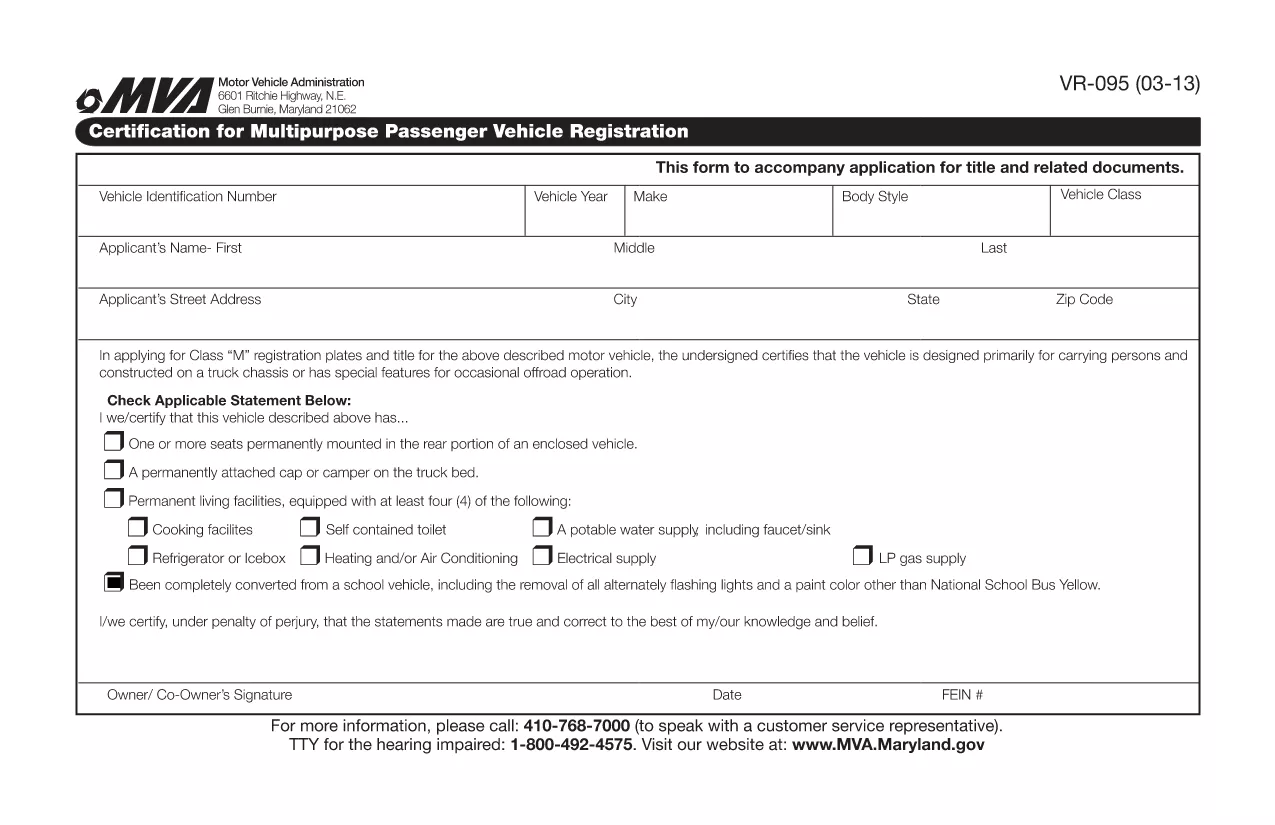
The VR-095 is Maryland’s official application for registering a multipurpose vehicle, such as a utility truck, golf cart, or a custom‑built vehicle that does not fit standard classifications. This form is required by the Maryland Motor Vehicle Administration (MVA) before the vehicle can receive a title, license plates, and registration stickers.

Formize.com hosts a fully fillable PDF version of the VR-095, so you can complete the entire application from any web browser—no need to print, write, or scan.

What is the VR-095 Form?

The VR-095 collects essential information about the vehicle (VIN, weight, dimensions, intended use) and the owner (name, address, insurance). It also includes sections for safety certifications, emissions testing, and any required exemptions.

How to Complete the VR-095 Online

Follow the simple steps below to fill out the form directly on Formize:

  • Click the “Fill out this form” button on the page.
  • Wait for the Formize PDF Filler app to load (usually a few seconds).
  • Enter the required data in each field – the filler automatically validates formats for VIN, dates, and numeric entries.
  • Save your progress at any time, or click Submit to generate a completed PDF.
  • Print the finished document or download it to attach to your MVA submission.

Common Mistakes to Avoid

  • Incorrect VIN entry: Double‑check the 17‑character VIN; a single typo will cause the MVA to reject the form.
  • Missing signatures: The owner and, if applicable, the dealer must sign the form; the online filler lets you add a digital signature.
  • Weight or dimension errors: Use the vehicle’s official weight sticker; inaccurate numbers can delay registration.
  • Out‑of‑date insurance info: Ensure the policy dates cover the registration period.

Download the Fillable PDF

If you prefer to work offline, you can download the original VR-095 PDF from the link below. The file is compatible with Adobe Acrobat Reader and other PDF editors.

Download VR-095 Fillable PDF

Need Help?

For additional guidance, visit the Maryland MVA website or contact your local MVA office. The Formize filler includes tooltips on every field to help you understand exactly what information is required.

SOALAN LAZIM
  • What is the purpose of the VR-095 form?

    VR-095 is used to register multipurpose vehicles in Maryland, allowing the MVA to issue a title, plates, and registration stickers.

  • Can I submit the VR-095 online?

    No. After filling the form online with Formize, you must print the completed PDF and submit it in person or by mail to your local MVA office.

  • Do I need a certified mechanic’s signature?

    If the vehicle’s weight or safety equipment differs from the manufacturer’s specifications, a certified mechanic must sign the appropriate section.

  • Is the PDF truly fillable on mobile devices?

    Yes. Formize’s PDF filler works on most modern smartphones and tablets, but for best experience we recommend a desktop browser.

  • What if I make a mistake after submitting?

    You can download a fresh copy of the VR-095 PDF, correct the error, and re‑submit. The MVA does not accept handwritten corrections on the original.

  • How long does the registration process take after I submit VR-095?

    Processing typically takes 7‑10 business days, provided all required documents and fees are included.

BAGAIMANA UNTUK

Cara mengisi VR-095 secara percuma, dalam talian dalam 4 langkah mudah:

  1. 1
    Click the Fill‑Out Button
    On the landing page, click the bright “Fill out this form” button to launch the Formize PDF Filler.
  2. 2
    Wait for the Filler to Load
    The browser will load the fillable PDF in a secure iframe. This usually takes 2‑5 seconds.
  3. 3
    Enter Your Information
    Complete each highlighted field. The filler validates VINs, dates, and numeric entries in real time.
  4. 4
    Save, Print, or Download
    When you’re finished, click “Save” to store a copy, “Print” for a hard copy, or “Download” to get the finished PDF for MVA submission.
Bentuk apl Pengisi PDF
TENTANG

Borang Pendaftaran Kenderaan

Jika anda memiliki atau memajak kenderaan bermotor, treler atau bot, anda mesti memenuhi kewajipan tertentu untuk memastikan kenderaan anda didaftarkan secara sah dan selamat.

VR-095 ialah salah satu borang pendaftaran Kenderaan yang merupakan dokumen yang digunakan untuk mendaftarkan kenderaan bermotor dengan pihak berkuasa negeri atau wilayah yang berkaitan. Borang ini biasanya diperlukan apabila seseorang membeli kenderaan baharu atau terpakai atau apabila mereka berpindah ke negeri atau wilayah baharu dengan kenderaan.

Keperluan dan borang tepat yang diperlukan untuk pendaftaran kenderaan boleh berbeza mengikut lokasi, tetapi secara amnya, proses itu melibatkan penyediaan maklumat tentang kenderaan, pemilik dan sebarang lien pada kenderaan.

Setelah borang pendaftaran dan bayaran diserahkan, pihak berkuasa negeri atau wilayah akan mengeluarkan sijil pendaftaran atau plat lesen kepada pemilik kenderaan. Pendaftaran ini membolehkan kenderaan itu dikendalikan secara sah di jalan raya dan lebuh raya awam.

CIRI-CIRI

Pengisi PDF

Cara paling mudah untuk mengisi VR-095 dalam talian

  • Cepat isi VR-095
    Mencari cara untuk mengisi VR-095 dengan cepat dalam talian? Dengan pengisi borang PDF percuma dalam talian kami, anda akan tahu cara mengedit dan mengisi dokumen pdf ini dalam masa kurang daripada satu minit.
  • Mudah untuk menggunakan editor PDF dalam talian
    Bosan dengan mencetak fail PDF supaya anda boleh mengeditnya, sebelum mengimbas semula dan menghantarnya semula? Edit dokumen PDF secara percuma dalam talian. Gunakan editor pdf dalam talian kami untuk menjimatkan masa dan kertas.
  • Alat yang hebat, semua platform
    Tertanya-tanya cara mengisi VR-095 pada Mac, atau mungkin cara menggunakan pengisi PDF secara percuma? Alat PDF dalam talian kami berfungsi pada semua platform.
  • Simpanan fail selamat
    Fail "VR-095" yang lengkap disimpan dalam pangkalan data selamat yang diuruskan oleh pengehosan Amazon Cloud. Anda boleh memadamkan fail anda daripada sistem kami pada bila-bila masa. Walau apa pun, fail ini dipadamkan secara automatik selepas 24 jam.
  • Sembang dengan VR-095
    Sembang dengan "VR-095" di Chatize yang merupakan pembantu pembaca PDF percuma. Tanya soalan dan dapatkan jawapan daripada "VR-095". Cuma klik pada butang Sembang Dengan Dokumen di atas.

Padamkan sesi pengisian

Padamkan sesi pengisian yang dipilih? Dalam kes ini, kemajuan anda dalam melengkapkan borang akan hilang.

Padamkan sesi penyuntingan

Padamkan sesi penyuntingan yang dipilih? Dalam kes ini, kemajuan anda dalam membuat dan mengedit borang akan hilang.