
Pilih Bahasa

VR-217 Security Interest Filing Form (Fillable PDF)

  1. Bahasa Inggeris
  2. Negara USA
  3. Aktiviti Pendaftaran Kenderaan
  4. negeri Maryland
Isi borang ini
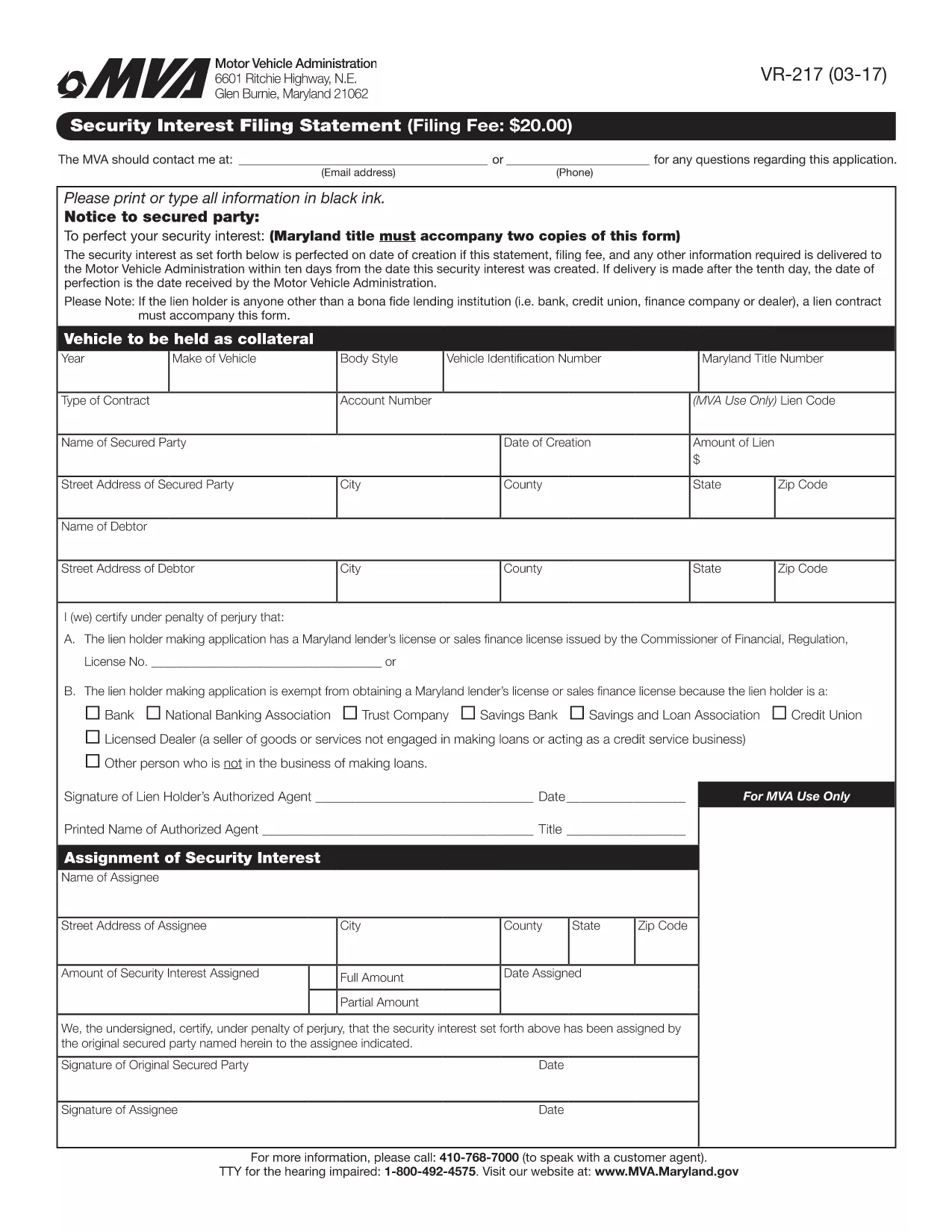
VR-217 Security Interest Filing Form (Fillable PDF)

The VR-217 is the Maryland Motor Vehicle Administration (MVA) Security Interest Filing Statement. It is required when a lienholder or secured party needs to record a security interest against a motor vehicle. Using Formize’s fillable PDF, you can complete the form quickly, avoid printing, and submit it electronically.

Why choose the fillable PDF? The online version automatically validates required fields, saves your progress, and produces a clean, printable copy for your records. No extra software is needed – just click the button and let Formize handle the rest.

Below you’ll find step‑by‑step instructions, tips to prevent common errors, and answers to the most frequently asked questions about the VR-217.

SOALAN LAZIM
  • What is the purpose of the VR-217 form?

    The VR-217 records a security interest (lien) on a motor vehicle, informing the Maryland MVA that a third party has a claim against the vehicle.

  • Who must file a VR-217?

    Any lienholder, financing company, or secured party that has a legal interest in a vehicle registered in Maryland must file the VR-217.

  • Can I file the VR-217 electronically?

    Yes. Using Formize’s fillable PDF, you can complete the form online and submit a PDF copy to the MVA, eliminating the need for paper.

  • What information is required on the VR-217?

    You’ll need the vehicle’s VIN, lienholder’s name and address, the type of security interest, and the effective date of the lien.

  • Is there a filing fee for the VR-217?

    The MVA typically charges a modest filing fee (check the latest schedule on the MVA website). The fee is paid directly to the agency, not through Formize.

  • How long does the filing process take?

    When submitted electronically, the MVA processes the VR-217 within 1–3 business days. Paper filings may take longer.

  • What common mistakes should I avoid?

    Make sure the VIN is entered exactly as it appears on the title, double‑check the lienholder’s address, and ensure the date format matches MM/DD/YYYY.

  • Can I edit the form after I’ve submitted it?

    Once submitted, you’ll need to file an amendment (VR-217A) to make changes. Use Formize to complete the amendment form as well.

  • Where do I send the completed VR-217?

    Submit the PDF to the Maryland Motor Vehicle Administration via their online portal or mail it to the address listed on the form.

  • Is the fillable PDF compatible with all browsers?

    Yes. Formize works in Chrome, Edge, Firefox, and Safari without additional plugins.

BAGAIMANA UNTUK

Cara mengisi VR-217 secara percuma, dalam talian dalam 5 langkah mudah:

  1. 1
    Open the Fillable Form
    Click the "Fill out this form" button on this page. The Formize PDF Filler app will load instantly in your browser.
  2. 2
    Enter Your Information
    Complete each field – the app highlights required sections and checks for formatting errors as you type.
  3. 3
    Review and Validate
    When all fields are filled, click "Validate". The system will flag any missing or incorrectly entered data.
  4. 4
    Submit the Form
    After validation, press "Submit". Formize will generate a secure PDF copy and give you the option to download or email it to the MVA.
  5. 5
    Save a Copy for Your Records
    Download the completed PDF and store it safely. You can also print a hard copy if the MVA requests a paper version.
Bentuk apl Pengisi PDF
TENTANG

Borang Pendaftaran Kenderaan

Jika anda memiliki atau memajak kenderaan bermotor, treler atau bot, anda mesti memenuhi kewajipan tertentu untuk memastikan kenderaan anda didaftarkan secara sah dan selamat.

VR-217 ialah salah satu borang pendaftaran Kenderaan yang merupakan dokumen yang digunakan untuk mendaftarkan kenderaan bermotor dengan pihak berkuasa negeri atau wilayah yang berkaitan. Borang ini biasanya diperlukan apabila seseorang membeli kenderaan baharu atau terpakai atau apabila mereka berpindah ke negeri atau wilayah baharu dengan kenderaan.

Keperluan dan borang tepat yang diperlukan untuk pendaftaran kenderaan boleh berbeza mengikut lokasi, tetapi secara amnya, proses itu melibatkan penyediaan maklumat tentang kenderaan, pemilik dan sebarang lien pada kenderaan.

Setelah borang pendaftaran dan bayaran diserahkan, pihak berkuasa negeri atau wilayah akan mengeluarkan sijil pendaftaran atau plat lesen kepada pemilik kenderaan. Pendaftaran ini membolehkan kenderaan itu dikendalikan secara sah di jalan raya dan lebuh raya awam.

CIRI-CIRI

Pengisi PDF

Cara paling mudah untuk mengisi VR-217 dalam talian

  • Cepat isi VR-217
    Mencari cara untuk mengisi VR-217 dengan cepat dalam talian? Dengan pengisi borang PDF percuma dalam talian kami, anda akan tahu cara mengedit dan mengisi dokumen pdf ini dalam masa kurang daripada satu minit.
  • Mudah untuk menggunakan editor PDF dalam talian
    Bosan dengan mencetak fail PDF supaya anda boleh mengeditnya, sebelum mengimbas semula dan menghantarnya semula? Edit dokumen PDF secara percuma dalam talian. Gunakan editor pdf dalam talian kami untuk menjimatkan masa dan kertas.
  • Alat yang hebat, semua platform
    Tertanya-tanya cara mengisi VR-217 pada Mac, atau mungkin cara menggunakan pengisi PDF secara percuma? Alat PDF dalam talian kami berfungsi pada semua platform.
  • Simpanan fail selamat
    Fail "VR-217" yang lengkap disimpan dalam pangkalan data selamat yang diuruskan oleh pengehosan Amazon Cloud. Anda boleh memadamkan fail anda daripada sistem kami pada bila-bila masa. Walau apa pun, fail ini dipadamkan secara automatik selepas 24 jam.
  • Sembang dengan VR-217
    Sembang dengan "VR-217" di Chatize yang merupakan pembantu pembaca PDF percuma. Tanya soalan dan dapatkan jawapan daripada "VR-217". Cuma klik pada butang Sembang Dengan Dokumen di atas.

Padamkan sesi pengisian

Padamkan sesi pengisian yang dipilih? Dalam kes ini, kemajuan anda dalam melengkapkan borang akan hilang.

Padamkan sesi penyuntingan

Padamkan sesi penyuntingan yang dipilih? Dalam kes ini, kemajuan anda dalam membuat dan mengedit borang akan hilang.