
Pilih Bahasa

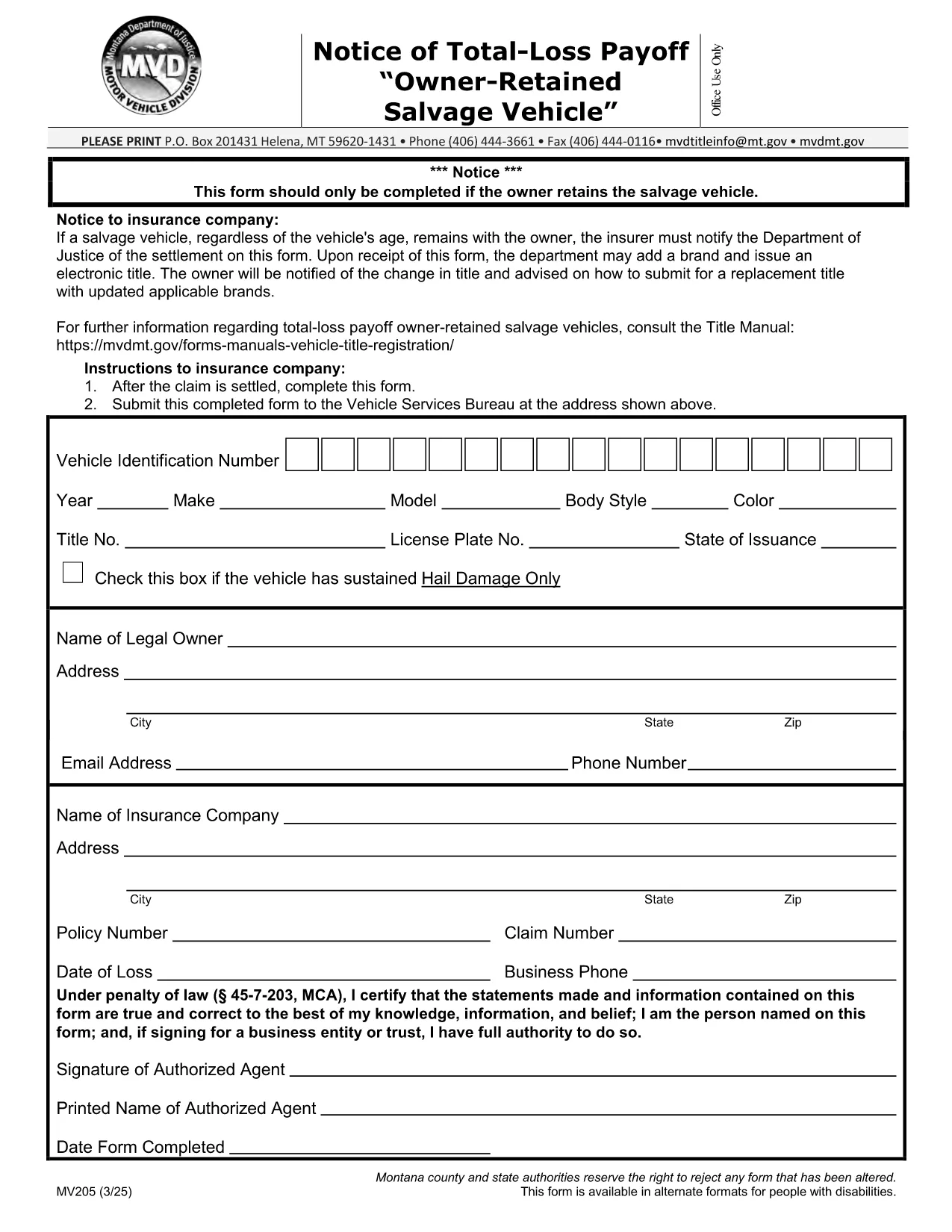
MV205 Notice of Total‑Loss Payoff – Owner‑Retained Salvage Vehicle

  1. Bahasa Inggeris
  2. Negara USA
  3. Aktiviti Pendaftaran Kenderaan
  4. negeri Montana
Isi borang ini
MV205 Notice of Total‑Loss Payoff – Owner‑Retained Salvage Vehicle

The MV205 Notice of Total‑Loss Payoff is the official document used when a salvage vehicle remains with its owner after a total‑loss settlement. Insurance companies must notify the Department of Motor Vehicles (DMV) using this form, and the owner may be required to surrender the certificate of ownership.

What Is the MV205 Form?

The MV205 captures essential details about the vehicle, the insurance settlement, and the owner’s intent to retain the salvage. It is required by most state motor vehicle agencies, including Montana, to ensure proper title handling and to prevent fraudulent title transfers.

How to Complete the MV205 Online with Formize

Instead of downloading, printing, and scanning, you can fill the MV205 directly in your browser. Follow these simple steps:

  1. Click the "Fill out this form" button on this page.
  2. Wait a few seconds while the Formize PDF Filler app loads.
  3. Enter the required information in each fillable field (vehicle VIN, insurer details, payout amount, etc.).
  4. Use the built‑in eSignature tool to sign the form electronically.
  5. Click Save & Download to get a completed PDF, or choose Send via Email to forward it directly to your insurance company or DMV.

Common Mistakes & Tips for a Successful Submission

  • Incorrect VIN: Double‑check the Vehicle Identification Number; a single digit error can delay processing.
  • Missing insurer information: Include the insurer’s name, claim number, and contact details exactly as they appear on the settlement statement.
  • Signature errors: Use the eSignature tool; a handwritten signature scanned later may be rejected.
  • Leaving optional fields blank: If a field is marked "optional," you may leave it empty, but be sure all required fields are completed.
  • Submitting the wrong version: Use the official MV205 PDF provided below to avoid outdated formats.

Where to Send the Completed Form

After you finish the online fill, send the PDF to the address listed on the form. Typically, this is the state Department of Motor Vehicles or the specific office handling title transfers. Some states also accept electronic submissions through their online portal—check your local DMV website for details.

Need help? Review the FAQs below or contact your insurance provider for clarification on the settlement amount.

SOALAN LAZIM
  • Who needs to file the MV205 form?

    Any vehicle owner whose insurance company has paid a total‑loss settlement and who intends to keep the salvage vehicle must file the MV205 with the state DMV.

  • Can I submit the MV205 electronically?

    Many states accept an electronically signed PDF. Check your local DMV website; otherwise, print the completed form and mail it to the address shown on the form.

  • What happens if I forget to include the insurer’s claim number?

    The DMV may reject the form, causing processing delays. Always include the full claim number as it appears on the settlement statement.

  • Do I need to surrender my current certificate of ownership?

    Yes, the DMV typically requires you to surrender the existing certificate of ownership when you submit the MV205 for a salvage vehicle.

  • Is the Formize filler free to use?

    Formize offers free filling and e‑signing for most state forms, including MV205. No download or installation is required.

  • How long does it take the DMV to process the MV205?

    Processing time varies by state, but most DMVs complete the review within 7‑10 business days after receiving a correctly completed form.

  • Can I correct a mistake after I’ve submitted the MV205?

    If you notice an error, contact your DMV immediately. In most cases, you’ll need to submit a corrected MV205 with a brief explanation.

  • Is the MV205 the same as a title transfer form?

    No. The MV205 notifies the DMV of a total‑loss payoff for a retained salvage vehicle. A separate title transfer form is required to change ownership.

BAGAIMANA UNTUK

Cara mengisi MV205 form secara percuma, dalam talian dalam 5 langkah mudah:

  1. 1
    Open the Fillable Form
    Click the "Fill out this form" button on the page. The Formize PDF Filler will open in a new tab.
  2. 2
    Load the Formize PDF Filler
    Wait a few seconds while the secure online editor loads the MV205 PDF.
  3. 3
    Enter All Required Information
    Type the VIN, insurer details, payout amount, and any other required fields directly into the fillable boxes.
  4. 4
    Add Your Electronic Signature
    Use the built‑in eSignature tool to sign the form. This signature is legally binding.
  5. 5
    Save or Send the Completed Form
    Click "Save & Download" to keep a copy, or choose "Send via Email" to forward the completed MV205 to your DMV or insurance company.
Bentuk apl Pengisi PDF
TENTANG

Borang Pendaftaran Kenderaan

MV205 form ialah salah satu borang DMV, juga dikenali sebagai borang Jabatan Kenderaan Bermotor, iaitu dokumen yang digunakan dalam pelbagai urus niaga dan proses yang berkaitan dengan kenderaan bermotor. DMV ialah agensi kerajaan yang bertanggungjawab untuk pelesenan pemandu, pendaftaran kenderaan dan menguatkuasakan undang-undang kenderaan bermotor. Borang DMV khusus yang tersedia boleh berbeza mengikut bidang kuasa, tetapi berikut ialah beberapa contoh biasa:

Borang Lesen Pemandu: Borang ini digunakan untuk memohon lesen memandu atau meminta perubahan atau pembaharuan. Mereka biasanya memerlukan maklumat peribadi, bukti identiti dan mungkin termasuk bahagian untuk maklumat perubatan atau sejarah pemanduan.

Borang Pendaftaran Kenderaan: Borang ini digunakan untuk mendaftarkan kenderaan bermotor dengan DMV. Mereka memerlukan maklumat kenderaan, butiran pemilikan dan bukti insurans.

Borang Pemindahan Hakmilik: Apabila membeli atau menjual kenderaan, borang ini digunakan untuk memindahkan pemilikan daripada satu pihak kepada pihak lain. Mereka memerlukan maklumat tentang pembeli, penjual, butiran kenderaan dan mungkin termasuk bil jualan.

Borang Pelepasan Liabiliti Kenderaan: Apabila menjual atau memindahkan pemilikan kenderaan, borang ini memberitahu DMV bahawa penjual tidak lagi bertanggungjawab ke atas kenderaan tersebut. Ia membantu melindungi penjual daripada liabiliti untuk kemalangan atau insiden yang melibatkan kenderaan selepas jualan.

Borang Pembaharuan Plat Lesen dan Pendaftaran: Borang ini digunakan untuk memperbaharui pendaftaran kenderaan atau meminta plat lesen baharu. Mereka biasanya memerlukan maklumat tentang pemilik berdaftar, butiran pendaftaran semasa dan pembayaran yuran yang berkenaan.

Borang Permintaan Rekod Memandu: Borang ini membenarkan individu meminta rekod pemanduan mereka daripada DMV, yang memberikan maklumat tentang pelanggaran pemanduan, status lesen dan butiran lain yang berkaitan.

Borang Plat Lesen Khas atau Diperibadikan: Borang ini digunakan untuk memohon plat lesen diperibadikan atau khusus, yang membolehkan individu menyesuaikan plat lesen mereka dengan aksara atau reka bentuk tertentu.

Ini hanyalah beberapa contoh daripada banyak bentuk yang mungkin tersedia melalui DMV. Borang dan keperluan khusus boleh berbeza mengikut bidang kuasa, jadi adalah penting untuk merujuk tapak web DMV tempatan atau melawat pejabat DMV untuk mendapatkan borang yang betul untuk keperluan khusus anda.

CIRI-CIRI

Pengisi PDF

Cara paling mudah untuk mengisi MV205 form dalam talian

  • Cepat isi MV205 form
    Mencari cara untuk mengisi MV205 form dengan cepat dalam talian? Dengan pengisi borang PDF percuma dalam talian kami, anda akan tahu cara mengedit dan mengisi dokumen pdf ini dalam masa kurang daripada satu minit.
  • Mudah untuk menggunakan editor PDF dalam talian
    Bosan dengan mencetak fail PDF supaya anda boleh mengeditnya, sebelum mengimbas semula dan menghantarnya semula? Edit dokumen PDF secara percuma dalam talian. Gunakan editor pdf dalam talian kami untuk menjimatkan masa dan kertas.
  • Alat yang hebat, semua platform
    Tertanya-tanya cara mengisi MV205 form pada Mac, atau mungkin cara menggunakan pengisi PDF secara percuma? Alat PDF dalam talian kami berfungsi pada semua platform.
  • Simpanan fail selamat
    Fail "MV205 form" yang lengkap disimpan dalam pangkalan data selamat yang diuruskan oleh pengehosan Amazon Cloud. Anda boleh memadamkan fail anda daripada sistem kami pada bila-bila masa. Walau apa pun, fail ini dipadamkan secara automatik selepas 24 jam.
  • Sembang dengan MV205 form
    Sembang dengan "MV205 form" di Chatize yang merupakan pembantu pembaca PDF percuma. Tanya soalan dan dapatkan jawapan daripada "MV205 form". Cuma klik pada butang Sembang Dengan Dokumen di atas.

Padamkan sesi pengisian

Padamkan sesi pengisian yang dipilih? Dalam kes ini, kemajuan anda dalam melengkapkan borang akan hilang.

Padamkan sesi penyuntingan

Padamkan sesi penyuntingan yang dipilih? Dalam kes ini, kemajuan anda dalam membuat dan mengedit borang akan hilang.