
Pilih Bahasa

IFTA Additional Decal Application (Fillable PDF)

  1. Bahasa Inggeris
  2. Negara USA
  3. Aktiviti Pendaftaran Kenderaan
  4. negeri Nebraska
Isi borang ini
IFTA Additional Decal Application (Fillable PDF)

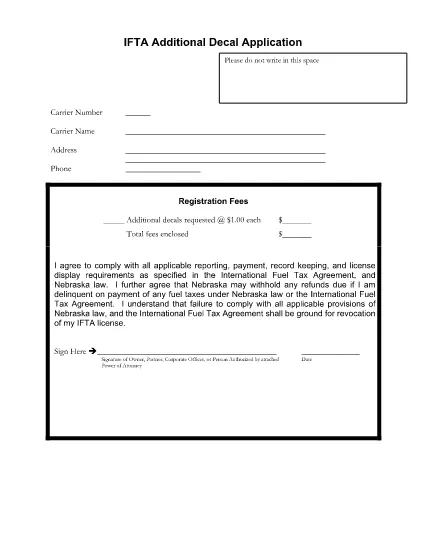
Managing your fleet’s International Fuel Tax Agreement (IFTA) compliance is easier with the right paperwork. If you need extra decals for additional vehicles or a replacement set, the IFTA Additional Decal Application is the official form used by most U.S. states, including Nebraska.

Why You Need an Additional IFTA Decal

Each commercial vehicle that operates in multiple jurisdictions must display a valid IFTA decal. When you add a new vehicle, lose a decal, or exceed the decal allowance in your existing fleet, you must submit an additional decal request to avoid fines and keep your tax records up to date.

How to Complete the IFTA Additional Decal Form

The form is fully fillable online through Formize’s PDF Filler. Follow these steps to submit a correct application:

  • Enter your IRP account number and contact information.
  • List each vehicle that requires a new or extra decal, including VIN and license plate.
  • Specify the number of decals requested (the fee is typically $1.00 per decal).
  • Sign the declaration confirming you will comply with all IFTA reporting requirements.

Common Mistakes to Avoid

  • Leaving fields blank: The form will not process if required fields are empty.
  • Incorrect VIN or plate numbers: Double‑check the numbers to prevent processing delays.
  • Wrong fee amount: Verify the current per‑decal fee before submitting payment.

Where to Submit Your Application

After completing the form, print it or export it as a PDF and mail it with the appropriate fee to your state’s Department of Motor Vehicles (DMV) office. For Nebraska, send it to the DMV’s IFTA Division. Check your state’s DMV website for exact submission addresses.

Download the Fillable PDF Instantly

Click the button below to open the IFTA Additional Decal Application directly in the Formize PDF Filler. No download, no extra software—just a smooth, browser‑based experience.

SOALAN LAZIM
  • What is an IFTA decal?

    An IFTA decal is a sticker that shows a vehicle is registered under the International Fuel Tax Agreement, allowing it to travel in participating jurisdictions without separate state registrations.

  • How many decals can I request on one form?

    You can request any number of additional decals on a single application, but each decal costs a nominal fee (usually $1.00). List each vehicle separately for clarity.

  • Do I need to attach proof of vehicle ownership?

    Yes. Attach a copy of the vehicle registration or lease agreement for each new or additional vehicle listed on the form.

  • Can I submit the form electronically?

    Many states still require a paper copy with payment, but you can complete the form online using Formize, save it, and then print and mail it.

  • What happens if I submit an incomplete form?

    The DMV will reject the application, and you’ll be asked to correct the missing information, causing delays in receiving the new decals.

  • Is there a deadline for requesting additional decals?

    Request the decals before the vehicle is used on IFTA‑covered trips. Some states have quarterly processing windows, so submit as early as possible.

  • Do I need to pay a fee for each decal?

    Yes. The standard fee is $1.00 per decal, but verify the current amount on your state’s DMV website before submitting payment.

  • Can I use this form for other states besides Nebraska?

    The form is accepted by many states, but always check your specific state’s DMV website for any variations or additional requirements.

BAGAIMANA UNTUK

Cara mengisi IFTA additional decal secara percuma, dalam talian dalam 5 langkah mudah:

  1. 1
    Open the Form in Formize
    Click the "Fill out this form" button on the page. The Formize PDF Filler loads directly in your browser.
  2. 2
    Complete Each Section
    Enter your IRP account number, vehicle details, and the number of decals requested. All fields are interactive.
  3. 3
    Review and Sign
    Double‑check the information, add your electronic signature, and confirm the fee amount.
  4. 4
    Save or Print
    Save the completed PDF to your computer or print it for mailing to the DMV with the required payment.
  5. 5
    Submit to the DMV
    Mail the printed form and payment to the address listed on the form or follow your state’s online submission instructions.
Bentuk apl Pengisi PDF
TENTANG

Borang Pendaftaran Kenderaan

Jika anda memiliki atau memajak kenderaan bermotor, treler atau bot, anda mesti memenuhi kewajipan tertentu untuk memastikan kenderaan anda didaftarkan secara sah dan selamat.

IFTA additional decal ialah salah satu borang pendaftaran Kenderaan yang merupakan dokumen yang digunakan untuk mendaftarkan kenderaan bermotor dengan pihak berkuasa negeri atau wilayah yang berkaitan. Borang ini biasanya diperlukan apabila seseorang membeli kenderaan baharu atau terpakai atau apabila mereka berpindah ke negeri atau wilayah baharu dengan kenderaan.

Keperluan dan borang tepat yang diperlukan untuk pendaftaran kenderaan boleh berbeza mengikut lokasi, tetapi secara amnya, proses itu melibatkan penyediaan maklumat tentang kenderaan, pemilik dan sebarang lien pada kenderaan.

Setelah borang pendaftaran dan bayaran diserahkan, pihak berkuasa negeri atau wilayah akan mengeluarkan sijil pendaftaran atau plat lesen kepada pemilik kenderaan. Pendaftaran ini membolehkan kenderaan itu dikendalikan secara sah di jalan raya dan lebuh raya awam.

CIRI-CIRI

Pengisi PDF

Cara paling mudah untuk mengisi IFTA additional decal dalam talian

  • Cepat isi IFTA additional decal
    Mencari cara untuk mengisi IFTA additional decal dengan cepat dalam talian? Dengan pengisi borang PDF percuma dalam talian kami, anda akan tahu cara mengedit dan mengisi dokumen pdf ini dalam masa kurang daripada satu minit.
  • Mudah untuk menggunakan editor PDF dalam talian
    Bosan dengan mencetak fail PDF supaya anda boleh mengeditnya, sebelum mengimbas semula dan menghantarnya semula? Edit dokumen PDF secara percuma dalam talian. Gunakan editor pdf dalam talian kami untuk menjimatkan masa dan kertas.
  • Alat yang hebat, semua platform
    Tertanya-tanya cara mengisi IFTA additional decal pada Mac, atau mungkin cara menggunakan pengisi PDF secara percuma? Alat PDF dalam talian kami berfungsi pada semua platform.
  • Simpanan fail selamat
    Fail "IFTA additional decal" yang lengkap disimpan dalam pangkalan data selamat yang diuruskan oleh pengehosan Amazon Cloud. Anda boleh memadamkan fail anda daripada sistem kami pada bila-bila masa. Walau apa pun, fail ini dipadamkan secara automatik selepas 24 jam.
  • Sembang dengan IFTA additional decal
    Sembang dengan "IFTA additional decal" di Chatize yang merupakan pembantu pembaca PDF percuma. Tanya soalan dan dapatkan jawapan daripada "IFTA additional decal". Cuma klik pada butang Sembang Dengan Dokumen di atas.

Padamkan sesi pengisian

Padamkan sesi pengisian yang dipilih? Dalam kes ini, kemajuan anda dalam melengkapkan borang akan hilang.

Padamkan sesi penyuntingan

Padamkan sesi penyuntingan yang dipilih? Dalam kes ini, kemajuan anda dalam membuat dan mengedit borang akan hilang.