
Pilih Bahasa

MVR‑37A Fillable PDF – North Carolina Disability Parking Placard Application

  1. Bahasa Inggeris
  2. Negara USA
  3. Aktiviti Pendaftaran Kenderaan
  4. negeri Carolina Utara
Isi borang ini
MVR‑37A Fillable PDF – North Carolina Disability Parking Placard Application

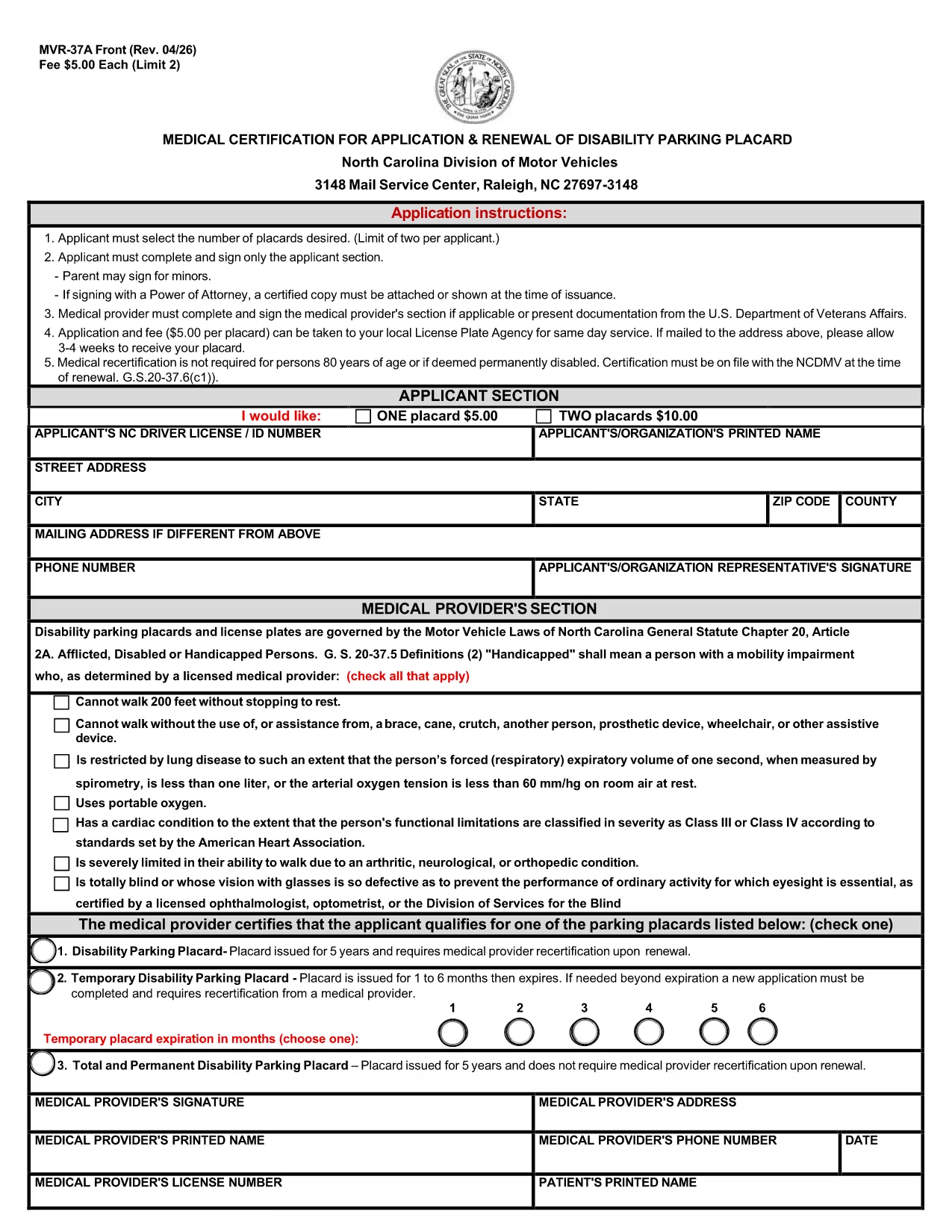
The MVR‑37A is the official medical certification required by the North Carolina Division of Motor Vehicles (DMV) to apply for or renew a disability parking placard. This fillable PDF lets you complete the entire application online, eliminating the need for printing, scanning, or hand‑writing.

What Is the MVR‑37A Form?

The form collects personal details, vehicle information, and a medical provider’s certification that you meet the state’s eligibility criteria. It is used for three types of placards:

  • Standard Disability Parking Placard
  • Temporary Disability Parking Placard
  • Total and Permanent Disability Placard

Who Needs a Disability Parking Placard in NC?

Anyone who has a qualifying medical condition that limits mobility may apply. Typical qualifying conditions include, but are not limited to, loss of limb function, severe arthritis, spinal cord injury, and certain cardiovascular or respiratory disorders.

Step‑by‑Step Guide to Fill the Form Online

Instead of downloading and opening the PDF in a separate editor, simply click the "Fill out this form" button on the page. The Formize PDF Filler app will load instantly, allowing you to:

  1. Select the number of placards you need (maximum two per applicant).
  2. Enter your personal and contact information.
  3. Provide your NC driver’s license or ID number.
  4. Have your medical provider complete the certification section.
  5. Electronically sign the applicant and provider sections.
  6. Save, download, or directly email the completed form to the DMV.

Common Mistakes to Avoid

  • Leaving the provider section blank: The DMV will reject any form without a completed medical certification.
  • Incorrect placard count: Only two placards are allowed per applicant; ordering more will cause delays.
  • Missing signature: Both the applicant and the medical provider must sign electronically.
  • Wrong address format: Use the exact mailing address as it appears on official documents.

Where to Submit Your Application

After completing the form, you can:

  • Mail the PDF to the NC DMV address listed on the form.
  • Submit it in person at your local DMV office.
  • Upload it through the NC DMV’s online portal if you have an account.

The processing time is typically 4‑6 weeks. Include the appropriate fee ($5 per placard) with a check or money order payable to the "North Carolina Division of Motor Vehicles."

SOALAN LAZIM
  • How many disability parking placards can I request?

    A maximum of two placards per applicant is allowed. Each placard costs $5.

  • Do I need a medical provider’s signature?

    Yes. The form is invalid without a completed and signed medical certification section.

  • Can I fill out the MVR‑37A online without printing?

    Absolutely. Use the Formize PDF Filler on this page to complete, sign, and save the form electronically.

  • What is the processing time after I submit the form?

    The North Carolina DMV typically processes applications within 4‑6 weeks.

  • What if I lose my placard after it’s issued?

    Report the loss to the NC DMV immediately and submit a new MVR‑37A form with a $5 replacement fee.

  • Is there a fee for a temporary disability placard?

    Yes, the same $5 fee applies for a temporary placard, which is valid for up to 90 days.

  • Can a parent sign the form for a minor?

    A parent or legal guardian may sign on behalf of a minor applicant and must indicate their relationship on the form.

BAGAIMANA UNTUK

Cara mengisi MVR-37A secara percuma, dalam talian dalam 5 langkah mudah:

  1. 1
    Open the Fillable Form
    Click the "Fill out this form" button on the page. The Formize PDF Filler will open in a new tab.
  2. 2
    Wait for the Formize App to Load
    Allow a few seconds for the online editor to initialize. No download is required.
  3. 3
    Complete All Required Fields
    Enter your personal details, select the number of placards, and have your medical provider fill out the certification section.
  4. 4
    Add Electronic Signatures
    Use your mouse, trackpad, or touchscreen to sign the applicant and provider sections.
  5. 5
    Save and Submit
    Click "Save" to download the completed PDF, then mail or upload it to the NC DMV as instructed on the form.
Bentuk apl Pengisi PDF
TENTANG

Borang Pendaftaran Kenderaan

Jika anda memiliki atau memajak kenderaan bermotor, treler atau bot, anda mesti memenuhi kewajipan tertentu untuk memastikan kenderaan anda didaftarkan secara sah dan selamat.

MVR-37A ialah salah satu borang pendaftaran Kenderaan yang merupakan dokumen yang digunakan untuk mendaftarkan kenderaan bermotor dengan pihak berkuasa negeri atau wilayah yang berkaitan. Borang ini biasanya diperlukan apabila seseorang membeli kenderaan baharu atau terpakai atau apabila mereka berpindah ke negeri atau wilayah baharu dengan kenderaan.

Keperluan dan borang tepat yang diperlukan untuk pendaftaran kenderaan boleh berbeza mengikut lokasi, tetapi secara amnya, proses itu melibatkan penyediaan maklumat tentang kenderaan, pemilik dan sebarang lien pada kenderaan.

Setelah borang pendaftaran dan bayaran diserahkan, pihak berkuasa negeri atau wilayah akan mengeluarkan sijil pendaftaran atau plat lesen kepada pemilik kenderaan. Pendaftaran ini membolehkan kenderaan itu dikendalikan secara sah di jalan raya dan lebuh raya awam.

CIRI-CIRI

Pengisi PDF

Cara paling mudah untuk mengisi MVR-37A dalam talian

  • Cepat isi MVR-37A
    Mencari cara untuk mengisi MVR-37A dengan cepat dalam talian? Dengan pengisi borang PDF percuma dalam talian kami, anda akan tahu cara mengedit dan mengisi dokumen pdf ini dalam masa kurang daripada satu minit.
  • Mudah untuk menggunakan editor PDF dalam talian
    Bosan dengan mencetak fail PDF supaya anda boleh mengeditnya, sebelum mengimbas semula dan menghantarnya semula? Edit dokumen PDF secara percuma dalam talian. Gunakan editor pdf dalam talian kami untuk menjimatkan masa dan kertas.
  • Alat yang hebat, semua platform
    Tertanya-tanya cara mengisi MVR-37A pada Mac, atau mungkin cara menggunakan pengisi PDF secara percuma? Alat PDF dalam talian kami berfungsi pada semua platform.
  • Simpanan fail selamat
    Fail "MVR-37A" yang lengkap disimpan dalam pangkalan data selamat yang diuruskan oleh pengehosan Amazon Cloud. Anda boleh memadamkan fail anda daripada sistem kami pada bila-bila masa. Walau apa pun, fail ini dipadamkan secara automatik selepas 24 jam.
  • Sembang dengan MVR-37A
    Sembang dengan "MVR-37A" di Chatize yang merupakan pembantu pembaca PDF percuma. Tanya soalan dan dapatkan jawapan daripada "MVR-37A". Cuma klik pada butang Sembang Dengan Dokumen di atas.

Padamkan sesi pengisian

Padamkan sesi pengisian yang dipilih? Dalam kes ini, kemajuan anda dalam melengkapkan borang akan hilang.

Padamkan sesi penyuntingan

Padamkan sesi penyuntingan yang dipilih? Dalam kes ini, kemajuan anda dalam membuat dan mengedit borang akan hilang.