
Pilih Bahasa

MVR‑605A – Request for Motor Vehicle Information (Fillable PDF)

  1. Bahasa Inggeris
  2. Negara USA
  3. Aktiviti Pendaftaran Kenderaan
  4. negeri Carolina Utara
Isi borang ini
MVR‑605A – Request for Motor Vehicle Information (Fillable PDF)

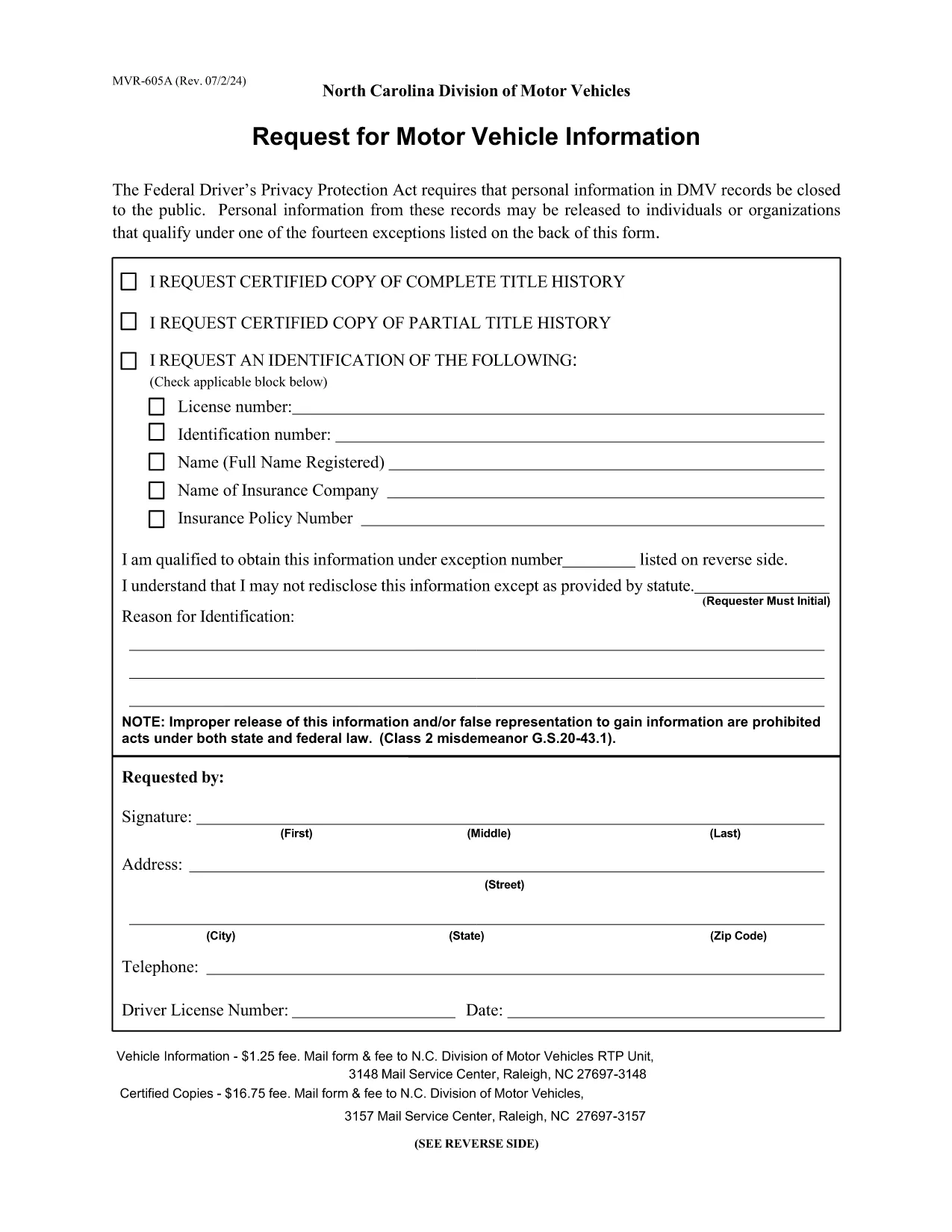
The MVR‑605A is the official North Carolina request form used to obtain motor vehicle records, driver safety data, emissions information, and related vehicle details. Whether you need the form for a legal matter, insurance claim, or personal research, the fillable PDF lets you complete it quickly and securely.

What Is the MVR‑605A Form?

The MVR‑605A (Motor Vehicle Record Request) is issued by the North Carolina Division of Motor Vehicles (NCDOT DMV). It authorizes the DMV to release vehicle and driver information to the requester. The form covers a wide range of uses, including safety investigations, emissions compliance, product recalls, and market research.

How to Fill Out the MVR‑605A Online

Instead of downloading and editing the PDF in a separate editor, simply click the "Fill out this form" button on this page. The Formize PDF Filler app will load the document directly in your browser, allowing you to type, check boxes, and sign electronically.

Common Mistakes to Avoid

  • Missing signatures: The DMV requires the requester's signature for every individual whose records are requested.
  • Incorrect fee amount: Verify the current processing fee on the form before submitting.
  • Incomplete address information: Provide a full mailing address; the DMV will not process partial entries.
  • Wrong vehicle identification: Include the correct VIN, license plate number, and registration details.

Where to Submit Your Request

After completing the form, print it (if a wet signature is required) and mail it to:

N.C. Division of Motor Vehicles – RTP Unit
3148 Mail Service Center
Raleigh, NC 27697‑3148

If you have a digital signature, you may email the PDF to the address listed on the form’s instructions.

Download the Fillable PDF

Click the button below to open the fillable MVR‑605A PDF in the Formize PDF Filler. No software download is needed.

SOALAN LAZIM
  • What fee is required to process the MVR‑605A?

    The standard fee is $1.00 for a basic record request. Certified copies cost $13.00. Verify the current fee on the form before submitting.

  • Can I submit the form electronically?

    Yes, if you use a digital signature the DMV accepts emailed PDFs. Otherwise, print, sign, and mail the form.

  • How long does it take to receive the records?

    Processing usually takes 5‑7 business days after the DMV receives a complete, correctly paid request.

  • Do I need to be the vehicle owner to request records?

    You must have a legitimate purpose and provide a signed authorization from the record holder. The DMV reviews each request for compliance.

  • What information must I include about the vehicle?

    Provide the full VIN, license plate number, and registration state. Incomplete vehicle data will delay the request.

  • Is the MVR‑605A form fillable on mobile devices?

    Yes. The Formize PDF Filler works on most modern smartphones and tablets, allowing you to complete the form on the go.

BAGAIMANA UNTUK

Cara mengisi MVR‑605A secara percuma, dalam talian dalam 5 langkah mudah:

  1. 1
    Click the Fill Out Button
    Press the "Fill out this form" button on the page to launch the Formize PDF Filler in your browser.
  2. 2
    Wait for the Filler to Load
    The app loads the MVR‑605A PDF automatically; this usually takes a few seconds.
  3. 3
    Complete Each Field
    Enter your personal information, vehicle details, and the reason for the request. Use the tab key to move between fields.
  4. 4
    Add Your Signature
    Use the signature tool to draw or type your signature, then confirm.
  5. 5
    Review, Save, and Submit
    Double‑check all entries, click "Save" to download a copy, and follow the submission instructions on the form.
Bentuk apl Pengisi PDF
TENTANG

Borang Pendaftaran Kenderaan

Jika anda memiliki atau memajak kenderaan bermotor, treler atau bot, anda mesti memenuhi kewajipan tertentu untuk memastikan kenderaan anda didaftarkan secara sah dan selamat.

MVR‑605A ialah salah satu borang pendaftaran Kenderaan yang merupakan dokumen yang digunakan untuk mendaftarkan kenderaan bermotor dengan pihak berkuasa negeri atau wilayah yang berkaitan. Borang ini biasanya diperlukan apabila seseorang membeli kenderaan baharu atau terpakai atau apabila mereka berpindah ke negeri atau wilayah baharu dengan kenderaan.

Keperluan dan borang tepat yang diperlukan untuk pendaftaran kenderaan boleh berbeza mengikut lokasi, tetapi secara amnya, proses itu melibatkan penyediaan maklumat tentang kenderaan, pemilik dan sebarang lien pada kenderaan.

Setelah borang pendaftaran dan bayaran diserahkan, pihak berkuasa negeri atau wilayah akan mengeluarkan sijil pendaftaran atau plat lesen kepada pemilik kenderaan. Pendaftaran ini membolehkan kenderaan itu dikendalikan secara sah di jalan raya dan lebuh raya awam.

CIRI-CIRI

Pengisi PDF

Cara paling mudah untuk mengisi MVR‑605A dalam talian

  • Cepat isi MVR‑605A
    Mencari cara untuk mengisi MVR‑605A dengan cepat dalam talian? Dengan pengisi borang PDF percuma dalam talian kami, anda akan tahu cara mengedit dan mengisi dokumen pdf ini dalam masa kurang daripada satu minit.
  • Mudah untuk menggunakan editor PDF dalam talian
    Bosan dengan mencetak fail PDF supaya anda boleh mengeditnya, sebelum mengimbas semula dan menghantarnya semula? Edit dokumen PDF secara percuma dalam talian. Gunakan editor pdf dalam talian kami untuk menjimatkan masa dan kertas.
  • Alat yang hebat, semua platform
    Tertanya-tanya cara mengisi MVR‑605A pada Mac, atau mungkin cara menggunakan pengisi PDF secara percuma? Alat PDF dalam talian kami berfungsi pada semua platform.
  • Simpanan fail selamat
    Fail "MVR‑605A" yang lengkap disimpan dalam pangkalan data selamat yang diuruskan oleh pengehosan Amazon Cloud. Anda boleh memadamkan fail anda daripada sistem kami pada bila-bila masa. Walau apa pun, fail ini dipadamkan secara automatik selepas 24 jam.
  • Sembang dengan MVR‑605A
    Sembang dengan "MVR‑605A" di Chatize yang merupakan pembantu pembaca PDF percuma. Tanya soalan dan dapatkan jawapan daripada "MVR‑605A". Cuma klik pada butang Sembang Dengan Dokumen di atas.

Padamkan sesi pengisian

Padamkan sesi pengisian yang dipilih? Dalam kes ini, kemajuan anda dalam melengkapkan borang akan hilang.

Padamkan sesi penyuntingan

Padamkan sesi penyuntingan yang dipilih? Dalam kes ini, kemajuan anda dalam membuat dan mengedit borang akan hilang.