
Pilih Bahasa

VTR-62-EMS Fillable PDF – Texas EMS Exempt License Plate Application

  1. Bahasa Inggeris
  2. Negara USA
  3. Aktiviti Pendaftaran Kenderaan
  4. negeri Texas
Isi borang ini
VTR-62-EMS Fillable PDF – Texas EMS Exempt License Plate Application

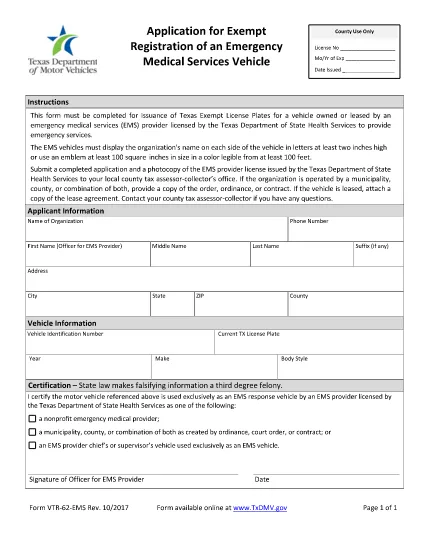
The VTR-62-EMS is the Texas Department of Motor Vehicles (TxDMV) application used by emergency medical services (EMS) providers to obtain exempt license plates for their emergency vehicles. This form must be completed, signed, and submitted to the TxDMV before the plates can be issued.

What Is the VTR-62-EMS Form?

The VTR-62-EMS form authorizes the issuance of special, exempt license plates that are reserved for EMS vehicles. The plates display the organization’s name or an approved emblem and are exempt from standard registration fees.

How to Complete the Form Online

Instead of downloading the PDF, simply click the "Fill out this form" button on this page. The Formize PDF Filler app will load the fillable version of the VTR-62-EMS, allowing you to:

  • Enter organization details, vehicle information, and contact data.
  • Upload a digital copy of the EMS emblem (optional).
  • Sign electronically with a mouse or touchscreen.
  • Save your progress and return later if needed.

Common Mistakes to Avoid

  • Incorrect vehicle identification number (VIN): Double‑check the VIN on the vehicle registration.
  • Missing signature: The form requires an authorized signature; an unsigned form will be rejected.
  • Improper emblem size: The emblem must be at least two inches high if used.
  • Wrong organization name spelling: The name appears on both sides of the plate and must be exact.

Where to Submit the Completed Form

After filling out and signing the form online, you can:

  • Download the completed PDF and mail it to the TxDMV address listed on the form.
  • Print the form and deliver it in person to any Texas Department of Motor Vehicles office.

Be sure to include any required supporting documents, such as proof of EMS licensing.

Download the Official PDF

If you prefer the original PDF, you can download it directly from the Texas DMV website:

Download VTR-62-EMS PDF

SOALAN LAZIM
  • Who can use the VTR-62-EMS form?

    Any EMS provider licensed by the Texas Department of State Health Services that operates emergency vehicles may apply for exempt plates using this form.

  • Is there a fee for the exempt license plates?

    The plates are exempt from the standard registration fee, but you may still need to pay for the physical plate production, depending on the TxDMV policy.

  • Can I submit the form electronically?

    Yes. After completing the fillable PDF with Formize, you can download the signed document and email it to the TxDMV, or mail a printed copy.

  • What size must the EMS emblem be?

    The emblem must be at least two inches high and clearly visible on the plate.

  • How long does it take to receive the plates after submission?

    Processing typically takes 7‑10 business days once the TxDMV receives a complete and correctly signed application.

  • Do I need to renew the exempt plates?

    Exempt plates are valid for the same period as standard plates. Renewal notices will be sent by the TxDMV.

  • What if I make a mistake on the form?

    Correct any errors before signing. If you submit a form with mistakes, the TxDMV will return it, causing delays.

  • Can I use a different PDF editor to fill the form?

    You can, but the Formize fillable version is optimized for ease of use and ensures all required fields are completed.

BAGAIMANA UNTUK

Cara mengisi VTR-62-EMS secara percuma, dalam talian dalam 5 langkah mudah:

  1. 1
    Click the Fill Out Button
    Press the "Fill out this form" button on the page to launch the Formize PDF Filler.
  2. 2
    Wait for the Filler to Load
    The fillable version of VTR-62-EMS will appear in a secure window. This only takes a few seconds.
  3. 3
    Enter All Required Information
    Complete each field—organization name, vehicle VIN, driver details, etc.—exactly as shown on your registration documents.
  4. 4
    Add Your Signature
    Use your mouse, trackpad, or touchscreen to sign electronically. The signature is legally binding.
  5. 5
    Save, Download, or Print
    When finished, click "Save" to store a copy in your browser, "Download" to get a PDF file, or "Print" to submit a hard copy to the TxDMV.
Bentuk apl Pengisi PDF
TENTANG

Borang Pendaftaran Kenderaan

Jika anda memiliki atau memajak kenderaan bermotor, treler atau bot, anda mesti memenuhi kewajipan tertentu untuk memastikan kenderaan anda didaftarkan secara sah dan selamat.

VTR-62-EMS ialah salah satu borang pendaftaran Kenderaan yang merupakan dokumen yang digunakan untuk mendaftarkan kenderaan bermotor dengan pihak berkuasa negeri atau wilayah yang berkaitan. Borang ini biasanya diperlukan apabila seseorang membeli kenderaan baharu atau terpakai atau apabila mereka berpindah ke negeri atau wilayah baharu dengan kenderaan.

Keperluan dan borang tepat yang diperlukan untuk pendaftaran kenderaan boleh berbeza mengikut lokasi, tetapi secara amnya, proses itu melibatkan penyediaan maklumat tentang kenderaan, pemilik dan sebarang lien pada kenderaan.

Setelah borang pendaftaran dan bayaran diserahkan, pihak berkuasa negeri atau wilayah akan mengeluarkan sijil pendaftaran atau plat lesen kepada pemilik kenderaan. Pendaftaran ini membolehkan kenderaan itu dikendalikan secara sah di jalan raya dan lebuh raya awam.

CIRI-CIRI

Pengisi PDF

Cara paling mudah untuk mengisi VTR-62-EMS dalam talian

  • Cepat isi VTR-62-EMS
    Mencari cara untuk mengisi VTR-62-EMS dengan cepat dalam talian? Dengan pengisi borang PDF percuma dalam talian kami, anda akan tahu cara mengedit dan mengisi dokumen pdf ini dalam masa kurang daripada satu minit.
  • Mudah untuk menggunakan editor PDF dalam talian
    Bosan dengan mencetak fail PDF supaya anda boleh mengeditnya, sebelum mengimbas semula dan menghantarnya semula? Edit dokumen PDF secara percuma dalam talian. Gunakan editor pdf dalam talian kami untuk menjimatkan masa dan kertas.
  • Alat yang hebat, semua platform
    Tertanya-tanya cara mengisi VTR-62-EMS pada Mac, atau mungkin cara menggunakan pengisi PDF secara percuma? Alat PDF dalam talian kami berfungsi pada semua platform.
  • Simpanan fail selamat
    Fail "VTR-62-EMS" yang lengkap disimpan dalam pangkalan data selamat yang diuruskan oleh pengehosan Amazon Cloud. Anda boleh memadamkan fail anda daripada sistem kami pada bila-bila masa. Walau apa pun, fail ini dipadamkan secara automatik selepas 24 jam.
  • Sembang dengan VTR-62-EMS
    Sembang dengan "VTR-62-EMS" di Chatize yang merupakan pembantu pembaca PDF percuma. Tanya soalan dan dapatkan jawapan daripada "VTR-62-EMS". Cuma klik pada butang Sembang Dengan Dokumen di atas.

Padamkan sesi pengisian

Padamkan sesi pengisian yang dipilih? Dalam kes ini, kemajuan anda dalam melengkapkan borang akan hilang.

Padamkan sesi penyuntingan

Padamkan sesi penyuntingan yang dipilih? Dalam kes ini, kemajuan anda dalam membuat dan mengedit borang akan hilang.