
Selecteer taal

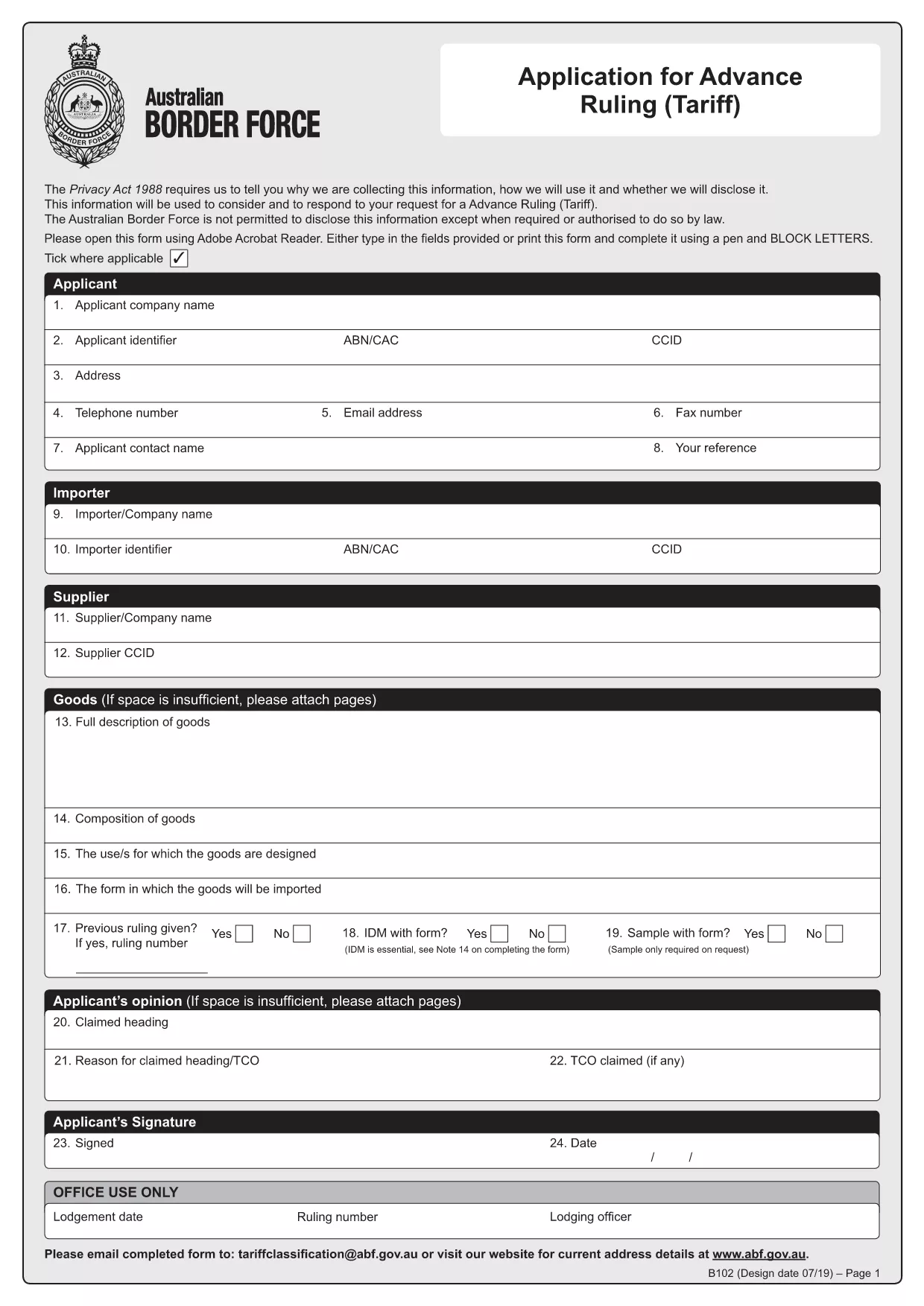
HSN Code Application Form (B102) – Fillable PDF

  1. Taal Engels
  2. Land Australië
  3. Activiteit Customs Classification
  4. Afdeling Australian Border Force
HSN Code Application Form (B102) – Fillable PDF

What is the HSN Code Application Form?

The HSN (Harmonized System Nomenclature) code is the international standard for classifying goods in customs. In Australia, the Form B102 – Application for Advance Ruling (Tariff) is used to request an official classification (HSN code) before importing goods. This ensures you know the correct duty rates and compliance requirements.

Why Use the Fillable B102 Form Online?

Formize turns the static PDF into a fillable, interactive form that can be completed in any browser. Benefits include:

  • Instant validation of required fields
  • Auto‑save so you never lose data
  • Direct PDF download after you finish
  • No need for Adobe Acrobat or other editors

Step‑by‑Step Guide to Complete the Form

Follow these simple steps to get your HSN code application ready for submission.

Common Mistakes to Avoid

Even experienced importers can miss details. Avoid these pitfalls:

  • Leaving the "Manufacturer Details" section blank.
  • Providing an incomplete product description.
  • Submitting the form without supporting technical specifications.

Where to Submit Your Completed Form

After you finish, download the completed PDF and email it to tariffclassification@abf.gov.au within 5 days of the request, or mail it to the National Trade Advice Centre, GPO Box 2809, Melbourne VIC 3001.

FAQ
  • What is an HSN code?

    An HSN (Harmonized System Nomenclature) code is a globally recognized six‑digit number used to classify goods for customs duties, taxes, and trade statistics.

  • Do I need a B102 form for every import?

    No. You only need to submit a B102 form when you want an advance ruling on the classification of a specific product before importing it.

  • Can I edit the form after I download it?

    Yes, but the easiest method is to complete the form online with Formize, then download the final PDF. Editing a static PDF later can cause formatting issues.

  • How long does the Australian Border Force take to issue a ruling?

    The standard service time is 30 days, though it can be longer during periods of high demand.

  • Is there a fee for submitting the B102 application?

    The service is free of charge when you submit directly to the Australian Border Force. Brokers may charge their own fees for assistance.

  • What supporting documents should I attach?

    Include product data sheets, technical specifications, photographs, and any prior classification decisions that relate to the goods.

  • What if I make a mistake on the form?

    You can withdraw the request and submit a new B102 application. Ensure all fields are correct before submission to avoid delays.

HOE

Zo vult u HSN code application form gratis online in in 4 eenvoudige stappen:

  1. 1
    Open the Fillable Form
    Click the **Fill out this form** button on the page. The Formize PDF Filler app loads instantly in your browser.
  2. 2
    Enter Your Information
    Complete each section—importer details, product description, and supporting documents. The app highlights any missing required fields.
  3. 3
    Validate & Save
    Use the built‑in validator to check for errors, then click **Save**. Your data is stored securely online.
  4. 4
    Download the Completed PDF
    When all fields are filled, click **Download PDF**. The file is ready for submission to the Australian Border Force.
Formize PDF Filler-app
WAT BETREFT

HSN code application form-sjabloon

Met de traditionele set functies voor het bekijken en invullen van een PDF-document, gecombineerd met de voordelen van een webapplicatie en responsieve lay-out, kunt u HSN code application form binnen enkele minuten voltooien.

FUNCTIES

PDF-vuller

De eenvoudigste manier om online PDF-formulieren in te vullen

  • Vul snel HSN code application form in
    Op zoek naar een manier om HSN code application form snel online in te vullen? Met onze online gratis PDF-formulierinvuller weet u hoe u dit pdf-document in minder dan een minuut kunt bewerken en invullen.
  • Gebruiksvriendelijke online PDF-editor
    Ben je het beu om PDF-bestanden uit te printen zodat je ze kunt bewerken, voordat je ze opnieuw scant en terugstuurt? Bewerk PDF-documenten gratis online. Gebruik onze online pdf-editor om tijd en papier te besparen.
  • Geweldige tools, alle platforms
    Vraagt ​​u zich af hoe u HSN code application form op een Mac moet invullen, of misschien hoe u gratis een PDF-filler kunt gebruiken? Onze online pdf-tools werken op alle platformen.
  • Veilige bestandsopslag
    Voltooide "HSN code application form"-bestanden worden opgeslagen in een beveiligde database die wordt beheerd door Amazon Cloud hosting. U kunt uw bestanden op elk moment uit ons systeem verwijderen. Deze bestanden worden in ieder geval na 24 uur automatisch verwijderd.
  • Chat met {trefwoord}
    Chat met "HSN code application form" op Chatize, een gratis PDF-lezerassistent. Stel vragen en krijg antwoorden van "HSN code application form". Klik gewoon op de knop Chatten met document hierboven.

De vulsessie verwijderen

De geselecteerde vulsessie verwijderen? In dat geval gaat uw voortgang bij het invullen van het formulier verloren.

Bewerkingssessie verwijderen

De geselecteerde bewerkingssessie verwijderen? In dit geval gaat uw voortgang bij het maken en bewerken van het formulier verloren.