
Selecteer taal

Contractor License Application Form – Fillable PDF

  1. Land Australië
  2. Taal Engels
  3. Afdeling Building Commission
  4. Activiteit Contractor Licensing
Contractor License Application Form – Fillable PDF

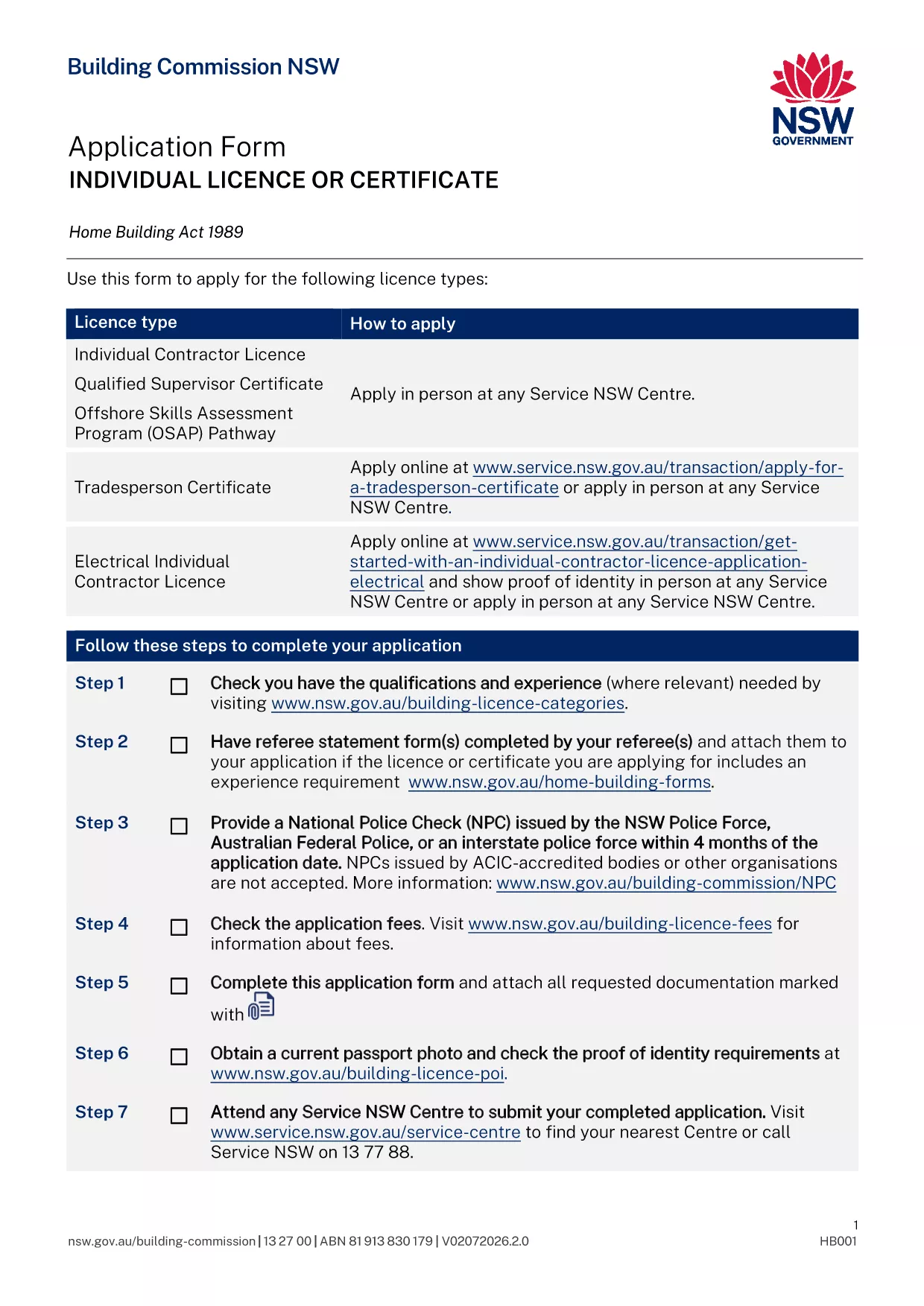
Applying for a contractor licence can feel overwhelming, but with the right form and clear instructions you can finish the process in minutes. The fillable PDF below is the official Application for Contractor Licence used by the Building Commission of New South Wales.

Why This Form Is Required

The Building Commission mandates a completed licence application for anyone who intends to contract, sub‑contract, or advertise residential building or trade work valued over $5,000. Submitting the correct form ensures your licence is processed without delay and keeps you compliant with the Home Building Act 1989.

Documents and Information You’ll Need

  • Proof of identity (driver licence, passport, or Medicare card)
  • Recent passport‑size photo
  • National Police Check (no older than 4 months)
  • Qualifications, employment history, and any relevant trade certificates
  • Details of any past compliance, insolvency, or criminal matters
  • Referee statements if required for your trade category

How to Complete the Form Online with Formize

Instead of downloading the PDF and editing it manually, simply click the "Fill out this form" button on this page. The Formize PDF Filler app will load, letting you type directly into each field, save progress, and download a completed copy ready for submission.

Common Mistakes to Avoid

  • Leaving required fields blank – the filler highlights missing information before you can submit.
  • Uploading an outdated police check – ensure the date is within the last four months.
  • Submitting an unsigned form – use the electronic signature feature in Formize.
  • Forgetting to attach supporting documents – the app lets you attach files before finalising.

What Happens After You Submit

Once you have a completed PDF, bring it to your booked Service NSW appointment or upload it through the online portal. The Building Commission will review your qualifications, fitness‑and‑propriety, and insurance details. You’ll receive a notification of approval, rejection, or a request for additional information within 2‑4 weeks.

FAQ
  • Do I need a separate form for a company contractor licence?

    Yes. Companies and partnerships use a different PDF (ap4452.pdf). The form linked here is for individual licences.

  • Can I submit the form without an appointment?

    If you have an ABN and choose the online route, no appointment is needed. For in‑person submissions, you must book a Service NSW appointment.

  • How long is a National Police Check valid?

    The police check must be issued within the last four months at the time you submit your application.

  • What if I make a mistake after I download the PDF?

    Open the PDF again in the Formize filler, correct the error, and re‑download the updated version before submitting.

  • Is there a fee for the contractor licence application?

    Yes. Fees vary by licence class (1, 3, or 5 years). The exact amount is listed on the Service NSW payment page.

  • Do I need insurance before applying?

    You must provide evidence of Home Building Compensation Fund insurance when you submit the application.

  • How will I know if my application is approved?

    The Building Commission will email you a decision or request additional information. You can also check the status via your MyServiceNSW account.

HOE

Zo vult u contractor license application gratis online in in 5 eenvoudige stappen:

  1. 1
    Open the Fillable Form
    Click the "Fill out this form" button on this page. The Formize PDF Filler loads instantly.
  2. 2
    Enter Your Details
    Type directly into each highlighted field – name, address, qualifications, and licence history.
  3. 3
    Attach Supporting Documents
    Use the attachment icon to upload your ID, police check, certificates, and referee statements.
  4. 4
    Review and Sign
    Check every section for completeness, then add an electronic signature using the Formize signature tool.
  5. 5
    Download and Submit
    Save the completed PDF, print it if required, and bring it to your Service NSW appointment or upload it online.
Formize PDF Filler-app
WAT BETREFT

contractor license application-sjabloon

Met de traditionele set functies voor het bekijken en invullen van een PDF-document, gecombineerd met de voordelen van een webapplicatie en responsieve lay-out, kunt u contractor license application binnen enkele minuten voltooien.

FUNCTIES

PDF-vuller

De eenvoudigste manier om online PDF-formulieren in te vullen

  • Vul snel contractor license application in
    Op zoek naar een manier om contractor license application snel online in te vullen? Met onze online gratis PDF-formulierinvuller weet u hoe u dit pdf-document in minder dan een minuut kunt bewerken en invullen.
  • Gebruiksvriendelijke online PDF-editor
    Ben je het beu om PDF-bestanden uit te printen zodat je ze kunt bewerken, voordat je ze opnieuw scant en terugstuurt? Bewerk PDF-documenten gratis online. Gebruik onze online pdf-editor om tijd en papier te besparen.
  • Geweldige tools, alle platforms
    Vraagt ​​u zich af hoe u contractor license application op een Mac moet invullen, of misschien hoe u gratis een PDF-filler kunt gebruiken? Onze online pdf-tools werken op alle platformen.
  • Veilige bestandsopslag
    Voltooide "contractor license application"-bestanden worden opgeslagen in een beveiligde database die wordt beheerd door Amazon Cloud hosting. U kunt uw bestanden op elk moment uit ons systeem verwijderen. Deze bestanden worden in ieder geval na 24 uur automatisch verwijderd.
  • Chat met {trefwoord}
    Chat met "contractor license application" op Chatize, een gratis PDF-lezerassistent. Stel vragen en krijg antwoorden van "contractor license application". Klik gewoon op de knop Chatten met document hierboven.

De vulsessie verwijderen

De geselecteerde vulsessie verwijderen? In dat geval gaat uw voortgang bij het invullen van het formulier verloren.

Bewerkingssessie verwijderen

De geselecteerde bewerkingssessie verwijderen? In dit geval gaat uw voortgang bij het maken en bewerken van het formulier verloren.