
Selecteer taal

Australian Age Pension Application Form (Fillable PDF)

  1. Taal Engels
  2. Land Australië
  3. Afdeling Centrelink
  4. Activiteit Retirement Benefits
Australian Age Pension Application Form (Fillable PDF)

Applying for the Centrelink Age Pension can feel overwhelming, but with the right form and clear instructions you can submit your claim confidently. This page gives you a direct link to the fillable PDF, a quick walkthrough of each section, and answers to the most common questions.

Why You Need the Age Pension Application Form

The Age Pension is a government‑provided income support for Australians aged 67 or older who meet residency and means‑test requirements. To start receiving payments you must complete the official application form, attach supporting documents, and submit it through myGov or a Centrelink service centre.

How to Fill Out the Form with Formize PDF Filler

Instead of downloading the PDF and editing it in a separate program, simply click the “Fill out this form” button on this page. The Formize PDF Filler app will load in your browser, letting you type, select dates, and add checkmarks directly on the form. When you’re done, you can save a copy and submit it online.

Key Documents & Information Required

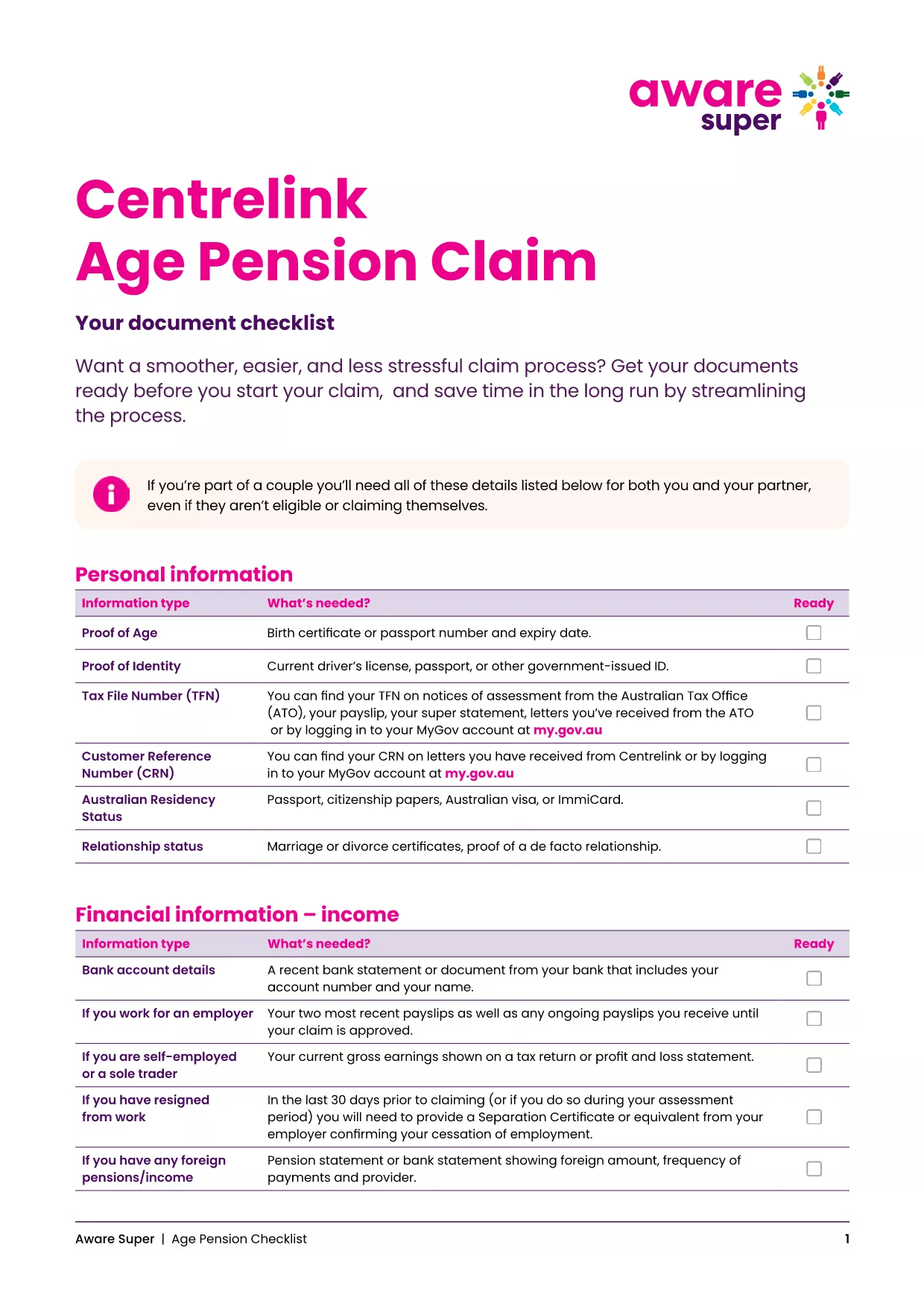
  • Proof of identity (passport, driver’s licence, or birth certificate)
  • Centrelink Reference Number (CRN)
  • Bank account details for pension payments
  • Details of assets, superannuation, and income
  • Proof of Australian residency (e.g., rental agreement or utility bill)

Common Mistakes to Avoid

  • Leaving fields blank: Even if a question does not apply, enter “N/A”.
  • Mismatched personal details: Ensure the name, date of birth and address match your Centrelink records.
  • Incorrect bank account: Payments are only made to accounts in the applicant’s name.
  • Out‑of‑date asset values: Use current market values for property, vehicles and investments.

Download & Print the Checklist PDF

For a printable, step‑by‑step checklist that helps you gather all required paperwork before you start the online claim, download the Age Pension Checklist PDF. Use it alongside the fillable application to keep everything organised.

FAQ
  • When can I start my Age Pension application?

    You can lodge an application up to 13 weeks before you turn 67. It’s best to gather all documents early to avoid delays.

  • Do I need to fill out a separate form for my partner?

    Yes. Even if your partner is not claiming the pension, you must provide their details and any assets they own.

  • Can I edit the PDF after I’ve saved it?

    Absolutely. The Formize PDF Filler lets you reopen the saved file, make changes, and re‑save before submitting.

  • What if I don’t have a myGov account?

    Create a myGov account at my.gov.au, then link it to your Centrelink profile using your CRN.

  • How long does the Age Pension claim take to process?

    Typical processing time is 2‑4 weeks after all required documents are received. You’ll be notified via email or SMS.

  • Is the PDF form truly fillable on mobile devices?

    Yes. Formize PDF Filler works on all modern browsers, including mobile Safari and Chrome.

  • What happens if I make a mistake on the form?

    Centrelink may contact you for clarification, which can delay payment. Double‑check each section before submitting.

  • Do I need to provide proof of home ownership?

    You must disclose any property you own, even if it’s rented out, and provide a recent valuation or mortgage statement.

  • Can I claim the Age Pension if I have superannuation?

    Yes, but your superannuation balances are counted towards the assets test. Include the current balance in the form.

  • Where can I get help if I’m stuck?

    Visit your nearest Centrelink service centre or call the Seniors Helpline on 132 300.

HOE

Zo vult u age pension application australia gratis online in in 5 eenvoudige stappen:

  1. 1
    Open the Fillable Form
    Click the “Fill out this form” button on this page. The Formize PDF Filler will open in a new tab.
  2. 2
    Enter Your Personal Details
    Type your name, date of birth, CRN and contact information into the highlighted fields.
  3. 3
    Add Supporting Information
    Upload or type details about your assets, income, and residency status as prompted.
  4. 4
    Review and Save
    Use the “Review” button to check for empty fields, then click “Save” to download a copy for your records.
  5. 5
    Submit Your Claim
    Log into myGov, link your Centrelink account, and upload the completed PDF. Submit and wait for confirmation.
Formize PDF Filler-app
WAT BETREFT

age pension application australia-sjabloon

Met de traditionele set functies voor het bekijken en invullen van een PDF-document, gecombineerd met de voordelen van een webapplicatie en responsieve lay-out, kunt u age pension application australia binnen enkele minuten voltooien.

FUNCTIES

PDF-vuller

De eenvoudigste manier om online PDF-formulieren in te vullen

  • Vul snel age pension application australia in
    Op zoek naar een manier om age pension application australia snel online in te vullen? Met onze online gratis PDF-formulierinvuller weet u hoe u dit pdf-document in minder dan een minuut kunt bewerken en invullen.
  • Gebruiksvriendelijke online PDF-editor
    Ben je het beu om PDF-bestanden uit te printen zodat je ze kunt bewerken, voordat je ze opnieuw scant en terugstuurt? Bewerk PDF-documenten gratis online. Gebruik onze online pdf-editor om tijd en papier te besparen.
  • Geweldige tools, alle platforms
    Vraagt ​​u zich af hoe u age pension application australia op een Mac moet invullen, of misschien hoe u gratis een PDF-filler kunt gebruiken? Onze online pdf-tools werken op alle platformen.
  • Veilige bestandsopslag
    Voltooide "age pension application australia"-bestanden worden opgeslagen in een beveiligde database die wordt beheerd door Amazon Cloud hosting. U kunt uw bestanden op elk moment uit ons systeem verwijderen. Deze bestanden worden in ieder geval na 24 uur automatisch verwijderd.
  • Chat met {trefwoord}
    Chat met "age pension application australia" op Chatize, een gratis PDF-lezerassistent. Stel vragen en krijg antwoorden van "age pension application australia". Klik gewoon op de knop Chatten met document hierboven.

De vulsessie verwijderen

De geselecteerde vulsessie verwijderen? In dat geval gaat uw voortgang bij het invullen van het formulier verloren.

Bewerkingssessie verwijderen

De geselecteerde bewerkingssessie verwijderen? In dit geval gaat uw voortgang bij het maken en bewerken van het formulier verloren.