
Selecteer taal

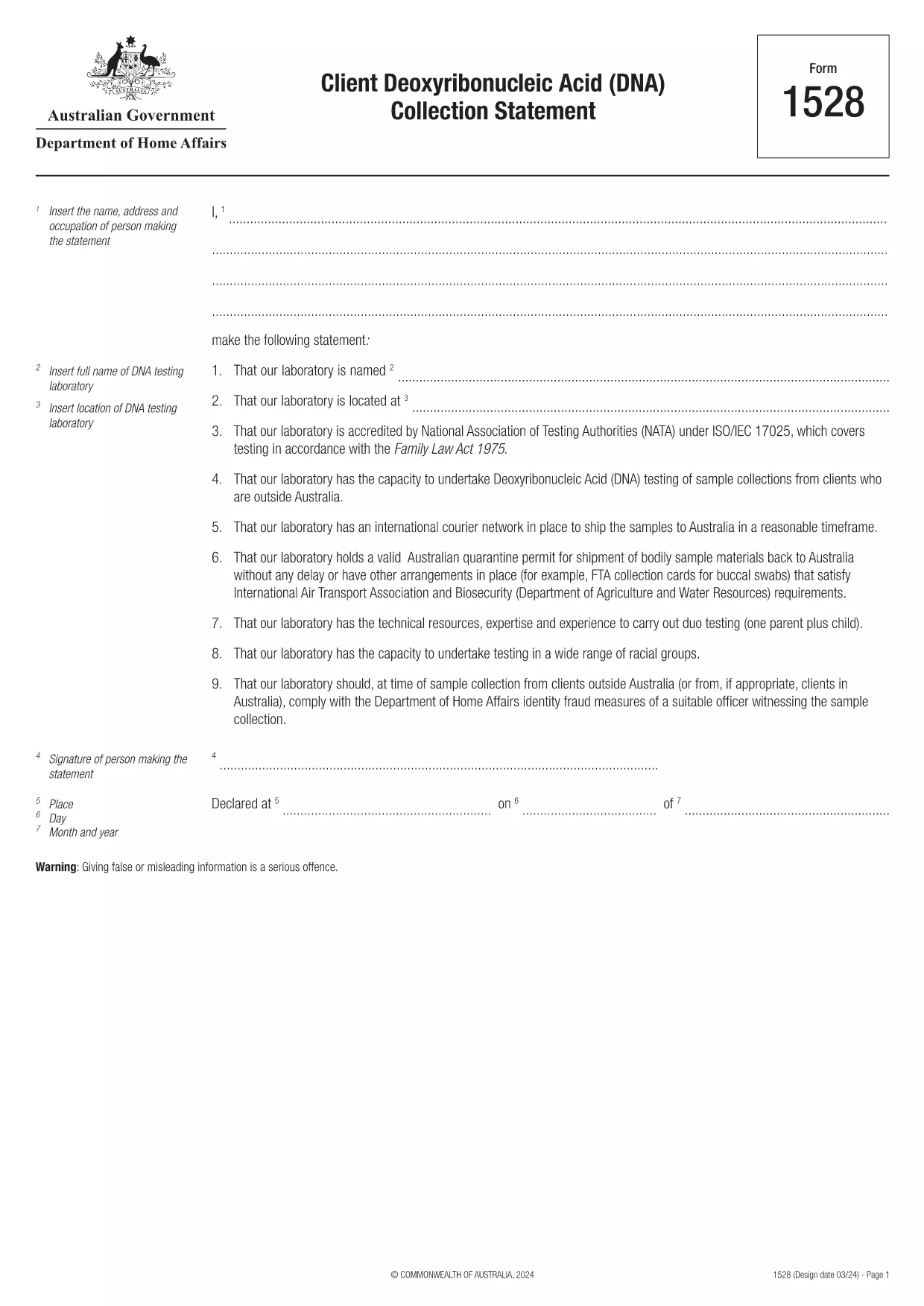
Form 1528 – Client DNA Collection Statement (Fillable PDF)

  1. Land Australië
  2. Taal Engels
  3. Activiteit Karakter of identiteit
Form 1528 – Client DNA Collection Statement (Fillable PDF)

Form 1528 is the official Client Deoxyribonucleic Acid (DNA) Collection Statement required by the Australian Department of Home Affairs. The form captures the name, address and occupation of the person making the statement, as well as details of the DNA testing laboratory.

What Is Form 1528?

This form is used when an individual must provide a DNA sample for immigration, visa, or forensic purposes. It must be completed by the person providing the sample and signed by an authorised DNA testing laboratory.

How to Fill Out Form 1528 with Formize

Instead of printing, scanning, or editing the PDF manually, simply click the “Fill out this form” button on this page. The Formize PDF Filler app will load the fillable version, letting you enter data, add signatures, and save the completed document in seconds.

Common Mistakes & Tips

  • Leave no blank fields – the Department rejects forms with empty required sections.
  • Use the exact laboratory name and address as it appears on the lab’s official letterhead.
  • Check date formats – use DD/MM/YYYY throughout.
  • Sign electronically only after all information is verified; a digital signature is accepted.

Where to Submit the Completed Form

After you download the completed PDF, you can upload it through your online visa portal, email it to the requesting officer, or deliver a printed copy to the nearest Australian Visa Application Centre.

Need More Help?

For detailed guidance, review the instructions on the Department of Home Affairs website or contact your DNA testing laboratory for clarification on laboratory‑specific fields.

FAQ
  • Is an electronic signature accepted on Form 1528?

    Yes. The Department of Home Affairs accepts a clear electronic signature created with the Formize PDF Filler.

  • Can I print the form after filling it online?

    Absolutely. After completing the form, you can download the PDF and print a hard copy if you prefer a physical submission.

  • What if I make a mistake after saving the form?

    Open the saved PDF again in Formize, edit the incorrect fields, and re‑save. The fillable PDF allows unlimited edits before final submission.

  • Do I need to attach any supporting documents?

    Typically, the DNA laboratory will provide a separate certification letter. Attach that letter alongside the completed Form 1528 when you submit your application.

  • How long does it take to process Form 1528?

    Processing time varies by case, but the Department generally reviews the statement within 5‑10 business days after receipt.

  • Is there a fee for using Formize’s PDF filler?

    Formize offers a free basic fillable version for Form 1528. Advanced features such as bulk signing require a paid plan, but are not needed for a single submission.

  • Can I fill out Form 1528 on a mobile device?

    Yes. The Formize PDF Filler works on smartphones and tablets, allowing you to complete the form anywhere.

  • What format should I use when uploading the completed form?

    Upload the final document as a PDF file. Ensure the file size does not exceed the portal’s limit (usually 5 MB).

HOE

Zo vult u Form 1528 gratis online in in 5 eenvoudige stappen:

  1. 1
    Open the Fillable Form
    Click the “Fill out this form” button on the page. The Formize PDF Filler app will launch in a new tab with the fillable version of Form 1528.
  2. 2
    Enter Your Information
    Type the required details – personal data, laboratory name, and address – directly into the highlighted fields.
  3. 3
    Add Electronic Signatures
    Use the signature tool to sign the statement and, if required, the laboratory representative’s signature.
  4. 4
    Review & Validate
    Double‑check every field for accuracy, especially dates and laboratory information.
  5. 5
    Download or Submit
    When you’re satisfied, click “Save & Download” to get the completed PDF, or use the built‑in “Submit” button to send it directly to the Home Affairs portal.
Formize PDF Filler-app
WAT BETREFT

Karakter- of identiteitsvormen

Form 1528 is een van de documenten of formulieren die verband houden met het vaststellen of verifiëren van de identiteit van een individu. Deze formulieren vereisen doorgaans persoonlijke informatie en documentatie om de identiteit van een persoon te bevestigen. Hier volgen enkele voorbeelden van formulieren die vaak worden geassocieerd met identiteitsverificatie:

Identiteitsverificatieformulieren: deze formulieren worden gebruikt door organisaties, zoals werkgevers, overheidsinstanties of financiële instellingen, om de identiteit van individuen te verifiëren. Ze vragen doorgaans om persoonlijke informatie, zoals naam, adres, geboortedatum en burgerservicenummer, en hebben mogelijk ondersteunende documentatie nodig, zoals een door de overheid uitgegeven identiteitsbewijs, paspoort of geboorteakte.

Formulieren voor adresbewijs: deze formulieren worden gebruikt om het woonadres van een persoon te verifiëren. Ze kunnen van de persoon eisen dat hij een energierekening, bankafschrift, huurovereenkomst of andere documenten overlegt waaruit zijn huidige adres blijkt.

Autorisatieformulieren voor antecedentenonderzoek: wanneer een organisatie een antecedentenonderzoek van een persoon uitvoert, wordt vaak van de persoon gevraagd dat hij een formulier invult waarmee hij de controle autoriseert. Deze formulieren kunnen om persoonlijke informatie vragen, waaronder naam, geboortedatum en burgerservicenummer, waardoor de identiteit van de persoon kan worden vastgesteld.

Beëdigde verklaringen voor identiteitsdiefstal: In gevallen van identiteitsdiefstal moeten slachtoffers mogelijk een beëdigde verklaring voor identiteitsdiefstal invullen. Met dit formulier kunnen personen frauduleus gebruik van hun identiteit melden en wordt het incident juridisch vastgelegd.

Het is belangrijk op te merken dat de specifieke vormen en vereisten voor het vaststellen of verifiëren van de identiteit kunnen variëren afhankelijk van de context, zoals het doel, het rechtsgebied of de betrokken organisatie. Raadpleeg altijd de specifieke formulieren die worden verstrekt door de organisatie of instelling die identiteitsverificatie aanvraagt ​​voor de meest nauwkeurige en actuele informatie.

FUNCTIES

PDF-vuller

De eenvoudigste manier om online PDF-formulieren in te vullen

  • Vul snel Form 1528 in
    Op zoek naar een manier om Form 1528 snel online in te vullen? Met onze online gratis PDF-formulierinvuller weet u hoe u dit pdf-document in minder dan een minuut kunt bewerken en invullen.
  • Gebruiksvriendelijke online PDF-editor
    Ben je het beu om PDF-bestanden uit te printen zodat je ze kunt bewerken, voordat je ze opnieuw scant en terugstuurt? Bewerk PDF-documenten gratis online. Gebruik onze online pdf-editor om tijd en papier te besparen.
  • Geweldige tools, alle platforms
    Vraagt ​​u zich af hoe u Form 1528 op een Mac moet invullen, of misschien hoe u gratis een PDF-filler kunt gebruiken? Onze online pdf-tools werken op alle platformen.
  • Veilige bestandsopslag
    Voltooide "Form 1528"-bestanden worden opgeslagen in een beveiligde database die wordt beheerd door Amazon Cloud hosting. U kunt uw bestanden op elk moment uit ons systeem verwijderen. Deze bestanden worden in ieder geval na 24 uur automatisch verwijderd.
  • Chat met {trefwoord}
    Chat met "Form 1528" op Chatize, een gratis PDF-lezerassistent. Stel vragen en krijg antwoorden van "Form 1528". Klik gewoon op de knop Chatten met document hierboven.

De vulsessie verwijderen

De geselecteerde vulsessie verwijderen? In dat geval gaat uw voortgang bij het invullen van het formulier verloren.

Bewerkingssessie verwijderen

De geselecteerde bewerkingssessie verwijderen? In dit geval gaat uw voortgang bij het maken en bewerken van het formulier verloren.