
Selecteer taal

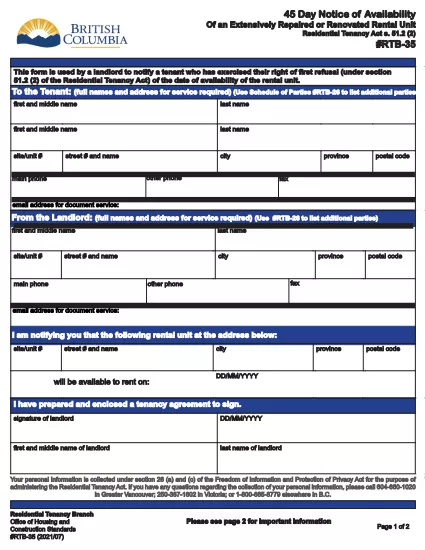
RTB‑35 45‑Day Notice of Availability (Fillable PDF)

  1. Land Canada
  2. Taal Engels
  3. Activiteit huur
  4. Afdeling Residential Tenancy Branch
RTB‑35 45‑Day Notice of Availability (Fillable PDF)

The RTB‑35 is the official 45‑Day Notice of Availability required by British Columbia’s Residential Tenancy Act. Landlords must give tenants at least 45 days’ notice before a rental unit becomes available for a new tenancy. This form ensures the notice is clear, legally compliant, and ready to be filed.

What Is the RTB‑35 Form?

RTB‑35 is a standardized, government‑approved PDF used by landlords across the province. It captures the date the unit will be available, the reason for vacancy, and the landlord’s contact information. Because it is a fillable PDF, you can complete it directly in your browser without printing a paper copy first.

When and Why You Need This Notice

  • When you plan to end a tenancy because the unit will be re‑rented or taken off the market.
  • When you are selling the property or converting it to another use.
  • To comply with the Residential Tenancy Act and avoid disputes or penalties.

How to Complete the RTB‑35 Online

Follow the simple steps below. The Formize PDF Filler loads the fillable version instantly, so you never need to download a separate editor.

Common Mistakes to Avoid

  • Providing a date that is less than 45 days from the notice date.
  • Leaving the “Reason for Vacancy” field blank.
  • Forgetting to sign the form before submitting to the tenant.

Download the Fillable PDF

Click the button below to open the RTB‑35 form in the Formize PDF Filler. When the app loads, you can fill, save, and print the notice in minutes.

Fill out this form

FAQ
  • What happens if I give less than 45 days’ notice?

    The notice will be considered invalid under the Residential Tenancy Act, and you may be required to continue the tenancy or face a dispute resolution claim.

  • Can I use a handwritten version of RTB‑35?

    Yes, but a fillable PDF is recommended because it reduces errors, ensures legibility, and creates a digital record.

  • Do I need to attach any supporting documents?

    Only if the reason for vacancy requires proof (e.g., a sale agreement). Otherwise, the RTB‑35 alone is sufficient.

  • Is the Formize PDF Filler free to use?

    Yes. You can fill, save, and download the form at no cost. No software installation is required.

  • Can I email the completed RTB‑35 to my tenant?

    Absolutely. Once you save the completed PDF, you can attach it to an email or upload it to a tenant portal.

  • Do I need to keep a copy of the notice?

    Keep a saved copy for your records for at least the length of the tenancy, as it may be requested during dispute resolution.

  • What if the tenant disputes the notice date?

    Provide the saved PDF with timestamps from the Formize app as evidence of when the notice was completed and sent.

HOE

Zo vult u RTB-35 gratis online in in 5 eenvoudige stappen:

  1. 1
    Open the Form
    Click the “Fill out this form” button above. The Formize PDF Filler app will load the RTB‑35 fillable PDF in a new tab.
  2. 2
    Enter Required Information
    Type the date the unit will be available, the reason for vacancy, and your contact details. All fields are interactive and save automatically.
  3. 3
    Review and Sign
    Check each section for accuracy, then add your electronic signature using the built‑in signature field.
  4. 4
    Save or Print
    When you’re finished, click “Save” to download a copy or “Print” to give a hard copy to your tenant.
  5. 5
    Submit to Tenant
    Deliver the completed notice by hand, email, or mail within the 45‑day window required by law.
Formize PDF Filler-app
WAT BETREFT

Formulieren voor verhuurders en/of huurders om actie voor te stellen met betrekking tot huurovereenkomsten.

RTB-35 is een van de documenten die worden gebruikt bij het huren of leasen van een woning. Deze formulieren vormen de juridische overeenkomst tussen de eigenaar (verhuurder) en de huurder, waarin de voorwaarden van de huurovereenkomst worden uiteengezet. Hier zijn enkele veel voorkomende huur- of leasevormen:

Huuraanvraag: dit formulier wordt doorgaans ingevuld door potentiële huurders die geïnteresseerd zijn in het huren van een woning. Het verzamelt persoonlijke informatie over de sollicitant, zoals hun naam, contactgegevens, arbeidsgegevens, huurgeschiedenis en referenties. De huurapplicatie helpt verhuurders de geschiktheid van huurders te beoordelen en weloverwogen beslissingen te nemen.

Leaseovereenkomst: De leaseovereenkomst is een juridisch bindend contract waarin de rechten en verantwoordelijkheden van zowel de verhuurder als de huurder worden beschreven. Het behandelt belangrijke details zoals de duur van het huurcontract, het huurbedrag, de borg, kosten voor te late betaling, huisdierenbeleid, onderhoudsverantwoordelijkheden en alle andere voorwaarden die specifiek zijn voor het huurobject. Leaseovereenkomsten kunnen qua lengte en complexiteit variëren, afhankelijk van de huurmarkt en lokale wetgeving.

Huurovereenkomst: Net als een huurovereenkomst is een huurovereenkomst een contract dat de huur van een woning regelt. Huurovereenkomsten worden echter over het algemeen gebruikt voor huur op kortere termijn, zoals maandelijkse overeenkomsten. Huurovereenkomsten hebben doorgaans meer flexibiliteit en kunnen met kortere opzegtermijnen worden beëindigd of gewijzigd in vergelijking met huurovereenkomsten met een langere looptijd.

Inspectieformulieren voor in- en uittrekken: deze formulieren worden gebruikt om de staat van het huurobject aan het begin en einde van de huurperiode te documenteren. Ze beschrijven de staat van elke kamer en eventuele bestaande schade, zodat beide partijen een overzicht hebben van de staat van de accommodatie om geschillen over borgsommen of schadeclaims op te lossen.

Opzegging tot ontruiming: Dit formulier wordt door de verhuurder of de huurder gebruikt om kennis te geven van het voornemen om de huur te beëindigen. De vereiste opzegtermijn kan variëren afhankelijk van de lokale wetgeving en de voorwaarden van de lease- of huurovereenkomst.

Het is belangrijk op te merken dat huur- of leasevormen kunnen variëren, afhankelijk van het rechtsgebied en de specifieke vereisten van de verhuurder of vastgoedbeheermaatschappij. Het wordt aanbevolen om de lokale wetgeving te raadplegen en professioneel advies in te winnen om ervoor te zorgen dat de toepasselijke regelgeving wordt nageleefd en om de juiste formulieren voor de specifieke huur- of leasetransactie te gebruiken.

FUNCTIES

PDF-vuller

De eenvoudigste manier om online PDF-formulieren in te vullen

  • Vul snel RTB-35 in
    Op zoek naar een manier om RTB-35 snel online in te vullen? Met onze online gratis PDF-formulierinvuller weet u hoe u dit pdf-document in minder dan een minuut kunt bewerken en invullen.
  • Gebruiksvriendelijke online PDF-editor
    Ben je het beu om PDF-bestanden uit te printen zodat je ze kunt bewerken, voordat je ze opnieuw scant en terugstuurt? Bewerk PDF-documenten gratis online. Gebruik onze online pdf-editor om tijd en papier te besparen.
  • Geweldige tools, alle platforms
    Vraagt ​​u zich af hoe u RTB-35 op een Mac moet invullen, of misschien hoe u gratis een PDF-filler kunt gebruiken? Onze online pdf-tools werken op alle platformen.
  • Veilige bestandsopslag
    Voltooide "RTB-35"-bestanden worden opgeslagen in een beveiligde database die wordt beheerd door Amazon Cloud hosting. U kunt uw bestanden op elk moment uit ons systeem verwijderen. Deze bestanden worden in ieder geval na 24 uur automatisch verwijderd.
  • Chat met {trefwoord}
    Chat met "RTB-35" op Chatize, een gratis PDF-lezerassistent. Stel vragen en krijg antwoorden van "RTB-35". Klik gewoon op de knop Chatten met document hierboven.

De vulsessie verwijderen

De geselecteerde vulsessie verwijderen? In dat geval gaat uw voortgang bij het invullen van het formulier verloren.

Bewerkingssessie verwijderen

De geselecteerde bewerkingssessie verwijderen? In dit geval gaat uw voortgang bij het maken en bewerken van het formulier verloren.