
Selecteer taal

INZ 1220 Supplementary Form – Fillable PDF

  1. Land Nieuw-Zeeland
  2. Taal Engels
  3. Activiteit Bezoek en toerisme Het werk Immigratie Studie
INZ 1220 Supplementary Form – Fillable PDF

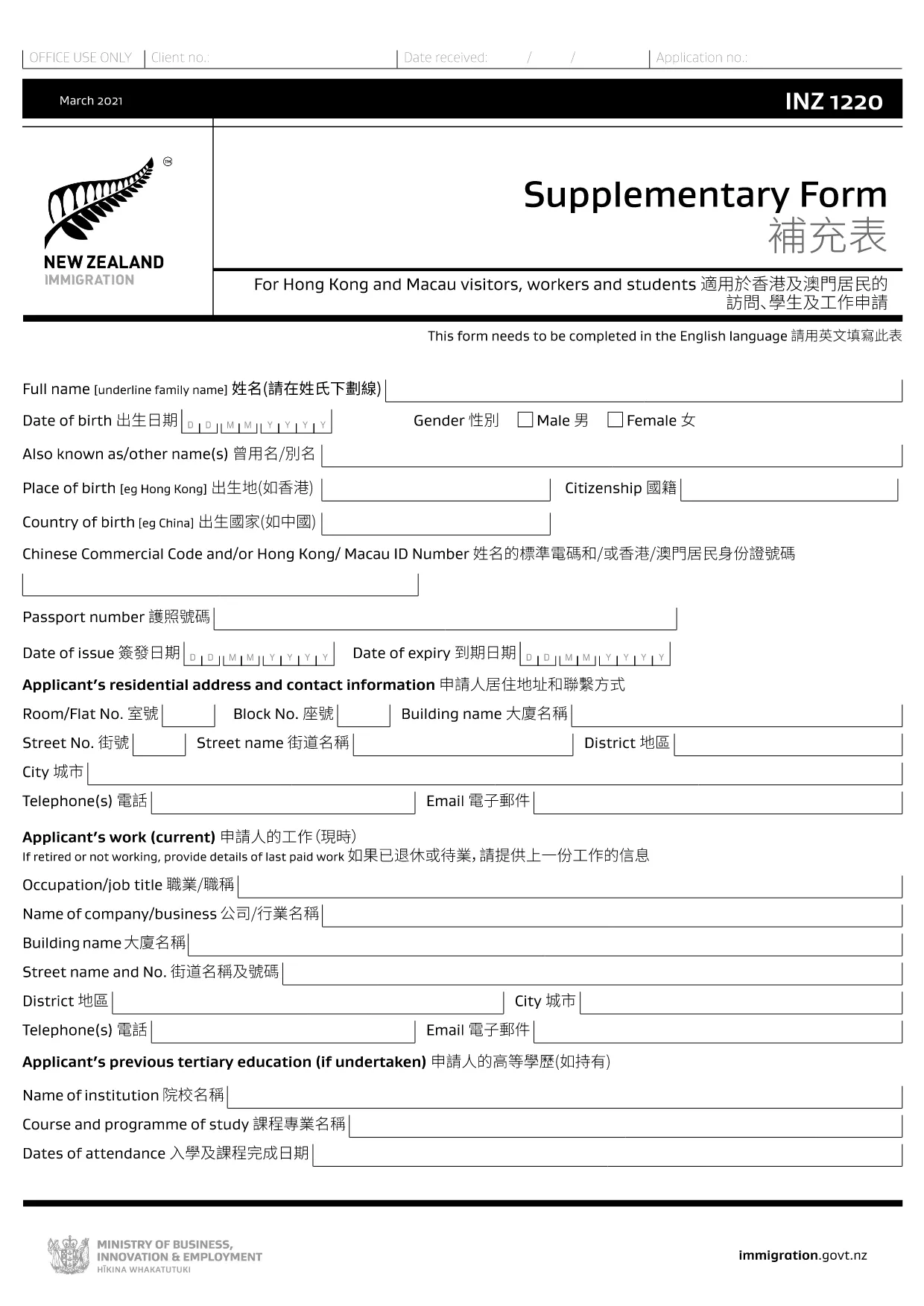
The INZ 1220 Supplementary Form is required by Immigration New Zealand for visitors, workers and students from Hong Kong and Macau who need to provide additional contact details. This fillable PDF lets you complete the form quickly, securely, and without printing.

Our page integrates the Formize PDF Filler app, so you can edit the document directly in your browser. No extra software, no downloads – just click, fill, and submit.

What Is the INZ 1220 Form?

INZ 1220 is a supplementary information sheet that collects the name, address, telephone, and email of a New Zealand contact (friend, family member, or sponsor). It is often requested alongside visa applications to verify local support.

How to Complete the INZ 1220 Online

Follow the simple steps below to fill out the form using Formize:

  • Click the **Fill out this form** button on this page.
  • Wait a few seconds while the Formize PDF Filler loads.
  • Enter the required details in each field – the interface highlights mandatory sections.
  • Review the information for accuracy.
  • Save the completed PDF to your device or download a copy for your records.

Common Mistakes to Avoid

  • Leaving the contact’s phone number incomplete – include country code.
  • Using an outdated email address – Immigration may send important updates.
  • Submitting the form with blank mandatory fields – the filler will flag these before you can save.

Where to Submit the Completed Form

After saving the PDF, attach it to your visa application through the Immigration New Zealand online portal, or email it to the address specified in your application instructions.

FAQs About INZ 1220

Find quick answers to the most common questions below (full FAQ list further down).

FAQ
  • Do I need to print the INZ 1220 form?

    No. Using the Formize PDF Filler you can complete the form entirely online and download the finished PDF.

  • What language is the INZ 1220 form in?

    The official form is in English. If you need a translation, you must provide a certified translation alongside the original.

  • Can I save my progress and finish later?

    Yes. While the Formize app is open, you can click **Save** to download a partially‑filled PDF, then reload it later to continue.

  • Is the contact’s New Zealand address mandatory?

    Yes. Immigration requires a full local address (street, city, postal code) to verify your support network.

  • What if I make a mistake after saving?

    Simply reopen the saved PDF in the Formize filler, correct the error, and save a new version.

  • How many pages is the INZ 1220 form?

    The supplementary form is a single‑page PDF, making it quick to fill and attach.

  • Do I need a digital signature?

    A handwritten signature is required. Print the completed PDF, sign it, then scan or take a clear photo to upload.

  • Where can I find help if I’m stuck?

    The Formize filler includes tooltip help for each field. For further assistance, consult the Immigration New Zealand website.

HOE

Zo vult u INZ 1220 gratis online in in 5 eenvoudige stappen:

  1. 1
    Open the Fillable Form
    Click the **Fill out this form** button on the page. The Formize PDF Filler app will open in a new tab.
  2. 2
    Load the Form
    Wait a few seconds while the INZ 1220 PDF loads. All fields become editable directly in the browser.
  3. 3
    Enter Your Information
    Type the required details (contact name, address, phone, email). Required fields are marked with an asterisk.
  4. 4
    Review and Save
    Check the entered data for errors, then click **Save** to download the completed PDF to your device.
  5. 5
    Submit with Your Visa Application
    Attach the saved INZ 1220 PDF to your Immigration New Zealand online application or email it as instructed.
Formize PDF Filler-app
WAT BETREFT

Toerisme formulieren

INZ 1220 is een van de toeristische formulieren die documenten zijn die worden gebruikt door individuen of groepen die van plan zijn om voor toeristische doeleinden te reizen. Deze formulieren kunnen variëren afhankelijk van het land van bestemming of de reisaanbieder, maar ze bevatten over het algemeen informatie over de reiziger, zijn reisroute en andere relevante details.

Enkele veel voorkomende vormen van toerisme zijn:

Reisroute: dit formulier vermeldt de geplande activiteiten van de reiziger, inclusief datums, tijden en locaties van vluchten, accommodaties, tours en andere activiteiten.

Visumaanvraag: veel landen eisen dat toeristen een visum aanvragen voordat ze het land binnenkomen. Het visumaanvraagformulier vraagt ​​meestal om persoonlijke informatie, reisgegevens en ondersteunende documentatie, zoals een paspoort, foto of financiële overzichten.

Gezondheidsverklaring: dit formulier wordt gebruikt om medische aandoeningen of mogelijke blootstelling aan overdraagbare ziekten, zoals COVID-19, aan te geven. Sommige landen eisen dat reizigers voor binnenkomst een negatieve COVID-19-test overleggen.

Reisverzekeringsformulier: dit formulier geeft informatie over de dekking van de reisverzekering van de reiziger, inclusief het type polis, dekkingslimieten en contactgegevens voor noodgevallen.

Douaneaangifteformulier: dit formulier is door sommige landen vereist om items aan te geven die het land worden binnengebracht, zoals geschenken, souvenirs of elektronica.

Accommodatieboekingsformulier: dit formulier geeft informatie over de accommodatie van de reiziger, inclusief de verblijfsdata, het kamertype en eventuele speciale verzoeken.

Toerismeformulieren kunnen vereist zijn door luchtvaartmaatschappijen, reisbureaus, hotels of andere reisdienstverleners, en ze kunnen beschikbaar zijn in elektronische of papieren vorm. Het is belangrijk dat ze alle benodigde formulieren zorgvuldig bekijken en invullen om een ​​vlotte en probleemloze reiservaring te garanderen.

FUNCTIES

PDF-vuller

De eenvoudigste manier om online PDF-formulieren in te vullen

  • Vul snel INZ 1220 in
    Op zoek naar een manier om INZ 1220 snel online in te vullen? Met onze online gratis PDF-formulierinvuller weet u hoe u dit pdf-document in minder dan een minuut kunt bewerken en invullen.
  • Gebruiksvriendelijke online PDF-editor
    Ben je het beu om PDF-bestanden uit te printen zodat je ze kunt bewerken, voordat je ze opnieuw scant en terugstuurt? Bewerk PDF-documenten gratis online. Gebruik onze online pdf-editor om tijd en papier te besparen.
  • Geweldige tools, alle platforms
    Vraagt ​​u zich af hoe u INZ 1220 op een Mac moet invullen, of misschien hoe u gratis een PDF-filler kunt gebruiken? Onze online pdf-tools werken op alle platformen.
  • Veilige bestandsopslag
    Voltooide "INZ 1220"-bestanden worden opgeslagen in een beveiligde database die wordt beheerd door Amazon Cloud hosting. U kunt uw bestanden op elk moment uit ons systeem verwijderen. Deze bestanden worden in ieder geval na 24 uur automatisch verwijderd.
  • Chat met {trefwoord}
    Chat met "INZ 1220" op Chatize, een gratis PDF-lezerassistent. Stel vragen en krijg antwoorden van "INZ 1220". Klik gewoon op de knop Chatten met document hierboven.

De vulsessie verwijderen

De geselecteerde vulsessie verwijderen? In dat geval gaat uw voortgang bij het invullen van het formulier verloren.

Bewerkingssessie verwijderen

De geselecteerde bewerkingssessie verwijderen? In dit geval gaat uw voortgang bij het maken en bewerken van het formulier verloren.