
Selecteer taal

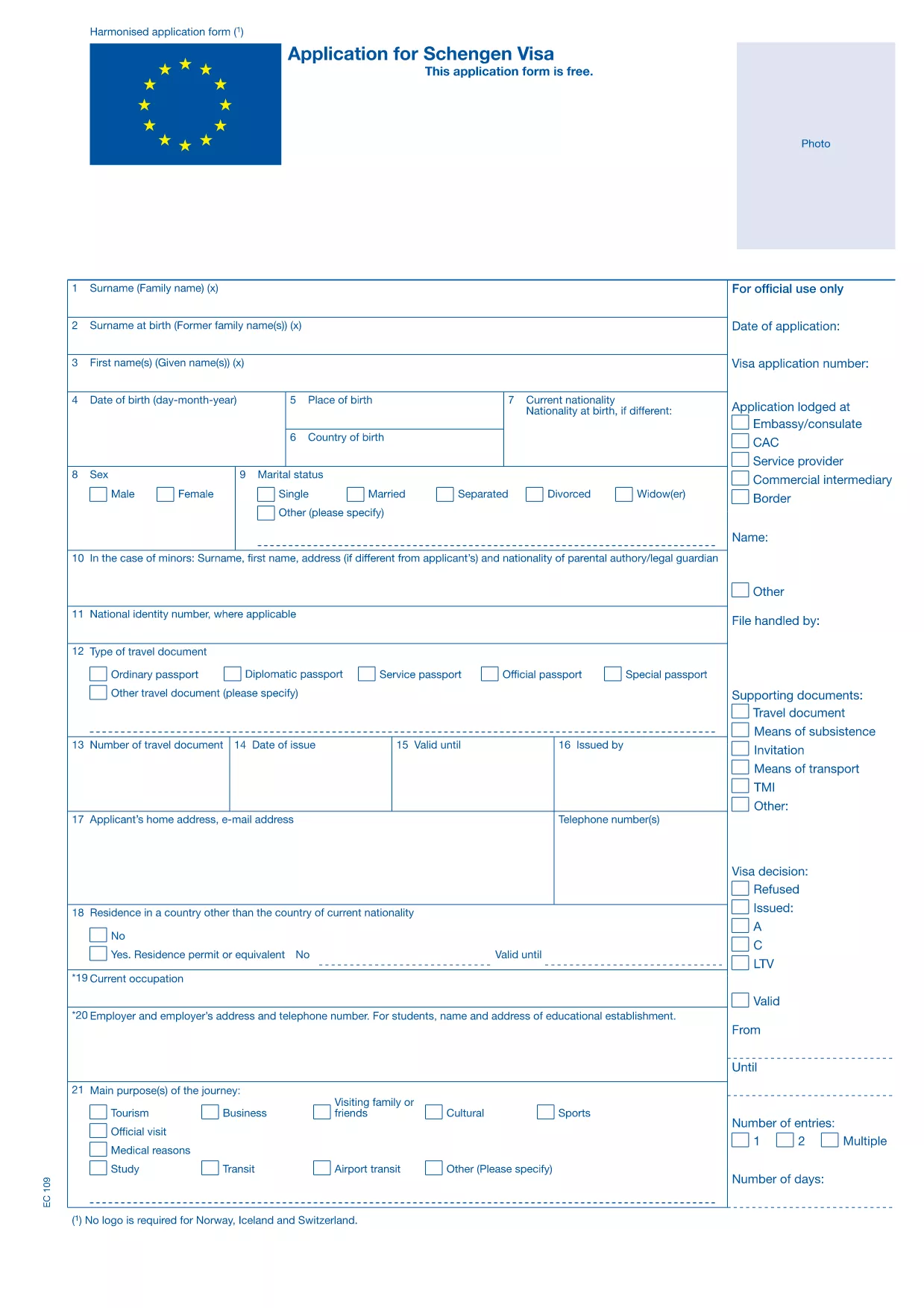
Portugal Schengen Visa Extension Form (Fillable PDF)

  1. Taal Engels
  2. Land Portugal
  3. Afdeling Consulate
  4. Activiteit Visa
Portugal Schengen Visa Extension Form (Fillable PDF)

Planning to stay longer in the Schengen Area while visiting Portugal? You’ll need to submit a Schengen visa extension request. Our fillable PDF version of the Portugal Schengen visa extension form lets you complete the application quickly, securely, and without any extra software.

Why Use the Fillable PDF Form?

The fillable PDF is fully compatible with the official Schengen visa extension template used by Portuguese consulates. It provides:

  • Clickable fields that prevent transcription errors
  • Automatic saving so you never lose your progress
  • Instant validation of required fields
  • A clean, printable version ready for submission

How to Complete the Extension Form Online

Instead of downloading the PDF and opening it in a separate editor, simply click the "Fill out this form" button on this page. The Formize PDF Filler app will load in your browser, and you can start typing right away.

All sections—personal data, current visa details, reason for extension, and supporting documents—are clearly labeled. Follow the on‑screen prompts, and the app will highlight any missing information before you finish.

Common Mistakes to Avoid

  • Leaving required fields blank: The form will not submit if any mandatory field is empty.
  • Using the wrong passport number: Double‑check the number exactly as it appears on your passport.
  • Submitting an outdated photo: The photo must be recent (within the last six months) and meet Schengen specifications.
  • Forgetting to sign: The electronic signature field is required; otherwise the application is rejected.

Submission Guidelines & Processing Times

After completing the form, download the finished PDF and attach it to your email or upload it through the Portuguese consulate’s online portal, together with required supporting documents (flight itinerary, proof of accommodation, financial means, etc.). Processing typically takes 7‑10 business days, but it can vary during peak travel seasons.

Frequently Asked Questions

Find quick answers to the most common queries about the Portugal Schengen visa extension form below.

FAQ
  • Can I extend my Schengen visa after it has already expired?

    No. Extensions must be requested before the current visa expires. Late requests are usually denied.

  • Do I need to provide a new passport photo for the extension?

    Yes. The photo must meet the same Schengen specifications as the original application and be taken within the last six months.

  • Is there a fee for the visa extension?

    Portugal charges a processing fee for extensions, which varies depending on the length of the requested stay. Check the consulate’s website for current rates.

  • How long can I stay in the Schengen Area after an approved extension?

    An approved extension can grant you up to an additional 90 days, but the total stay must not exceed 180 days within any 360‑day period.

  • What supporting documents are required?

    You’ll need proof of continued travel purpose (e.g., flight change confirmation), proof of sufficient funds, accommodation proof, and travel insurance covering the extended stay.

  • Can I submit the form in paper format instead of online?

    Yes, you can print the completed PDF and submit it in person, but the online submission is faster and reduces the chance of missing information.

  • How can I track the status of my extension request?

    After submission, the consulate will send you a reference number. Use this number on the consulate’s portal to check the processing status.

HOE

Zo vult u Portugal Schengen visa extension gratis online in in 5 eenvoudige stappen:

  1. 1
    Click the Fill‑out Button
    On this page, press the “Fill out this form” button. The Formize PDF Filler app will launch directly in your browser.
  2. 2
    Wait for the Filler to Load
    A few seconds may pass while the app initializes. Once the form appears, you’re ready to start entering data.
  3. 3
    Enter Your Information
    Complete each field—personal details, current visa info, reason for extension, and supporting documents. Required fields are marked with an asterisk.
  4. 4
    Review, Sign, and Save
    After filling the form, review every entry, add your electronic signature, and click “Save”. The completed PDF will download to your computer.
  5. 5
    Submit to the Portuguese Consulate
    Attach the saved PDF to your email or upload it through the consulate’s online portal along with the required supporting documents.
Formize PDF Filler-app
WAT BETREFT

Visa Formulieren

Portugal Schengen visa extension is een van de Visa-formulieren die documenten zijn die worden gebruikt om een ​​visum aan te vragen om een ​​vreemd land binnen te komen. Een visum is een document waarmee een vreemdeling voor een bepaalde tijd een vreemd land kan binnenkomen, verblijven en soms kan werken. De exacte formulieren en vereisten voor het verkrijgen van een visum verschillen per land en type visum.

Visumformulieren vereisen doorgaans persoonlijke informatie zoals naam, geboortedatum en paspoortinformatie, evenals informatie over het doel en de duur van de reis, de beoogde bestemming en of de aanvrager eerder een visum is geweigerd of uit een land is gedeporteerd. De formulieren kunnen ook ondersteunende documenten vereisen, zoals een paspoort, foto's en een bewijs van financiële steun.

In de Verenigde Staten zijn de meest voorkomende visumformulieren de DS-160- en DS-260-formulieren. Het DS-160-formulier wordt gebruikt om een ​​niet-immigrantenvisum aan te vragen, terwijl het DS-260-formulier wordt gebruikt om een ​​immigrantenvisum aan te vragen. Deze formulieren vereisen gedetailleerde informatie over de persoonlijke en reisgeschiedenis van de aanvrager, evenals ondersteunende documentatie zoals een paspoort, reisroute en financiële gegevens.

Andere landen kunnen andere visumvormen en -vereisten hebben, maar het basisproces omvat meestal het invullen van een visumaanvraag, het verstrekken van ondersteunende documentatie en het bijwonen van een interview met een consulaire ambtenaar op een Amerikaanse ambassade of consulaat. Het is belangrijk op te merken dat het visumaanvraagproces complex en tijdrovend kan zijn, en het wordt aanbevolen dat personen die een visum zoeken een immigratieadvocaat of een andere gekwalificeerde professional raadplegen om ervoor te zorgen dat aan alle noodzakelijke formulieren en vereisten wordt voldaan.

FUNCTIES

PDF-vuller

De eenvoudigste manier om online PDF-formulieren in te vullen

  • Vul snel Portugal Schengen visa extension in
    Op zoek naar een manier om Portugal Schengen visa extension snel online in te vullen? Met onze online gratis PDF-formulierinvuller weet u hoe u dit pdf-document in minder dan een minuut kunt bewerken en invullen.
  • Gebruiksvriendelijke online PDF-editor
    Ben je het beu om PDF-bestanden uit te printen zodat je ze kunt bewerken, voordat je ze opnieuw scant en terugstuurt? Bewerk PDF-documenten gratis online. Gebruik onze online pdf-editor om tijd en papier te besparen.
  • Geweldige tools, alle platforms
    Vraagt ​​u zich af hoe u Portugal Schengen visa extension op een Mac moet invullen, of misschien hoe u gratis een PDF-filler kunt gebruiken? Onze online pdf-tools werken op alle platformen.
  • Veilige bestandsopslag
    Voltooide "Portugal Schengen visa extension"-bestanden worden opgeslagen in een beveiligde database die wordt beheerd door Amazon Cloud hosting. U kunt uw bestanden op elk moment uit ons systeem verwijderen. Deze bestanden worden in ieder geval na 24 uur automatisch verwijderd.
  • Chat met {trefwoord}
    Chat met "Portugal Schengen visa extension" op Chatize, een gratis PDF-lezerassistent. Stel vragen en krijg antwoorden van "Portugal Schengen visa extension". Klik gewoon op de knop Chatten met document hierboven.

De vulsessie verwijderen

De geselecteerde vulsessie verwijderen? In dat geval gaat uw voortgang bij het invullen van het formulier verloren.

Bewerkingssessie verwijderen

De geselecteerde bewerkingssessie verwijderen? In dit geval gaat uw voortgang bij het maken en bewerken van het formulier verloren.