Selecteer taal

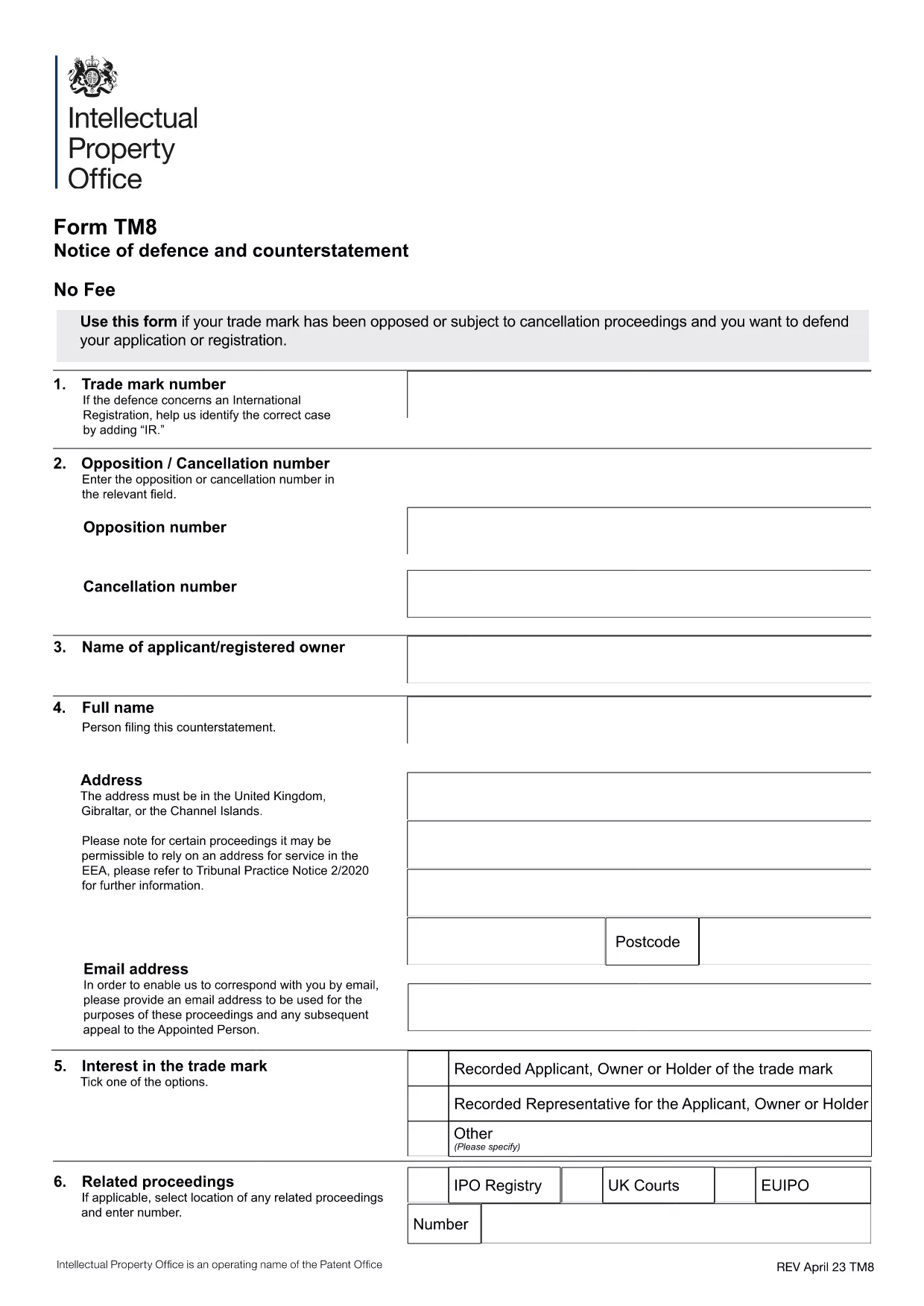
Form TM8 – Notice of Defence and Counterstatement (UK Trademark)

  1. Land United Kingdom
  2. Taal Engels
  3. Activiteit Trademarks
  4. Afdeling Intellectual Property Office
Form TM8 – Notice of Defence and Counterstatement (UK Trademark)

The Form TM8 is the official UK Intellectual Property Office (IPO) document used to submit a defence and counter‑statement when you are challenged on a trademark registration. Whether you are responding to a notice of opposition or a cancellation request, TM8 lets you set out the legal reasons why your trademark should remain protected.

What is Form TM8 and When Is It Required?

TM8 is filed by the trademark owner (or a licensed user) after receiving a formal objection from an opponent. It must detail the factual and legal basis of your defence, and may include any counter‑claims you wish to raise.

Key Sections of the TM8 Form Explained

  • Section 1 – Applicant Details: Name, address, and registration number of the trademark.
  • Section 2 – Grounds of Defence: List each ground you rely on, such as prior use, lack of similarity, or procedural errors.
  • Section 3 – Evidence: Attach supporting documents, screenshots, or contracts.
  • Section 4 – Counter‑Statement (if any): State any claims you are making against the opponent.
  • Section 5 – Signature: Certified declaration by the owner or authorised representative.

How to Complete TM8 Online with Formize

Instead of downloading, printing, and scanning, you can fill the form directly in your browser. Simply click the “Fill out this form” button below, and the Formize PDF Filler will load the official TM8 template ready for editing.

Common Mistakes to Avoid

  • Leaving any mandatory field blank – the IPO will reject the submission.
  • Submitting outdated contact details – you may miss important communications.
  • Failing to attach all referenced evidence – unsupported arguments are dismissed.
  • Using an unsigned PDF – the declaration must be signed electronically or manually before filing.

Where to Submit Your Completed Form

Once you have saved the filled PDF, upload it through the UK IPO online portal or send it by post to the address listed on the form. Keep a copy for your records.

FAQ
  • What is the deadline for filing Form TM8?

    The deadline is usually 28 days from the date you receive the opposition or cancellation notice, but always check the specific notice for the exact timeframe.

  • Can I submit a partially completed TM8?

    No. The IPO will reject any TM8 that has empty mandatory fields or missing signatures.

  • Do I need a lawyer to fill out TM8?

    A lawyer is not required, but legal advice can help ensure your defence is robust, especially for complex grounds.

  • Is an electronic signature accepted?

    Yes. The IPO accepts a qualified electronic signature or a scanned handwritten signature attached to the PDF.

  • Can I edit the TM8 after I have saved it?

    Yes. Open the saved PDF again in Formize or any PDF editor, make the changes, and re‑save before submission.

  • What evidence should I attach?

    Include any documents that prove prior use, ownership, or that counter the opponent’s claims – such as invoices, marketing material, or correspondence.

  • Is there a fee for filing TM8?

    Filing a defence does not incur a separate fee, but the original trademark application or opposition may have associated costs.

  • Where can I find the official TM8 PDF?

    The official version is available for download via the link below, hosted by the UK government.

HOE

Zo vult u Form TM8 gratis online in in 5 eenvoudige stappen:

  1. 1
    Open the Fillable Form
    Click the “Fill out this form” button on the page. The Formize PDF Filler app will load the official TM8 template instantly.
  2. 2
    Enter Your Details
    Complete each section – applicant information, grounds of defence, evidence, and counter‑statement – using the on‑screen fields.
  3. 3
    Add Attachments
    Use the “Add File” button to upload supporting documents (e.g., contracts, screenshots) directly into the PDF.
  4. 4
    Review & Sign
    Double‑check all entries for accuracy, then apply your electronic signature in the final declaration field.
  5. 5
    Save and Submit
    Save the completed PDF to your computer. Upload it to the UK IPO portal or mail it as instructed on the form.
Formize PDF Filler-app
WAT BETREFT

Form TM8-sjabloon

Met de traditionele set functies voor het bekijken en invullen van een PDF-document, gecombineerd met de voordelen van een webapplicatie en responsieve lay-out, kunt u Form TM8 binnen enkele minuten voltooien.

FUNCTIES

PDF-vuller

De eenvoudigste manier om online PDF-formulieren in te vullen

  • Vul snel Form TM8 in
    Op zoek naar een manier om Form TM8 snel online in te vullen? Met onze online gratis PDF-formulierinvuller weet u hoe u dit pdf-document in minder dan een minuut kunt bewerken en invullen.
  • Gebruiksvriendelijke online PDF-editor
    Ben je het beu om PDF-bestanden uit te printen zodat je ze kunt bewerken, voordat je ze opnieuw scant en terugstuurt? Bewerk PDF-documenten gratis online. Gebruik onze online pdf-editor om tijd en papier te besparen.
  • Geweldige tools, alle platforms
    Vraagt ​​u zich af hoe u Form TM8 op een Mac moet invullen, of misschien hoe u gratis een PDF-filler kunt gebruiken? Onze online pdf-tools werken op alle platformen.
  • Veilige bestandsopslag
    Voltooide "Form TM8"-bestanden worden opgeslagen in een beveiligde database die wordt beheerd door Amazon Cloud hosting. U kunt uw bestanden op elk moment uit ons systeem verwijderen. Deze bestanden worden in ieder geval na 24 uur automatisch verwijderd.
  • Chat met {trefwoord}
    Chat met "Form TM8" op Chatize, een gratis PDF-lezerassistent. Stel vragen en krijg antwoorden van "Form TM8". Klik gewoon op de knop Chatten met document hierboven.

De vulsessie verwijderen

De geselecteerde vulsessie verwijderen? In dat geval gaat uw voortgang bij het invullen van het formulier verloren.

Bewerkingssessie verwijderen

De geselecteerde bewerkingssessie verwijderen? In dit geval gaat uw voortgang bij het maken en bewerken van het formulier verloren.