Selecteer taal

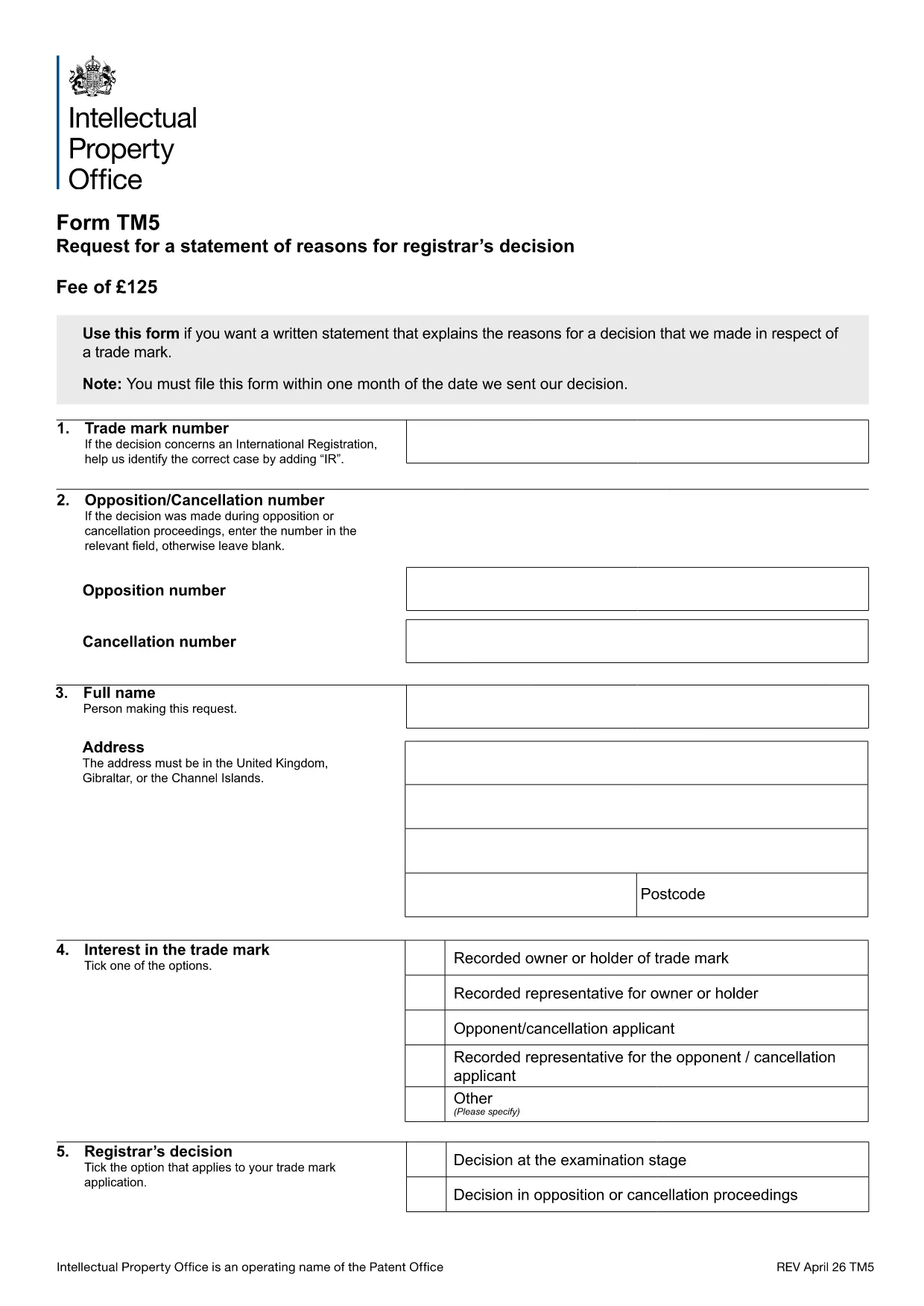
TM5 Trade Mark Statement of Reasons – Fillable PDF

  1. Taal Engels
  2. Land United Kingdom
  3. Afdeling Intellectual Property Office
  4. Activiteit Trade Marks
TM5 Trade Mark Statement of Reasons – Fillable PDF

The TM5 form is the official UK Intellectual Property Office (IPO) document used to request a written statement of reasons when a trade mark application is refused or limited. It is essential for anyone contesting a decision, filing an opposition, or seeking clarification on the registrar’s reasoning.

Formize makes the TM5 completely fillable in the browser. No need to print, scan, or download a separate editor – simply click the "Fill out this form" button and the Formize PDF Filler loads the official document ready for you to complete.

Our step‑by‑step guide walks you through each section, highlights common pitfalls, and provides quick answers to the most frequently asked questions. You’ll be able to submit a correctly completed TM5 in minutes, saving time and avoiding costly re‑submissions.

FAQ
  • What is the purpose of the TM5 form?

    The TM5 requests a written statement of reasons from the UK IPO when a trade mark application is refused, limited, or otherwise affected.

  • Do I need a lawyer to complete TM5?

    No. The TM5 is a straightforward request form. However, you may wish to consult a trademark attorney for complex cases.

  • Can I edit the PDF after I download it?

    Yes. With Formize you can edit the PDF directly in your browser before downloading the final version.

  • How long does it take for the IPO to respond?

    Typically the IPO provides the statement of reasons within 14 days of receiving a correctly completed TM5.

  • What common mistakes should I avoid?

    Missing the trademark number, leaving required fields blank, or providing unclear reasons are the most frequent errors. Follow our guide to ensure every field is completed.

  • Is there a filing fee for TM5?

    No fee is charged for requesting a statement of reasons using the TM5 form.

  • Can I submit the TM5 electronically?

    Yes. After filling the form online, download the completed PDF and upload it via the IPO’s electronic filing portal.

  • What if I need to amend the form after submission?

    You can submit a corrected TM5 as a new request, clearly referencing the previous submission and explaining the changes.

HOE

Zo vult u TM5 form gratis online in in 4 eenvoudige stappen:

  1. 1
    Open the Fillable TM5 Form
    Click the bright "Fill out this form" button on this page. The Formize PDF Filler app will open in a new tab and load the official TM5 document.
  2. 2
    Enter Your Details
    Start typing directly into each highlighted field – applicant name, trademark number, reasons for request, and any supporting information.
  3. 3
    Save and Review
    When you finish, use the "Save" button to download a completed copy or click "Print" to generate a PDF for submission to the IPO.
  4. 4
    Submit to the IPO
    Upload the saved PDF through the UK IPO online portal or mail it as instructed in the form’s submission section.
Formize PDF Filler-app
WAT BETREFT

TM5 form-sjabloon

Met de traditionele set functies voor het bekijken en invullen van een PDF-document, gecombineerd met de voordelen van een webapplicatie en responsieve lay-out, kunt u TM5 form binnen enkele minuten voltooien.

FUNCTIES

PDF-vuller

De eenvoudigste manier om online PDF-formulieren in te vullen

  • Vul snel TM5 form in
    Op zoek naar een manier om TM5 form snel online in te vullen? Met onze online gratis PDF-formulierinvuller weet u hoe u dit pdf-document in minder dan een minuut kunt bewerken en invullen.
  • Gebruiksvriendelijke online PDF-editor
    Ben je het beu om PDF-bestanden uit te printen zodat je ze kunt bewerken, voordat je ze opnieuw scant en terugstuurt? Bewerk PDF-documenten gratis online. Gebruik onze online pdf-editor om tijd en papier te besparen.
  • Geweldige tools, alle platforms
    Vraagt ​​u zich af hoe u TM5 form op een Mac moet invullen, of misschien hoe u gratis een PDF-filler kunt gebruiken? Onze online pdf-tools werken op alle platformen.
  • Veilige bestandsopslag
    Voltooide "TM5 form"-bestanden worden opgeslagen in een beveiligde database die wordt beheerd door Amazon Cloud hosting. U kunt uw bestanden op elk moment uit ons systeem verwijderen. Deze bestanden worden in ieder geval na 24 uur automatisch verwijderd.
  • Chat met {trefwoord}
    Chat met "TM5 form" op Chatize, een gratis PDF-lezerassistent. Stel vragen en krijg antwoorden van "TM5 form". Klik gewoon op de knop Chatten met document hierboven.

De vulsessie verwijderen

De geselecteerde vulsessie verwijderen? In dat geval gaat uw voortgang bij het invullen van het formulier verloren.

Bewerkingssessie verwijderen

De geselecteerde bewerkingssessie verwijderen? In dit geval gaat uw voortgang bij het maken en bewerken van het formulier verloren.