
Select language

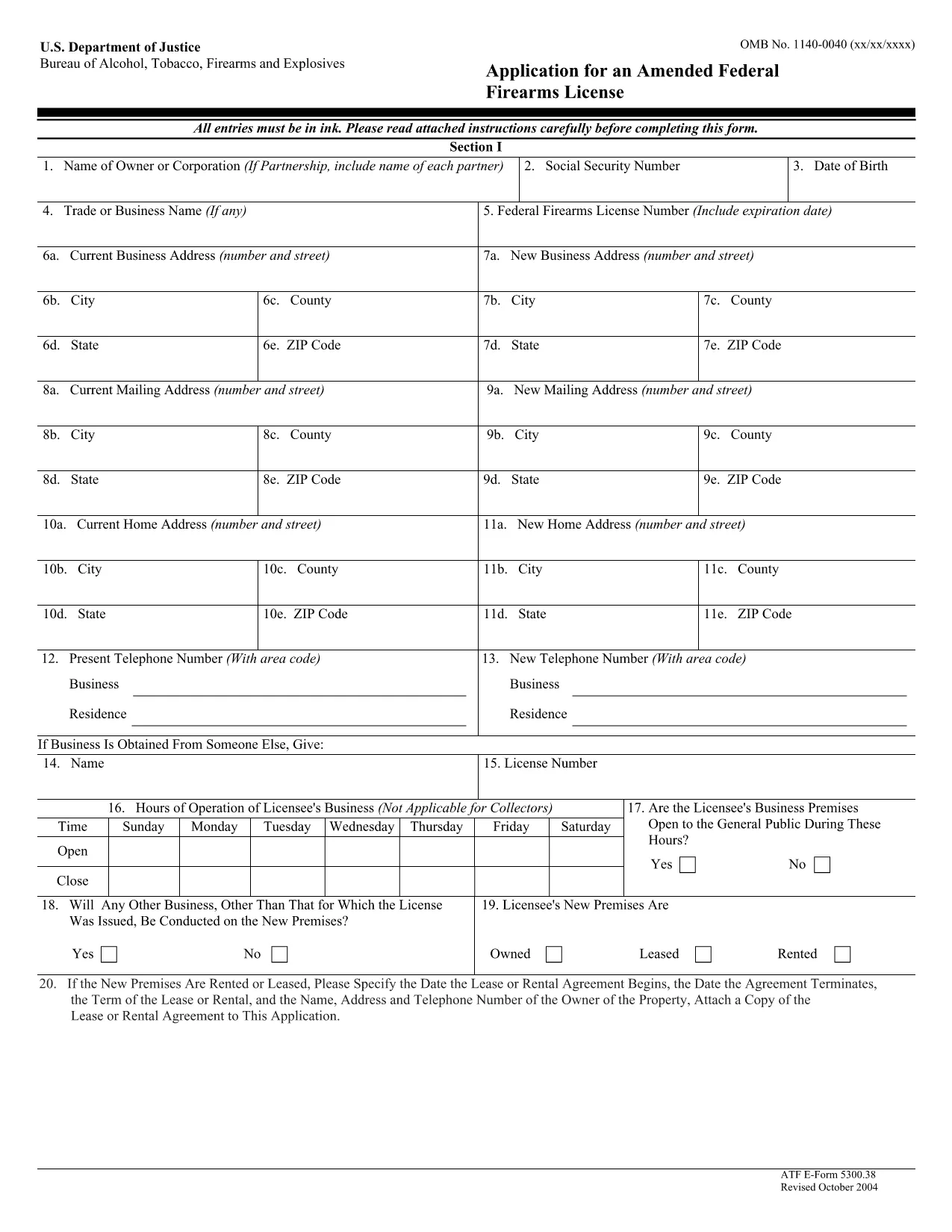
ATF Form 5300.38 – Amended Federal Firearms License Application

  1. Language English
  2. Country USA
  3. Department Bereau of Alcohol, Tobacco, Firearms and Explosives
  4. Sector Firearms
Fill out this form
ATF Form 5300.38 – Amended Federal Firearms License Application

The ATF Form 5300.38 is the official application used to request an amendment to an existing Federal Firearms License (FFL). Whether you need to add a new class of firearms, change your business address, or update other license details, this form is required by the Bureau of Alcohol, Tobacco, Firearms and Explosives (ATF).

Formize.com offers a 100% fillable, searchable PDF version of the ATF Form 5300.38. You can either download the PDF to complete it offline or use our integrated online PDF filler to fill it out instantly in your browser—no extra software needed.

What is ATF Form 5300.38?

This form is titled “Application for an Amended Federal Firearms License” and is governed by 18 U.S.C. Chapter 44. It is used by existing FFL holders to request any change to their license that does not require a completely new application.

How to Fill Out the Form Online

Follow the simple steps below to complete the form securely with Formize’s PDF Filler:

  • Click the “Fill out this form” button on this page.
  • Wait a few seconds while the Formize PDF Filler loads the fillable ATF Form 5300.38.
  • Enter your information directly into each field. The filler validates dates, phone numbers, and required fields in real time.
  • Review the completed form, sign electronically if required, and click “Download” or “Print”.
  • Mail the signed form to the ATF Federal Firearms Licensing Center as instructed.

Common Mistakes to Avoid

Even a small error can delay processing. Keep these tips in mind:

  • Incorrect ATF Number: Double‑check your current FFL number.
  • Missing Signatures: All required signatures must be original or an accepted electronic signature.
  • Out‑of‑Date Addresses: Use the exact mailing address listed on your current license.
  • Incomplete Attachments: If you’re adding a new class, include the appropriate supplemental pages.

Where to Submit Your Application

After completing the form, mail it to:

Chief, Federal Firearms Licensing Center
2600 Century Parkway NE
Atlanta, GA 30345
United States

Use certified mail or a reputable courier to ensure delivery tracking.

Download the Official PDF

If you prefer to fill out the form offline, click the download button below to get the official ATF Form 5300.38 PDF directly from the government source.

Download ATF Form 5300.38 PDF

FAQ
  • Is the ATF Form 5300.38 available as a fillable PDF?

    Yes. Formize provides a fully fillable PDF version that you can complete online or download for offline use.

  • Do I need a digital signature for this form?

    The ATF accepts electronic signatures for most sections, but the final signature line often requires a wet ink signature. Check the instructions on the form.

  • How long does it take for the ATF to process an amendment?

    Processing times vary, but most amended license requests are reviewed within 4‑6 weeks after receipt.

  • Can I submit the form electronically?

    The ATF still requires a hard‑copy submission by mail. You can, however, fill out the form electronically and print it for mailing.

  • What should I do if I make a mistake after printing?

    Cross out the error with a single line, initial the change, and complete the rest of the form. For major errors, it’s best to start a new copy.

  • Is there a fee for filing an amendment?

    Generally, there is no additional fee for amending an existing FFL unless the amendment adds a new class of firearms, which may incur a fee.

  • Where can I find the official ATF instructions for Form 5300.38?

    The official instruction sheet is included as the first page of the PDF linked above or can be accessed on the ATF website.

  • Do I need to attach any supporting documents?

    Depending on the amendment, you may need to attach a copy of your current license, a new business location map, or other relevant documentation.

HOW TO

How to fill out ATF Form 5300.38 for free, online in 5 easy steps:

  1. 1
    Click the Fill‑out Button
    Press the “Fill out this form” button on this page to launch the Formize PDF Filler.
  2. 2
    Wait for the Filler to Load
    The fillable ATF Form 5300.38 will appear in your browser within a few seconds.
  3. 3
    Enter Your Information
    Complete each field. The tool validates entries and highlights required sections.
  4. 4
    Review and Sign
    Check the completed form for accuracy, add an electronic signature if allowed, and save.
  5. 5
    Download or Print
    Download the finished PDF or print it to mail to the ATF Federal Firearms Licensing Center.
Formize PDF Filler app
ABOUT

Bereau of Alcohol, Tobacco, Firearms and Explosives (ATF) Forms

ATF Form 5300.38 is one of the official forms that are used by the ATF, a federal law enforcement agency within the United States Department of Justice. The ATF is responsible for enforcing federal laws and regulations related to alcohol, tobacco, firearms, and explosives. These forms are used for various purposes, including the registration, licensing, and regulation of businesses and individuals involved in these industries. Here are some examples of ATF forms:

ATF Form 4473: This form is used for the background check process when a person purchases a firearm from a federally licensed firearms dealer. It collects information about the purchaser's identity, background, and eligibility to possess firearms.

ATF Form 1: This form is used to apply for the making and registration of a firearm. It is typically used for individuals who want to manufacture a firearm for personal use or convert an existing firearm into a different configuration.

ATF Form 4: This form is used for the transfer and registration of a firearm from one individual or entity to another. It is commonly used in the process of purchasing a firearm from a private party or transferring a firearm to a trust or corporation.

ATF Form 6: This form is used for the importation of firearms, ammunition, and certain other items regulated by the ATF. It is required for individuals or businesses who want to import such items into the United States.

ATF Form 7: This form is used for the application and renewal of a federal firearms license (FFL). It is required for individuals or businesses engaged in the business of manufacturing, dealing, or importing firearms.

ATF Form 5320.20: This form is used for the notification and approval of the transport of firearms or destructive devices across state lines.

ATF Form 5400.13: This form is used for the registration and reporting of explosive materials and devices.

These are just a few examples of the ATF forms used for various purposes related to the regulation and enforcement of federal laws governing alcohol, tobacco, firearms, and explosives. The specific forms required depend on the particular activity or transaction being conducted and the regulations that apply. It's important to consult the official website of the Bureau of Alcohol, Tobacco, Firearms and Explosives (www.atf.gov) or seek professional guidance for accurate and up-to-date information regarding the specific ATF forms relevant to your situation.

FEATURES

PDF Filler

The easiest way to fill ATF Form 5300.38 online

  • Quickly fill out ATF Form 5300.38
    Looking for a way to quickly fill ATF Form 5300.38 online? With our online free PDF form filler, you’ll know how to how to edit and fill this pdf document in less than a minute.
  • Easy to use online PDF editor
    Fed up with printing out PDF files so you can edit them, before rescanning and sending them back? Edit PDF documents for free online. Use our online pdf editor to save time and paper.
  • Great tools, all platforms
    Wondering how to fill in ATF Form 5300.38 on a Mac, or maybe how to use a PDF filler free? Our online PDF tools work on all platforms.
  • Secure file storage
    Completed "ATF Form 5300.38" files are stored in a secured database managed by Amazon Cloud hosting. You can delete your files from our system anytime. In any case, these files are automatically deleted after 24 hours.
  • Chat with ATF Form 5300.38
    Chat with "ATF Form 5300.38" on Chatize that is a free PDF reader assistant. Ask questions and get answers from "ATF Form 5300.38". Just click on Chat With Document button above.

Delete filling session

Delete the selected filling session? In this case, your progress in completing the form will be lost.

Delete editing session

Delete the selected editing session? In this case, your progress in creating and editing the form will be lost.