
Select language

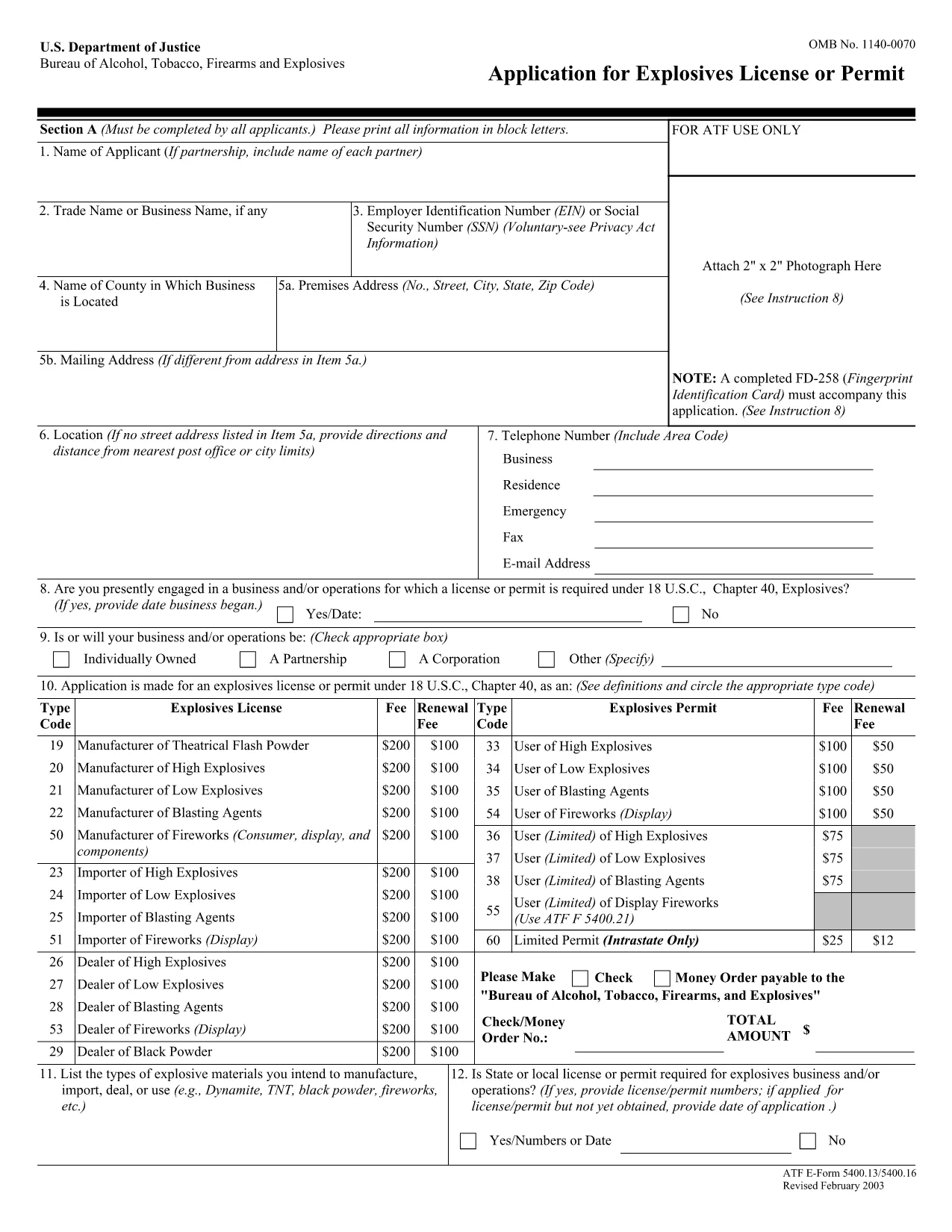
ATF Form 5400.13/5400.16 – Responsible Person Questionnaire

  1. Language English
  2. Country USA
  3. Department Bereau of Alcohol, Tobacco, Firearms and Explosives
  4. Sector Explosives
Fill out this form
ATF Form 5400.13/5400.16 – Responsible Person Questionnaire

The ATF Form 5400.13 (Responsible Person Questionnaire) and its companion Form 5400.16 are required for anyone applying for an explosives license or permit. These forms collect detailed information about each responsible person associated with the business, ensuring compliance with the Bureau of Alcohol, Tobacco, Firearms and Explosives (ATF) regulations.

What Is ATF Form 5400.13/5400.16?

Form 5400.13 gathers personal, business, and background data for each responsible person, while Form 5400.16 provides additional certification and signature fields. Together, they form the core of the ATF’s Responsible Person Questionnaire, a mandatory part of every explosives license or permit application.

How to Complete the Form Online with Formize

  • Step 1: Click the "Fill out this form" button on this page.
  • Step 2: Wait a few seconds while the Formize PDF Filler app loads the fillable PDF.
  • Step 3: Enter the requested information in each field. The interface saves your progress automatically.
  • Step 4: When all sections are complete, download the finished PDF or submit it directly to the ATF portal.

Common Mistakes & Tips for a Successful Submission

Don’t leave any required fields blank. The ATF will reject applications with missing data. Use the "Add another responsible person" button if you have more than one individual to report.

Use legal names only. Include maiden names, previous married names, and any aliases exactly as they appear on official documents.

Double‑check dates. Ensure birth dates, licensing dates, and expiration dates follow the MM/DD/YYYY format.

Where to Send the Completed Form

After you download the completed PDF, mail or fax it to the ATF National Services Center, Federal Explosives Licensing Center, P.O. Box 6200‑18, Portland, OR 97228‑6200. Refer to the ATF instructions for any additional submission requirements.

Need a printable version? Use the download link below to get the original PDF.

FAQ
  • Who must complete ATF Form 5400.13/5400.16?

    Every individual who will act as a responsible person for an explosives business – owners, partners, officers, and key employees – must complete the questionnaire.

  • Can I submit a paper copy instead of the fillable PDF?

    Yes, a printed version is accepted, but using the fillable PDF reduces errors and speeds up processing.

  • What if I have more than three responsible persons?

    Use the "Add another responsible person" button in the online filler, or attach additional sheets if you print the form.

  • How long is the form valid after I submit it?

    The information is valid for the duration of the license or permit. Any changes (e.g., new responsible person) must be reported to the ATF promptly.

  • Do I need a digital signature?

    A typed name in the signature field is acceptable for the online version. For paper submissions, sign with a pen.

  • Is there a filing fee associated with this questionnaire?

    The questionnaire itself has no fee, but it is part of the overall explosives license application, which may have associated fees.

  • What should I do if I make a mistake after saving?

    Open the saved PDF in the Formize filler again, correct the error, and re‑download the updated file.

  • Where can I find the official ATF instructions?

    The ATF publishes detailed guidance on its website under the Explosives Licensing section; a link is included on the form’s cover page.

HOW TO

How to fill out ATF Form 5400.13 for free, online in 4 easy steps:

  1. 1
    Click the Fill‑out Button
    Press the "Fill out this form" button on the page to launch the Formize PDF Filler.
  2. 2
    Wait for the Filler to Load
    A few seconds later the fillable PDF appears in the browser. No download or extra software is needed.
  3. 3
    Enter All Required Information
    Complete each field for every responsible person. The app auto‑saves as you type.
  4. 4
    Download or Submit
    When finished, click "Download PDF" to save a copy or follow ATF instructions to submit the form.
Formize PDF Filler app
ABOUT

Bereau of Alcohol, Tobacco, Firearms and Explosives (ATF) Forms

ATF Form 5400.13 is one of the official forms that are used by the ATF, a federal law enforcement agency within the United States Department of Justice. The ATF is responsible for enforcing federal laws and regulations related to alcohol, tobacco, firearms, and explosives. These forms are used for various purposes, including the registration, licensing, and regulation of businesses and individuals involved in these industries. Here are some examples of ATF forms:

ATF Form 4473: This form is used for the background check process when a person purchases a firearm from a federally licensed firearms dealer. It collects information about the purchaser's identity, background, and eligibility to possess firearms.

ATF Form 1: This form is used to apply for the making and registration of a firearm. It is typically used for individuals who want to manufacture a firearm for personal use or convert an existing firearm into a different configuration.

ATF Form 4: This form is used for the transfer and registration of a firearm from one individual or entity to another. It is commonly used in the process of purchasing a firearm from a private party or transferring a firearm to a trust or corporation.

ATF Form 6: This form is used for the importation of firearms, ammunition, and certain other items regulated by the ATF. It is required for individuals or businesses who want to import such items into the United States.

ATF Form 7: This form is used for the application and renewal of a federal firearms license (FFL). It is required for individuals or businesses engaged in the business of manufacturing, dealing, or importing firearms.

ATF Form 5320.20: This form is used for the notification and approval of the transport of firearms or destructive devices across state lines.

ATF Form 5400.13: This form is used for the registration and reporting of explosive materials and devices.

These are just a few examples of the ATF forms used for various purposes related to the regulation and enforcement of federal laws governing alcohol, tobacco, firearms, and explosives. The specific forms required depend on the particular activity or transaction being conducted and the regulations that apply. It's important to consult the official website of the Bureau of Alcohol, Tobacco, Firearms and Explosives (www.atf.gov) or seek professional guidance for accurate and up-to-date information regarding the specific ATF forms relevant to your situation.

FEATURES

PDF Filler

The easiest way to fill ATF Form 5400.13 online

  • Quickly fill out ATF Form 5400.13
    Looking for a way to quickly fill ATF Form 5400.13 online? With our online free PDF form filler, you’ll know how to how to edit and fill this pdf document in less than a minute.
  • Easy to use online PDF editor
    Fed up with printing out PDF files so you can edit them, before rescanning and sending them back? Edit PDF documents for free online. Use our online pdf editor to save time and paper.
  • Great tools, all platforms
    Wondering how to fill in ATF Form 5400.13 on a Mac, or maybe how to use a PDF filler free? Our online PDF tools work on all platforms.
  • Secure file storage
    Completed "ATF Form 5400.13" files are stored in a secured database managed by Amazon Cloud hosting. You can delete your files from our system anytime. In any case, these files are automatically deleted after 24 hours.
  • Chat with ATF Form 5400.13
    Chat with "ATF Form 5400.13" on Chatize that is a free PDF reader assistant. Ask questions and get answers from "ATF Form 5400.13". Just click on Chat With Document button above.

Delete filling session

Delete the selected filling session? In this case, your progress in completing the form will be lost.

Delete editing session

Delete the selected editing session? In this case, your progress in creating and editing the form will be lost.