Select language

Reg 116 Report & Consent Form – Fillable PDF

  1. Language English
  2. Country Australia
  3. Department City of Melbourne
  4. Activity Building Regulations
Fill out this form
Reg 116 Report & Consent Form – Fillable PDF

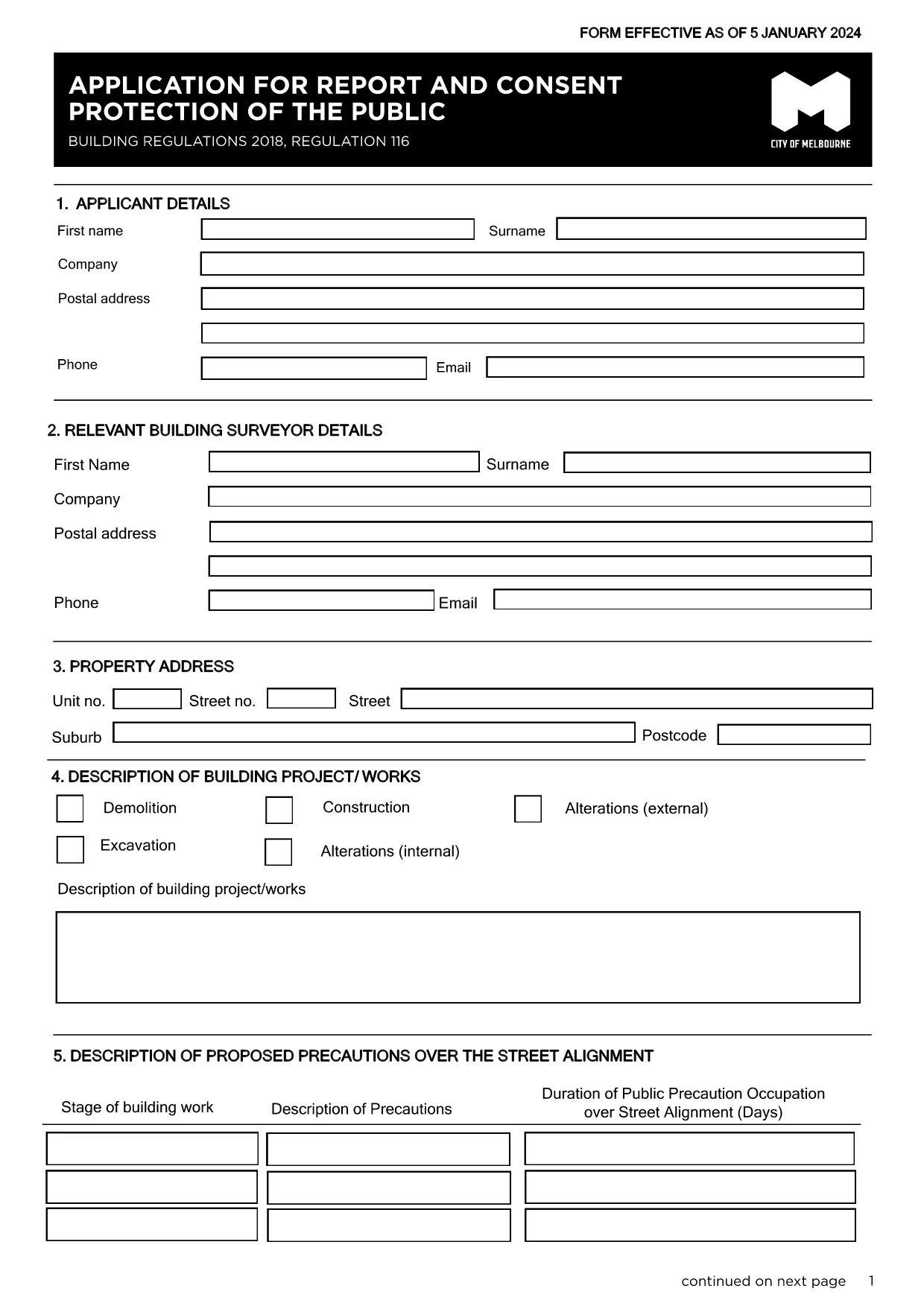
The Regulation 116 Report and Consent is required for any construction or demolition work that could affect public safety in the City of Melbourne. This fillable PDF lets you provide all necessary details quickly, securely, and in compliance with the Building Act 1993.

What Is the Reg 116 Report & Consent?

Reg 116 is a specific provision of the Building Regulations 2018 that mandates a formal report and consent before starting public‑protection measures such as hoardings, scaffolding, gantries, or exclusion zones. The form captures project details, risk assessments, and proposed safety measures.

When Do You Need This Form?

  • Any new construction, alteration, or demolition that impacts public spaces.
  • When a Construction Management Plan (CMP) is required.
  • Before installing hoardings, scaffolding, or temporary structures near footpaths or roads.

How to Complete the Form Online with Formize

Instead of downloading the PDF and editing it in a separate program, simply click the "Fill out this form" button on this page. The Formize PDF Filler app will load automatically, allowing you to:

  1. Enter text directly into each field.
  2. Upload supporting drawings or risk‑assessment documents.
  3. Save a draft and return later if needed.
  4. Submit the completed form securely to the City of Melbourne.

Common Mistakes to Avoid

  • Leaving required fields blank – the system will highlight missing information before you can submit.
  • Using an outdated version – always use the latest PDF linked below.
  • Submitting without a signature – you can add a digital signature in Formize or print, sign, and scan.

Where to Submit the Completed Form

After you finish, the Formize platform routes the file to the City of Melbourne’s Building Department. You will receive a confirmation email with a reference number. If you prefer a hard copy, you can print the PDF and deliver it to:

Building Department
City of Melbourne
Administration Building, 120 Swanston St
Melbourne VIC 3000

For any questions, refer to the FAQ section below.

FAQ
  • What is Regulation 116?

    Regulation 116 requires a Report and Consent for any work that could affect public safety, such as hoardings, scaffolding, or temporary structures.

  • Do I need a digital signature?

    A digital signature is accepted when using Formize. If you prefer a handwritten signature, print, sign, and scan the completed PDF before uploading.

  • Can I save a draft and finish later?

    Yes. Formize lets you save your progress and return to the form at any time using the same browser session or by logging into your account.

  • How long does the approval take?

    The City of Melbourne typically reviews Reg 116 submissions within 5‑10 business days, depending on project complexity.

  • Is there a fee for filing Reg 116?

    Yes. As of the latest schedule, the fee for a public‑protection consent is $334.50. Check the City’s fee schedule for updates.

  • What if I submit the wrong version of the form?

    The system will reject outdated versions. Always use the latest PDF linked on this page to avoid delays.

  • Can I submit the form by email?

    While you can email a completed PDF, using the Formize online submission ensures the file is logged and tracked automatically.

  • What supporting documents are required?

    Attach a site plan, risk assessment, and any relevant engineering drawings. The form’s attachment section lists all required files.

  • Who can I contact for help?

    For technical assistance with the Formize filler, refer to the help icon on the form. For regulatory questions, contact the City of Melbourne Building Department at building@melbourne.vic.gov.au.

HOW TO

How to fill out Reg 116 report and consent for free, online in 5 easy steps:

  1. 1
    Open the Fillable Form
    Click the "Fill out this form" button on the page. The Formize PDF Filler will load in your browser.
  2. 2
    Enter Your Details
    Complete each field – project description, site address, risk assessments, and proposed safety measures.
  3. 3
    Add Attachments
    Upload any required drawings, risk‑assessment PDFs, or supporting documents using the attachment icon.
  4. 4
    Review and Sign
    Use the built‑in digital signature tool or print, sign, and scan the form before final submission.
  5. 5
    Submit Securely
    Press the Submit button. You’ll receive an email confirmation with a reference number for tracking.
Formize PDF Filler app
ABOUT

Reg 116 report and consent template

With the traditional set of features for viewing and filling out a PDF document, combined with the benefits of a web application and responsive layout, you can complete Reg 116 report and consent in minutes.

FEATURES

PDF Filler

The easiest way to fill Reg 116 report and consent online

  • Quickly fill out Reg 116 report and consent
    Looking for a way to quickly fill Reg 116 report and consent online? With our online free PDF form filler, you’ll know how to how to edit and fill this pdf document in less than a minute.
  • Easy to use online PDF editor
    Fed up with printing out PDF files so you can edit them, before rescanning and sending them back? Edit PDF documents for free online. Use our online pdf editor to save time and paper.
  • Great tools, all platforms
    Wondering how to fill in Reg 116 report and consent on a Mac, or maybe how to use a PDF filler free? Our online PDF tools work on all platforms.
  • Secure file storage
    Completed "Reg 116 report and consent" files are stored in a secured database managed by Amazon Cloud hosting. You can delete your files from our system anytime. In any case, these files are automatically deleted after 24 hours.
  • Chat with Reg 116 report and consent
    Chat with "Reg 116 report and consent" on Chatize that is a free PDF reader assistant. Ask questions and get answers from "Reg 116 report and consent". Just click on Chat With Document button above.

Delete filling session

Delete the selected filling session? In this case, your progress in completing the form will be lost.

Delete editing session

Delete the selected editing session? In this case, your progress in creating and editing the form will be lost.