Select language

Australian Citizenship Application Form – Fillable PDF Online

  1. Country Australia
  2. Language English
  3. Activity Immigration
  4. Department Department of Home Affairs and Justice
Fill out this form
Australian Citizenship Application Form – Fillable PDF Online

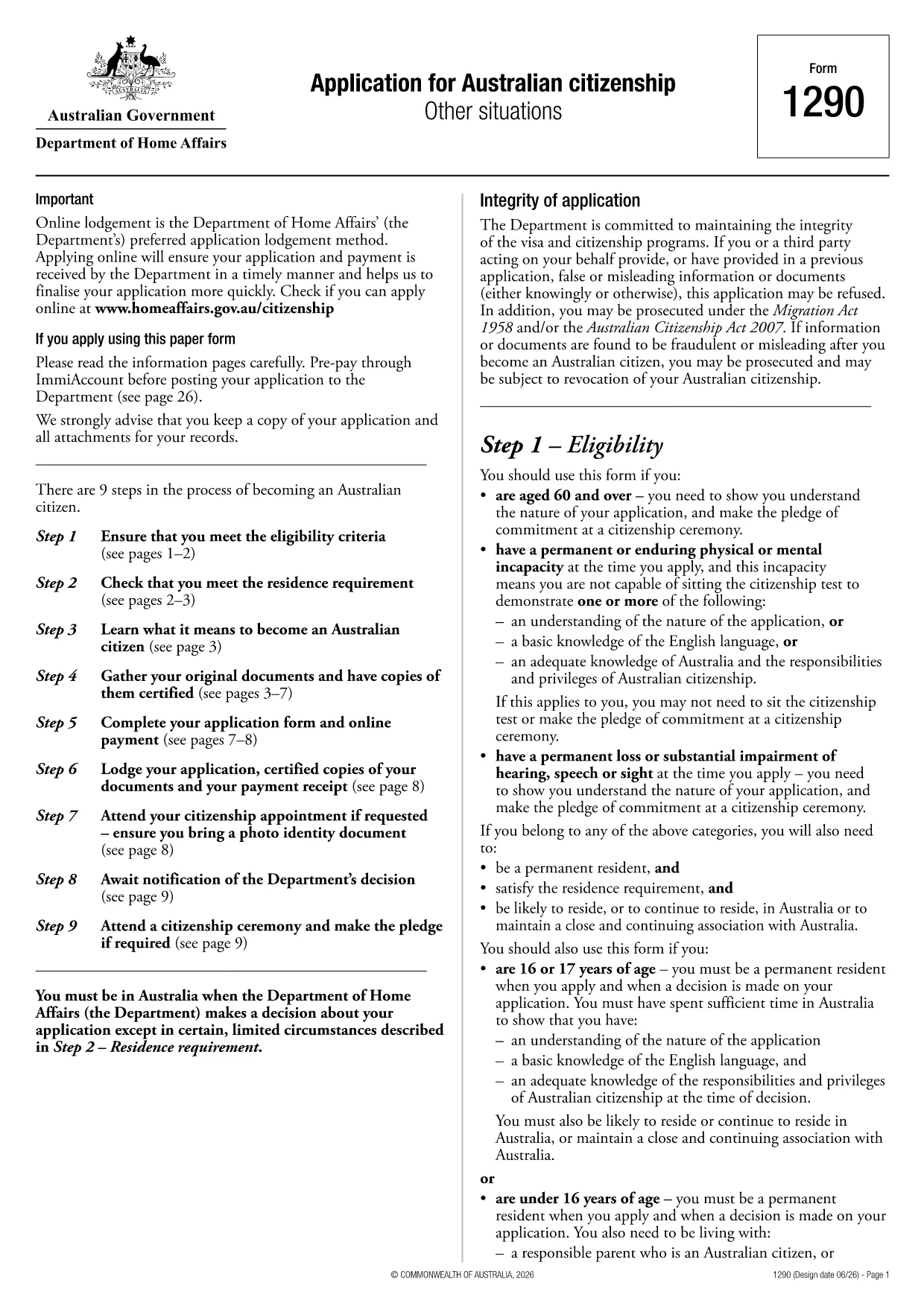
Applying for Australian citizenship is a major step, and the first requirement is submitting the correct application form. The Application for Australian citizenship – Other situations (Form 1290) is the official PDF provided by the Department of Home Affairs. With Formize you can open the PDF directly in your browser, fill every field, and save a completed copy without printing.

What is the Australian Citizenship Application Form?

Form 1290 is used when you apply under special circumstances such as:

  • Applying after a previous citizenship application was refused
  • Applying for a child born overseas to Australian parents
  • Other exceptional cases defined by the Department of Home Affairs

The form is a fillable PDF, meaning each field can be typed into, checked, or selected directly on the screen.

How to Fill the Form Using Formize

Instead of downloading the PDF and opening a separate editor, simply click the "Fill out this form" button on this page. The Formize PDF Filler will load in seconds, letting you complete the application online.

Key Sections & Required Information

Make sure you have the following documents handy before you start:

  • Proof of identity (passport, birth certificate)
  • Evidence of residency in Australia
  • Previous citizenship or visa details
  • Supporting documents for the specific "other situation" you are applying under

Each section of the form is clearly labelled. Fill in personal details, residency history, and the reason for your special application. Use block letters as required.

Common Mistakes & Tips for a Successful Submission

  • Do not leave any mandatory field blank. The PDF will highlight missing information when you try to save.
  • Use black or blue ink equivalents when printing. If you later need a hard copy, the digital entry will translate cleanly.
  • Double‑check dates and passport numbers. A typo can delay processing.
  • Save a copy for your records. After completing the form, download the filled PDF and store it securely.

Once you have completed the form, you can either download it for printing and mailing to the Department of Home Affairs or submit it electronically if the department accepts digital submissions.

FAQ
  • Do I need to print the form after filling it online?

    If the Department of Home Affairs requires a paper copy, print the completed PDF using black or blue ink. Otherwise, you can submit the digital file directly if electronic submission is accepted.

  • Can I save my progress and return later?

    Yes. The Formize PDF Filler lets you save the partially completed form to your device or cloud storage, then reopen it later to finish.

  • What documents should I have ready before starting?

    You’ll need proof of identity, residence history, any previous citizenship or visa details, and supporting evidence for the special situation you’re applying under.

  • Is there a fee for using Formize to fill the form?

    Formize’s basic PDF filling feature is free. Any government filing fees are paid directly to the Department of Home Affairs, not through Formize.

  • How do I know if my application was received?

    After mailing the printed form, you’ll receive a receipt from the Department. If you submit electronically, you’ll get a confirmation email with a reference number.

  • Can I edit the form after I’ve downloaded it?

    Yes, as long as the PDF is not locked. Open the downloaded file again in Formize to make any needed changes before final submission.

HOW TO

How to fill out Australian citizenship application form for free, online in 5 easy steps:

  1. 1
    Open the Fillable Form
    Click the "Fill out this form" button on the page. The Formize PDF Filler app will load instantly in your browser.
  2. 2
    Enter Your Information
    Type directly into each field, select dates from the calendar picker, and upload any required supporting documents.
  3. 3
    Review & Validate
    Use the built‑in validation to ensure no required fields are missing. Correct any highlighted errors.
  4. 4
    Save or Download
    When completed, click "Save" to store the filled PDF in your cloud storage or download it to your device for printing.
  5. 5
    Submit to the Department
    Print and mail the form with supporting documents, or follow any electronic submission instructions provided by the Department of Home Affairs.
Formize PDF Filler app
ABOUT

Australian citizenship application form template

With the traditional set of features for viewing and filling out a PDF document, combined with the benefits of a web application and responsive layout, you can complete Australian citizenship application form in minutes.

FEATURES

PDF Filler

The easiest way to fill Australian citizenship application form online

  • Quickly fill out Australian citizenship application form
    Looking for a way to quickly fill Australian citizenship application form online? With our online free PDF form filler, you’ll know how to how to edit and fill this pdf document in less than a minute.
  • Easy to use online PDF editor
    Fed up with printing out PDF files so you can edit them, before rescanning and sending them back? Edit PDF documents for free online. Use our online pdf editor to save time and paper.
  • Great tools, all platforms
    Wondering how to fill in Australian citizenship application form on a Mac, or maybe how to use a PDF filler free? Our online PDF tools work on all platforms.
  • Secure file storage
    Completed "Australian citizenship application form" files are stored in a secured database managed by Amazon Cloud hosting. You can delete your files from our system anytime. In any case, these files are automatically deleted after 24 hours.
  • Chat with Australian citizenship application form
    Chat with "Australian citizenship application form" on Chatize that is a free PDF reader assistant. Ask questions and get answers from "Australian citizenship application form". Just click on Chat With Document button above.

Delete filling session

Delete the selected filling session? In this case, your progress in completing the form will be lost.

Delete editing session

Delete the selected editing session? In this case, your progress in creating and editing the form will be lost.