Select language

Form 1467 Australia

  1. Language English
Fill out this form
Form 1467 Australia

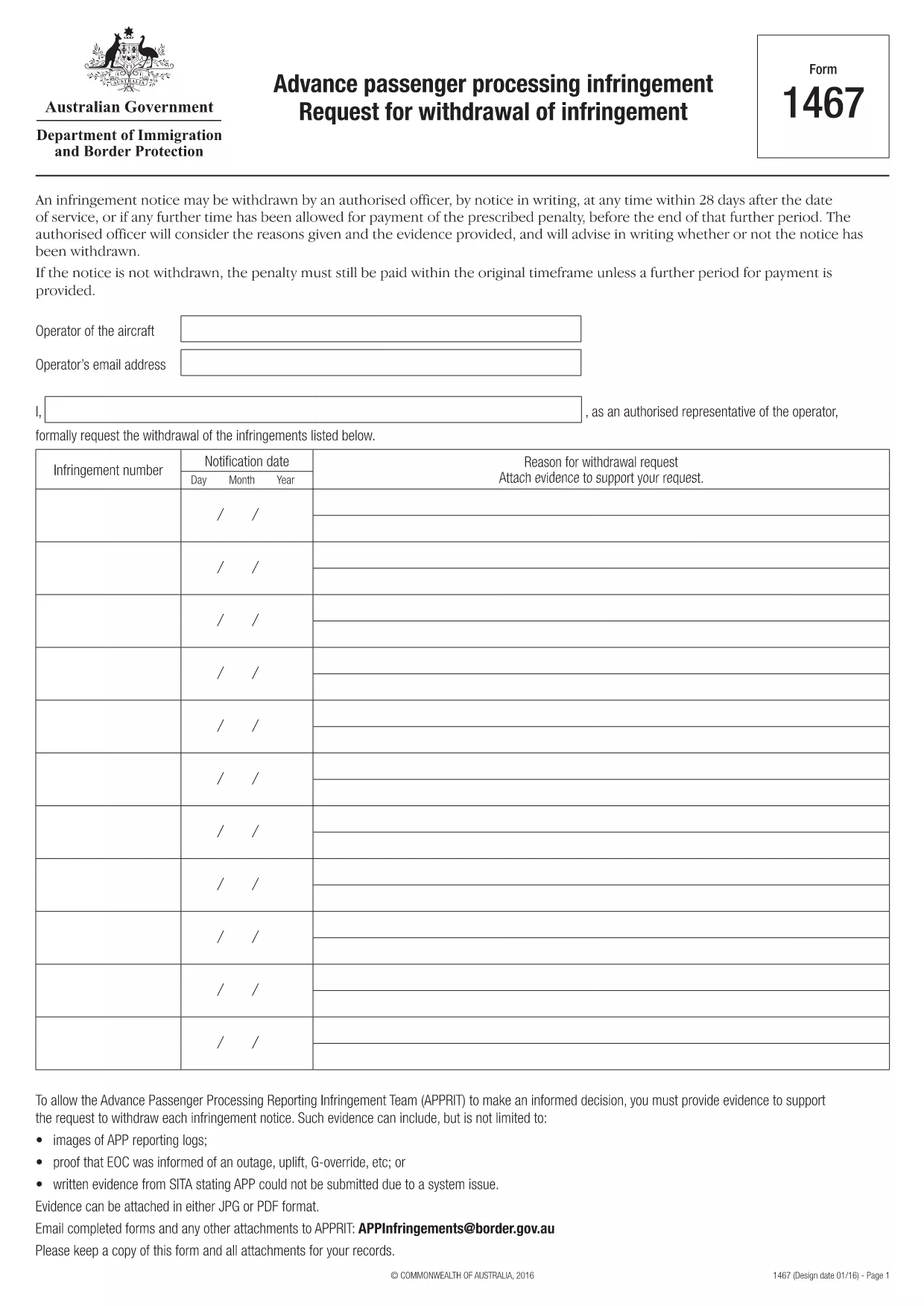
1467 - Advance passenger processing infringement Request for withdrawal of infringement

This document outlines the process for requesting withdrawal of infringement notices issued by the Commonwealth of Australia for non-compliance with Advance Passenger Processing (APP) requirements. The notice can be withdrawn within 28 days after service, or if a further period for payment has been granted, by providing reasons and evidence to the Advance Passenger Processing Reporting Infringement Team (APPRIT). The document explains what types of evidence are acceptable, such as APP reporting logs, proof of notification of outages or uplifts, and written statements from SITA regarding system issues. The request must be made in writing and emailed to APPRIT along with any attachments.

Search tags

FAQ
  • How can Form 1467 be submitted to the APPRIT team?

    Form 1467 and any attachments can be submitted to the APPRIT team by email at [APPInfringements@border.gov.au](mailto:APPInfringements@border.gov.au).

  • What are the reasons that an authorized officer will consider when requesting to withdraw an infringement notice?

    An authorized officer will consider the reasons given and the evidence provided when considering a request to withdraw an infringement notice.

  • What is the purpose of Form 1467?

    Form 1467 is used to request the withdrawal of an infringement notice by an authorized officer within 28 days after the date of service or if any further time has been allowed for payment of the prescribed penalty.

  • What format should evidence be submitted in?

    Evidence should be attached in either JPG or PDF format.

  • What should be done with a copy of Form 1467 and attachments?

    A copy of the form and all attachments should be kept for records.

  • Who can withdraw an infringement notice?

    An authorized officer can withdraw an infringement notice at any time within 28 days after the date of service or if any further time has been allowed for payment of the prescribed penalty.

HOW TO

How to fill out Form 1467 for free, online in 3 easy steps:

  1. 1
    Open form template in editor
    Click on the “Get this template” button.
  2. 2
    Fill out Form 1467
    Wait a moment and you will be redirected to our online PDF Filler app.
  3. 3
    Download file
    Download your completed Form 1467 for free. You can also save it to a cloud storage.
Formize PDF Filler app
ABOUT

Form 1467 template

With the traditional set of features for viewing and filling out a PDF document, combined with the benefits of a web application and responsive layout, you can complete Form 1467 in minutes.

FEATURES

PDF Filler

The easiest way to fill Form 1467 online

  • Quickly fill out Form 1467
    Looking for a way to quickly fill Form 1467 online? With our online free PDF form filler, you’ll know how to how to edit and fill this pdf document in less than a minute.
  • Easy to use online PDF editor
    Fed up with printing out PDF files so you can edit them, before rescanning and sending them back? Edit PDF documents for free online. Use our online pdf editor to save time and paper.
  • Great tools, all platforms
    Wondering how to fill in Form 1467 on a Mac, or maybe how to use a PDF filler free? Our online PDF tools work on all platforms.
  • Secure file storage
    Completed "Form 1467" files are stored in a secured database managed by Amazon Cloud hosting. You can delete your files from our system anytime. In any case, these files are automatically deleted after 24 hours.
  • Chat with Form 1467
    Chat with "Form 1467" on Chatize that is a free PDF reader assistant. Ask questions and get answers from "Form 1467". Just click on Chat With Document button above.

Delete filling session

Delete the selected filling session? In this case, your progress in completing the form will be lost.

Delete editing session

Delete the selected editing session? In this case, your progress in creating and editing the form will be lost.