Select language

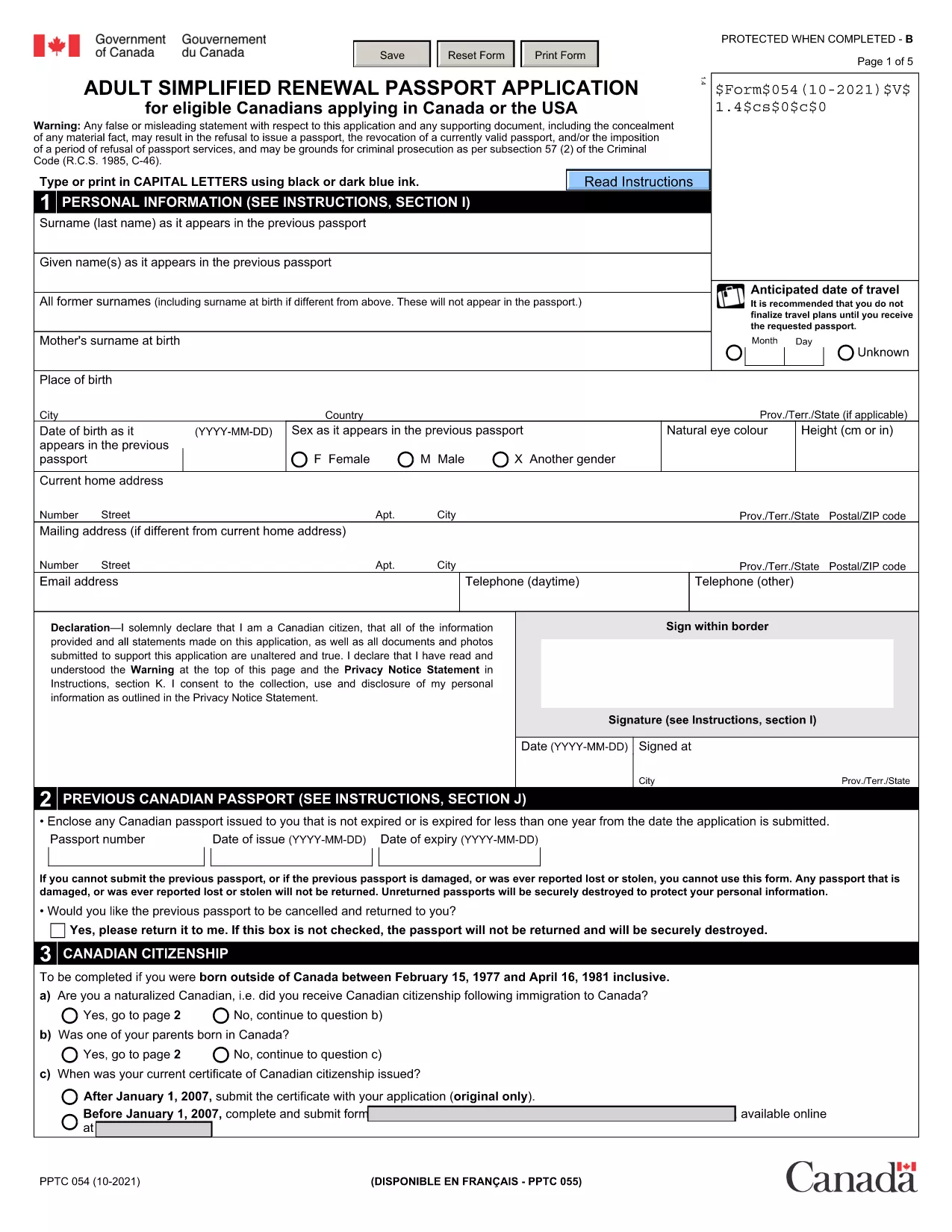
Fillable Canadian Passport Renewal Form (PPTC‑054)

  1. Language English
  2. Country Canada
  3. Department Immigration, Refugees and Citizenship Canada
  4. Activity Passport Renewal
Fill out this form
Fillable Canadian Passport Renewal Form (PPTC‑054)

Need to renew your Canadian passport quickly? The Adult Simplified Renewal Passport Application (form PPTC‑054) is the official, government‑approved document for eligible Canadians. With Formize you can open the fillable PDF directly in your browser, complete it, and download a signed copy—no extra software required.

What Is the PPTC‑054 Renewal Form?

PPTC‑054 is the streamlined renewal form used by Canadian citizens whose passports have expired or are about to expire. It collects personal details, travel history, and a guarantor’s signature, then forwards the information to Immigration, Refugees and Citizenship Canada (IRCC) for processing.

Who Can Use This Simplified Application?

  • Canadian adults (18 years or older) with a previously issued passport.
  • Applicants whose most recent passport is still valid or has expired within the last 12 months.
  • Those who meet the eligibility criteria listed on the form (no name change, no lost passport, etc.).

How to Complete the Form Online with Formize

Follow these three easy steps and you’ll have a completed, printable PDF in minutes:

  1. Click the "Fill out this form" button on this page.
  2. Wait a few seconds while the Formize PDF Filler app loads the fillable version of PPTC‑054.
  3. Enter your information, add a digital signature, and click Download to save the finished form.

Common Mistakes to Avoid

  • Leaving required fields blank – the form will not submit if any mandatory section is empty.
  • Using an invalid guarantor – the guarantor must meet the IRCC criteria (Canadian citizen, 18 + years old, known for at least 2 years).
  • Incorrect passport number format – double‑check the series of letters and numbers on your current passport.

Where to Submit Your Completed Application

After downloading the filled PDF, include it with your passport photos, payment receipt, and any supporting documents, then mail or deliver the package to the nearest Passport Canada Office or a participating Service Canada centre. For detailed mailing addresses, visit the IRCC website.

Ready to start? Click the button below and let Formize handle the heavy lifting.

FAQ
  • Do I need to print the form before filling it out?

    No. With Formize you fill the PDF directly in your browser and download the completed version.

  • Can I use this form if my passport was lost or stolen?

    No. PPTC‑054 is only for standard renewals. Lost or stolen passports require a different application (PPTC 040).

  • How long does the renewal process take after I submit?

    Processing typically takes 10‑20 business days for standard service; express service may be faster for an additional fee.

  • What payment methods are accepted for the passport fee?

    Accepted methods include credit/debit cards, money orders, and certified checks. Check the IRCC website for the most current list.

  • Is the digital signature legally valid?

    Yes. Formize creates a compliant electronic signature that meets Canadian e‑signing standards for passport applications.

  • Can I save my progress and finish later?

    The Formize app allows you to download a partially completed PDF, which you can reopen later to finish.

  • Do I need a guarantor for this renewal?

    A guarantor is required unless you qualify for the “no‑guarantor” option listed on the form (e.g., certain diplomatic applicants).

  • Where can I find passport photos that meet IRCC standards?

    Use a professional photo studio that follows IRCC guidelines, or follow the online photo specifications on the IRCC website.

HOW TO

How to fill out Canadian passport renewal form for free, online in 3 easy steps:

  1. 1
    Click the Fill‑out Button
    Press the “Fill out this form” button on the page to launch the Formize PDF Filler.
  2. 2
    Wait for the Filler to Load
    The fillable version of PPTC‑054 loads in a few seconds—no download required.
  3. 3
    Enter Your Details and Sign
    Complete each field, add your digital signature, then click Download to save the finished PDF.
Formize PDF Filler app
ABOUT

Canadian passport renewal form template

With the traditional set of features for viewing and filling out a PDF document, combined with the benefits of a web application and responsive layout, you can complete Canadian passport renewal form in minutes.

FEATURES

PDF Filler

The easiest way to fill Canadian passport renewal form online

  • Quickly fill out Canadian passport renewal form
    Looking for a way to quickly fill Canadian passport renewal form online? With our online free PDF form filler, you’ll know how to how to edit and fill this pdf document in less than a minute.
  • Easy to use online PDF editor
    Fed up with printing out PDF files so you can edit them, before rescanning and sending them back? Edit PDF documents for free online. Use our online pdf editor to save time and paper.
  • Great tools, all platforms
    Wondering how to fill in Canadian passport renewal form on a Mac, or maybe how to use a PDF filler free? Our online PDF tools work on all platforms.
  • Secure file storage
    Completed "Canadian passport renewal form" files are stored in a secured database managed by Amazon Cloud hosting. You can delete your files from our system anytime. In any case, these files are automatically deleted after 24 hours.
  • Chat with Canadian passport renewal form
    Chat with "Canadian passport renewal form" on Chatize that is a free PDF reader assistant. Ask questions and get answers from "Canadian passport renewal form". Just click on Chat With Document button above.

Delete filling session

Delete the selected filling session? In this case, your progress in completing the form will be lost.

Delete editing session

Delete the selected editing session? In this case, your progress in creating and editing the form will be lost.