
Select language

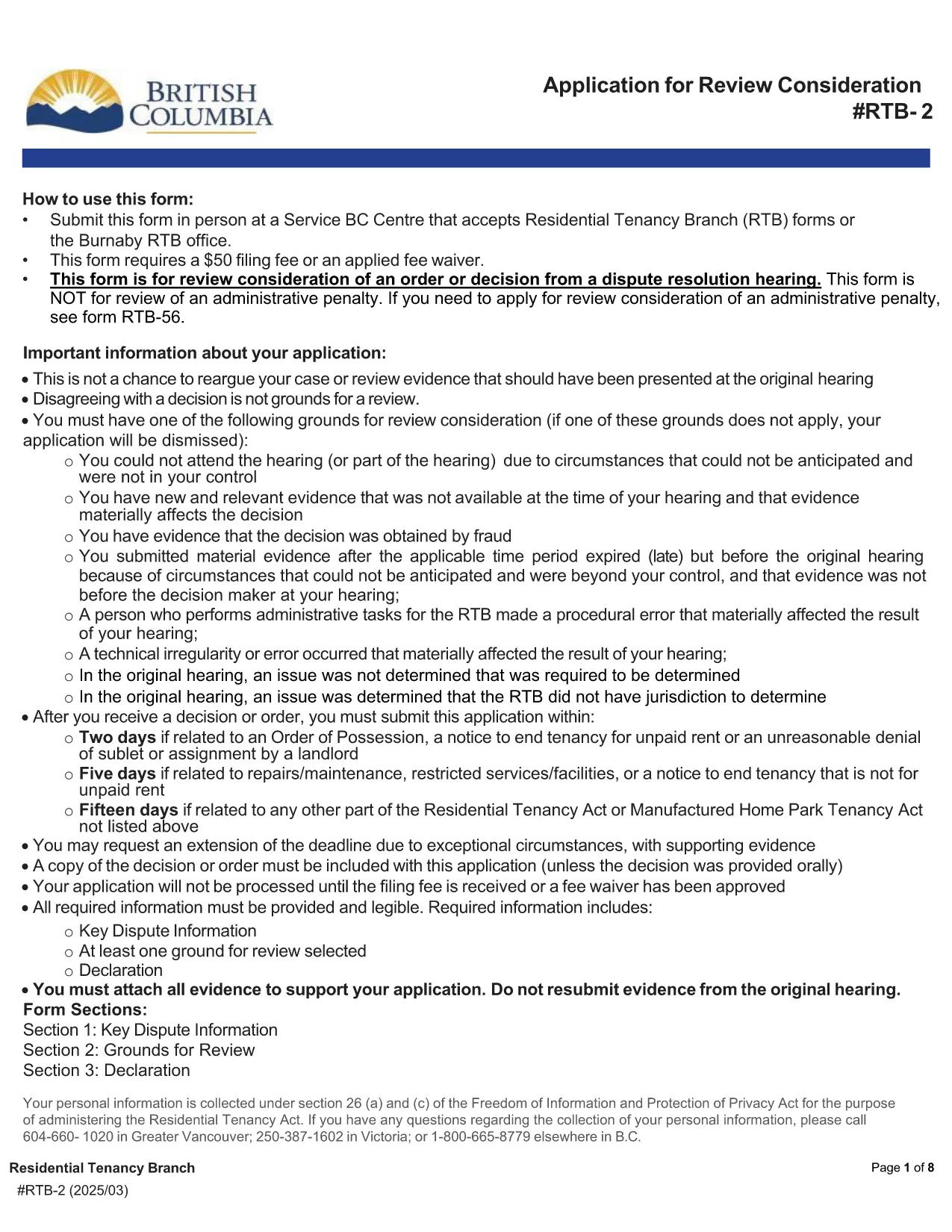
RTB‑2 Review Consideration Form – Fillable PDF for BC Tenancy Disputes

  1. Language English
  2. Country Canada
  3. Activity Tenancy
  4. State British Columbia
Fill out this form
RTB‑2 Review Consideration Form – Fillable PDF for BC Tenancy Disputes

What Is the RTB‑2 Form?

The RTB‑2, or Review Consideration Form, is the official application used in British Columbia to request a review of an order or decision issued after a Residential Tenancy Branch (RTB) dispute resolution hearing. Landlords and tenants use this form when they believe the decision was made in error or when new evidence is available.

How to Complete the RTB‑2 Online

Formize makes the RTB‑2 completely fillable directly in your browser. Follow these simple steps:

  1. Click the "Fill out this form" button on this page.
  2. Wait a few seconds while the Formize PDF Filler app loads the fillable RTB‑2.
  3. Enter all required information – party details, hearing date, reasons for review, and any supporting documents.
  4. Use the built‑in validation to catch missing fields before you submit.
  5. When finished, click Submit to download the completed PDF, then print or email it as required.

Common Mistakes to Avoid

  • Leaving required fields blank: The form will not validate until every mandatory field is filled.
  • Incorrect filing fee amount: The standard fee is $50 unless you qualify for a fee waiver.
  • Submitting the wrong version: Always use the latest PDF (linked below) to ensure compliance with current RTB rules.
  • Missing supporting evidence: Attach any new documents that justify a review request.

Where to Submit the Completed Form

After you download the filled‑out RTB‑2, you can submit it in one of the following ways:

  • In person at any Service BC Centre that accepts RTB forms.
  • By mail to the RTB office listed on the form.
  • Electronically via the RTB’s online portal (if you have an account).

Remember to include the $50 filing fee or a completed fee‑waiver request.

Download the Official PDF

If you prefer to work offline, you can download the official, government‑issued RTB‑2 PDF directly from the link below. The file is fully fillable with Adobe Reader or any modern PDF viewer.

Download RTB‑2 Form (PDF)

FAQ
  • Who can use the RTB‑2 form?

    Both landlords and tenants in British Columbia may use the RTB‑2 to request a review of a dispute resolution decision.

  • Is there a fee to file the RTB‑2?

    Yes, the standard filing fee is $50. A fee waiver can be requested if you meet the eligibility criteria outlined on the form.

  • Can I edit the PDF after I download it?

    Yes, the PDF is fully fillable. You can edit it using Formize online or any PDF editor like Adobe Acrobat Reader.

  • What supporting documents should I attach?

    Attach any new evidence, correspondence, or records that were not considered in the original hearing and that support your request for review.

  • How long do I have to submit the RTB‑2 after the decision?

    You must file the RTB‑2 within 30 days of receiving the original decision, unless an extension is granted by the RTB.

  • Can I submit the form electronically?

    Yes, if you have an RTB online account you can upload the completed PDF directly through the RTB portal.

  • What happens after I submit the RTB‑2?

    The RTB will review your application, may schedule a new hearing, and will issue a written decision on the review request.

HOW TO

How to fill out RTB-2 for free, online in 5 easy steps:

  1. 1
    Click the Fill‑out Button
    Press the "Fill out this form" button on the page to launch the Formize PDF Filler.
  2. 2
    Wait for the Form to Load
    A few seconds later the fillable RTB‑2 PDF will appear in the browser.
  3. 3
    Enter All Required Information
    Complete each field, attach supporting documents, and double‑check the filing fee details.
  4. 4
    Validate and Review
    Use the built‑in validation to ensure no required fields are missing.
  5. 5
    Download or Submit
    When satisfied, click "Submit" to download the completed PDF and follow the submission instructions.
Formize PDF Filler app
ABOUT

Forms for landlords and/or tenants to propose action relating to tenancy agreements.

RTB-2 is the type of residential tenancy agreements used by most private landlords and housing associations.

There are a number of matters on which landlords or tenants must follow certain rules laid down in the regulations. In some cases it may be necessary for them to complete a form, called a ‘prescribed form’, that proposes an action that may affect the other party to the tenancy agreement.

The forms are called prescribed forms because the wording in them has been carefully drafted to ensure that the person completing the form and the person on whom it is served may understand what is being proposed and what they may do in response. Failure to serve the correct form may invalidate the action that is being proposed.

You may not alter the wording in these forms unless a form says you may do so. If you alter the wording, the form may be invalidated. You must also comply with any notice periods set out in the form.

FEATURES

PDF Filler

The easiest way to fill RTB-2 online

  • Quickly fill out RTB-2
    Looking for a way to quickly fill RTB-2 online? With our online free PDF form filler, you’ll know how to how to edit and fill this pdf document in less than a minute.
  • Easy to use online PDF editor
    Fed up with printing out PDF files so you can edit them, before rescanning and sending them back? Edit PDF documents for free online. Use our online pdf editor to save time and paper.
  • Great tools, all platforms
    Wondering how to fill in RTB-2 on a Mac, or maybe how to use a PDF filler free? Our online PDF tools work on all platforms.
  • Secure file storage
    Completed "RTB-2" files are stored in a secured database managed by Amazon Cloud hosting. You can delete your files from our system anytime. In any case, these files are automatically deleted after 24 hours.
  • Chat with RTB-2
    Chat with "RTB-2" on Chatize that is a free PDF reader assistant. Ask questions and get answers from "RTB-2". Just click on Chat With Document button above.

Delete filling session

Delete the selected filling session? In this case, your progress in completing the form will be lost.

Delete editing session

Delete the selected editing session? In this case, your progress in creating and editing the form will be lost.