
Select language

RTB-26 Schedule of Parties – Fillable PDF Form (Canada)

  1. Language English
  2. Country Canada
  3. Activity Tenancy
  4. State British Columbia
Fill out this form
RTB-26 Schedule of Parties – Fillable PDF Form (Canada)

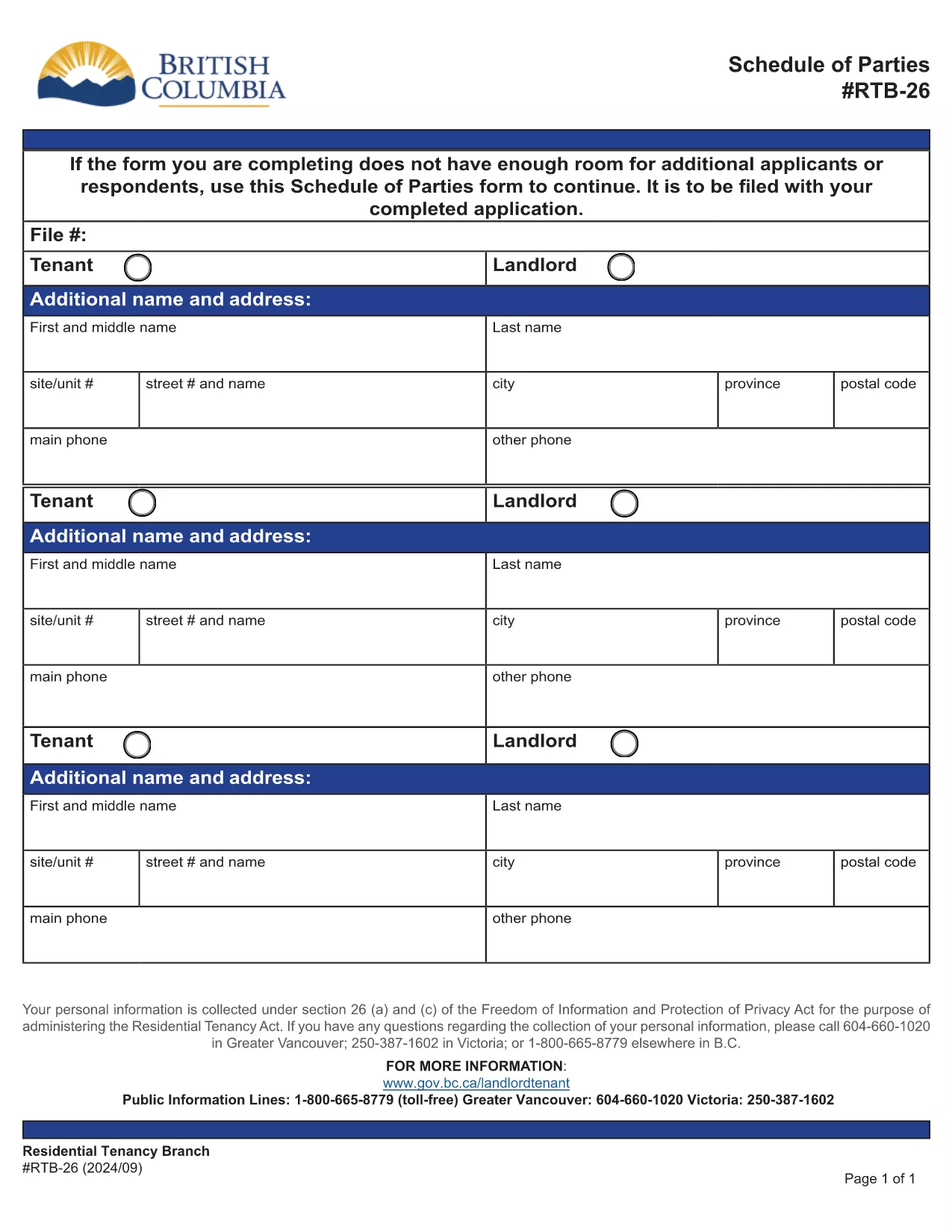
The RTB-26 Schedule of Parties is the official form used under British Columbia's Residential Tenancy Act to list all tenants and landlords involved in a tenancy. Landlords attach this form when there are additional names to add or remove from the original tenancy agreement.

What Is the RTB-26 Schedule of Parties?

RTB‑26 captures the names, contact information, and relationship of each party to the tenancy. It ensures the Residential Tenancy Branch (RTB) has an up‑to‑date record, which is essential for dispute resolution, rent increases, and ending a tenancy.

How to Complete the RTB-26 Form Online

With Formize’s free fillable PDF tool you can complete RTB‑26 directly in your browser—no Adobe Acrobat required. Follow the simple steps below to fill, save, and submit the form.

Common Mistakes to Avoid on RTB-26

  • Leaving fields blank: Every field marked with an asterisk (*) is mandatory.
  • Incorrect dates: Use the exact date format (YYYY‑MM‑DD) as shown in the example.
  • Mismatched signatures: All parties must sign; a missing signature can delay processing.

Why Use Formize’s Fillable PDF Filler?

Formize automatically validates entries, highlights required fields, and lets you download a completed PDF ready for upload to the RTB portal. It saves time, reduces errors, and works on any device.

Ready to get started? Click the “Fill out this form” button below, let the Formize PDF Filler load, and complete the RTB‑26 in minutes.

FAQ
  • Who needs to fill out the RTB‑26 Schedule of Parties?

    Both landlords and tenants must complete RTB‑26 whenever a new person is added to or removed from the tenancy agreement.

  • Can I submit a printed version of RTB‑26?

    Yes, you can print the completed form and mail it, but submitting the digital PDF through the RTB portal is faster and reduces processing time.

  • Is the Formize filler free to use?

    Yes, Formize provides a free, web‑based fillable PDF editor for all British Columbia tenancy forms, including RTB‑26.

  • What should I do if I make a mistake after saving?

    Open the saved PDF again in Formize, correct the error, and re‑save. The filler retains all previously entered data.

  • Do I need Adobe Acrobat to fill RTB‑26?

    No. Formize’s online filler works in any modern browser, eliminating the need for Adobe Acrobat or other PDF editors.

  • How long is the RTB‑26 valid after submission?

    The form remains valid until the tenancy ends or another Schedule of Parties is filed to update the party list.

  • Can I attach additional documents to the RTB‑26 PDF?

    Yes, after completing the form you can merge other supporting PDFs using Formize’s “Add Attachment” feature before downloading.

HOW TO

How to fill out RTB-26 for free, online in 5 easy steps:

  1. 1
    Click the Fill Out Button
    Press the “Fill out this form” button on this page to launch Formize’s PDF filler.
  2. 2
    Wait for the Filler to Load
    The fillable PDF will appear in your browser within a few seconds. No download is required.
  3. 3
    Enter All Required Information
    Complete each highlighted field, double‑check dates and signatures, and use the built‑in validation to avoid errors.
  4. 4
    Review and Save
    When all sections are filled, click “Save” to download a completed copy of the RTB‑26 form.
  5. 5
    Submit to the RTB
    Upload the saved PDF to the British Columbia Residential Tenancy Branch portal or email it as instructed in your tenancy agreement.
Formize PDF Filler app
ABOUT

Forms for landlords and/or tenants to propose action relating to tenancy agreements.

RTB-26 is the type of residential tenancy agreements used by most private landlords and housing associations.

There are a number of matters on which landlords or tenants must follow certain rules laid down in the regulations. In some cases it may be necessary for them to complete a form, called a ‘prescribed form’, that proposes an action that may affect the other party to the tenancy agreement.

The forms are called prescribed forms because the wording in them has been carefully drafted to ensure that the person completing the form and the person on whom it is served may understand what is being proposed and what they may do in response. Failure to serve the correct form may invalidate the action that is being proposed.

You may not alter the wording in these forms unless a form says you may do so. If you alter the wording, the form may be invalidated. You must also comply with any notice periods set out in the form.

FEATURES

PDF Filler

The easiest way to fill RTB-26 online

  • Quickly fill out RTB-26
    Looking for a way to quickly fill RTB-26 online? With our online free PDF form filler, you’ll know how to how to edit and fill this pdf document in less than a minute.
  • Easy to use online PDF editor
    Fed up with printing out PDF files so you can edit them, before rescanning and sending them back? Edit PDF documents for free online. Use our online pdf editor to save time and paper.
  • Great tools, all platforms
    Wondering how to fill in RTB-26 on a Mac, or maybe how to use a PDF filler free? Our online PDF tools work on all platforms.
  • Secure file storage
    Completed "RTB-26" files are stored in a secured database managed by Amazon Cloud hosting. You can delete your files from our system anytime. In any case, these files are automatically deleted after 24 hours.
  • Chat with RTB-26
    Chat with "RTB-26" on Chatize that is a free PDF reader assistant. Ask questions and get answers from "RTB-26". Just click on Chat With Document button above.

Delete filling session

Delete the selected filling session? In this case, your progress in completing the form will be lost.

Delete editing session

Delete the selected editing session? In this case, your progress in creating and editing the form will be lost.