
Select language

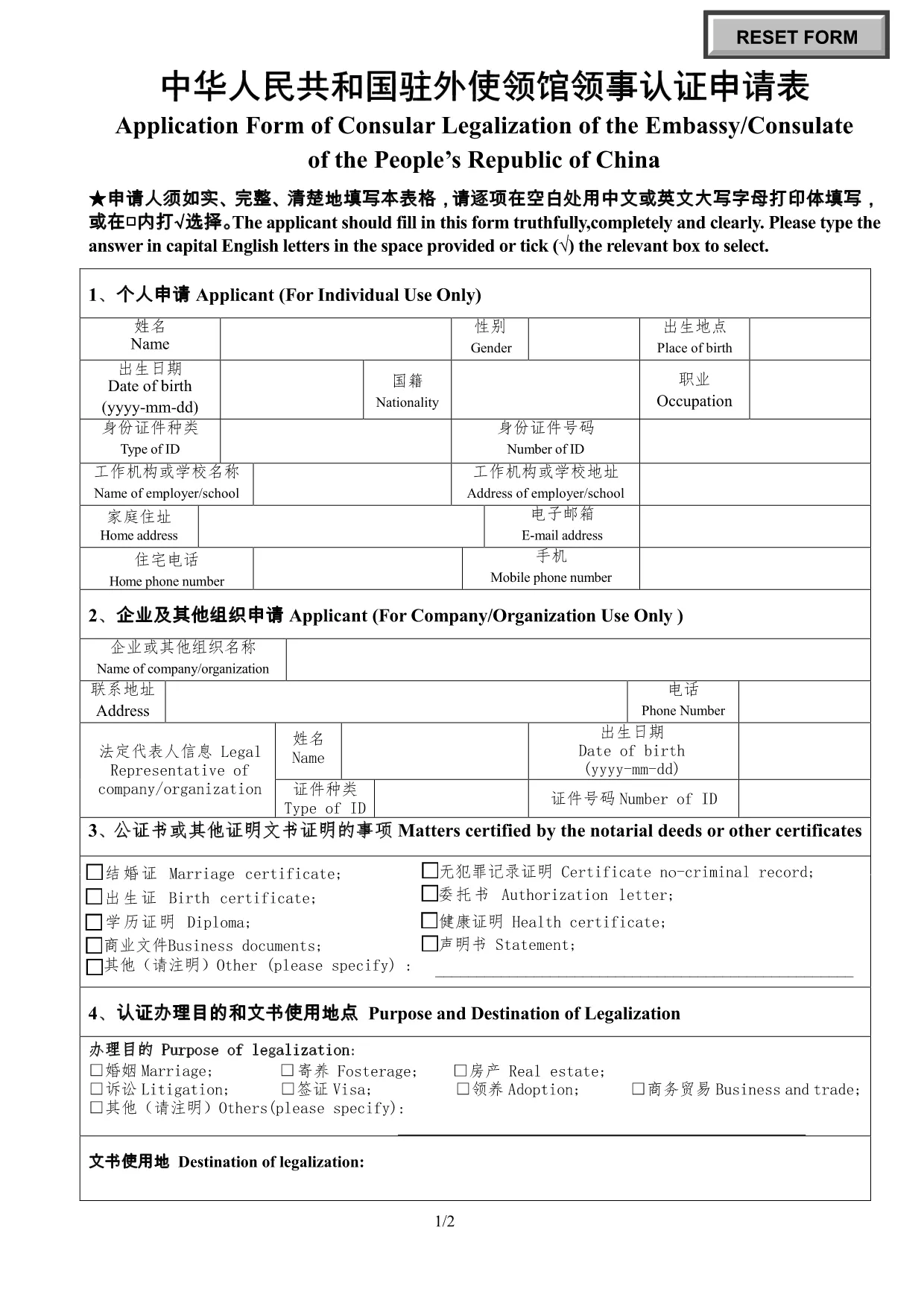
Application Form of Consular Legalization – Embassy of China

  1. Country China
  2. Language English
  3. Activity Legalization
  4. Department Embassy
Fill out this form
Application Form of Consular Legalization – Embassy of China

Need to authenticate a document for use in China? The Application Form of Consular Legalization is the official paperwork required by the Embassy or Consulate of the People’s Republic of China. This fillable PDF lets you submit your request quickly and accurately.

What Is Consular Legalization?

Consular legalization (also called consular authentication) is the final step in verifying foreign documents for use in China. After a document is notarized and apostilled, the Chinese embassy or consulate adds its seal, confirming the document’s authenticity.

How to Complete the Application Form

Follow these simple steps to fill out the form online with Formize’s PDF Filler:

  1. Click the "Fill out this form" button below.
  2. Wait a few seconds while the Formize PDF Filler app loads.
  3. Enter your information in capital English letters or Chinese characters as instructed.
  4. Save the completed form, print it, and attach any required supporting documents.
  5. Submit the printed form to the nearest Chinese embassy or consulate.

Common Mistakes to Avoid

  • Leaving blanks: Every field must be completed, even if the answer is “N/A”.
  • Using cursive handwriting: Print in clear block letters; the form is not accepted if the text is illegible.
  • Incorrect document type: Verify that your document is eligible for consular legalization before filling the form.
  • Mismatched languages: Use Chinese or English as requested; mixing both in the same field can cause delays.

Download & Fill the Form Instantly

Our integrated Formize PDF Filler loads the official PDF directly in your browser—no extra software needed. Click the button, fill the fields, and you’re ready to print and submit.

Fill out this form

FAQ
  • What is consular legalization?

    Consular legalization is the process by which a Chinese embassy or consulate certifies the authenticity of foreign public documents so they can be used in China.

  • Who needs to fill out this form?

    Anyone who wants a foreign document (e.g., birth certificate, academic diploma, power of attorney) recognized in China must submit this application.

  • Can I edit the form after I’ve saved it?

    Yes. The Formize PDF Filler lets you reopen the saved PDF and make changes before printing the final version.

  • How long does the legalization process take?

    Processing time varies by embassy, but most consulates complete legalization within 3–5 business days after receiving a complete application.

  • Is there a fee for consular legalization?

    Yes. Each embassy sets its own fee schedule. Check the specific embassy’s website for the current cost.

  • Do I need to bring the original document?

    Yes. Submit the original document together with the completed application form and any required copies.

  • Can I submit the form electronically?

    The form itself must be printed and signed, but you can fill it out electronically with Formize before printing.

  • What languages are accepted on the form?

    The form may be completed in either English or Chinese. Use clear block letters; cursive handwriting is not accepted.

  • Where can I find the official PDF?

    The official fillable PDF is available for download via the link below, hosted on the Chinese embassy’s website.

  • What should I do if I make a mistake?

    If you notice an error after printing, cross out the mistake neatly, initial it, and write the correct information in the space provided.

HOW TO

How to fill out Consular legalization form China for free, online in 5 easy steps:

  1. 1
    Open the Form
    Click the "Fill out this form" button on the page. The Formize PDF Filler will open the official consular legalization PDF in a new tab.
  2. 2
    Load the PDF Filler
    Allow a few seconds for the online filler to load. No download or installation is required.
  3. 3
    Enter Your Information
    Complete every field using capital English letters or Chinese characters as indicated. Use the tab key to move quickly between fields.
  4. 4
    Save and Print
    When all sections are filled, click "Save" to download a copy, then print the form on plain A4 paper.
  5. 5
    Submit to the Embassy
    Attach the printed form to your supporting documents and submit them to the nearest Chinese embassy or consulate for legalization.
Formize PDF Filler app
ABOUT

Consular legalization form China template

With the traditional set of features for viewing and filling out a PDF document, combined with the benefits of a web application and responsive layout, you can complete Consular legalization form China in minutes.

FEATURES

PDF Filler

The easiest way to fill Consular legalization form China online

  • Quickly fill out Consular legalization form China
    Looking for a way to quickly fill Consular legalization form China online? With our online free PDF form filler, you’ll know how to how to edit and fill this pdf document in less than a minute.
  • Easy to use online PDF editor
    Fed up with printing out PDF files so you can edit them, before rescanning and sending them back? Edit PDF documents for free online. Use our online pdf editor to save time and paper.
  • Great tools, all platforms
    Wondering how to fill in Consular legalization form China on a Mac, or maybe how to use a PDF filler free? Our online PDF tools work on all platforms.
  • Secure file storage
    Completed "Consular legalization form China" files are stored in a secured database managed by Amazon Cloud hosting. You can delete your files from our system anytime. In any case, these files are automatically deleted after 24 hours.
  • Chat with Consular legalization form China
    Chat with "Consular legalization form China" on Chatize that is a free PDF reader assistant. Ask questions and get answers from "Consular legalization form China". Just click on Chat With Document button above.

Delete filling session

Delete the selected filling session? In this case, your progress in completing the form will be lost.

Delete editing session

Delete the selected editing session? In this case, your progress in creating and editing the form will be lost.