Select language

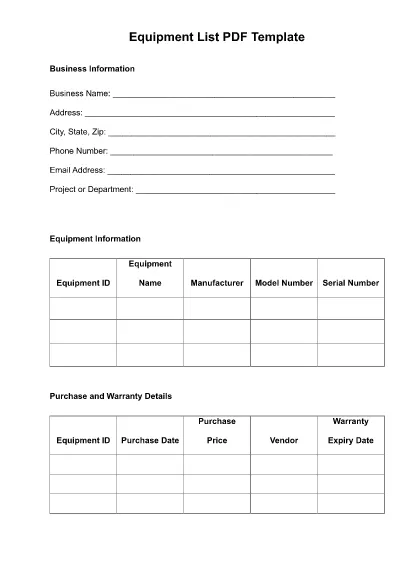
Equipment List Template

  1. Language English
Fill out this form
Equipment List Template
HOW TO

How to fill out Equipment List Template for free, online in 3 easy steps:

  1. 1
    Open form template in editor
    Click on the “Get this template” button.
  2. 2
    Fill out Equipment List Template
    Wait a moment and you will be redirected to our online PDF Filler app.
  3. 3
    Download file
    Download your completed Equipment List Template for free. You can also save it to a cloud storage.
Formize PDF Filler app
ABOUT

Equipment List Template template

With the traditional set of features for viewing and filling out a PDF document, combined with the benefits of a web application and responsive layout, you can complete Equipment List Template in minutes.

FEATURES

PDF Filler

The easiest way to fill Equipment List Template online

  • Quickly fill out Equipment List Template
    Looking for a way to quickly fill Equipment List Template online? With our online free PDF form filler, you’ll know how to how to edit and fill this pdf document in less than a minute.
  • Easy to use online PDF editor
    Fed up with printing out PDF files so you can edit them, before rescanning and sending them back? Edit PDF documents for free online. Use our online pdf editor to save time and paper.
  • Great tools, all platforms
    Wondering how to fill in Equipment List Template on a Mac, or maybe how to use a PDF filler free? Our online PDF tools work on all platforms.
  • Secure file storage
    Completed "Equipment List Template" files are stored in a secured database managed by Amazon Cloud hosting. You can delete your files from our system anytime. In any case, these files are automatically deleted after 24 hours.
  • Chat with Equipment List Template
    Chat with "Equipment List Template" on Chatize that is a free PDF reader assistant. Ask questions and get answers from "Equipment List Template". Just click on Chat With Document button above.

Delete filling session

Delete the selected filling session? In this case, your progress in completing the form will be lost.

Delete editing session

Delete the selected editing session? In this case, your progress in creating and editing the form will be lost.