
Select language

Form 15H – Senior Citizens’ Interest Income Declaration (Fillable PDF)

  1. Language English
  2. Country India
  3. Activity Taxes
Fill out this form
Form 15H – Senior Citizens’ Interest Income Declaration (Fillable PDF)

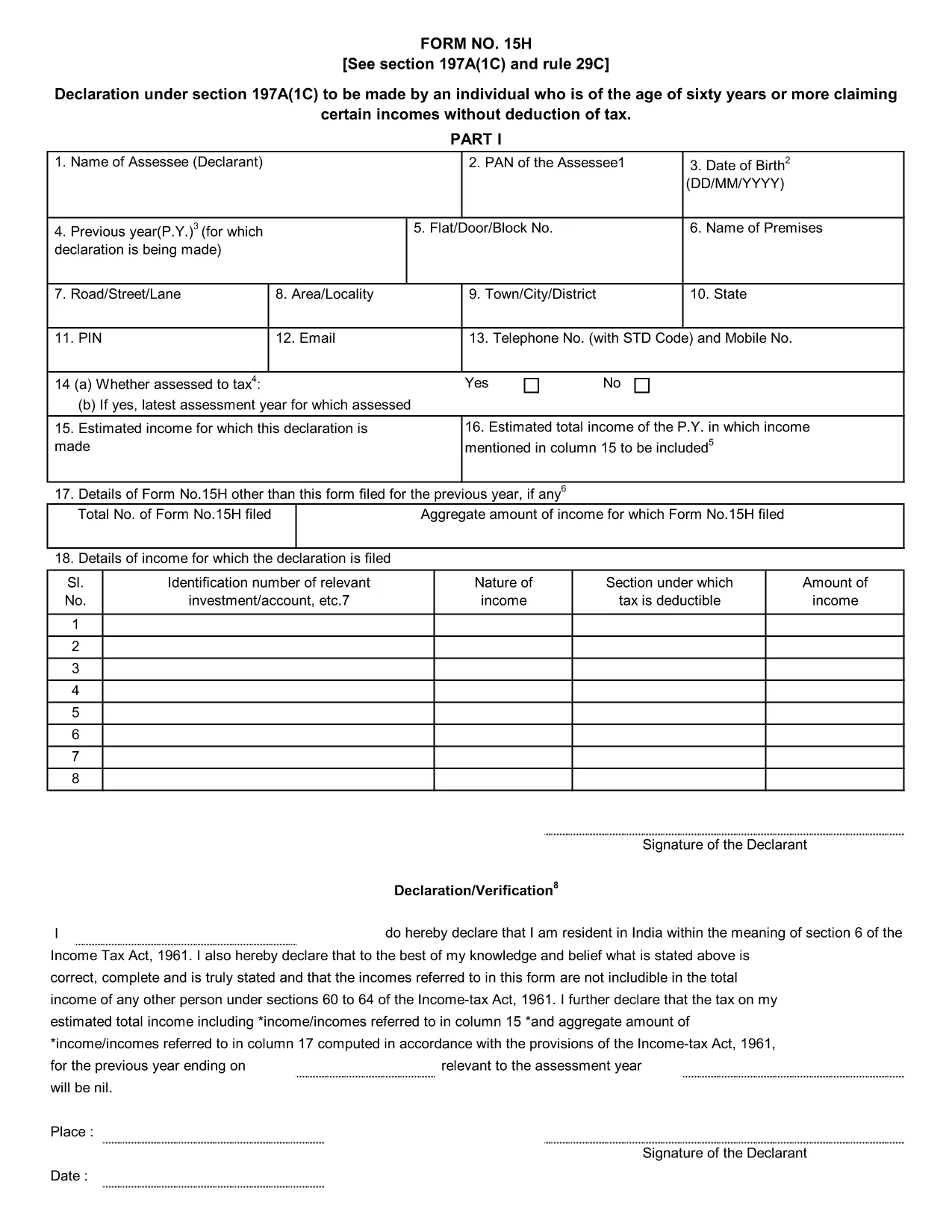
Form 15H is a declaration under sub‑section (1C) of section 197A of the Income‑Tax Act, 1961. It allows senior citizens (aged 60 years or more) to request that tax be **not deducted at source (TDS)** on interest earned from bank or post‑office deposits, provided they meet certain income thresholds.

Who Can Use Form 15H?

  • Resident individuals aged 60 years or above.
  • Those whose total taxable income does not exceed the limits set by the Act (₹3 lakhs for ages 60‑79, ₹5 lakhs for 80 years and above).
  • Taxpayers who receive interest income from banks, post offices, or cooperative societies.

Eligibility & Income Limits

The Income‑Tax Department defines two income caps:

  • Age 60‑79: Taxable income ≤ ₹300,000 per financial year.
  • Age 80 and above: Taxable income ≤ ₹500,000 per financial year.

If your interest earnings are below ₹50,000 in a year, you are not required to submit Form 15H – the bank will not deduct TDS automatically.

How to Fill Form 15H Online

Instead of downloading the PDF and editing it locally, simply click the "Fill out this form" button on this page. The Formize PDF Filler app will load in your browser, allowing you to complete the declaration in a few easy steps:

  1. Enter your name, PAN, and address as they appear on your PAN card.
  2. Provide your bank account details where the interest is credited.
  3. Declare the total interest earned and confirm it is within the eligible limit.
  4. Sign electronically (or print, sign, and scan if you prefer a hard copy).
  5. Submit the form to your bank or download it for manual submission.

Common Mistakes to Avoid

  • Entering an incorrect PAN – the bank will reject the form.
  • Mis‑calculating total taxable income; always include salary, rent, and other earnings.
  • Submitting the form after the interest has already been taxed – it must be given **before** the bank deducts TDS.
  • Leaving the "Signature" field blank; an electronic signature is acceptable in most banks.

Download & Save the Fillable PDF

If you prefer a local copy, you can download the official fillable PDF below. The file retains the original layout and can be opened with any modern PDF reader.

Download Form 15H – Fillable PDF

Using Formize’s online filler saves time, reduces errors, and lets you submit the declaration instantly to your bank.

FAQ
  • What is the purpose of Form 15H?

    Form 15H allows senior citizens (60 years or older) to request that TDS be **not deducted** on interest income when their total taxable income is below the specified thresholds.

  • Can I use Form 15H if I am below 60 years?

    No. Individuals under 60 should use Form 15G, which serves the same purpose for younger taxpayers.

  • Do I need to submit Form 15H every financial year?

    Yes. The declaration is valid only for the financial year in which it is submitted. A new Form 15H must be provided each year you wish to claim the exemption.

  • What if my interest income exceeds ₹50,000?

    If interest exceeds ₹50,000, the bank will automatically deduct TDS unless you submit a valid Form 15H before the interest is credited.

  • Is an electronic signature accepted?

    Most banks accept an electronic signature entered via the Formize PDF Filler. If your bank requires a handwritten signature, print, sign, and scan the completed form.

  • Can I submit Form 15H online to the Income‑Tax Department?

    Form 15H is submitted to the **bank or post‑office** where the interest is credited, not directly to the Income‑Tax Department.

  • What happens if I submit an incorrect PAN?

    The bank will reject the form and may still deduct TDS. Ensure the PAN matches the one on your PAN card.

  • Do I need to attach any supporting documents?

    Generally no. The form itself is sufficient, but keep your interest statements handy in case the bank requests verification.

HOW TO

How to fill out Form 15H for free, online in 5 easy steps:

  1. 1
    Click the Fill‑out Button
    Press the "Fill out this form" button on the page. The Formize PDF Filler loads instantly in your browser.
  2. 2
    Enter Your Details
    Provide your name, PAN, address, bank account number, and total interest earned as prompted.
  3. 3
    Verify Income Limits
    The filler will automatically check that your total taxable income is within the ₹3 Lakh or ₹5 Lakh limits based on age.
  4. 4
    Add Your Signature
    Use the electronic signature tool or upload a scanned signature image.
  5. 5
    Submit or Download
    Send the completed form directly to your bank via their portal, or download the PDF for manual submission.
Formize PDF Filler app
ABOUT

Income Tax Department Forms

Form 15H is one of the official forms that are used by the Income Tax Department of India to administer and collect income taxes. These forms are used by taxpayers to report their income, deductions, and tax liability to the tax authorities.

Here are some commonly used Income Tax Department forms in India:

ITR-1 (Sahaj): This form is used by individuals having income from salary, one house property, and other sources like interest, pension, or family pension. It is applicable for individuals with total income up to Rs. 50 lakhs.

ITR-2: This form is used by individuals and Hindu Undivided Families (HUFs) having income from sources other than business or profession. It is applicable for individuals having total income exceeding Rs. 50 lakhs or having foreign assets/income.

ITR-3: This form is used by individuals and HUFs having income from business or profession. It is applicable for individuals having income from a partnership firm and professionals carrying out a profession.

ITR-4 (Sugam): This form is used by individuals, HUFs, and firms (other than LLP) who have opted for the presumptive taxation scheme under sections 44AD, 44ADA, or 44AE of the Income Tax Act.

Form 16: This form is provided by employers to employees and contains details of salary, tax deducted at source (TDS), and other related information. It helps employees in filing their income tax returns accurately.

Form 26AS: This is not a form but an annual consolidated tax statement that provides a summary of tax-related information like TDS, advance tax, and self-assessment tax paid by the taxpayer. It helps taxpayers cross-verify their tax liabilities while filing their income tax returns.

These are just a few examples of Income Tax Department forms in India. The specific forms and requirements may vary based on the nature of income, taxpayer category, and tax laws prevailing in India. It's important to consult the official website of the Income Tax Department of India (www.incometaxindia.gov.in) or seek professional advice to obtain accurate and up-to-date information regarding the specific income tax forms relevant to your tax situation in India.

FEATURES

PDF Filler

The easiest way to fill Form 15H online

  • Quickly fill out Form 15H
    Looking for a way to quickly fill Form 15H online? With our online free PDF form filler, you’ll know how to how to edit and fill this pdf document in less than a minute.
  • Easy to use online PDF editor
    Fed up with printing out PDF files so you can edit them, before rescanning and sending them back? Edit PDF documents for free online. Use our online pdf editor to save time and paper.
  • Great tools, all platforms
    Wondering how to fill in Form 15H on a Mac, or maybe how to use a PDF filler free? Our online PDF tools work on all platforms.
  • Secure file storage
    Completed "Form 15H" files are stored in a secured database managed by Amazon Cloud hosting. You can delete your files from our system anytime. In any case, these files are automatically deleted after 24 hours.
  • Chat with Form 15H
    Chat with "Form 15H" on Chatize that is a free PDF reader assistant. Ask questions and get answers from "Form 15H". Just click on Chat With Document button above.

Delete filling session

Delete the selected filling session? In this case, your progress in completing the form will be lost.

Delete editing session

Delete the selected editing session? In this case, your progress in creating and editing the form will be lost.