
Select language

Form 1040 Schedule 1 – Fillable PDF

  1. Country USA
  2. Language English
  3. Activity Taxes
  4. Department Internal Revenue Service
Fill out this form
Form 1040 Schedule 1 – Fillable PDF

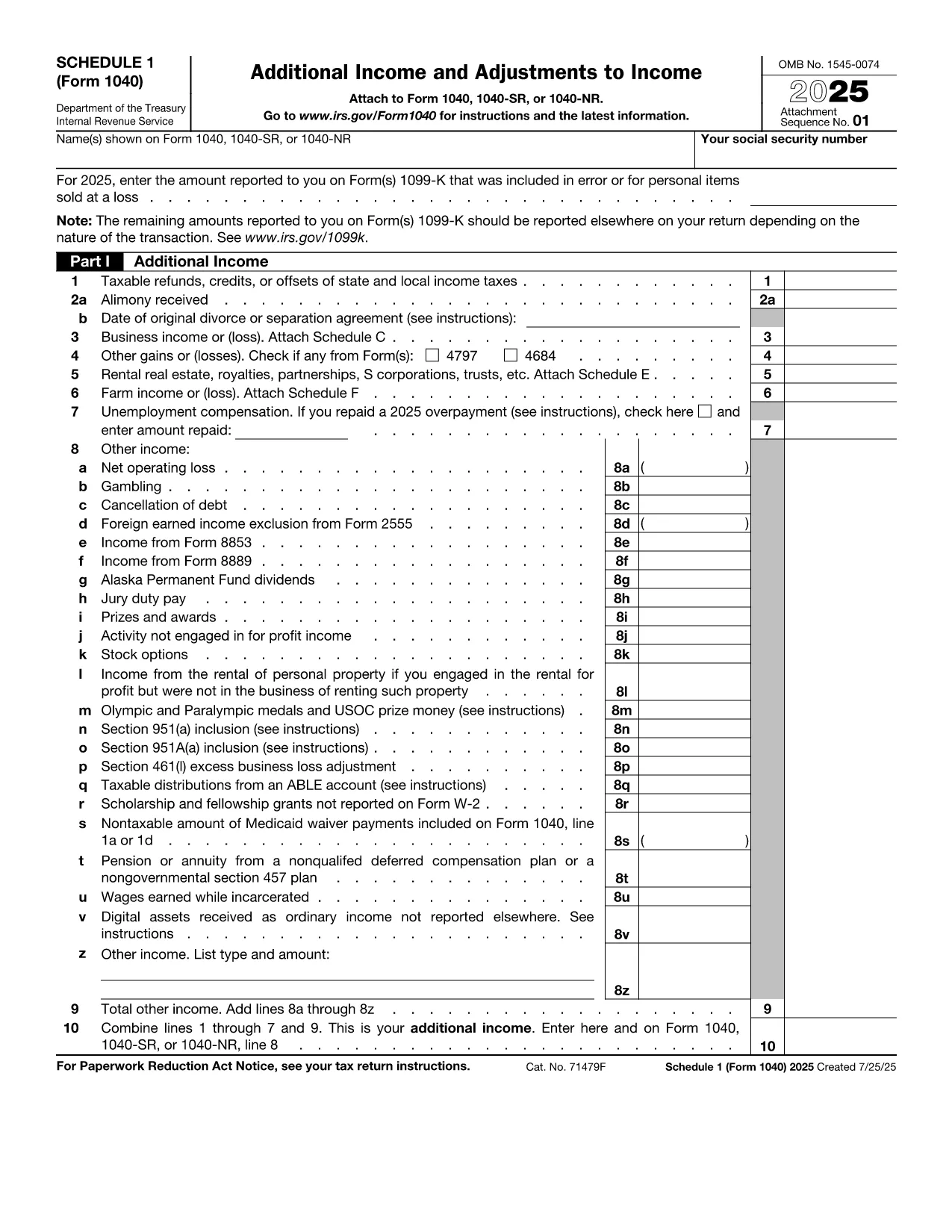
The IRS Form 1040 Schedule 1 is an essential supplement to the main U.S. Individual Income Tax Return (Form 1040). It captures additional income, adjustments to income, and certain credits that don’t fit on the primary form. With Formize’s fillable PDF, you can complete Schedule 1 directly in your browser—no extra software required.

What Is Form 1040 Schedule 1?

Schedule 1 (Form 1040) reports:

  • Business income or loss (self‑employment)
  • Rental real estate, royalties, partnerships, S corporations, trusts
  • Unemployment compensation, alimony received, and other income
  • Adjustments such as educator expenses, student loan interest, and IRA contributions

Filling this schedule accurately can lower your taxable income and increase your refund.

How to Complete the Fillable PDF on Formize

Follow the simple steps below to finish Schedule 1 online:

  1. Click the "Fill out this form" button on this page.
  2. Wait a few seconds while the Formize PDF Filler app loads the fillable version of Schedule 1.
  3. Enter your information in each field. The interface highlights required fields and validates numbers in real time.
  4. When you’re done, press Save & Download to get a completed PDF you can print or attach to your electronic filing.

Common Mistakes to Avoid

Even with a fillable form, errors can happen. Keep an eye out for these frequent pitfalls:

  • Leaving required fields blank – the Formize validator will flag them before you download.
  • Mismatching line numbers between Schedule 1 and the main Form 1040.
  • Using the wrong tax year version – always verify the year on the PDF header.
  • Forgetting signatures – the signature line must be signed by hand after printing.

Where to Submit Your Completed Form

After downloading the filled PDF, you can:

  • Attach it to your electronic filing through approved tax software.
  • Print, sign, and mail it with the rest of your Form 1040 package.

Make sure to keep a copy for your records.

Instructions

FAQ
  • Who must file Form 1040 Schedule 1?

    Anyone who has additional income, adjustments, or credits not reported on the main Form 1040 must attach Schedule 1. This includes self‑employment income, unemployment compensation, and certain deductions.

  • Can I file Schedule 1 electronically?

    Yes. Most tax software accepts the filled PDF as part of an electronic submission. Ensure you sign the final Form 1040 by hand after printing, if required.

  • What is the deadline for filing Schedule 1?

    Schedule 1 follows the same deadline as Form 1040 – typically April 15 of the year following the tax year, with extensions available until October 15.

  • Do I need a PDF reader to use the fillable form?

    No. The Formize filler runs entirely in your browser, so you don’t need Adobe Acrobat or any other PDF reader to complete the form.

  • Is the fillable PDF free to use?

    Yes. Formize provides the fillable version of Schedule 1 at no cost. You only pay if you choose premium services, which are optional.

  • What should I do if I make a mistake after downloading?

    You can reopen the saved PDF in any PDF editor, correct the fields, and re‑download. For major errors, it’s often easier to start a new fillable session.

HOW TO

How to fill out Form 1040 Schedule 1 for free, online in 4 easy steps:

  1. 1
    Click the Fill‑out Button
    Press the "Fill out this form" button on the page to launch the Formize PDF Filler.
  2. 2
    Wait for the Filler to Load
    A short loading screen appears while the fillable Schedule 1 PDF is prepared in the browser.
  3. 3
    Enter Your Information
    Complete each highlighted field. Required fields are marked with an asterisk and validated instantly.
  4. 4
    Save and Download
    When all data is entered, click "Save & Download" to obtain a completed PDF ready for printing or electronic filing.
Formize PDF Filler app
ABOUT

Internal Revenue Service (IRS) Forms

Form 1040 Schedule 1 is one of the official tax forms used in the United States to report income, claim deductions and credits, calculate tax liability, and fulfill other tax-related obligations. The IRS is the federal agency responsible for administering and enforcing the internal revenue laws in the United States.

Here are some examples of Internal Revenue Service forms:

Form 1040: This is the primary individual income tax return form used by most taxpayers. It is used to report various types of income, claim deductions and credits, calculate tax liability, and determine whether a taxpayer owes additional tax or is entitled to a refund.

Form 1099: There are different variations of Form 1099, such as 1099-MISC, 1099-INT, 1099-DIV, etc. These forms are used to report income received by individuals or businesses from various sources other than employment, such as self-employment income, interest income, dividend income, and rental income.

Form W-2: This form is used by employers to report wages paid to employees and the taxes withheld from their pay. Employees use the information on Form W-2 to complete their individual tax returns.

Form 941: Employers use this form to report employment taxes, including federal income tax withheld, Social Security tax, and Medicare tax, for their employees.

Form 1065: This form is used by partnerships to report their income, deductions, and tax liability. Partnerships themselves do not pay income tax; instead, the partners report their share of partnership income on their individual tax returns.

Form 1120: This is the corporate income tax return form used by C corporations to report their income, deductions, and tax liability.

Form 990: This form is used by tax-exempt organizations, such as nonprofits and charities, to report their financial information, activities, and compliance with tax laws.

Form 8862: This form is used by taxpayers who previously claimed the Earned Income Tax Credit (EITC) but had it disallowed, and now want to claim it again.

These are just a few examples of the numerous IRS forms that exist to fulfill various tax-related obligations. The specific forms required for an individual or business depend on their unique circumstances, income sources, and deductions. It's advisable to consult the official website of the Internal Revenue Service (www.irs.gov) or seek professional tax advice to obtain accurate and up-to-date information regarding the specific IRS forms relevant to your tax situation.

FEATURES

PDF Filler

The easiest way to fill Form 1040 Schedule 1 online

  • Quickly fill out Form 1040 Schedule 1
    Looking for a way to quickly fill Form 1040 Schedule 1 online? With our online free PDF form filler, you’ll know how to how to edit and fill this pdf document in less than a minute.
  • Easy to use online PDF editor
    Fed up with printing out PDF files so you can edit them, before rescanning and sending them back? Edit PDF documents for free online. Use our online pdf editor to save time and paper.
  • Great tools, all platforms
    Wondering how to fill in Form 1040 Schedule 1 on a Mac, or maybe how to use a PDF filler free? Our online PDF tools work on all platforms.
  • Secure file storage
    Completed "Form 1040 Schedule 1" files are stored in a secured database managed by Amazon Cloud hosting. You can delete your files from our system anytime. In any case, these files are automatically deleted after 24 hours.
  • Chat with Form 1040 Schedule 1
    Chat with "Form 1040 Schedule 1" on Chatize that is a free PDF reader assistant. Ask questions and get answers from "Form 1040 Schedule 1". Just click on Chat With Document button above.

Delete filling session

Delete the selected filling session? In this case, your progress in completing the form will be lost.

Delete editing session

Delete the selected editing session? In this case, your progress in creating and editing the form will be lost.