
Select language

IRS Form 14453 – Penalty Computation Worksheet (Fillable Online)

  1. Country USA
  2. Language English
  3. Activity Taxes
  4. Department Internal Revenue Service
Fill out this form
IRS Form 14453 – Penalty Computation Worksheet (Fillable Online)

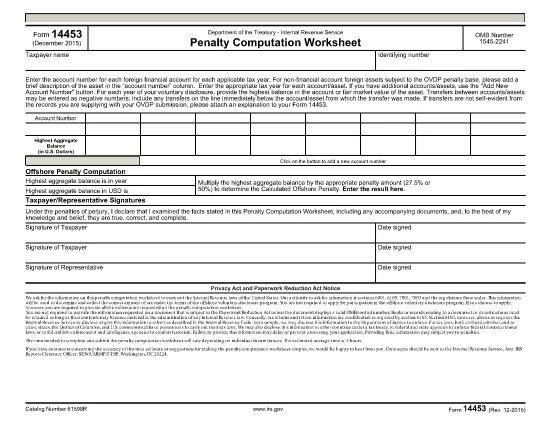
Form 14453 is the Penalty Computation Worksheet used by taxpayers who are participating in the IRS Offshore Voluntary Disclosure Program (OVDP) or similar offshore tax compliance initiatives. The worksheet helps calculate the aggregate balance of foreign accounts and the resulting penalty amount.

What Is Form 14453 and Who Needs It?

This form is required when you need to report the highest balance for each foreign financial account and let the IRS compute the offshore penalty. It is typically filed by U.S. persons with undisclosed foreign accounts, foreign trusts, or foreign corporations.

Key Sections of the Worksheet Explained

  • Account Information – List each foreign account, its highest balance, and the country of the account.
  • Aggregate Balance – The worksheet automatically adds the highest balances to give you a total aggregate balance.
  • Penalty Calculation – Based on the aggregate balance, the IRS applies the statutory penalty rate (usually 40%).
  • Signature & Date – Required to certify the accuracy of the information.

How to Complete Form 14453 with Formize

Instead of downloading the PDF and opening it in a PDF editor, simply click the "Fill out this form" button on this page. The Formize PDF Filler app will load in your browser, allowing you to complete the worksheet instantly.

Common Mistakes to Avoid

  • Entering the same balance for multiple accounts – each account must list its own highest balance.
  • Leaving negative numbers or blanks in the aggregate section – the form auto‑calculates, so leave those fields untouched.
  • Forgetting to sign the form – an unsigned worksheet will be rejected by the IRS.

Where to Find Additional IRS Guidance

Visit the IRS website for detailed instructions on the Offshore Voluntary Disclosure Program, penalty rates, and filing deadlines. You can also review related forms such as Form 14457 (OVDP Letter).

Ready to start? Click the button below and let Formize handle the rest.

FAQ
  • Do I need to download Form 14453 before filling it out?

    No. With Formize you can fill the form directly in your browser. Just click the "Fill out this form" button and the app loads the PDF for you.

  • Can I edit the aggregate balance field?

    The aggregate balance is calculated automatically. Do not edit it manually; the worksheet will recalculate if you change any account balances.

  • Is Form 14453 required for every offshore account?

    Only if you are reporting undisclosed foreign accounts to the IRS under the Offshore Voluntary Disclosure Program or a similar compliance program.

  • What penalty rate is applied on the worksheet?

    The worksheet uses the statutory offshore penalty rate of 40% of the aggregate balance, unless the IRS provides a reduced rate based on reasonable cause.

  • Can I submit the filled form electronically?

    Yes. After completing the form in Formize, you can download the PDF and attach it to your electronic OVDP filing or mail it as part of a paper submission.

  • What if I make a mistake after submitting?

    You can download a new copy of the form, correct the error, and resubmit. Keep both versions for your records.

  • Is there a fee to use Formize for this form?

    Formize offers free filling for IRS forms like 14453. No hidden fees or subscriptions are required.

  • Do I need a PDF reader to view the completed form?

    No. The Formize app lets you view and edit the PDF in the browser. You can also open the final PDF with any standard PDF reader if you wish.

HOW TO

How to fill out Form 14453 for free, online in 5 easy steps:

  1. 1
    Open the Fillable Form
    Click the "Fill out this form" button on the page. The Formize PDF Filler will launch directly in your browser.
  2. 2
    Enter Your Account Details
    Add each foreign account, its highest balance, and the country. The worksheet will automatically calculate the aggregate balance.
  3. 3
    Review the Penalty Calculation
    Check the auto‑generated penalty amount. Make sure all numbers are correct before proceeding.
  4. 4
    Sign and Submit
    Enter your signature and the date, then click "Submit". You can download a completed copy for your records.
  5. 5
    Save or Print
    After submission, save the PDF to your computer or print it to attach to your OVDP filing package.
Formize PDF Filler app
ABOUT

Tax forms

Form 14453 is one of Tax forms that are documents used to report information related to taxes to the relevant tax authority. There are various types of tax forms, including federal, state, and local tax forms, which can vary depending on the taxpayer's circumstances and location.

FEATURES

PDF Filler

The easiest way to fill Form 14453 online

  • Quickly fill out Form 14453
    Looking for a way to quickly fill Form 14453 online? With our online free PDF form filler, you’ll know how to how to edit and fill this pdf document in less than a minute.
  • Easy to use online PDF editor
    Fed up with printing out PDF files so you can edit them, before rescanning and sending them back? Edit PDF documents for free online. Use our online pdf editor to save time and paper.
  • Great tools, all platforms
    Wondering how to fill in Form 14453 on a Mac, or maybe how to use a PDF filler free? Our online PDF tools work on all platforms.
  • Secure file storage
    Completed "Form 14453" files are stored in a secured database managed by Amazon Cloud hosting. You can delete your files from our system anytime. In any case, these files are automatically deleted after 24 hours.
  • Chat with Form 14453
    Chat with "Form 14453" on Chatize that is a free PDF reader assistant. Ask questions and get answers from "Form 14453". Just click on Chat With Document button above.

Delete filling session

Delete the selected filling session? In this case, your progress in completing the form will be lost.

Delete editing session

Delete the selected editing session? In this case, your progress in creating and editing the form will be lost.