
Select language

Form 14454 – IRS Offshore Voluntary Disclosure Attachment (Fillable PDF)

  1. Country USA
  2. Language English
  3. Activity Taxes
  4. Department Internal Revenue Service
Fill out this form
Form 14454 – IRS Offshore Voluntary Disclosure Attachment (Fillable PDF)

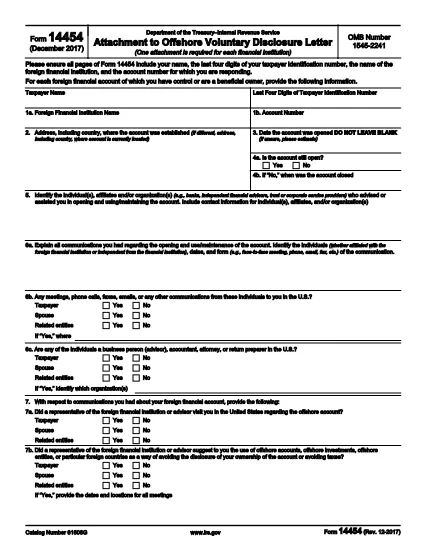
Form 14454 is the official attachment required when filing an Offshore Voluntary Disclosure Letter with the Internal Revenue Service (IRS). It captures essential details about the foreign financial institution, account numbers, and taxpayer identification.

What Is Form 14454?

This form serves as a supplemental schedule to the offshore disclosure program. Taxpayers must provide accurate information about each foreign account, including the institution’s name, address, and the last four digits of the taxpayer’s SSN or ITIN.

How to Complete the Fillable PDF Online

Instead of downloading the PDF and editing it manually, simply click the "Fill out this form" button on this page. The Formize PDF Filler app will load instantly, letting you type directly into each field, add check marks, and save a copy for your records.

  • All fields are interactive – no extra software required.
  • Use the Tab key to jump between sections quickly.
  • When finished, download the completed PDF or email it straight to the IRS.

Common Mistakes to Avoid

  • Leaving fields blank: Every required field must be filled; otherwise the IRS will reject the submission.
  • Mismatched taxpayer ID: Ensure the last four digits of the SSN/ITIN match the main disclosure letter.
  • Incorrect institution name or address: Verify the foreign bank’s official name as it appears on statements.

Where to Submit the Completed Form

After you finish the fillable PDF, attach it to your Offshore Voluntary Disclosure Letter and send the package to the IRS address listed in the program’s instructions. For electronic submissions, follow the IRS’s secure upload guidelines.

Key Definitions and Terms

Foreign Financial Institution (FFI): Any bank, brokerage, or similar entity located outside the United States.

ITIN: Individual Taxpayer Identification Number, used when a taxpayer does not have an SSN.

Use this page as your one‑stop resource for downloading, filling, and submitting Form 14454 correctly.

FAQ
  • Do I need a special PDF editor to fill Form 14454?

    No. The Formize online filler works in any modern browser, so you can complete the form without installing additional software.

  • Can I save my progress and return later?

    Yes. Use the "Save" button in the filler to download a partially completed PDF, then reload it later to finish.

  • What if I make a mistake after downloading the PDF?

    Open the saved PDF again in the Formize filler, correct the error, and re‑download the updated version.

  • Is Form 14454 required for every offshore account?

    The form must be attached for each foreign financial institution you disclose under the Offshore Voluntary Disclosure Program.

  • Where do I send the completed form?

    Submit it with your Offshore Voluntary Disclosure Letter to the IRS address specified in the program’s guidance, or follow the IRS’s electronic filing procedures.

  • Is there a filing deadline for Form 14454?

    The form must be submitted together with your disclosure letter by the deadline stated in the IRS notice you received.

  • Can I use Form 14454 for non‑U.S. taxpayers?

    Form 14454 is an IRS attachment, so it is intended for U.S. taxpayers who are disclosing foreign accounts.

  • Do I need to attach supporting documents?

    Include any required statements from the foreign institution as referenced in the IRS disclosure instructions.

HOW TO

How to fill out Form 14454 for free, online in 5 easy steps:

  1. 1
    Open the Fillable Form
    Click the "Fill out this form" button on the page. The Formize PDF Filler will open directly in your browser.
  2. 2
    Enter Your Information
    Type into each highlighted field. Use the Tab key to move quickly between sections.
  3. 3
    Review for Accuracy
    Double‑check every required field, especially the taxpayer ID and foreign institution details.
  4. 4
    Save or Download
    When finished, click "Download PDF" to save a copy, or use the built‑in email option to send it to your tax advisor.
  5. 5
    Submit to the IRS
    Attach the completed Form 14454 to your Offshore Voluntary Disclosure Letter and follow the IRS submission instructions.
Formize PDF Filler app
ABOUT

Internal Revenue Service (IRS) Forms

Form 14454 is one of the official tax forms used in the United States to report income, claim deductions and credits, calculate tax liability, and fulfill other tax-related obligations. The IRS is the federal agency responsible for administering and enforcing the internal revenue laws in the United States.

Here are some examples of Internal Revenue Service forms:

Form 1040: This is the primary individual income tax return form used by most taxpayers. It is used to report various types of income, claim deductions and credits, calculate tax liability, and determine whether a taxpayer owes additional tax or is entitled to a refund.

Form 1099: There are different variations of Form 1099, such as 1099-MISC, 1099-INT, 1099-DIV, etc. These forms are used to report income received by individuals or businesses from various sources other than employment, such as self-employment income, interest income, dividend income, and rental income.

Form W-2: This form is used by employers to report wages paid to employees and the taxes withheld from their pay. Employees use the information on Form W-2 to complete their individual tax returns.

Form 941: Employers use this form to report employment taxes, including federal income tax withheld, Social Security tax, and Medicare tax, for their employees.

Form 1065: This form is used by partnerships to report their income, deductions, and tax liability. Partnerships themselves do not pay income tax; instead, the partners report their share of partnership income on their individual tax returns.

Form 1120: This is the corporate income tax return form used by C corporations to report their income, deductions, and tax liability.

Form 990: This form is used by tax-exempt organizations, such as nonprofits and charities, to report their financial information, activities, and compliance with tax laws.

Form 8862: This form is used by taxpayers who previously claimed the Earned Income Tax Credit (EITC) but had it disallowed, and now want to claim it again.

These are just a few examples of the numerous IRS forms that exist to fulfill various tax-related obligations. The specific forms required for an individual or business depend on their unique circumstances, income sources, and deductions. It's advisable to consult the official website of the Internal Revenue Service (www.irs.gov) or seek professional tax advice to obtain accurate and up-to-date information regarding the specific IRS forms relevant to your tax situation.

FEATURES

PDF Filler

The easiest way to fill Form 14454 online

  • Quickly fill out Form 14454
    Looking for a way to quickly fill Form 14454 online? With our online free PDF form filler, you’ll know how to how to edit and fill this pdf document in less than a minute.
  • Easy to use online PDF editor
    Fed up with printing out PDF files so you can edit them, before rescanning and sending them back? Edit PDF documents for free online. Use our online pdf editor to save time and paper.
  • Great tools, all platforms
    Wondering how to fill in Form 14454 on a Mac, or maybe how to use a PDF filler free? Our online PDF tools work on all platforms.
  • Secure file storage
    Completed "Form 14454" files are stored in a secured database managed by Amazon Cloud hosting. You can delete your files from our system anytime. In any case, these files are automatically deleted after 24 hours.
  • Chat with Form 14454
    Chat with "Form 14454" on Chatize that is a free PDF reader assistant. Ask questions and get answers from "Form 14454". Just click on Chat With Document button above.

Delete filling session

Delete the selected filling session? In this case, your progress in completing the form will be lost.

Delete editing session

Delete the selected editing session? In this case, your progress in creating and editing the form will be lost.