
Select language

Form 2210

  1. Country USA
  2. Language English
  3. Activity Taxes
  4. Department Internal Revenue Service
Fill out this form
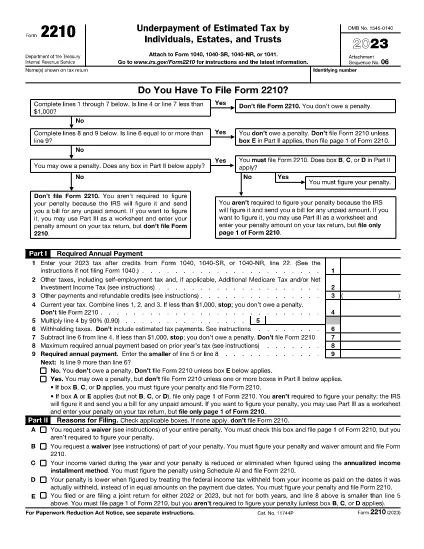
Form 2210

Underpayment of Estimated Tax by Individuals, Estates, and Trusts

Rev. 2023

These instructions explain how to complete Part III of Form 2210 (Annualized Income Installment Method) for tax years 2023. It covers calculating annualization amounts, figuring installment income and taxes, and determining penalties for underpayment or overpayment.

Instructions

  • Form 2210 Instructions - Instructions for Form 2210, Underpayment of Estimated Tax by Individuals, Estates, and Trusts
FAQ
  • What is the purpose of Part II in Form 2210?

    Part II of Form 2210 is used to figure your annualized self-employment tax. If you had net earnings from self-employment during any period, you must complete this section for each period.

  • What is the difference between Form 1040 and Form 1040-SR?

    Form 1040 is used for filing an individual income tax return, while Form 1040-SR is a version of the Form 1040 specifically designed for filers age 65 or older. The primary difference between the two forms is that Form 1040-SR provides larger print and wider spaces to make it easier for older taxpayers to read and complete.

  • What information does Form 2210 Part I require?

    Part I of Form 2210 requires information about your income, deductions, and taxable earnings for each period during the tax year. You will also figure any alternative minimum tax (AMT) for each period.

  • What is Form 2210 used for?

    Form 2210, also known as the Annualized Income Installment Method Worksheet, is used to figure estimated tax payments for certain individuals with income from annuities, pensions, and other sources that do not meet the pay-as-you-go requirement.

  • What is Alternative Minimum Tax (AMT)?

    Alternative minimum tax (AMT) is a separate computation of tax that applies to certain taxpayers. The AMT calculation ensures that these taxpayers pay at least a minimum amount of tax, even if they have significant deductions or tax preferences.

HOW TO

How to fill out Form 2210 for free, online in 3 easy steps:

  1. 1
    Open form template in editor
    Click on the “Get this template” button.
  2. 2
    Fill out Form 2210
    Wait a moment and you will be redirected to our online PDF Filler app.
  3. 3
    Download file
    Download your completed Form 2210 for free. You can also save it to a cloud storage.
Formize PDF Filler app
ABOUT

Tax forms

Form 2210 is one of Tax forms that are documents used to report information related to taxes to the relevant tax authority. There are various types of tax forms, including federal, state, and local tax forms, which can vary depending on the taxpayer's circumstances and location.

FEATURES

PDF Filler

The easiest way to fill Form 2210 online

  • Quickly fill out Form 2210
    Looking for a way to quickly fill Form 2210 online? With our online free PDF form filler, you’ll know how to how to edit and fill this pdf document in less than a minute.
  • Easy to use online PDF editor
    Fed up with printing out PDF files so you can edit them, before rescanning and sending them back? Edit PDF documents for free online. Use our online pdf editor to save time and paper.
  • Great tools, all platforms
    Wondering how to fill in Form 2210 on a Mac, or maybe how to use a PDF filler free? Our online PDF tools work on all platforms.
  • Secure file storage
    Completed "Form 2210" files are stored in a secured database managed by Amazon Cloud hosting. You can delete your files from our system anytime. In any case, these files are automatically deleted after 24 hours.
  • Chat with Form 2210
    Chat with "Form 2210" on Chatize that is a free PDF reader assistant. Ask questions and get answers from "Form 2210". Just click on Chat With Document button above.

Delete filling session

Delete the selected filling session? In this case, your progress in completing the form will be lost.

Delete editing session

Delete the selected editing session? In this case, your progress in creating and editing the form will be lost.