
Select language

IRS Form 3911 – Fillable PDF for Lost Refund Trace

  1. Country USA
  2. Language English
  3. Activity Taxes
  4. Department Internal Revenue Service
Fill out this form
IRS Form 3911 – Fillable PDF for Lost Refund Trace

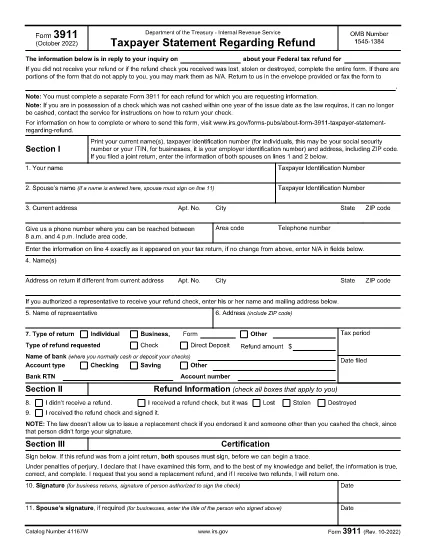
IRS Form 3911, titled “Taxpayer Statement Regarding Refund,” is the official document you use when a tax refund check is lost, stolen or never received. The form lets the IRS trace the payment and issue a replacement.

What Is IRS Form 3911?

This one‑page form collects your personal information, details about the original tax return, and the refund amount. It is required for each missing refund.

How to Fill Out Form 3911 Online

Instead of downloading a static PDF, click the “Fill out this form” button on this page. The Formize PDF Filler loads the fillable version instantly. Follow these steps:

  1. Enter your name, Social Security Number (or EIN/ITIN), and mailing address.
  2. Provide the tax year, type of return (1040, 1040‑SR, etc.), and the exact refund amount.
  3. Indicate whether the original refund was a check or direct deposit.
  4. If a representative will receive the check, fill in their details.
  5. Sign and date the form in Section III.

Common Mistakes to Avoid

  • Leaving any required field blank – the IRS will reject the submission.
  • Using an outdated address – make sure the address matches the one on your most recent return.
  • Submitting one form for multiple missing refunds – file a separate Form 3911 for each refund.
  • Signing only the taxpayer’s line when filing jointly – both spouses must sign.

Where to Send the Completed Form

After you save the completed PDF, mail it to the address listed in the form’s instructions for your state. If you have a pre‑addressed IRS envelope, use it; otherwise, send it to the IRS Processing Center for “Taxpayer Statement Regarding Refund.”

FAQs About Form 3911

Quick answers to the most common questions are listed below.

FAQ
  • When should I file IRS Form 3911?

    File Form 3911 as soon as you know a refund check was lost, stolen, never received, or returned by the post office. The IRS cannot trace a refund without this form.

  • Do I need to file a separate Form 3911 for each missing refund?

    Yes. Each missing check requires its own Form 3911, even if the refunds are from different tax years.

  • Can I file Form 3911 electronically?

    Form 3911 must be printed, signed, and mailed to the IRS. The fillable PDF makes completing it easier, but electronic submission is not accepted.

  • What if my address changed after I filed my return?

    Enter the new address in Section I and also write the address as it appears on your original tax return in Line 4. This helps the IRS locate the refund.

  • How long does the IRS take to process a refund trace?

    Processing typically takes 30–45 days after the IRS receives your completed Form 3911, but times can vary based on workload and the complexity of the case.

  • Do I need to include supporting documents?

    Usually a copy of your most recent tax return and a photo ID are helpful but not required unless the IRS requests them.

  • What if the original check was cashed fraudulently?

    Indicate that situation in Section II and provide any relevant details. The IRS will investigate and may issue a replacement refund.

HOW TO

How to fill out IRS Form 3911 for free, online in 4 easy steps:

  1. 1
    Open the Fillable Form
    Click the "Fill out this form" button on this page. The Formize PDF Filler app will load the fillable version of IRS Form 3911 directly in your browser.
  2. 2
    Enter Your Personal Information
    Type your name, Social Security Number (or EIN/ITIN), mailing address, and phone number in Section I.
  3. 3
    Provide Refund Details
    In Section II, select the tax year, indicate the type of return, enter the refund amount, and specify whether the original refund was a check or direct deposit.
  4. 4
    Sign and Submit
    Complete Section III with your signature (and spouse’s signature if filing jointly), save the PDF, and mail it to the address shown in the form’s instructions.
Formize PDF Filler app
ABOUT

Tax forms

IRS Form 3911 is one of Tax forms that are documents used to report information related to taxes to the relevant tax authority. There are various types of tax forms, including federal, state, and local tax forms, which can vary depending on the taxpayer's circumstances and location.

FEATURES

PDF Filler

The easiest way to fill IRS Form 3911 online

  • Quickly fill out IRS Form 3911
    Looking for a way to quickly fill IRS Form 3911 online? With our online free PDF form filler, you’ll know how to how to edit and fill this pdf document in less than a minute.
  • Easy to use online PDF editor
    Fed up with printing out PDF files so you can edit them, before rescanning and sending them back? Edit PDF documents for free online. Use our online pdf editor to save time and paper.
  • Great tools, all platforms
    Wondering how to fill in IRS Form 3911 on a Mac, or maybe how to use a PDF filler free? Our online PDF tools work on all platforms.
  • Secure file storage
    Completed "IRS Form 3911" files are stored in a secured database managed by Amazon Cloud hosting. You can delete your files from our system anytime. In any case, these files are automatically deleted after 24 hours.
  • Chat with IRS Form 3911
    Chat with "IRS Form 3911" on Chatize that is a free PDF reader assistant. Ask questions and get answers from "IRS Form 3911". Just click on Chat With Document button above.

Delete filling session

Delete the selected filling session? In this case, your progress in completing the form will be lost.

Delete editing session

Delete the selected editing session? In this case, your progress in creating and editing the form will be lost.