
Select language

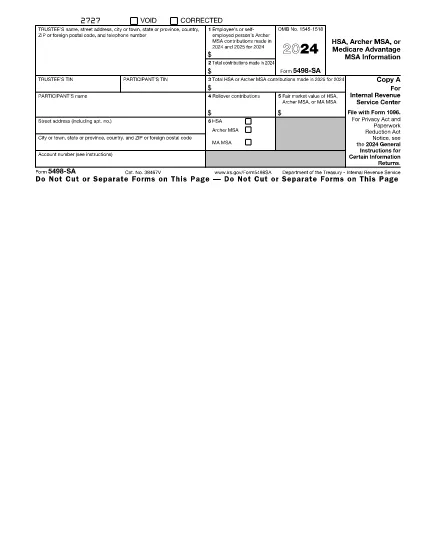
Form 5498-SA

  1. Country USA
  2. Language English
  3. Activity Taxes
  4. Department Internal Revenue Service
Form 5498-SA

HSA, Archer MSA, or Medicare Advantage MSA Information

Rev. 2024

Form 5498-SA is a document related to Health Savings Account (HSA), Archer Medical Savings Account (MSA), or Medicare Advantage MSA. It provides information about trustee, participant's details, contributions made in 2024 and 2025, rollover contributions, fair market value of the account, and types of accounts. Participants can deduct their contributions on their tax return. Employer contributions are shown in Form W-2 with different codes. The document does not attach to income tax return but should be kept for records.

Instructions

  • Instructions for Forms 1099-SA and 5498-SA - Instructions for Forms 1099-SA and 5498-SA, Distributions From an HSA, Archer MSA, or Medicare Advantage MSA, and HSA, Archer MSA, or Medicare Advantage MSA Information

Search tags

FAQ
  • Do I need to file Form 5498-SA if my HSA or Archer MSA had no contributions for the year?

    If there were no contributions made during the year, you are not required to file Form 5498-SA with the IRS. However, you must furnish a statement of the December 31, 2023, FMV of the participant's account to the participant by January 31, 2024. If no statement is provided, the participant may be required to file Form 5498-SA with the IRS.

  • What information should be reported in Box 2 of Form 5498-SA?

    Box 2 of Form 5498-SA is used to report total HSA or Archer MSA contributions made during the current taxable year, including qualified HSA funding distributions received from an IRA.

  • What information should be reported in Box 1 of Form 5498-SA?

    Box 1 of Form 5498-SA is used to report Archer MSA contributions made by an employee or self-employed person for the current and prior year.

  • What is the due date for filing Form 5498-SA with the IRS?

    Form 5498-SA must be filed with the IRS by May 31 following the calendar year for which the information is being reported.

  • Who must file Form 5498-SA?

    Trustees or custodians of HSAs and Archer MSAs are required to file Form 5498-SA with the IRS and furnish a statement to each participant (or beneficiary) by May 31 following the calendar year for which the information is being reported.

  • What should I do if there were both HSA and Archer MSA contributions made during the year?

    If you are filing Form 5498-SA for an HSA and an Archer MSA, you must report contributions for each plan type separately. Report contributions to the HSA in box 2a, and contributions to the Archer MSA in box 3.

  • What forms are required for reporting contributions, distributions, and fair market values for HSAs and Archer MSAs?

    Form 5498-SA is used to report contributions, distributions, and fair market values for Health Savings Accounts (HSAs) and Archer Medical Savings Accounts (Archer MSAs).

  • Can I designate an account number for multiple Forms 5498-SA?

    Yes, you may designate a unique account number for each Form 5498-SA that you file. This will help to prevent confusion when processing multiple forms.

  • What information is reported in Box 4 of Form 5498-SA?

    In Box 4, you report rollover contributions received during the year. These are contributions that were made to another HSA, Archer MSA, or MA MSA and rolled over to the current plan.

HOW TO

How to fill out Form 5498-SA for free, online in 3 easy steps:

  1. 1
    Open form template in editor
    Click on the “Get this template” button.
  2. 2
    Fill out Form 5498-SA
    Wait a moment and you will be redirected to our online PDF Filler app.
  3. 3
    Download file
    Download your completed Form 5498-SA for free. You can also save it to a cloud storage.
Formize PDF Filler app
ABOUT

Federal tax forms

Form 5498-SA is one of Federal tax forms that are documents used to report and file federal income taxes with the Internal Revenue Service (IRS) in the United States. These forms are used by individuals, businesses, and organizations to report their income, deductions, and other relevant information necessary for calculating their federal tax liability.

The most commonly used federal tax form is the Form 1040, which is used by individual taxpayers to report their personal income tax. Other commonly used forms include the Form 1065 for partnerships, Form 1120 for corporations, and Form 990 for tax-exempt organizations.

Federal tax forms typically require taxpayers to report various sources of income, such as wages, salaries, and tips, as well as income from investments, rental properties, and other sources. The forms also allow taxpayers to claim deductions and credits for various expenses, such as charitable contributions, mortgage interest, and healthcare expenses.

It is important to file federal tax forms accurately and on time, as failure to do so can result in penalties and interest charges from the IRS.

FEATURES

PDF Filler

The easiest way to fill Form 5498-SA online

  • Quickly fill out Form 5498-SA
    Looking for a way to quickly fill Form 5498-SA online? With our online free PDF form filler, you’ll know how to how to edit and fill this pdf document in less than a minute.
  • Easy to use online PDF editor
    Fed up with printing out PDF files so you can edit them, before rescanning and sending them back? Edit PDF documents for free online. Use our online pdf editor to save time and paper.
  • Great tools, all platforms
    Wondering how to fill in Form 5498-SA on a Mac, or maybe how to use a PDF filler free? Our online PDF tools work on all platforms.
  • Secure file storage
    Completed "Form 5498-SA" files are stored in a secured database managed by Amazon Cloud hosting. You can delete your files from our system anytime. In any case, these files are automatically deleted after 24 hours.
  • Chat with Form 5498-SA
    Chat with "Form 5498-SA" on Chatize that is a free PDF reader assistant. Ask questions and get answers from "Form 5498-SA". Just click on Chat With Document button above.

Delete filling session

Delete the selected filling session? In this case, your progress in completing the form will be lost.

Delete editing session

Delete the selected editing session? In this case, your progress in creating and editing the form will be lost.