
Select language

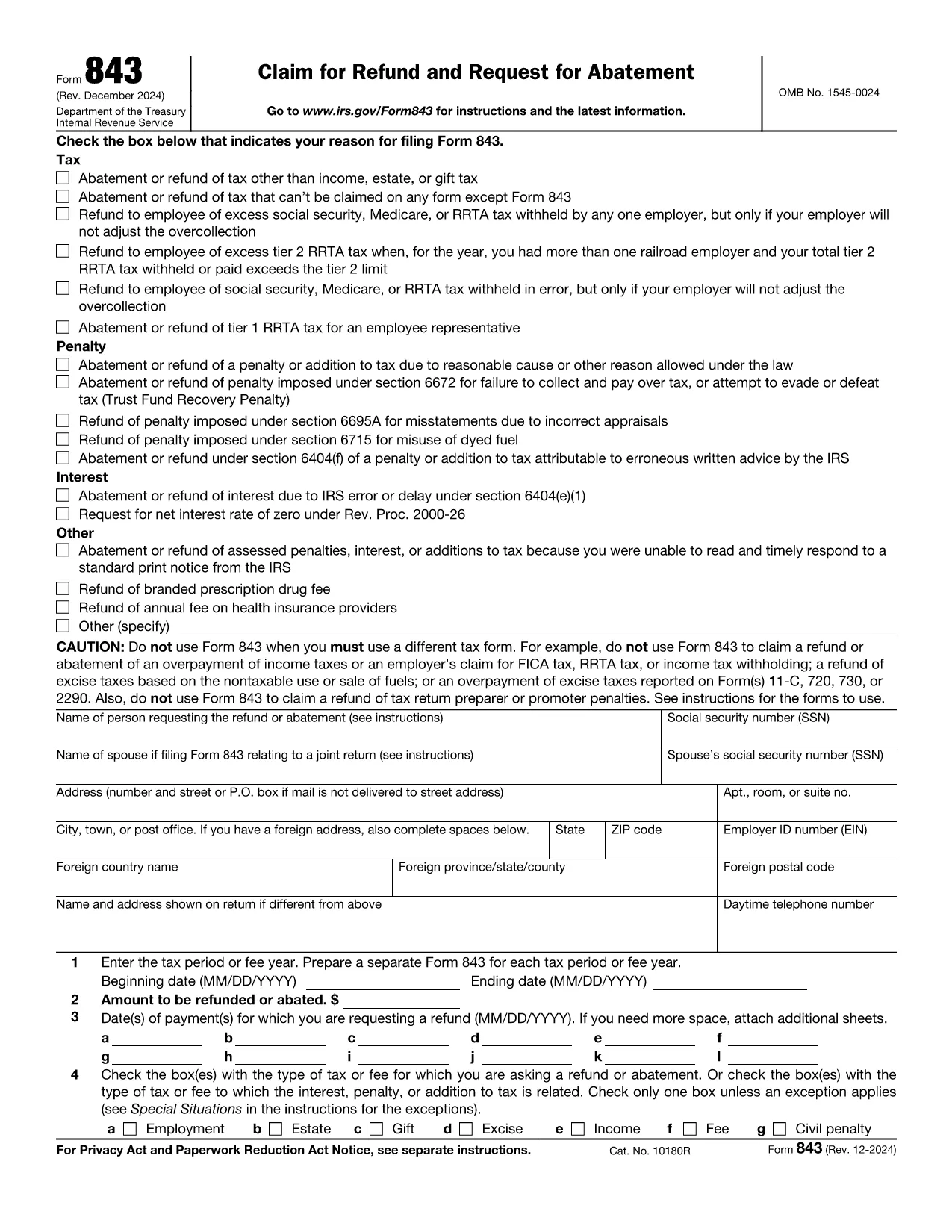
Fillable IRS Form 843 – Claim Refund or Request Abatement

  1. Country USA
  2. Language English
  3. Activity Taxes
  4. Department Internal Revenue Service
Fill out this form
Fillable IRS Form 843 – Claim Refund or Request Abatement

Form 843 (Claim for Refund and Request for Abatement) lets taxpayers ask the Internal Revenue Service for a refund of taxes, penalties, interest, or fees that were paid in error. Whether you’re seeking a refund on an employment tax, an excise tax, or a penalty, this two‑page form is the official way to make the request.

What Is IRS Form 843?

Form 843 is a multipurpose tax document used for:

  • Refunding overpaid taxes (e.g., employment, estate, gift, excise).
  • Requesting abatement of penalties or interest.
  • Claiming refunds for specific fees such as the branded prescription drug fee.

When Should You Use Form 843?

You should file Form 843 when you have a legitimate reason to believe the IRS collected more than it was entitled to, or when an error caused an improper penalty or interest assessment. Typical scenarios include:

  • Incorrect calculation of employment taxes.
  • Excess Tier 2 RRTA tax.
  • Interest charged due to IRS processing delays.
  • Fee refunds for prescription drug fees.

How to Complete Form 843 Online with Formize

Formize makes the process painless. Follow these simple steps:

  1. Click the "Fill out this form" button on this page.
  2. The Formize PDF Filler app loads in your browser – no download needed.
  3. Enter your taxpayer information, tax period, amount, and reason for the claim.
  4. Attach any supporting documents (e.g., W‑2s, Form 8947) using the attachment field.
  5. Review, sign electronically, and submit directly to the IRS or download the completed PDF for mailing.

Common Mistakes to Avoid

  • Leaving lines blank: Every applicable line must be completed, even if the answer is “0”.
  • Incorrect tax type selection: Choose the exact tax or fee from the list on Line 4.
  • Missing signatures: Both the taxpayer and, if applicable, the authorized representative must sign.
  • Insufficient documentation: Attach copies of the original tax return or related forms to support your claim.

Where to Submit Your Completed Form

After filling out Form 843, you have two options:

  • Mail: Send the signed PDF to the address listed in the form’s instructions for your tax type.
  • Electronic submission: Use the IRS’s secure e‑file portal if you have a valid e‑file account.

Using Formize’s online filler ensures the PDF is correctly formatted for both mailing and electronic submission.

Instructions

FAQ
  • What tax types can I claim on Form 843?

    Form 843 covers employment tax, estate tax, gift tax, excise tax, fee refunds, and certain interest or penalty abatements. It does not apply to regular income tax refunds.

  • Do I need a certified tax professional to fill out Form 843?

    No. The form is straightforward, and with Formize’s fillable PDF you can complete it yourself. However, consult a tax professional if your situation is complex.

  • How long does the IRS take to process a Form 843 request?

    Processing time varies, but most refunds or abatements are issued within 60–90 days after the IRS receives a complete and accurate submission.

  • Can I file Form 843 electronically?

    Yes. After completing the form with Formize, you can upload the PDF to the IRS e‑file portal if you have an active e‑file account.

  • What supporting documents should I include?

    Attach copies of the original tax return, payment receipts, related forms (e.g., W‑2, Form 8947), and any IRS notices that explain the penalty or interest.

  • Is there a filing fee for Form 843?

    No. There is no fee to file Form 843; however, you may incur postage costs if mailing a paper copy.

  • Can I request a refund for a penalty that was assessed in error?

    Yes. If you can demonstrate that the penalty was incorrectly assessed, you can use Form 843 to request an abatement.

HOW TO

How to fill out Form 843 for free, online in 5 easy steps:

  1. 1
    Open the Fillable Form
    Click the "Fill out this form" button on this page. The Formize PDF Filler app will load directly in your browser.
  2. 2
    Enter Your Information
    Complete each section of Form 843 – taxpayer details, tax period, amount, and reason for the claim – using the on‑screen fields.
  3. 3
    Attach Supporting Documents
    Use the attachment option to upload copies of W‑2s, prior tax returns, or any other documents that support your refund or abatement request.
  4. 4
    Review and Sign
    Double‑check all entries, then apply your electronic signature in the signature field.
  5. 5
    Submit or Download
    Choose to submit the completed form directly to the IRS through the portal, or download the PDF to mail it yourself.
Formize PDF Filler app
ABOUT

Tax forms

Form 843 is one of Tax forms that are documents used to report income, deductions, and tax liability to the relevant tax authority. These forms are an essential part of the tax filing process and are used to ensure individuals and businesses comply with tax laws and accurately calculate their tax obligations.

The specific tax forms required can vary depending on factors such as an individual's filing status, sources of income, and the country's tax laws. However, here are some common types of tax forms:

Individual Income Tax Forms: These forms, such as the 1040 series in the United States, are used by individuals to report their income, claim deductions and credits, and calculate their tax liability.

Business Tax Forms: Businesses, including sole proprietorships, partnerships, corporations, and self-employed individuals, may have to file various forms to report their income, expenses, and taxes owed. Examples include Schedule C (Profit or Loss from Business) and Form 1120 (U.S. Corporation Income Tax Return).

Employment Tax Forms: Employers are required to report employee wages and withhold and remit payroll taxes. Forms such as W-2 (Wage and Tax Statement) and 941 (Employer's Quarterly Federal Tax Return) are used for this purpose.

Investment and Retirement Account Forms: These forms are used to report investment income, capital gains, and losses, as well as contributions and distributions from retirement accounts. Examples include Form 1099-DIV (Dividends and Distributions) and Form 5498 (IRA Contribution Information).

Estate and Gift Tax Forms: When a person passes away or makes significant gifts, specific forms such as Form 706 (United States Estate (and Generation-Skipping Transfer) Tax Return) and Form 709 (United States Gift (and Generation-Skipping Transfer) Tax Return) are used to report and calculate any applicable estate or gift taxes.

It is important to note that tax laws and forms can change over time, so individuals and businesses should consult the relevant tax authority or seek professional tax advice to ensure compliance with the current requirements.

FEATURES

PDF Filler

The easiest way to fill Form 843 online

  • Quickly fill out Form 843
    Looking for a way to quickly fill Form 843 online? With our online free PDF form filler, you’ll know how to how to edit and fill this pdf document in less than a minute.
  • Easy to use online PDF editor
    Fed up with printing out PDF files so you can edit them, before rescanning and sending them back? Edit PDF documents for free online. Use our online pdf editor to save time and paper.
  • Great tools, all platforms
    Wondering how to fill in Form 843 on a Mac, or maybe how to use a PDF filler free? Our online PDF tools work on all platforms.
  • Secure file storage
    Completed "Form 843" files are stored in a secured database managed by Amazon Cloud hosting. You can delete your files from our system anytime. In any case, these files are automatically deleted after 24 hours.
  • Chat with Form 843
    Chat with "Form 843" on Chatize that is a free PDF reader assistant. Ask questions and get answers from "Form 843". Just click on Chat With Document button above.

Delete filling session

Delete the selected filling session? In this case, your progress in completing the form will be lost.

Delete editing session

Delete the selected editing session? In this case, your progress in creating and editing the form will be lost.