
Select language

IRS Form 8554 – Fillable PDF Renewal for Enrolled Agents

  1. Country USA
  2. Language English
  3. Activity Taxes
  4. Department Internal Revenue Service
Fill out this form
IRS Form 8554 – Fillable PDF Renewal for Enrolled Agents

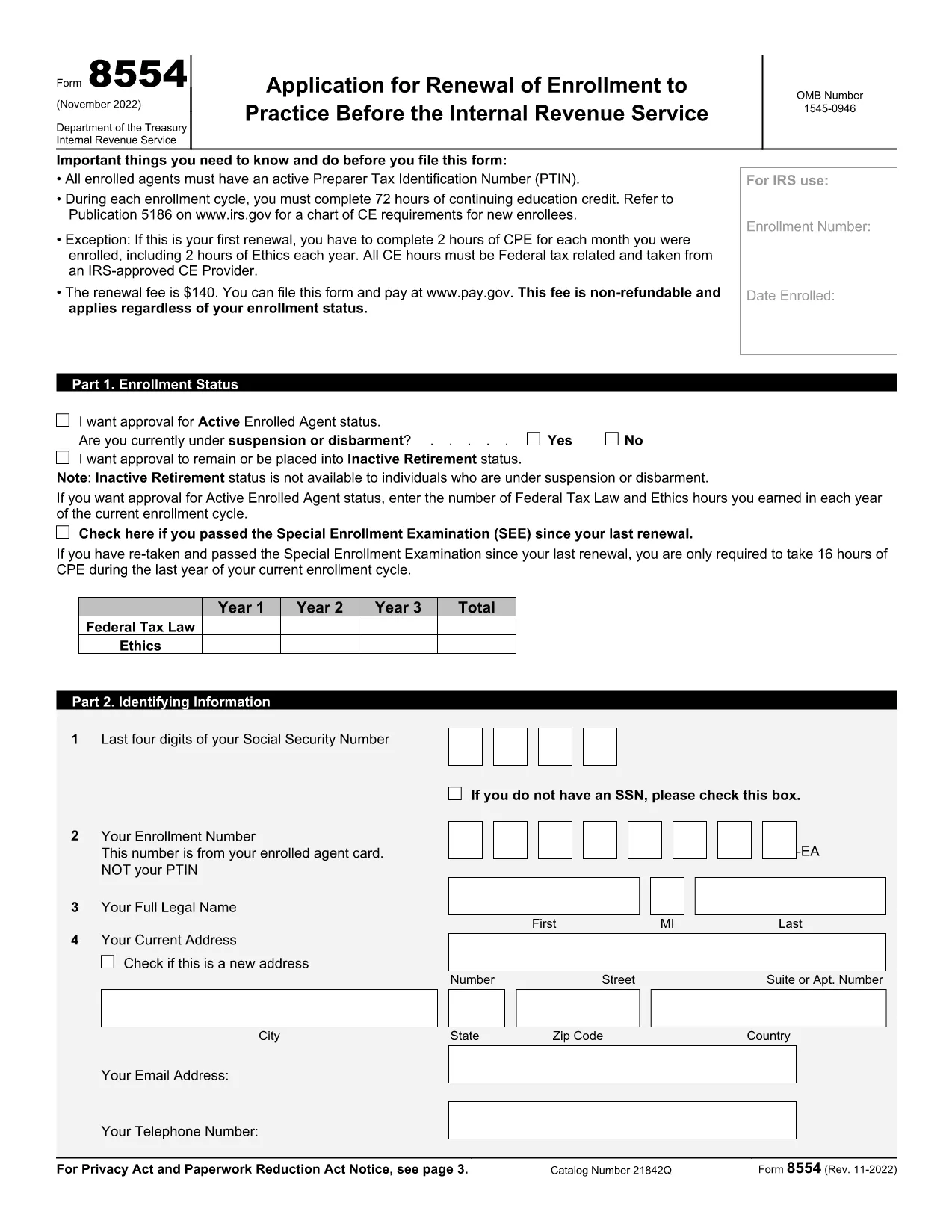
Form 8554, Application for Renewal of Enrollment to Practice Before the Internal Revenue Service, is required every three years for Enrolled Agents (EAs) and Enrolled Retirement Plan Agents (ERPAs) who want to keep their practice rights. Using Formize’s fillable PDF, you can complete the form online, save your work, and download a ready‑to‑submit version.

What Is IRS Form 8554?

The form verifies that you have met the continuing education (CE) requirements, hold an active PTIN, and have paid the renewal fee. It consists of three parts: enrollment status, identifying information, and the signature section.

How to Complete the Fillable Form

Follow these simple steps to finish Form 8554 directly in your browser:

  1. Click the Fill out this form button on the page.
  2. Formize’s PDF Filler loads the fillable version of Form 8554.
  3. Enter your personal details, select the appropriate enrollment status, and record your CE hours.
  4. Review the information, add your electronic signature, and click Submit to download the completed PDF.

Common Mistakes to Avoid

  • Incorrect PTIN status – Verify that your PTIN is active before submitting.
  • Missing CE hours – Ensure you have the required 72 hours (or the prorated amount for a first renewal).
  • Wrong enrollment status box – Choose Active, Inactive, or Retirement accurately.
  • Signature errors – Use the built‑in electronic signature tool; a handwritten signature on a printed copy will be rejected.

Submission Options and Fees

The renewal fee is $140 (non‑refundable). You can pay online through Pay.gov when you submit the form electronically, or you may mail a check with the printed PDF to the address listed in the instructions.

Download the Fillable PDF

Ready to start? Click the button below to open the fillable version of Form 8554 in the Formize PDF Filler app.

Fill out this form

FAQ
  • Who must file IRS Form 8554?

    All Enrolled Agents (EAs) and Enrolled Retirement Plan Agents (ERPAs) must file Form 8554 every three years to maintain the right to practice before the IRS.

  • What is the renewal fee for Form 8554?

    The fee is $140 per renewal cycle, payable online through Pay.gov or by mailing a check with the completed form.

  • How many continuing education hours are required?

    You must complete 72 hours of CE in each three‑year cycle, including 16 hours of ethics. First‑time renewals have prorated requirements based on enrollment length.

  • Can I submit Form 8554 electronically?

    Yes. After completing the fillable PDF with Formize, you can upload the PDF to the IRS portal or submit it by mail with a payment.

  • What happens if I miss the renewal deadline?

    Your enrollment status becomes inactive, and you lose the ability to represent taxpayers until you submit a new Form 8554 and pay the fee.

  • Do I need to renew my PTIN separately?

    Your PTIN must be active at the time of filing Form 8554, but PTIN renewal is a separate process handled through the IRS e-Services portal.

  • Is there a penalty for incomplete CE hours?

    If you do not meet the CE requirement, the IRS will reject your renewal and you must complete the missing hours before resubmitting.

  • Can I request inactive retirement status on Form 8554?

    Yes. Select the “Inactive/Retirement” option in Part 1 if you wish to stop practicing but still maintain your enrollment for future reactivation.

HOW TO

How to fill out IRS Form 8554 for free, online in 5 easy steps:

  1. 1
    Open the Fillable Form
    Click the “Fill out this form” button on the page. The Formize PDF Filler app will load the fillable version of Form 8554.
  2. 2
    Enter Your Information
    Complete each field—status, PTIN, CE hours, and personal details—using the on‑screen prompts.
  3. 3
    Add Your Signature
    Use the built‑in electronic signature tool to sign the form securely.
  4. 4
    Review and Save
    Check all entries for accuracy, then click “Save” to download the completed PDF to your device.
  5. 5
    Submit or Mail
    Pay the $140 fee online via Pay.gov or attach the PDF to a check and mail it to the IRS address provided in the instructions.
Formize PDF Filler app
ABOUT

Internal Revenue Service (IRS) Forms

IRS Form 8554 is one of the official tax forms used in the United States to report income, claim deductions and credits, calculate tax liability, and fulfill other tax-related obligations. The IRS is the federal agency responsible for administering and enforcing the internal revenue laws in the United States.

Here are some examples of Internal Revenue Service forms:

Form 1040: This is the primary individual income tax return form used by most taxpayers. It is used to report various types of income, claim deductions and credits, calculate tax liability, and determine whether a taxpayer owes additional tax or is entitled to a refund.

Form 1099: There are different variations of Form 1099, such as 1099-MISC, 1099-INT, 1099-DIV, etc. These forms are used to report income received by individuals or businesses from various sources other than employment, such as self-employment income, interest income, dividend income, and rental income.

Form W-2: This form is used by employers to report wages paid to employees and the taxes withheld from their pay. Employees use the information on Form W-2 to complete their individual tax returns.

Form 941: Employers use this form to report employment taxes, including federal income tax withheld, Social Security tax, and Medicare tax, for their employees.

Form 1065: This form is used by partnerships to report their income, deductions, and tax liability. Partnerships themselves do not pay income tax; instead, the partners report their share of partnership income on their individual tax returns.

Form 1120: This is the corporate income tax return form used by C corporations to report their income, deductions, and tax liability.

Form 990: This form is used by tax-exempt organizations, such as nonprofits and charities, to report their financial information, activities, and compliance with tax laws.

Form 8862: This form is used by taxpayers who previously claimed the Earned Income Tax Credit (EITC) but had it disallowed, and now want to claim it again.

These are just a few examples of the numerous IRS forms that exist to fulfill various tax-related obligations. The specific forms required for an individual or business depend on their unique circumstances, income sources, and deductions. It's advisable to consult the official website of the Internal Revenue Service (www.irs.gov) or seek professional tax advice to obtain accurate and up-to-date information regarding the specific IRS forms relevant to your tax situation.

FEATURES

PDF Filler

The easiest way to fill IRS Form 8554 online

  • Quickly fill out IRS Form 8554
    Looking for a way to quickly fill IRS Form 8554 online? With our online free PDF form filler, you’ll know how to how to edit and fill this pdf document in less than a minute.
  • Easy to use online PDF editor
    Fed up with printing out PDF files so you can edit them, before rescanning and sending them back? Edit PDF documents for free online. Use our online pdf editor to save time and paper.
  • Great tools, all platforms
    Wondering how to fill in IRS Form 8554 on a Mac, or maybe how to use a PDF filler free? Our online PDF tools work on all platforms.
  • Secure file storage
    Completed "IRS Form 8554" files are stored in a secured database managed by Amazon Cloud hosting. You can delete your files from our system anytime. In any case, these files are automatically deleted after 24 hours.
  • Chat with IRS Form 8554
    Chat with "IRS Form 8554" on Chatize that is a free PDF reader assistant. Ask questions and get answers from "IRS Form 8554". Just click on Chat With Document button above.

Delete filling session

Delete the selected filling session? In this case, your progress in completing the form will be lost.

Delete editing session

Delete the selected editing session? In this case, your progress in creating and editing the form will be lost.