
Select language

Form 8554‑EP – Enrolled Retirement Plan Agent Renewal (Fillable PDF)

  1. Country USA
  2. Language English
  3. Activity Taxes
  4. Department Internal Revenue Service
Fill out this form
Form 8554‑EP – Enrolled Retirement Plan Agent Renewal (Fillable PDF)

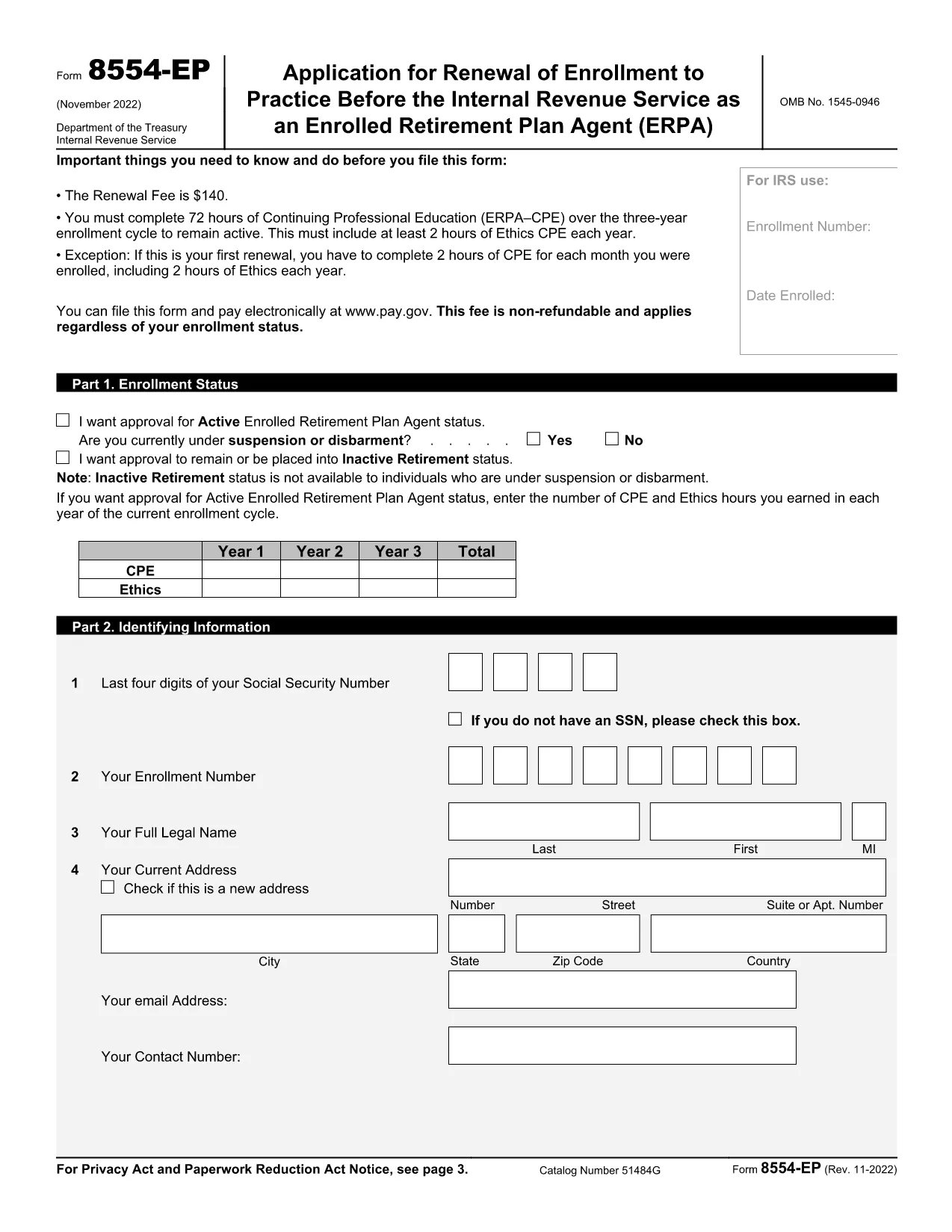
The Form 8554‑EP is the official IRS renewal application for Enrolled Retirement Plan Agents (ERPA). Every three years, ERPA‑qualified tax professionals must submit this form to maintain their ability to practice before the IRS on retirement plan matters.

What Is Form 8554‑EP?

Form 8554‑EP (Rev. 11‑2022) collects information about your credentials, continuing professional education (CPE) credits, and any changes to your practice. The form ensures you remain in good standing with the IRS.

Who Must File This Form?

  • Individuals who are currently enrolled as Retirement Plan Agents.
  • Those whose enrollment expired or will expire within the next three years.
  • Tax professionals seeking to reactivate an inactive ERPA status.

How to Complete the Fillable PDF

Our online Formize PDF Filler loads the official IRS PDF directly in your browser. No extra software is required.

Common Mistakes to Avoid

  • Leaving any required field blank – the IRS will reject incomplete submissions.
  • Failing to attach proof of CPE credits when required.
  • Signing the form with an unauthorized signature.

Submission & Deadlines

Submit the completed form to the IRS address listed on the last page of the PDF. Keep a copy for your records. The renewal deadline is the last day of the three‑year enrollment cycle.

Ready to start? Click the button below to launch the fillable version instantly.

FAQ
  • How often do I need to renew my ERPA enrollment?

    Renewal is required every three (3) years. The IRS will notify you when your current enrollment is approaching expiration.

  • Can I submit Form 8554‑EP electronically?

    The IRS currently accepts only paper submissions for Form 8554‑EP. Use the fillable PDF to ensure accuracy, then mail the printed form.

  • What CPE documentation must I attach?

    Attach copies of certificates or transcripts that verify you have completed the required 15 CPE hours in retirement plan practice for the enrollment cycle.

  • What happens if I miss the renewal deadline?

    Your ERPA status becomes inactive, and you cannot represent clients before the IRS on retirement‑plan matters until you re‑apply and receive approval.

  • Do I need a signature on the form?

    Yes. The form must be signed by the applicant or an authorized representative. Electronic signatures are not accepted; a handwritten signature is required.

  • Is there a fee to renew my ERPA status?

    No fee is required for the renewal of Form 8554‑EP. The IRS may assess penalties only if the form is incomplete or submitted late.

  • Where can I find the official instructions for Form 8554‑EP?

    The instructions are included in the PDF itself, beginning on page 3. Additional guidance is available on the IRS website under the Retirement Plan Community section.

HOW TO

How to fill out Form 8554-EP for free, online in 5 easy steps:

  1. 1
    Click the Fillable Form Button
    On this page, click the bright “Fill out this form” button. The Formize PDF Filler app will open the official Form 8554‑EP in your browser.
  2. 2
    Wait for the PDF Filler to Load
    A loading screen appears while the PDF is prepared. This only takes a few seconds.
  3. 3
    Enter Your Information
    Navigate through each field, entering your personal data, CPE credits, and any changes to your practice. Required fields are highlighted.
  4. 4
    Validate and Correct Errors
    The filler automatically checks for missing or incorrectly formatted entries. Fix any highlighted issues before proceeding.
  5. 5
    Save, Download, and Submit
    When all fields are complete, click “Save & Download.” Keep the saved copy for your records and mail the printed form to the IRS address shown on page 2.
Formize PDF Filler app
ABOUT

Tax forms

Form 8554-EP is one of Tax forms that are documents used to report information related to taxes to the relevant tax authority. There are various types of tax forms, including federal, state, and local tax forms, which can vary depending on the taxpayer's circumstances and location.

FEATURES

PDF Filler

The easiest way to fill Form 8554-EP online

  • Quickly fill out Form 8554-EP
    Looking for a way to quickly fill Form 8554-EP online? With our online free PDF form filler, you’ll know how to how to edit and fill this pdf document in less than a minute.
  • Easy to use online PDF editor
    Fed up with printing out PDF files so you can edit them, before rescanning and sending them back? Edit PDF documents for free online. Use our online pdf editor to save time and paper.
  • Great tools, all platforms
    Wondering how to fill in Form 8554-EP on a Mac, or maybe how to use a PDF filler free? Our online PDF tools work on all platforms.
  • Secure file storage
    Completed "Form 8554-EP" files are stored in a secured database managed by Amazon Cloud hosting. You can delete your files from our system anytime. In any case, these files are automatically deleted after 24 hours.
  • Chat with Form 8554-EP
    Chat with "Form 8554-EP" on Chatize that is a free PDF reader assistant. Ask questions and get answers from "Form 8554-EP". Just click on Chat With Document button above.

Delete filling session

Delete the selected filling session? In this case, your progress in completing the form will be lost.

Delete editing session

Delete the selected editing session? In this case, your progress in creating and editing the form will be lost.